
SJOYBRING B0D7CJHMZQ
SJoyBring 7-Inch Double Din Car Stereo User Manual
Model: B0D7CJHMZQ
Brand: SJOYBRING
Introduction
This user manual provides comprehensive instructions for the SJoyBring 7-Inch Double Din Car Stereo. This advanced car infotainment system is designed to enhance your driving experience with seamless smartphone integration, superior audio capabilities, and essential safety features. Please read this manual thoroughly before installation and operation to ensure proper use and maximize the product's performance.
Key Features
- Wireless Apple CarPlay & Android Auto: Connect your iPhone or Android phone wirelessly for navigation, music, calls, and voice control.
- 4.2-Channel Audio & Dual Subwoofers: Supports 4 Channels RCA Audio Out for aftermarket amplifiers and includes 2 separate subwoofer outputs for enhanced sound quality.
- Upgraded Bluetooth & Noise-Canceling Mic: Features an independent Bluetooth module and antenna for stable, clear connections and crystal-clear calls.
- 7-inch QLED HD Touchscreen: High-resolution (1280x720) display with Mirror Link support for mirroring smartphone screens.
- 170° HD Backup Camera & Night Vision: Automatically displays rear view when reversing, offering a wide viewing angle and waterproof design.
- Physical Buttons & Rotating Volume Control: Provides convenient tactile control while driving.
Product Overview
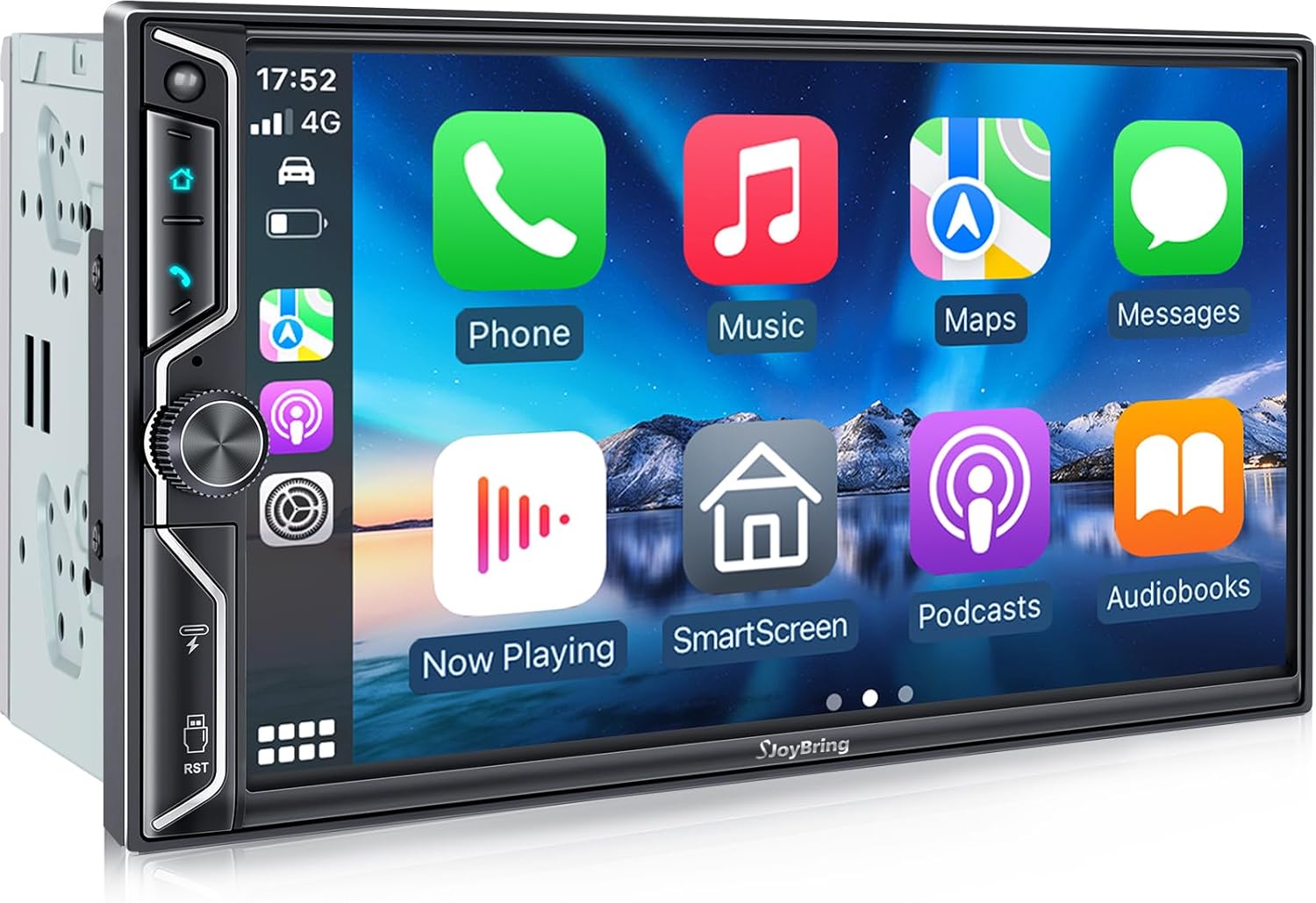
Front view of the SJoyBring 7-Inch Double Din Car Stereo, showcasing its QLED touchscreen interface.

Illustration of wireless CarPlay and Android Auto functionality, including voice control and live navigation.
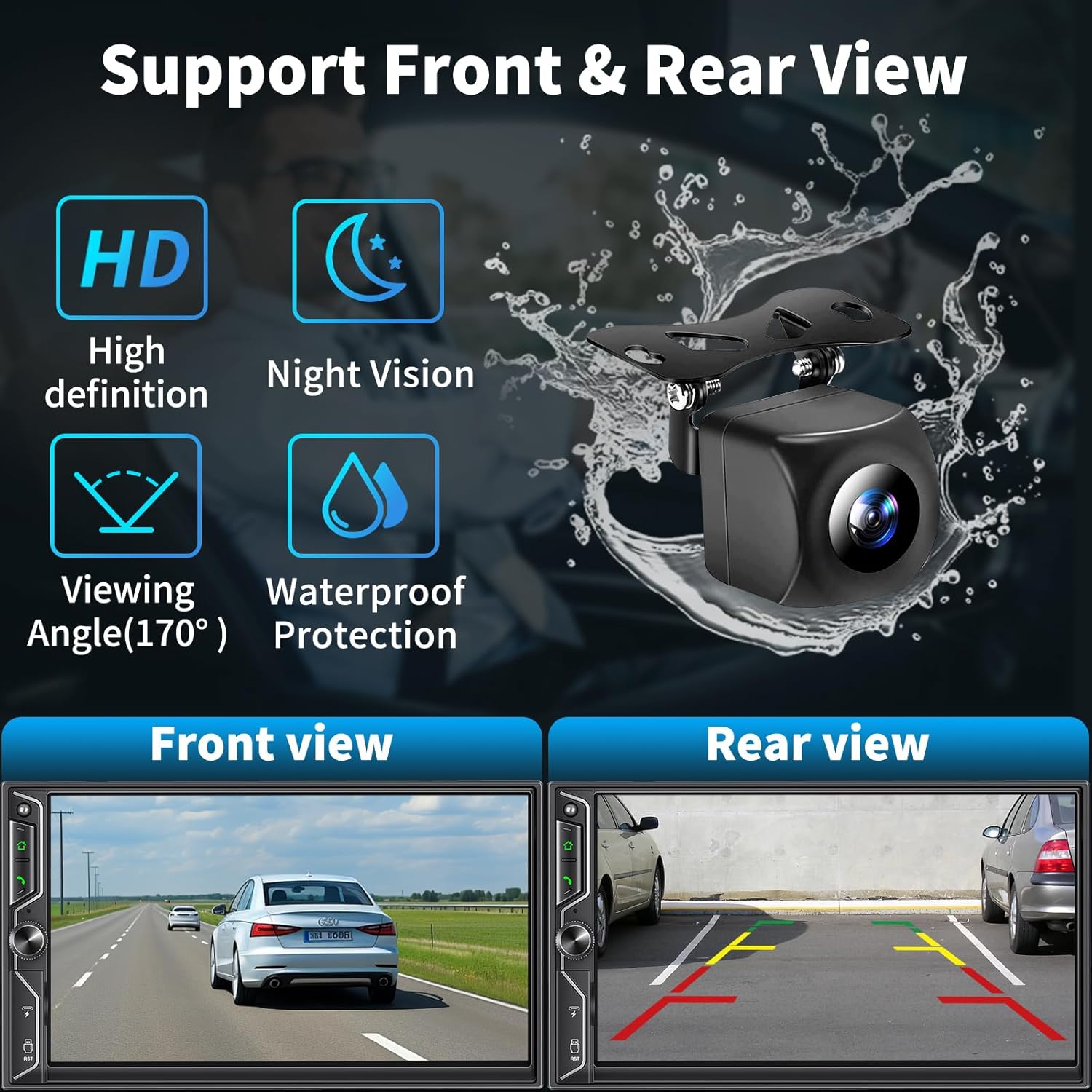
Diagram showing support for both front and rear view cameras, highlighting HD, night vision, and waterproof features.

Visual representation of the 4.2-channel RCA audio outputs and dual subwoofer outputs for enhanced sound.
Depiction of the upgraded Bluetooth system with an independent module and noise-canceling microphone for clear communication.

Comparison illustrating the superior clarity and touch responsiveness of the HD QLED touchscreen.

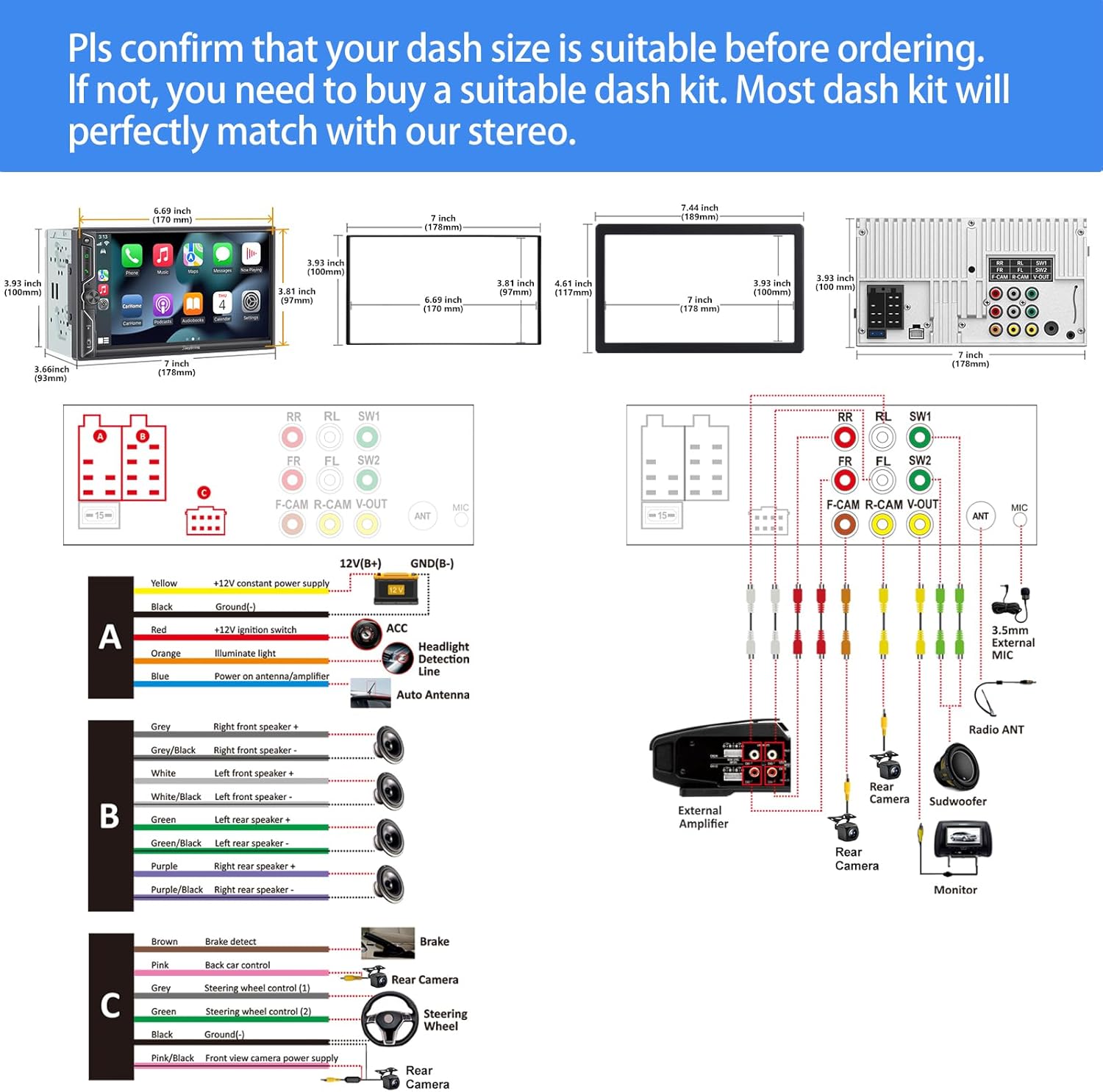
Detailed diagram showing the product dimensions and comprehensive wiring connections for installation.

An overview of all items included in the product package, such as the stereo, camera, remote, and wiring harnesses.
Setup
Installation Considerations
Before installation, ensure your dashboard opening size is compatible with the double din car stereo. If the stereo size does not match, a suitable dash kit may be required. Professional installation by a car audio shop is highly recommended for optimal results and to avoid potential damage. Some vehicles may require additional accessories like a wire harness adapter or a radio antenna adapter.
Wiring Diagram
Refer to the detailed wiring diagram provided in the 'Product Overview' section (image `71YJe-SCIyL.jpg`) for specific connections. Ensure all connections are secure and correctly matched to your vehicle's wiring system.
Operating Instructions
Wireless CarPlay & Android Auto
To use Wireless CarPlay or Android Auto, ensure Bluetooth and Wi-Fi are enabled on your smartphone. Pair your phone with the car stereo via Bluetooth. Once paired, the system will prompt you to enable CarPlay or Android Auto. Follow the on-screen instructions to complete the setup. This allows for seamless access to navigation, music, calls, and messaging directly from the stereo's touchscreen.
Official product video demonstrating the wireless CarPlay and Android Auto features of the SJoyBring car stereo, including its user interface and connectivity.
Bluetooth Connectivity
The stereo features an independent Bluetooth module for stable connections. To pair a new device, navigate to the Bluetooth settings on the stereo and your phone, then select the stereo from your phone's available devices. Once connected, you can stream music, make and receive calls hands-free, and access your phone's contacts.
Audio Settings
Access the EQ Setup menu to fine-tune your audio experience. The system offers an adjustable 10-band equalizer with preset options (Jazz, Classic, Rock, Pop, Soft, User) and individual control over frequency bands. You can also adjust subwoofer output levels and sound field balance (FAD/BAL) to optimize sound distribution within your vehicle.
MirrorLink
Mirror Link allows you to display your smartphone's screen directly on the stereo. Connect your iOS or Android phone via USB. Once connected, select the Mirror Link option on the stereo to begin mirroring. This feature is ideal for viewing navigation apps, videos, or other content from your phone on the larger QLED display.
Backup Camera
When the vehicle is shifted into reverse, the stereo automatically displays the rear view camera feed. The included HD night vision camera provides a 170° ultra-wide viewing angle, making parking and maneuvering safer and easier, especially in low-light conditions.
AM/FM Radio
Navigate to the Radio application to access AM/FM tuning. You can manually tune to frequencies or use the scan function to find available stations. Favorite stations can be saved to preset buttons for quick access.
Steering Wheel Control
The unit supports steering wheel control (SWC) functionality. Connect the SWC wire from your vehicle to the stereo. Access the 'Wheel' settings in the setup menu to program your steering wheel buttons. This allows you to control volume, track changes, and other functions without taking your hands off the steering wheel.
Maintenance
To ensure the longevity and optimal performance of your SJoyBring car stereo, regularly clean the touchscreen with a soft, lint-free cloth. Avoid using abrasive cleaners or solvents. Keep the unit free from dust and moisture. Periodically check wiring connections for any looseness or corrosion.
Troubleshooting
Common Issues and Solutions
- No Power: Check power connections and vehicle's fuse box. Ensure proper grounding.
- No Sound: Verify speaker connections, amplifier connections (if applicable), and audio settings (EQ, volume, mute).
- Bluetooth Connectivity Issues: Ensure Bluetooth is enabled on both devices. Forget and re-pair the device. Check for interference.
- CarPlay/Android Auto Not Connecting: Ensure Wi-Fi is also enabled on your phone. Try restarting both the phone and the stereo. For wired MirrorLink, ensure the USB cable is functioning correctly.
- Touchscreen Unresponsive: Perform a soft reset (refer to the manual for specific reset instructions). Ensure the screen is clean and free from debris.
- Backup Camera Not Displaying: Check the camera's power and video signal connections. Ensure the reverse trigger wire is correctly connected.
For persistent issues not covered here, please refer to the full user manual or contact SJoyBring customer support.
Specifications
| Feature | Specification |
|---|---|
| Brand | SJOYBRING |
| Connectivity Technology | Bluetooth |
| Controller Type | iOS, Android |
| Special Feature | Android Auto, RCA, Subwoofer, Apple CarPlay, Voice Control |
| Compatible Devices | Smartphone |
| Connector Type | USB |
| Audio Output Mode | Stereo |
| Surround Sound Channel Configuration | 5.1 or 7.1 |
| Video Encoding | H.264, H.265 |
| Output Power | 60 Watts |
| Package Dimensions | 9.17 x 6.38 x 5.98 inches |
| Item Weight | 2.72 pounds |
| Country of Origin | China |
Warranty and Support
For warranty information, technical support, or any inquiries regarding your SJoyBring car stereo, please contact the manufacturer directly through their official channels. Keep your purchase receipt as proof of purchase for warranty claims.
Related documentsB0D7CJHMZQ


Ask a question about this manual
Ask about setup, troubleshooting, compatibility, parts, safety, or missing instructions. Manuals+ will review the question and use this page’s manual context to help answer it.