
1. Introduction
The INKBIRD INK-VS04 Home Food Vacuum Sealer Machine is designed to preserve food freshness by removing air from specially designed bags and containers. This manual provides essential information for safe and effective operation, maintenance, and troubleshooting of your device.
2. Safety Instructions
- Read all instructions before using the appliance.
- Do not immerse the appliance, power cord, or plug in water or other liquids.
- Keep out of reach of children. Close supervision is necessary when used near children.
- Unplug from outlet when not in use and before cleaning.
- Do not operate any appliance with a damaged cord or plug, or after the appliance malfunctions or has been damaged in any manner.
- Use only manufacturer-recommended attachments.
- Do not use outdoors.
- Avoid contact with moving parts.
- Do not use for purposes other than intended.
- Exercise caution when handling the sealing strip, as it can become hot during operation.
- Ensure the appliance is placed on a stable, flat surface during use.
3. Package Contents
The INKBIRD INK-VS04 Home Food Vacuum Sealer Machine comes with the following items:
- INK-VS04 Vacuum Sealer Machine (x1)
- 11''x16.4' / 28x500cm Bag Roll (x1)
- 8''x11.8'' / 22x30cm Food Bags (x5)
- Air Suction Tube (x1)
- Power Cable (x1)
- Sticky Note (x1)
- User Manual (x1)

Image: All accessories included with the INKBIRD INK-VS04 Vacuum Sealer Machine.
4. Product Features and Components
The INKBIRD INK-VS04 is equipped with advanced features for efficient food preservation:
- Dual Motor, Dual Pump: Achieves a high vacuum speed of 22-25L/min for quick and stable operation.
- Wide Sealing: Features a 32cm sealing length and 5mm sealing width for secure bag closure.
- Countdown LED Display: Provides real-time progress of the vacuum process.
- Overheat Protection: Ensures safe operation during extended use.
- Built-in Cutter and Bag Storage: Conveniently stores bag rolls up to 11''x16.4' (28x500cm) and allows custom bag sizing.
- Removable Water Drip Tray: Collects excess liquid during vacuuming and is easy to clean.
- Multiple Food Modes: DRY, MOIST, LIQUID settings for various food types.
- Vacuum Strength Modes: GENTLE and NORMAL options to protect delicate foods.
- Operation Modes: Vac & Seal, Seal Only, Pulse, and Canister modes for versatile use.

Image: Control panel highlighting various food and operation modes.

Image: Detailed view of variable settings for vacuum strength and sealing time.
5. Setup
- Unpack the Appliance: Carefully remove the vacuum sealer and all accessories from the packaging.
- Inspect for Damage: Check the appliance for any signs of damage. Do not use if damaged.
- Placement: Place the vacuum sealer on a dry, flat, and stable surface. Ensure there is enough space around the unit for proper operation.
- Power Connection: Plug the power cable into the appliance and then into a suitable electrical outlet (220V).
- Install Bag Roll (Optional): If using a bag roll, open the lid and place the roll into the internal bag storage compartment. Pull out the desired length of bag material.
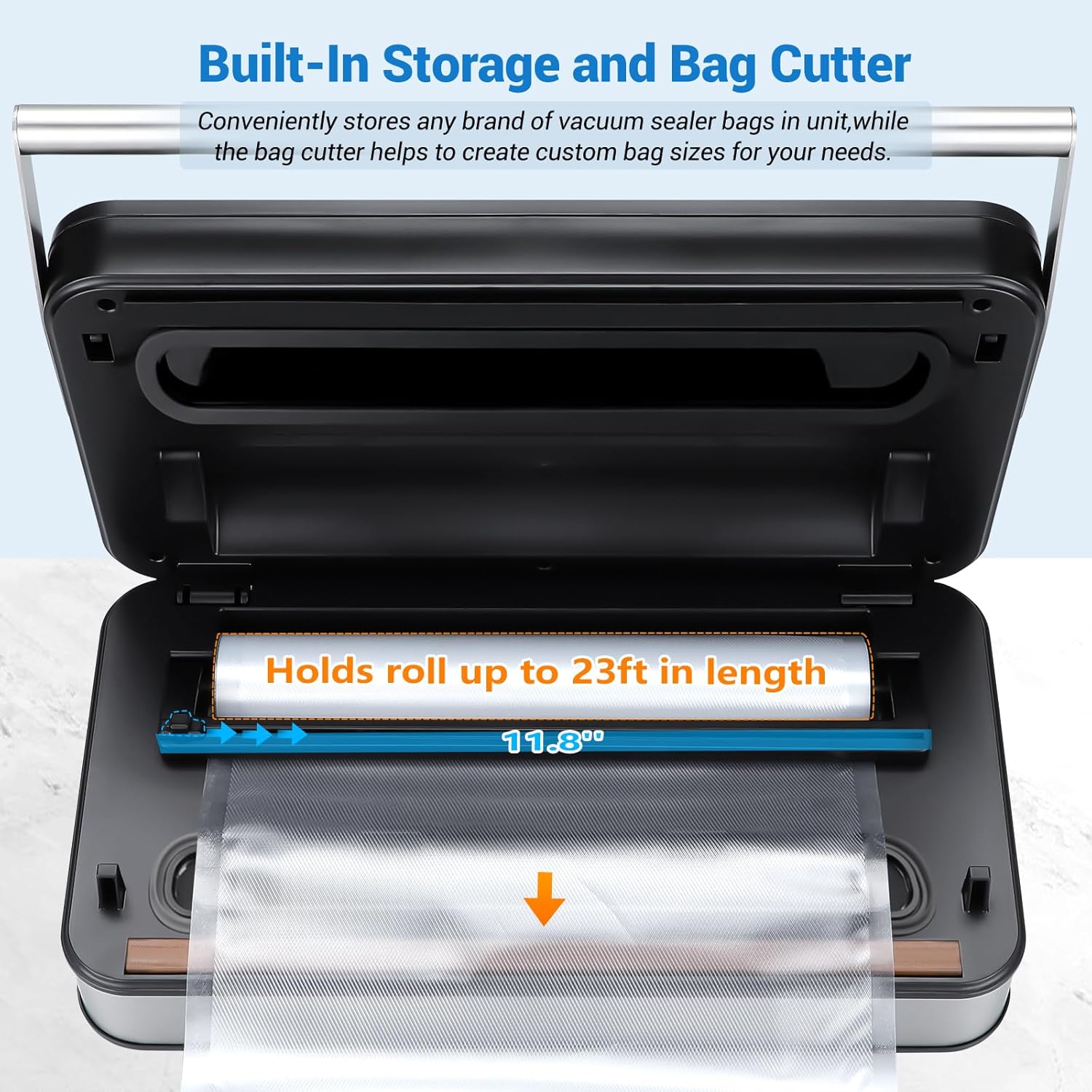
Image: Built-in bag storage and cutter for convenient bag preparation.
6. Operating Instructions
6.1. Basic Vacuum Sealing (Bags)
- Prepare the Bag: Place the food item into a vacuum sealer bag, leaving at least 3 inches of space between the food and the top edge of the bag. Ensure the bag opening is clean and dry.
- Position the Bag: Open the lid of the vacuum sealer. Place the open end of the bag into the vacuum channel, ensuring it lies flat across the sealing strip.
- Close the Lid: Close the lid firmly until it locks automatically. The machine is designed for one-handed operation.
- Select Mode: Choose the appropriate food mode (DRY, MOIST, LIQUID) and vacuum strength (GENTLE or NORMAL) based on your food item.
- Start Operation: Press the 'Vac & Seal' button. The machine will automatically vacuum the air and then seal the bag. The LED display will show a countdown.
- Release and Remove: Once the process is complete, the machine will release the lid. Carefully remove the sealed bag.

Image: Automatic locking and one-handed operation for vacuum sealing.
Video: Demonstration of an INKBIRD vacuum sealer (model IVS-011) in operation, showing the vacuum and seal process. While the model may differ slightly, the operational principles are similar.
6.2. Seal Only Function
Use this function to seal bags without vacuuming, ideal for delicate items or creating custom-sized bags from a roll.
- Position the Bag: Place the open end of the bag across the sealing strip.
- Close the Lid: Close the lid firmly until it locks.
- Start Sealing: Press the 'Seal Only' button. The machine will create a seal without removing air.
- Remove Bag: Once the sealing is complete, remove the bag.
6.3. Pulse Function
The Pulse function allows manual control over the vacuum process, suitable for delicate or fragile foods that could be crushed by full vacuum pressure.
- Position the Bag: Place the open end of the bag into the vacuum channel.
- Close the Lid: Close the lid firmly until it locks.
- Control Vacuum: Press and hold the 'Pulse' button to start vacuuming. Release the button to stop. Repeat until desired vacuum level is reached.
- Seal the Bag: Once the desired vacuum is achieved, quickly press the 'Seal Only' button to seal the bag.
6.4. Canister Function
Use the included air suction tube to vacuum seal compatible canisters and containers.
- Prepare Canister: Place food into a vacuum-sealable canister and secure its lid.
- Connect Tube: Insert one end of the air suction tube into the accessory port on the vacuum sealer and the other end onto the canister's vacuum port.
- Start Vacuum: Press the 'Canister' button. The machine will automatically remove air from the canister.
- Disconnect: Once vacuuming is complete, the machine will stop. Remove the air suction tube from both the machine and the canister.
Video: General demonstration of vacuum sealer bags, showing various types and uses. This video is from a different brand (Lerway) but illustrates the concept of vacuum sealer bags.
7. Maintenance and Cleaning
7.1. Cleaning the Appliance
- Unplug: Always unplug the appliance before cleaning.
- Wipe Exterior: Use a soft, damp cloth with mild soap to wipe down the exterior of the machine. Do not use abrasive cleaners.
- Clean Vacuum Channel: Wipe the vacuum channel and sealing strip area with a damp cloth. Ensure no food particles are left behind.
- Dry Thoroughly: Ensure all parts are completely dry before storing or next use.
7.2. Cleaning the Water Drip Tray
The removable water drip tray is designed to collect liquids extracted during vacuuming, preventing them from entering the machine.
- Remove Tray: Gently pull out the water drip tray located near the sealing strip.
- Wash: Wash the tray with warm, soapy water.
- Dry and Reinstall: Dry thoroughly and reinsert it into its slot.

Image: Detachable drip tray being cleaned under running water.
8. Troubleshooting
| Problem | Possible Cause | Solution |
|---|---|---|
| Machine does not turn on. | Power cord not properly connected. | Ensure the power cord is securely plugged into the machine and the outlet. |
| Machine vacuums but does not seal. | Sealing strip is dirty or wet. Bag is not positioned correctly. | Clean and dry the sealing strip. Reposition the bag, ensuring it is flat and smooth. |
| Machine seals but does not vacuum properly. | Bag is not properly placed in the vacuum channel. Bag has a hole or tear. | Ensure the bag opening is fully inside the vacuum channel. Check the bag for damage and use a new one if necessary. |
| Vacuum is weak or inconsistent. | Food contents are too wet (for DRY mode). Overheating protection activated. | Use MOIST or LIQUID mode for wet foods. Allow the machine to cool down if it has been used continuously. |
| Lid does not close or open easily. | Lid is not aligned correctly. | Ensure the lid is properly aligned before pressing down to lock. Do not force it. |
9. Specifications
| Feature | Detail |
|---|---|
| Brand | Inkbird |
| Model | INK-VS04 |
| Voltage | 220V |
| Wattage | 120 watts |
| Operation Mode | Semi-Automatic |
| Power Source | Corded Electric |
| Item Weight | 3740 Grams |
| Product Dimensions | 43L x 27.3W x 17H cm |
| Color | Sliver |
| Material | Stainless Steel |
10. Warranty and Support
INKBIRD products are designed and manufactured to the highest quality standards. This product is covered by a limited warranty from the date of purchase. For detailed warranty information, product support, or to register your product, please visit the official INKBIRD website or contact customer service.
Official Website: www.inkbird.com
Customer Support: Refer to the contact information provided on the official website or in your product packaging for assistance.


