
1. Introduction
This manual provides essential information for the safe and efficient operation, maintenance, and troubleshooting of your Cadac 8000W Petrol/LPG Dual Generator. This versatile generator is designed to provide portable power using either petrol or LPG fuel sources. Please read this manual thoroughly before operating the generator and keep it for future reference.
Key Features:
- Dual fuel capability: Operates on either petrol or LPG for enhanced versatility.
- 8000W peak power output: Capable of powering high-demand electrical appliances.
- Automatic Voltage Regulation (AVR): Maintains a stable power output for sensitive electronics.
- Equipped with circuit breakers: Provides added safety against overloads.
- Lightweight and compact design: Facilitates easy portability.
2. Safety Instructions
WARNING: Failure to follow these safety instructions could result in serious injury or death.
- Carbon Monoxide Hazard: Generators produce carbon monoxide, a colorless, odorless, poisonous gas. Operate the generator outdoors in a well-ventilated area, far away from windows, doors, and vents. Never operate indoors or in enclosed spaces.
- Fire Hazard: Fuel is highly flammable. Refuel in a well-ventilated area with the engine off and cool. Do not smoke or allow open flames near the generator. Store fuel in approved containers.
- Electrical Shock Hazard: Do not operate the generator in wet conditions. Ensure all electrical connections are secure and dry. Never connect the generator directly to a building's electrical system without a proper transfer switch installed by a qualified electrician.
- Hot Surfaces: The generator engine and muffler become very hot during operation and remain hot for some time after shutdown. Avoid contact to prevent burns.
- Children and Pets: Keep children and pets away from the generator at all times.
- Personal Protective Equipment: Wear appropriate safety gear, such as gloves and eye protection, when handling fuel or performing maintenance.
3. Components Overview
Familiarize yourself with the main components of your Cadac 8000W Dual Generator.
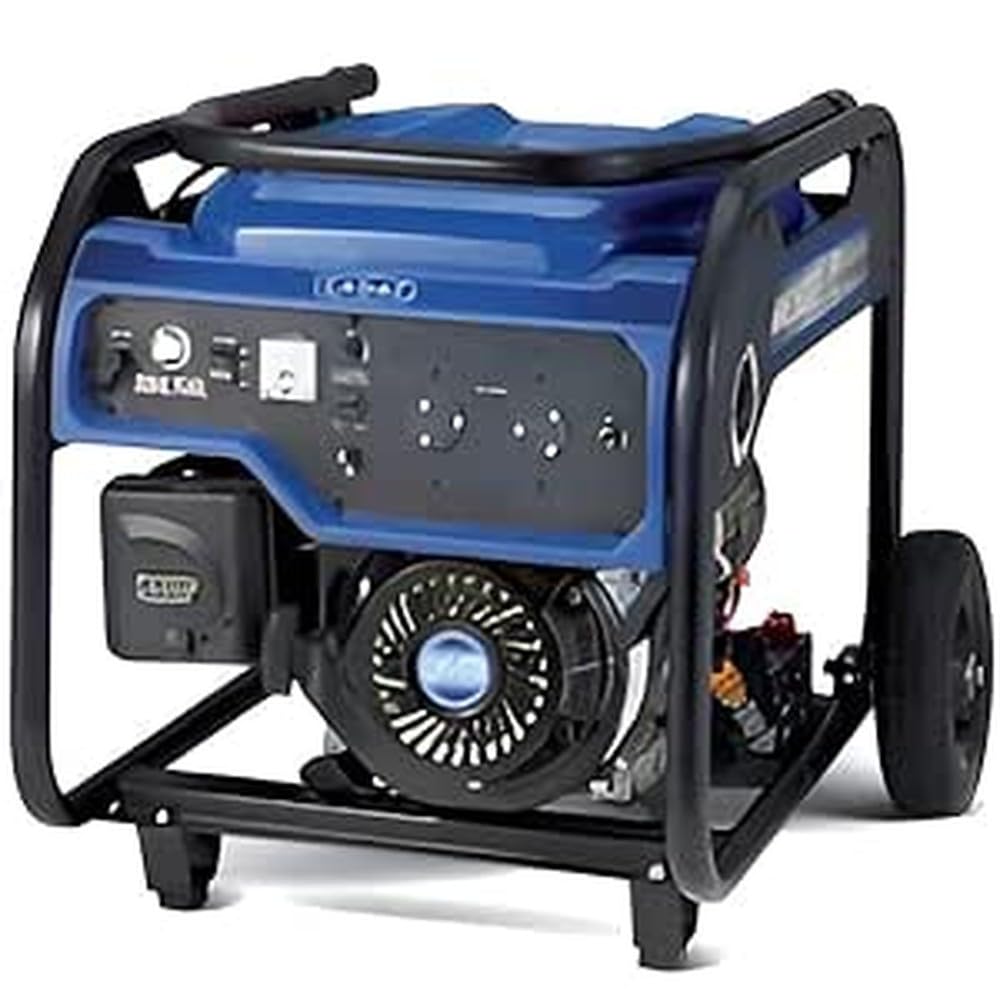
Image: The Cadac 8000W Petrol/LPG Dual Generator, showcasing its robust frame, control panel, fuel tank, and wheel assembly. This image provides a general view of the product.
Key components typically include:
- Engine: The power source of the generator.
- Fuel Tank: For petrol storage (28L capacity).
- LPG Inlet: Connection point for LPG fuel supply.
- Control Panel: Contains outlets, switches, indicators, and circuit breakers.
- Exhaust Muffler: Reduces engine noise and directs exhaust gases.
- Wheels and Handles: For portability and ease of transport.
- Oil Fill Cap/Dipstick: For checking and adding engine oil.
- Battery: Lead-acid type, for electric start (if applicable).
4. Setup
Before first use, proper setup is crucial for safe and effective operation.
- Unpacking: Carefully remove the generator from its packaging. Inspect for any shipping damage. Retain packaging materials for future storage or transport.
- Wheel and Handle Assembly: Attach the wheels and handles as per the included assembly instructions. These components are designed for easy portability.
- Add Engine Oil: The generator is shipped without engine oil. Fill the crankcase with 0.9L of SAE 10W-30 or SAE 10W-40 engine oil. Do not overfill. Check the oil level using the dipstick before each use.
- Connect Battery: If your model features an electric start, connect the lead-acid battery terminals according to the markings (+ to + and - to -). Ensure connections are secure.
- Add Fuel:
- Petrol: Ensure the generator is off and cool. Fill the 28L fuel tank with fresh, unleaded petrol. Do not fill above the fuel filter screen.
- LPG: Connect a standard LPG cylinder (not included) to the LPG inlet on the generator using an approved hose and regulator (not included). Ensure all connections are tight to prevent leaks.
Important: Never mix petrol and LPG in the same fuel system simultaneously. Select one fuel source before starting.
5. Operating Instructions
Follow these steps to start and operate your dual fuel generator.
- Preparation:
- Ensure the generator is on a level surface, outdoors, and away from any combustible materials.
- Check engine oil level.
- Ensure all circuit breakers are in the 'OFF' position.
- Select your desired fuel source (petrol or LPG).
- Starting (Petrol):
- Open the petrol fuel valve.
- Move the choke lever to the 'CHOKE' position.
- If electric start: Turn the ignition key to 'START' until the engine starts.
- If recoil start: Pull the recoil starter handle firmly until the engine starts.
- Once the engine starts, gradually move the choke lever to the 'RUN' position.
- Starting (LPG):
- Open the valve on the LPG cylinder.
- Move the choke lever to the 'CHOKE' position.
- If electric start: Turn the ignition key to 'START' until the engine starts.
- If recoil start: Pull the recoil starter handle firmly until the engine starts.
- Once the engine starts, gradually move the choke lever to the 'RUN' position.
- Connecting Appliances:
- Allow the generator to run for a few minutes to stabilize.
- Plug in your appliances. Ensure the total wattage does not exceed the generator's rated output.
- Flip the circuit breakers to the 'ON' position.
- The Automatic Voltage Regulation (AVR) system will help maintain a stable power output.
- Stopping the Generator:
- Turn off and unplug all connected appliances.
- Flip all circuit breakers to the 'OFF' position.
- If running on petrol: Close the petrol fuel valve. Allow the engine to run until it runs out of fuel to prevent carburetor gumming.
- If running on LPG: Close the valve on the LPG cylinder.
- Turn the ignition key to 'OFF' or move the engine switch to 'OFF'.
6. Maintenance
Regular maintenance ensures the longevity and reliable performance of your generator.
- Engine Oil: Check oil level before each use. Change oil after the first 20 hours of operation, then every 50-100 hours or annually, whichever comes first.
- Air Filter: Inspect and clean the air filter every 50 hours or more frequently in dusty conditions. Replace if damaged.
- Spark Plug: Inspect and clean the spark plug every 100 hours. Replace if worn or fouled.
- Fuel Filter: Inspect and clean or replace the fuel filter as needed.
- Battery: Check battery terminals for corrosion and ensure they are clean and tight. Recharge the battery periodically if the generator is not used for extended periods.
- Storage: For long-term storage, drain the petrol fuel tank and carburetor, or add a fuel stabilizer. Disconnect the battery. Store in a clean, dry area.
7. Troubleshooting
Refer to this section for common issues and their solutions.
| Problem | Possible Cause | Solution |
|---|---|---|
| Engine will not start | No fuel (petrol/LPG) Low engine oil Choke in wrong position Spark plug issue Battery low (electric start) | Add fuel Add oil Adjust choke Clean/replace spark plug Charge/replace battery |
| No power output | Circuit breaker tripped Overload Loose connections | Reset circuit breaker Reduce load Check and secure connections |
| Engine runs rough | Stale fuel Dirty air filter Spark plug issue | Drain and refill with fresh fuel Clean/replace air filter Clean/replace spark plug |
| Excessive noise | Loose components Muffler damage | Inspect and tighten Contact service for repair |
If you encounter problems not listed here or if solutions do not resolve the issue, please contact customer support.
8. Specifications
Detailed technical specifications for the Cadac 8000W Petrol/LPG Dual Generator:
- Rated Power Output: 8000W (Peak)
- Rated Current: 12.2A
- Rated Speed: 3800rpm
- Rated DC Output: 12V/8.3A
- Fuel Tank Capacity (Petrol): 28L
- Lube Oil Capacity: 0.9L
- Recommended Lube Oil: SAE 10W-30 or SAE 10W-40
- Run Time at 1/2 Load: 11 hours (petrol), 6 hours (50% load per 9.07kg LPG)
- Noise Level (Measured at 7m): Approximately 73 dB
- Battery Type: Lead-acid
- Dimensions (Package): 76 x 60 x 59 cm
- Weight (Package): 94 kg
- Power Source: Fuel Powered (Petrol/LPG)
9. Warranty and Support
Your Cadac 8000W Petrol/LPG Dual Generator is backed by a manufacturer's warranty. Please refer to the warranty card included with your purchase for specific terms and conditions, including coverage duration and limitations. Keep your proof of purchase for warranty claims.
For technical assistance, spare parts, or warranty inquiries, please contact Cadac customer support through their official website or the retailer where the product was purchased. Provide your model number (600-9350) and ASIN (B0D7C58PT6) when seeking support.