
Introduction
Welcome to the Oraolo S11 Wearable Bluetooth Speaker user manual. This guide provides detailed instructions for the proper use, setup, and maintenance of your device. Please read this manual thoroughly before operating the speaker to ensure optimal performance and longevity.
Product Overview
The Oraolo S11 is a compact and portable Bluetooth speaker designed for hands-free audio. It features an integrated clip for easy attachment, a built-in microphone for calls, and a durable, water-resistant design.
Components and Controls
- Speaker Grille: Audio output.
- Power/Multi-function Button: Controls power, play/pause, and call functions.
- Volume Up (+) / Next Track Button: Increases volume and skips to the next track.
- Volume Down (-) / Previous Track Button: Decreases volume and skips to the previous track.
- Charging Port: USB-C port for charging the device.
- LED Indicator Light: Displays power, pairing, and charging status.
- Integrated Clip: For attaching the speaker to clothing or other surfaces.

This image displays the Oraolo S11 speaker held in a hand, highlighting its control buttons and the charging port. Text on the image indicates an extended battery life of up to 18 hours.
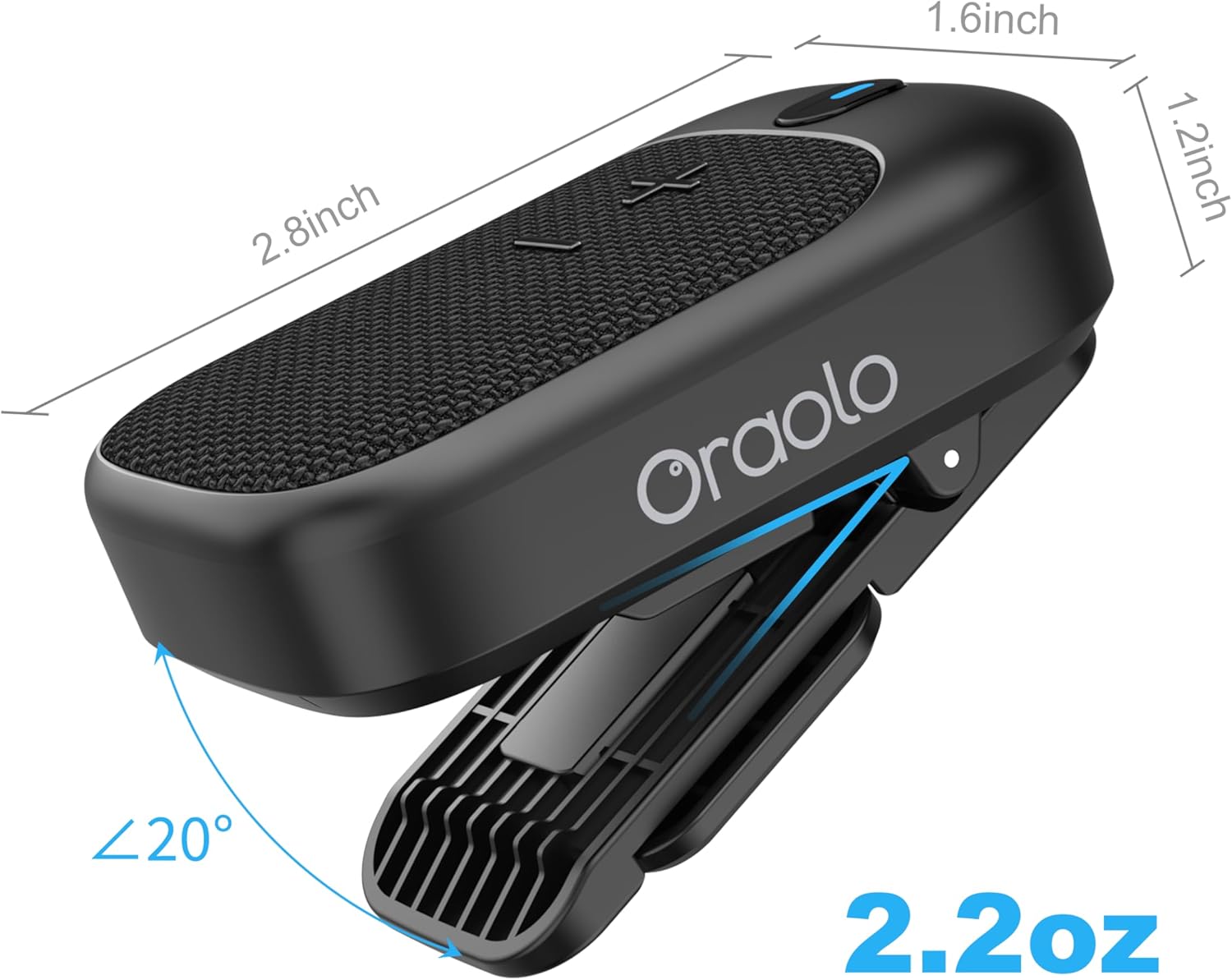
A detailed diagram illustrating the compact dimensions of the Oraolo S11 speaker, measuring 2.8 inches in length, 1.6 inches in width, and 1.2 inches in height.
Setup
1. Charging the Speaker
Before first use, fully charge your Oraolo S11 speaker. Connect the speaker to a USB power source (e.g., computer, wall adapter) using the provided USB cable. The LED indicator light will show the charging status. A full charge provides up to 18 hours of playtime at 50% volume.
2. Bluetooth Pairing
- Ensure the speaker is sufficiently charged.
- Press and hold the Power/Multi-function Button for approximately 2 seconds to turn on the speaker. The LED indicator light will flash, indicating that the speaker is in Bluetooth pairing mode.
- On your audio device (e.g., smartphone, tablet), enable Bluetooth and search for available devices.
- Select "Oraolo S11" from the list of detected devices to connect.
- Once successfully paired, the LED indicator light on the speaker will turn solid, and you may hear an audible confirmation.
Operating Instructions
Power On/Off
- Power On: Press and hold the Power/Multi-function Button for 2 seconds.
- Power Off: Press and hold the Power/Multi-function Button for 2 seconds.
Music Playback
- Play/Pause: Press the Power/Multi-function Button once.
- Volume Up: Press the "+" Button once.
- Volume Down: Press the "-" Button once.
- Next Track: Press and hold the "+" Button for 2 seconds.
- Previous Track: Press and hold the "-" Button for 2 seconds.
Hands-Free Calls
- Answer Call: Press the Power/Multi-function Button once when an incoming call rings.
- End Call: Press the Power/Multi-function Button once during an active call.
- Reject Call: Press and hold the Power/Multi-function Button for 2 seconds when an incoming call rings.

This image shows a man wearing the Oraolo S11 speaker clipped to his shirt strap, demonstrating its use for hands-free calls with the built-in microphone.
Wearing the Speaker
The Oraolo S11 features an integrated clip for convenient, hands-free use. Attach the speaker securely to your clothing (e.g., shirt collar, pocket), backpack strap, or other suitable surfaces. Ensure the speaker is positioned to optimize sound projection and microphone pickup for calls.

An image of a man working, with the Oraolo S11 speaker clipped to his work overalls, demonstrating the versatility and customizable nature of its clip for various attachment points.

A man is shown cycling outdoors, with the Oraolo S11 speaker clipped to his shirt collar, illustrating its use for listening to music during active pursuits.
Maintenance
Cleaning
Wipe the exterior of the speaker with a soft, dry, or slightly damp cloth. Do not use harsh chemicals, abrasive cleaners, or solvents, as these may damage the finish or internal components.
Water Resistance (IPX5)
The Oraolo S11 speaker has an IPX5 water resistance rating, meaning it is protected against low-pressure water jets from any direction. This makes it suitable for use in environments with splashes or light rain. Do not submerge the speaker in water. Always ensure the charging port cover is securely closed to maintain water resistance.

This image features a woman surfing, with text highlighting the speaker's water resistance. While the image indicates IPX7, the product specifications confirm an IPX5 rating, suitable for splashes and light rain.
Storage
Store the speaker in a cool, dry place when not in use. Avoid prolonged exposure to direct sunlight, high temperatures, or extreme cold, as these conditions can affect battery life and overall performance.
Troubleshooting
If you encounter issues with your Oraolo S11 speaker, please refer to the following common problems and solutions:
- Speaker does not power on:
- Ensure the battery is charged. Connect the speaker to a power source and try again.
- No sound or low volume:
- Check the speaker's volume level and your connected device's volume.
- Ensure the speaker is correctly paired with your device.
- Cannot pair with device:
- Ensure the speaker is in pairing mode (LED indicator flashing).
- Turn off and then turn on Bluetooth on your device.
- Move the speaker closer to your device and away from potential interference sources.
- If previously paired, try forgetting the device on your phone and re-pairing.
- Poor sound quality or disconnections:
- Ensure the speaker is within the effective Bluetooth range (typically 10 meters or 33 feet) of your device.
- Avoid obstacles (walls, large objects) between the speaker and your device.
- Ensure there are no other active Bluetooth devices causing interference.
Specifications
| Brand | Oraolo |
| Model Name | S11 |
| Connectivity Technology | Bluetooth |
| Special Feature | Built-In Microphone |
| Recommended Uses | Clip-on |
| Product Dimensions (D x W x H) | 1.6" x 2.8" x 1.2" |
| Item Weight | 65 Grams (2.29 ounces) |
| Waterproof Rating | IPX5 |
| Power Source | Battery Powered |
| Battery Life | Up to 18 hours (at 50% volume) |
| Batteries Required | 1 A battery (included) |
Warranty and Support
For detailed warranty information, product registration, or technical support, please refer to the documentation included with your purchase or visit the official Oraolo website. You may also contact Oraolo customer service directly for assistance.