
ANNFUZ 7206B
ANNFUZ Double-Sided Mechanical Keyless Entry Door Lock Knob User Manual
Model: 7206B
1. Introduction
This manual provides detailed instructions for the installation, operation, and maintenance of your ANNFUZ 100% Mechanical Keyless Entry Door Lock Knob. This robust, battery-free lock is designed for secure access control on various doors, including outdoor gates, fences, and garden entrances.
Please read this manual thoroughly before installation and use to ensure proper function and longevity of your lock.
2. Product Features
- 100% Mechanical Operation: No batteries, wiring, or external power source required, ensuring reliability and eliminating concerns about power failure.
- Double-Sided Keypads: Allows for independent and different codes to be set for both interior and exterior access.
- Auto-Lock Function: Automatically locks the door upon closing, enhancing security and peace of mind.
- Passage Mode: Enables the lock to function as a standard door handle, allowing free entry and exit without a code for periods of frequent use.
- Adjustable Handle: Compatible with both left and right-handed doors.
- Durable Construction: Made from solid zinc alloy with long-lasting plating, suitable for outdoor use and resistant to weather elements.
- Easy Code Setup: Simple process for setting 4-7 digit codes with no repeating numbers or letters (except 'C').
- Wide Application: Ideal for residential doors, outdoor gates, fences, gardens, warehouses, and secured access areas.

The ANNFUZ mechanical keyless entry door lock highlights its key features: no batteries, no electronics, no wiring, and fully mechanical operation, making it a reliable choice for various applications including warehouse doors, front doors, and garden gates.
3. What's in the Box
Verify that all components listed below are present in your package:
- 1x Exterior Panel with Lever
- 1x Interior Panel with Lever
- 1x Spindle
- 1x 60mm Latch
- 1x Strike Plate
- 1x Strike Box
- Brass Keys (quantity not specified, typically 2-3)
- 2x Rubber Seal
- Instruction Manual (this document)
- Screw Pack (includes 4x Plate Wood Screws, 3x Bolts, 3x Screws)
- 1x Bolt Guide
- 1x Spindle with Spring

An overview of all parts included in the box, ensuring you have everything needed for installation.
4. Specifications
| Attribute | Detail |
|---|---|
| Model Name | Double-sided Mechanical Keyless Entry Door Lock with Keypad |
| Model Number | 7206B |
| Color | Pearl Chrome |
| Material | Zinc Alloy |
| Lock Type | Combination Lock, Keypad |
| Special Features | Passcode Unlock, Resettable, Auto-Lock |
| Item Dimensions (L x W x H) | 3.3 x 5.49 x 1.9 inches |
| Item Weight | 2.6 Pounds |
| Applicable Door Thickness | 1-3/8" to 2" (35 mm-50 mm) |
| Applicable Backset | 60mm (2-3/8") only (70mm replacement available upon request) |
| Batteries Required | No |

Detailed dimensions of the lock components and required door specifications.
5. Setup and Installation
Before you begin, ensure your door's backset is 60mm (2-3/8"). If you require a 70mm (2-3/4") latch, please contact customer support for a replacement.
5.1 Pre-Installation Checks
- Confirm door thickness is between 1-3/8" to 2" (35 mm-50 mm).
- Ensure all components listed in "What's in the Box" are present.
- Gather necessary tools: Phillips head screwdriver, flathead screwdriver, measuring tape, pencil.
5.2 Installation Steps
- Confirm Installation Position: Mark the desired location for the lock on your door. Ensure it aligns with the latch mechanism.
- Install the Latch: Insert the 60mm latch into the door edge. Secure it with the provided screws. Ensure the latch bolt faces the correct direction for your door swing.
- Install the Spindle with Spring: Insert the spindle through the latch mechanism. Ensure the spring is correctly positioned on the spindle. The spindle should rotate freely.
- Set a Passcode (Initial Setup): Before installing the panels, it is recommended to set your initial passcode. Refer to Section 6.1 for detailed instructions on setting the code.
- Install Front and Back Panels:
- Attach the rubber seals to the back of both the exterior and interior panels.
- Align the exterior panel with the spindle and latch.
- From the interior side, align the interior panel with the spindle and secure both panels using the long bolts and screws provided. Ensure the panels are flush and the lock operates smoothly.
- Install Strike Plate and Box: Install the strike box and strike plate on the door frame, aligning them with the latch bolt. Secure with screws.

Visual guide for the easy installation process.

The lock's handle is adjustable for both left and right-handed door configurations.
6. Operating Instructions
6.1 Setting and Changing the Passcode
The passcode can be 4-7 digits long and can consist of numbers or letters. The 'C' button is used to clear previous entries and cannot be part of the code itself. Codes can be entered in any order.
- Remove the lock from the door (if already installed) or access the back of the exterior panel.
- Locate the small screws on the back of the keypad module. These correspond to the buttons on the front.
- To set a code, turn the screws corresponding to your desired code digits so that their "fish eyes" face outwards (towards the 'G' side).
- To remove a digit from the code, turn its screw so that its "fish eyes" face inwards (towards the 'F' side).
- Ensure the 'C' button's screw is always set to "inwards" (no password set) as it is a clear button, not a code digit.
- Once the desired code is set, reassemble the lock if you removed it.
Important: Always press the "C" button before entering your code to clear any previous inputs.
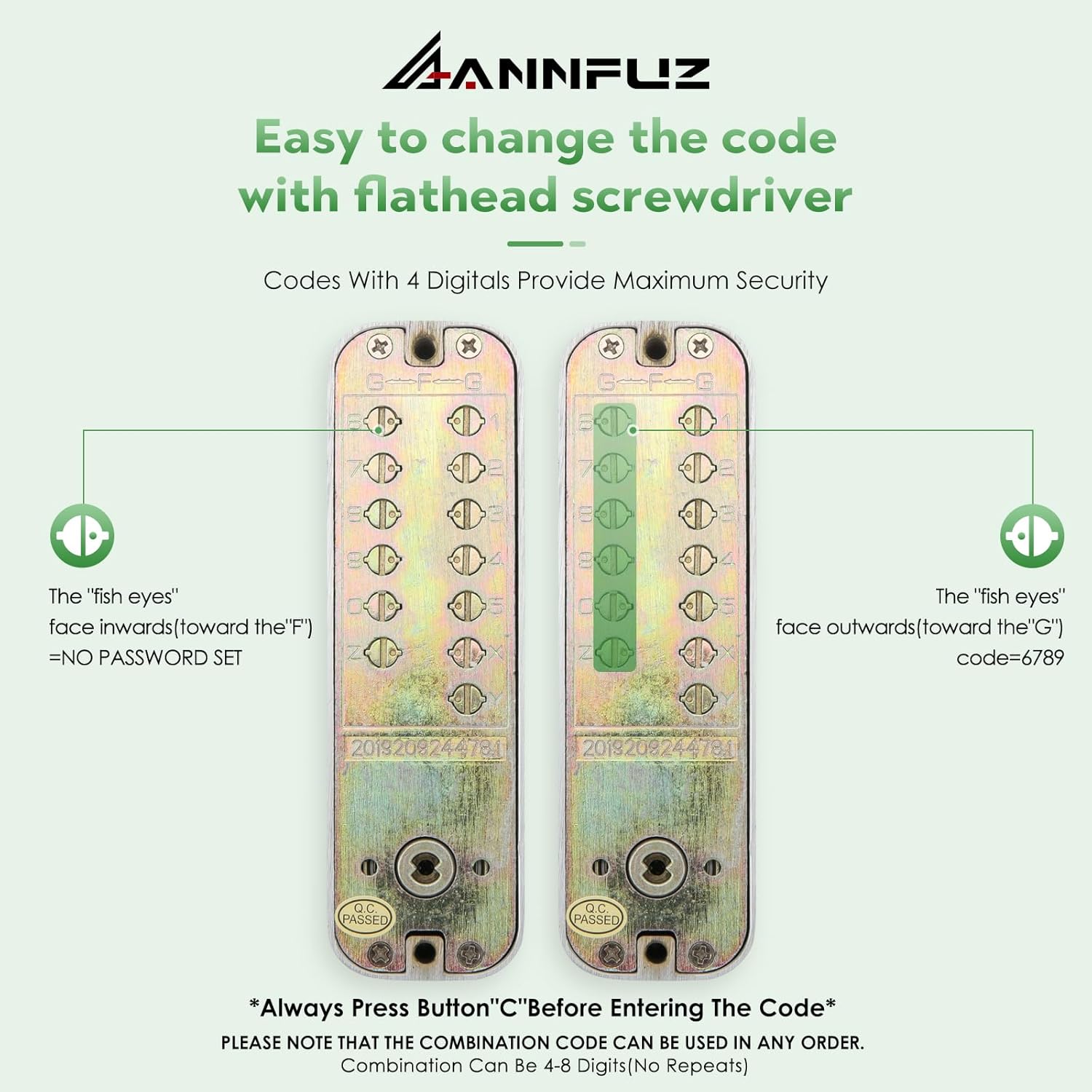
Instructions for changing the code using a flathead screwdriver on the internal mechanism.
6.2 Unlocking the Door
- Press the "C" button to clear any previous entries.
- Enter your 4-7 digit passcode. The digits can be pressed in any order.
- Rotate the knob to open the door.
6.3 Auto-Lock Function
The lock is designed to automatically engage the locking mechanism once the door is closed. This means you do not need to manually lock the door after exiting.
6.4 Passage Mode
Passage mode allows the door to be opened without entering a code, functioning like a standard door handle. This is useful for periods of high traffic or when temporary unrestricted access is desired.
- To activate Passage Mode: Locate the small switch or lever on the interior side of the lock (refer to product diagrams if available). Move it to the "open" or "passage" position.
- To deactivate Passage Mode: Move the switch or lever back to the "locked" or "auto-lock" position. The keypad will then resume its normal function, requiring a code for entry.
7. Maintenance
- Cleaning: Wipe the lock surface with a soft, damp cloth. Avoid abrasive cleaners, solvents, or harsh chemicals, as these can damage the finish.
- Lubrication: Periodically apply a small amount of graphite lubricant or silicone spray to the internal moving parts of the latch and spindle to ensure smooth operation. Do not use oil-based lubricants as they can attract dust and debris.
- Inspection: Regularly check all screws and bolts to ensure they are tight. Inspect the latch and strike plate for any signs of wear or misalignment.
- Outdoor Use: While designed for outdoor use, extreme weather conditions may require more frequent inspection and cleaning.
8. Troubleshooting
| Problem | Possible Cause | Solution |
|---|---|---|
| Lock does not open after entering code. | Incorrect code entered; "C" button not pressed before code; internal mechanism issue. | Ensure correct code is entered. Always press "C" first. Re-check internal code setting pins. |
| Knob is stiff or hard to turn. | Lack of lubrication; misalignment of components; debris in mechanism. | Apply graphite lubricant to internal moving parts. Check for proper alignment of panels and spindle. Clean any debris. |
| Door does not auto-lock. | Passage mode is active; latch misalignment; internal spring issue. | Deactivate Passage Mode. Check latch alignment with strike plate. Inspect internal springs. |
| Code setting pins are difficult to adjust. | Tool not suitable; pins are stiff. | Use a proper flathead screwdriver. Apply gentle pressure. If very stiff, a small amount of lubricant might help. |
| Lock feels loose on the door. | Mounting screws are loose. | Tighten all mounting screws on both interior and exterior panels. |
9. Warranty and Support
ANNFUZ products are manufactured to high-quality standards. For any issues, questions, or to request a 70mm latch replacement, please contact ANNFUZ customer support.
For further assistance, please visit the official ANNFUZ store on Amazon or contact their customer service directly.
ANNFUZ Store Link: https://www.amazon.com/stores/ANNFUZ/page/C921D65D-12CA-43E7-8C86-A32B65DD6CC
Related documents7206B

Ask a question about this manual
Ask about setup, troubleshooting, compatibility, parts, safety, or missing instructions. Manuals+ will review the question and use this page’s manual context to help answer it.