
1. Introduction
This manual provides detailed instructions for the safe and efficient operation, setup, and maintenance of your Mcilpoog M3 Super Automatic Coffee Machine. Please read this manual thoroughly before using the appliance and retain it for future reference.
The Mcilpoog M3 is designed to deliver a variety of coffee beverages with ease, featuring a 15-bar pressure system and a user-friendly interface. It offers eight drink options, accessible via a 5-inch touchscreen, and includes a 7-gear adjustable grinder for optimal flavor extraction.
2. Safety Instructions
Always observe basic safety precautions when using electrical appliances to reduce the risk of fire, electric shock, and injury to persons.
- Ensure the voltage specified on the appliance matches your local mains voltage before connecting.
- Do not immerse the appliance, power cord, or plug in water or any other liquid.
- Keep hands and cords away from hot surfaces. The brewing unit and steam wand can become very hot during operation.
- Unplug the machine from the outlet when not in use and before cleaning.
- Do not operate any appliance with a damaged cord or plug, or after the appliance malfunctions or has been damaged in any manner.
- Use only accessories recommended by the manufacturer.
- This appliance is for household use only.
3. Product Overview
The Mcilpoog M3 features an intuitive design for convenient coffee preparation and maintenance. Familiarize yourself with the main components of your machine.

Figure 3.1: Front view of the Mcilpoog M3 Super Automatic Coffee Machine, showing the touchscreen display, coffee spout, and external milk container connected via a tube.

Figure 3.2: Key components of the Mcilpoog M3, including the removable drip tray, a 2-in-1 coffee warehouse for beans and ground coffee, a 250g bean storage bin, and a detachable water tank.
Key Features:
- 5-inch Touchscreen Display: For easy selection of 8 different drink options.
- Integrated Grinder: Adjustable with 7 gears for various coffee bean types and desired fineness.
- 15-Bar Pressure System: Ensures optimal extraction for rich espresso.
- Adjustable Spout Height: Accommodates various cup sizes for different beverages.
- 5-Hole Outlet: Separate channels for coffee, milk, and hot water to prevent flavor contamination.
- Automatic Self-Cleaning Milk System: Simplifies maintenance of milk-related components.
- Removable Drip Tray and Detachable Water Tank: For easy cleaning and refilling.
4. Setup
4.1 Unpacking and Initial Cleaning
- Carefully remove all packaging materials.
- Wash the water tank, milk container, and drip tray with warm soapy water, then rinse thoroughly.
- Wipe the exterior of the machine with a damp cloth.
4.2 Filling the Water Tank
- Remove the detachable water tank from the side of the machine.
- Fill the tank with fresh, cold drinking water up to the MAX level indicator.
- Reinsert the water tank securely into the machine.
4.3 Loading Coffee Beans or Ground Coffee
- Open the lid of the bean hopper located on top of the machine.
- Pour fresh coffee beans into the hopper. The net format bean bin is designed to prevent beans from getting stuck.
- If using pre-ground coffee, open the ground coffee chute (usually next to the bean hopper) and add one scoop of ground coffee per serving. Do not add ground coffee to the bean hopper.
4.4 Power Connection
- Plug the power cord into a grounded electrical outlet.
- Press the power button to turn on the machine. The machine will perform an initial rinse cycle.
5. Operating Instructions
The Mcilpoog M3 offers a variety of beverages with one-touch convenience.

Figure 5.1: Close-up of the 5-inch touchscreen display, illustrating the various drink options available for selection.
5.1 Selecting a Beverage
- Ensure the water tank is filled and coffee beans are in the hopper (or ground coffee in the chute).
- Place a cup under the coffee spout. Adjust the spout height if necessary.
- On the 5-inch touchscreen, select your desired beverage (e.g., Espresso, Coffee, Americano, Latte, Macchiato, Cappuccino, Milk Froth, Hot Water).
- The machine will automatically grind the beans (if selected), brew, and dispense the drink.
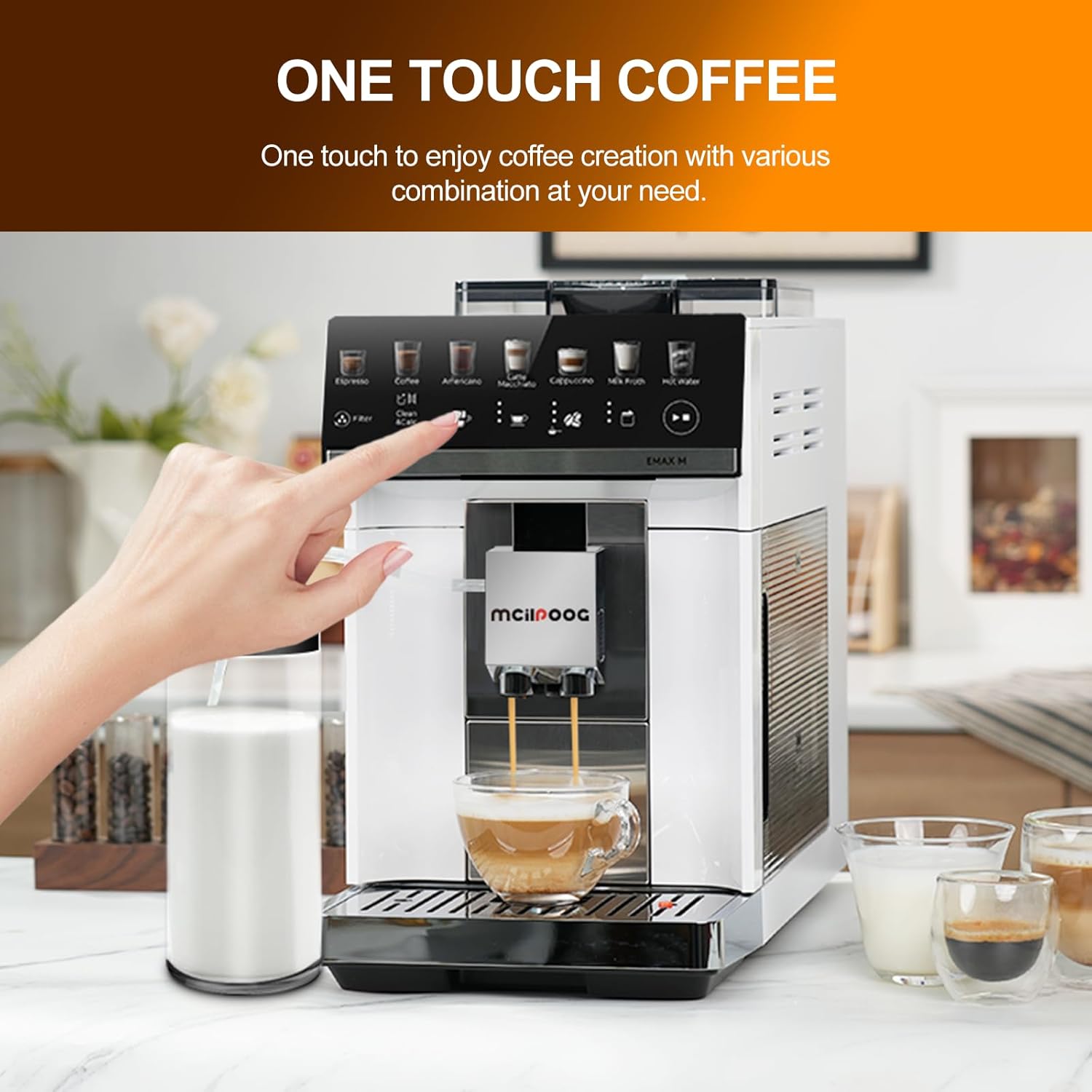
Figure 5.2: A hand interacting with the touchscreen for one-touch coffee creation, demonstrating the ease of use.
5.2 Adjusting Grind Settings
The integrated grinder has 7 adjustable settings to suit your preference for coffee strength and flavor.

Figure 5.3: Detailed view of the grinder adjustment dial, showing settings from 1 to 7 for fine-tuning coffee grind size.
- To adjust the grind fineness, locate the grinder adjustment dial inside the bean hopper.
- Turn the dial to your desired setting. A finer grind (lower number) results in a stronger espresso, while a coarser grind (higher number) is suitable for lighter coffee.
- It is recommended to adjust the grind setting only when the grinder is operating to prevent damage.
5.3 Pre-Soaking Function
The machine utilizes a low-pressure pre-soaking function to balance sweet, sour, and bitter flavors, enhancing the overall taste profile of your coffee.

Figure 5.4: A visual comparison demonstrating the benefits of low-pressure pre-soaking for balanced flavor extraction versus extraction without pre-soaking.
6. Maintenance
Regular cleaning and maintenance ensure the longevity and optimal performance of your Mcilpoog M3 coffee machine.
6.1 Automatic Self-Cleaning Milk System
The machine features an automatic self-cleaning program for the milk system.

Figure 6.1: The machine's milk system undergoing an automatic self-cleaning cycle, using hot water and steam to sanitize components.
- After preparing milk-based drinks, the machine may prompt you to clean the milk system.
- Follow the on-screen instructions to activate the automatic cleaning program.
- The machine will use hot water and steam to clean all parts in contact with milk.
6.2 Daily Cleaning
- Drip Tray: Empty and rinse the removable drip tray daily.
- Water Tank: Rinse the water tank daily and refill with fresh water.
- Coffee Grounds Container: Empty the coffee grounds container when prompted or regularly to prevent mold growth.
- Exterior: Wipe the exterior surfaces with a soft, damp cloth.
6.3 Descaling
The machine will indicate when descaling is required. Descaling removes mineral buildup from the internal components, ensuring optimal performance and taste.
- Purchase a suitable descaling solution for coffee machines.
- Follow the instructions on the descaling solution packaging and the machine's display for the descaling process.
- Typically, this involves adding the solution to the water tank and running a descaling program.
- After descaling, perform several rinse cycles with fresh water to remove any descaling residue.
7. Troubleshooting
This section addresses common issues you might encounter with your Mcilpoog M3 coffee machine.
| Problem | Possible Cause | Solution |
|---|---|---|
| Machine does not turn on | No power supply | Check if the power cord is securely plugged into the outlet and the machine. |
| Coffee is not dispensing | Water tank empty; Coffee beans/grounds empty; Brewing unit clogged | Fill water tank; Refill coffee; Clean the brewing unit according to maintenance instructions. |
| Milk is not frothing properly | Milk system clogged; Insufficient milk; Incorrect milk type | Run the automatic milk system cleaning cycle; Ensure sufficient cold milk is used; Try different milk types (e.g., whole milk). |
| Error message on display | Specific machine issue | Refer to the specific error code on the display and consult the machine's digital manual or contact customer support. |
8. Specifications
Technical details of the Mcilpoog M3 Super Automatic Coffee Machine.
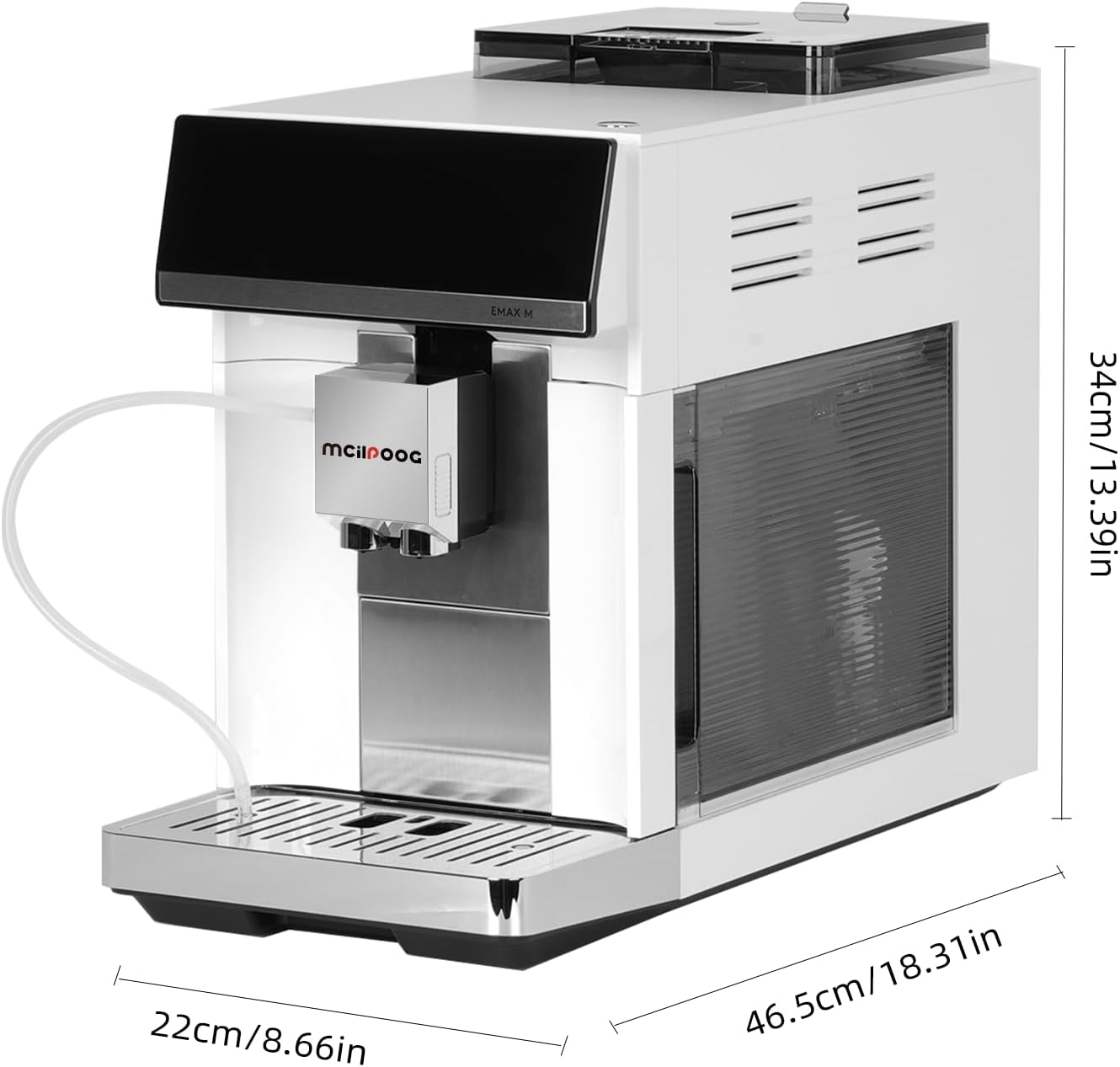
Figure 8.1: Dimensions of the Mcilpoog M3 Coffee Machine, indicating a depth of 18.1 inches (46.5 cm), width of 8.7 inches (22 cm), and height of 13.4 inches (34 cm).
- Brand: Mcilpoog
- Model Name: M3
- Product Dimensions: 18.1"D x 8.7"W x 13.4"H (46.5cm D x 22cm W x 34cm H)
- Item Weight: 20.3 pounds
- Coffee Maker Type: Espresso Machine
- Operation Mode: Fully Automatic
- Voltage: 220 Volts
- Human Interface Input: Touchscreen
- Coffee Input Type: Bean Flour (Whole Beans or Ground Coffee)
- Special Feature: Auto Clean Function
- Included Components: Milk Frother
- UPC: 025128281285
9. Warranty and Support
Specific warranty information for the Mcilpoog M3 Super Automatic Coffee Machine is not provided in the product details. For warranty claims, technical support, or service inquiries, please contact Mcilpoog customer support directly through their official website or the retailer where the product was purchased.
Always retain your proof of purchase for warranty purposes.