
Introduction
Thank you for choosing the THOMSON Multimedia Tower with CD Player. This device is designed to provide versatile audio playback options, including Bluetooth connectivity, CD playback, USB and SD card support for MP3 files, FM radio, and an AUX input. This manual will guide you through the setup, operation, and maintenance of your new audio system to ensure optimal performance and longevity.
Safety Information
- Read all instructions carefully before using the product.
- Keep this manual for future reference.
- Do not expose the unit to rain, moisture, or extreme temperatures.
- Ensure proper ventilation around the unit. Do not block any ventilation openings.
- Use only the power supply specified for this device (230V AC).
- Do not open the casing. Refer all servicing to qualified personnel.
- Avoid placing the unit near heat sources or in direct sunlight.
- Clean the unit only with a dry, soft cloth.
Package Contents
Verify that all items are present in the package:
- THOMSON Multimedia Tower
- 3.5mm AUX IN Cable
- Remote Control
- 230V AC Power Supply Cable
- Instruction Manual
Product Overview
Familiarize yourself with the various parts and controls of your multimedia tower.
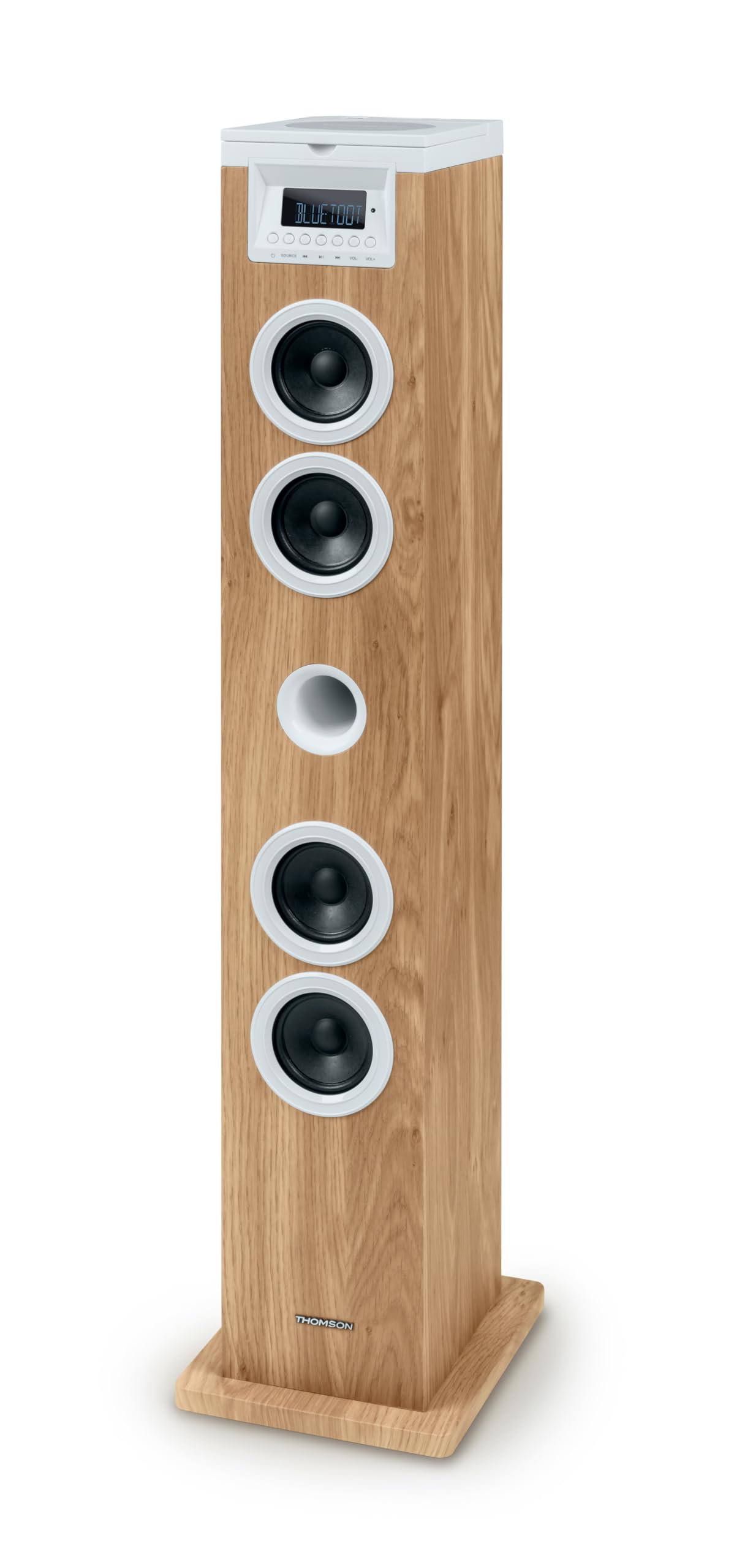
Figure 1: Top Panel with USB and SD Card Slots. This image displays the top surface of the multimedia tower, highlighting the USB port with a flash drive inserted and the adjacent SD card slot for media playback.
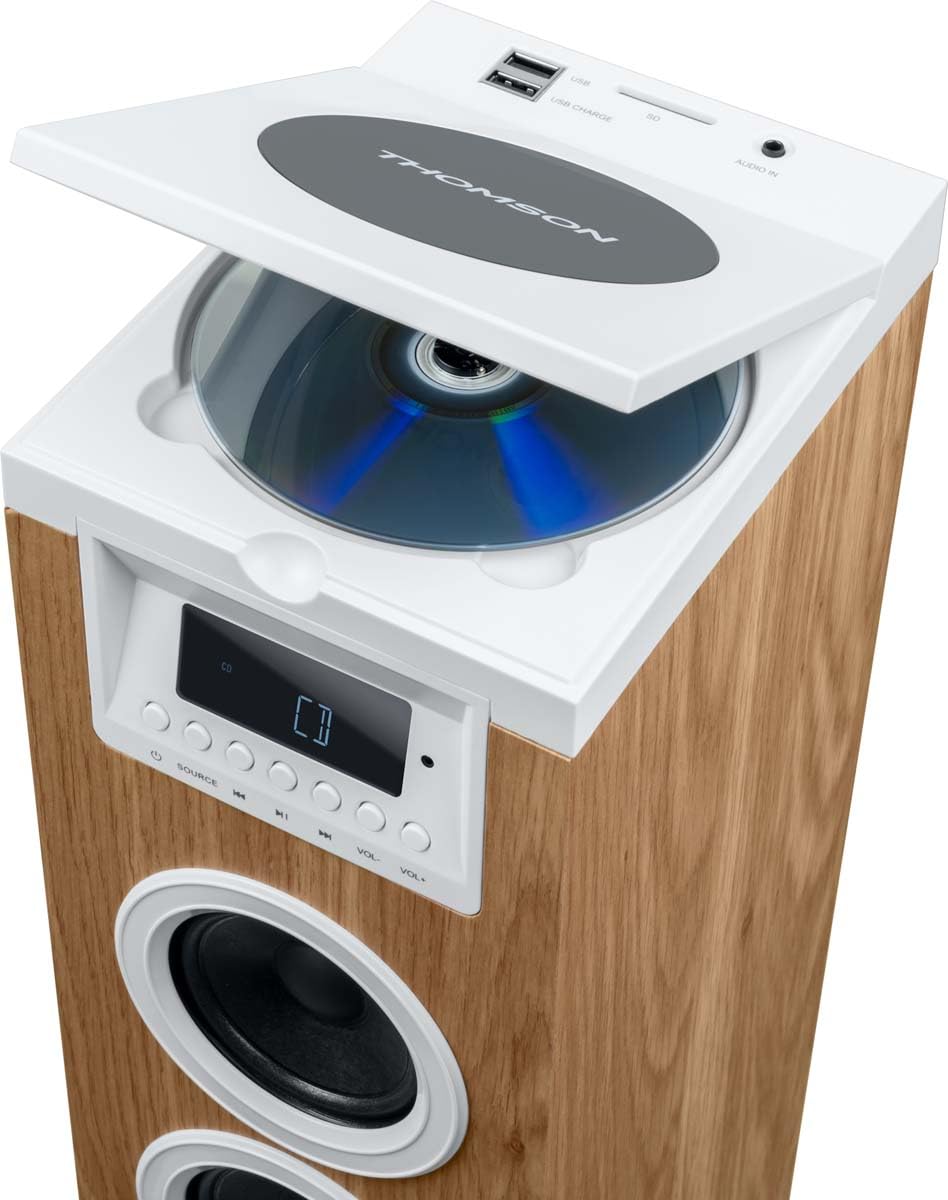
Figure 2: Top Panel with CD Player Open. This image shows the top panel of the tower with the CD compartment lid lifted, revealing a compact disc placed inside the player.

Figure 3: Included Remote Control and AUX Cable. This image features the white remote control unit and the 3.5mm AUX IN cable, both essential accessories for operating the multimedia tower.
Front Panel Controls
- LED Display: Shows current mode, track information, and radio frequency.
- SOURCE Button: Switches between input modes (Bluetooth, CD, USB, SD, FM, AUX).
- Play/Pause Button: Controls playback for CD, USB, and SD modes.
- Previous/Next Track Buttons: Navigates tracks or radio stations.
- Volume Up/Down Buttons: Adjusts the audio output level.
Top Panel Connections
- CD Player: Top-loading CD compartment.
- USB Port (Playback/Charging): For playing MP3 files from USB drives and charging compatible devices.
- SD Card Slot: For playing MP3 files from SD cards.
- AUDIO IN (3.5mm AUX): Connect external audio devices.
Setup
- Unpacking: Carefully remove the multimedia tower and all accessories from the packaging. Retain the packaging for future transport or storage.
- Placement: Place the tower on a stable, flat surface. Ensure there is adequate space around the unit for ventilation. Avoid placing it near direct heat sources or in areas with high humidity.
- Power Connection: Connect the 230V AC power supply cable to the power input on the back of the tower, then plug it into a standard wall outlet.
- Antenna (FM Radio): Extend the FM antenna for better radio reception.
Operating Instructions
Power On/Off
To turn the unit on or off, use the ON/OFF switch located on the back of the tower or press the Power button on the remote control.
Source Selection
Press the SOURCE button on the front panel or remote control repeatedly to cycle through the available input modes: Bluetooth, CD, USB, SD, FM Radio, and AUX IN.
Bluetooth Operation
- Switch the tower to Bluetooth mode using the SOURCE button. The LED display will show 'BT' or a similar indicator.
- On your mobile device (smartphone, tablet), enable Bluetooth and search for available devices.
- Select 'THOMSON Tower' (or similar name) from the list of devices.
- Once paired, you can play audio from your device through the tower.
CD Playback
- Switch the tower to CD mode using the SOURCE button.
- Open the CD compartment lid on the top panel.
- Place a CD with the label side facing up.
- Close the CD compartment lid. The unit will begin reading the CD automatically.
- Use the Play/Pause, Previous/Next Track buttons on the front panel or remote control to manage playback.
USB/SD Playback
- Insert a USB flash drive into the USB port or an SD card into the SD card slot on the top panel.
- Switch the tower to USB or SD mode using the SOURCE button. The unit will automatically detect and begin playing compatible MP3 files.
- Use the Play/Pause, Previous/Next Track buttons on the front panel or remote control to manage playback.
FM Radio
- Switch the tower to FM Radio mode using the SOURCE button.
- Auto Scan: Press and hold the Play/Pause button to automatically scan and save available FM stations.
- Manual Tuning: Use the Previous/Next Track buttons to manually tune to desired frequencies.
- Preset Stations: Use the MEM- / MEM+ buttons on the remote control to navigate through saved stations.
AUX Input
- Connect an external audio device (e.g., smartphone, MP3 player) to the 3.5mm AUDIO IN port on the top panel using the provided AUX cable.
- Switch the tower to AUX IN mode using the SOURCE button.
- Play audio from your connected device. The volume can be controlled via the tower or the external device.
Remote Control Functions
The remote control provides convenient access to all functions. Refer to Figure 3 for a visual guide to the remote control buttons.
- Power (⑂): Turns the unit on or off.
- SLEEP: Sets a sleep timer.
- MUTE: Mutes or unmutes the audio.
- TIME: Displays or sets the time.
- ALARM: Sets an alarm.
- SOURCE: Selects input mode.
- MEM-, MEM+: Navigates saved radio stations or folders.
- Repeat (↺): Repeats current track or all tracks.
- Stop (■): Stops playback.
- Shuffle (⇄): Plays tracks in random order.
- VOL+, VOL-: Adjusts volume up or down.
- Previous (◀◀), Play/Pause (▶‖), Next (▶▶): Standard playback controls.
Maintenance
- Cleaning: Disconnect the power before cleaning. Use a soft, dry cloth to wipe the exterior of the unit. Do not use liquid cleaners or abrasive materials.
- CD Player Care: Handle CDs by their edges to avoid fingerprints and scratches. If the CD lens needs cleaning, use a specialized CD lens cleaner disc.
- Storage: If storing the unit for an extended period, unplug it from the power outlet and store it in a cool, dry place, preferably in its original packaging.
Troubleshooting
| Problem | Possible Cause | Solution |
|---|---|---|
| No power | Power cable not connected; Power switch off | Ensure power cable is securely plugged in; Turn the ON/OFF switch to ON. |
| No sound | Volume too low; Mute function active; Incorrect source selected | Increase volume; Press MUTE on remote; Select correct source (CD, BT, USB, SD, FM, AUX). |
| Bluetooth not connecting | Device not in pairing mode; Tower not in Bluetooth mode; Device too far | Ensure tower is in BT mode; Enable Bluetooth on your device and search; Move device closer to the tower. |
| CD not playing | CD inserted incorrectly; CD scratched/dirty; Incorrect source selected | Insert CD with label side up; Clean or replace CD; Select CD source. |
| Poor FM reception | Antenna not extended; Weak signal | Fully extend the FM antenna; Reposition the tower for better signal. |
Specifications
| Feature | Specification |
|---|---|
| Brand | Thomson |
| Model Number | 9eb81657-1d7e-4ab8-8f71-2c93aa6b3ea7 |
| Compatible Devices | Smartphone, Tablet, Laptop |
| Surround Sound Channel Configuration | 2.0 |
| Color | White, Wood |
| Item Weight | 4.28 Kilograms |
| Warranty Type | Limited |
| Control Method | Remote |
| Wireless Communication Technology | Bluetooth |
| Speaker Size | 1 Inch |
| Power Source | Corded Electric |
| Speaker Maximum Output Power | 60 Watts |
| Connectivity Technology | AUX, USB |
| Audio Output Mode | Stereo |
| Input Voltage | 230 Volts |
| Mounting Type | Floor Standing |
| Speaker Type | Stereo |
| Special Feature | Bluetooth |
| Recommended Uses For Product | For smartphones or tablets |
Warranty and Support
This product comes with a limited warranty. For detailed warranty information, please refer to the warranty card included in your package or contact Thomson customer support. For technical assistance or service inquiries, please visit the official Thomson website or contact their customer service department.


