
Introduction
This manual provides comprehensive instructions for the proper use and maintenance of your KRPTQJoo replacement remote control. This remote is designed to operate specific York and McQuay window room air conditioner models. Please read this manual carefully before use to ensure optimal performance and longevity of your device.

Image: Front view of the KRPTQJoo remote control, displaying temperature and fan settings.
Setup
Battery Installation
- Locate the battery compartment cover on the back of the remote control.
- Slide the cover downwards or press the latch and lift to open.
- Insert two (2) AAA batteries, ensuring the positive (+) and negative (-) terminals align correctly with the markings inside the compartment.
- Replace the battery compartment cover by sliding it back into place until it clicks securely.
Note: Batteries are not included with the remote control.

Image: Rear view of the remote control with the battery cover removed, showing the battery slots.
Operating Instructions
Ensure a clear line of sight between the remote control and the air conditioner's receiver for proper operation.
Basic Functions
- Power Button (red circle with vertical line / blue circle with vertical line): Press to turn the air conditioner ON or OFF.
- Mode Button: Press repeatedly to cycle through available operating modes (e.g., Cool, Heat, Fan, Auto). The current mode will be displayed on the remote's screen.
- Temperature Adjustment Buttons (▼ / ▲): Use these buttons to increase or decrease the desired temperature setting.
- Fan Button: Press to adjust the fan speed (e.g., Low, Medium, High, Auto).
Advanced Functions
- Timer Function: Use the "TIMER FUNCTION" buttons (ON/CANCEL/OFF) to set a specific time for the air conditioner to turn on or off. Refer to your air conditioner's manual for detailed timer programming.
- Sleep Button: Activates the sleep mode, which typically adjusts temperature and fan speed for comfortable sleep and energy saving.
- Louver Button: Controls the vertical swing of the air conditioner's louver.
- Swing Button: Controls the horizontal swing of the air conditioner's louver.
- Ionizer Button: Activates or deactivates the air ionizer function, if available on your air conditioner model.
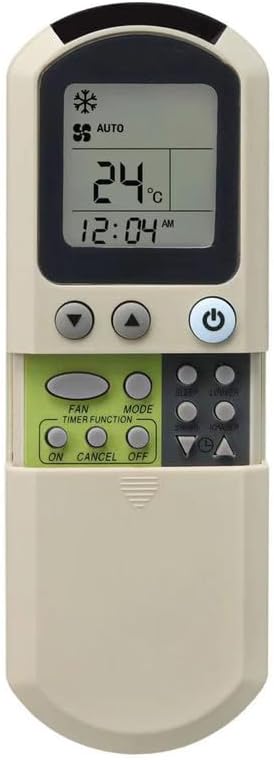
Image: Remote control displaying 'AUTO' mode and various function buttons for operation.
Maintenance
Cleaning
To clean the remote control, wipe it gently with a soft, dry cloth. Do not use liquid cleaners, sprays, or abrasive materials, as these can damage the remote's surface or internal components.
Battery Replacement
Replace batteries when the remote's operating range decreases or if the display becomes dim. Always replace both batteries simultaneously with new AAA batteries. Do not mix old and new batteries or different types of batteries.
Troubleshooting
- Remote not responding:
- Check if the batteries are inserted correctly with the correct polarity.
- Replace old batteries with new ones.
- Ensure there are no obstructions between the remote and the air conditioner's receiver.
- Confirm the remote is pointed directly at the air conditioner.
- Short operating range:
- Replace batteries.
- Ensure no strong light sources (like direct sunlight) are interfering with the infrared signal.
- Air conditioner not performing desired function:
- Verify that the remote control model is compatible with your specific air conditioner model. Refer to the product listing or your air conditioner's manual.
- Ensure the air conditioner itself is powered on and functioning correctly.
Specifications
| Brand | KRPTQJoo |
| Model Number | Joo4028 |
| Compatible Devices | York YORK2-A, YORK2, McQuay G5, MWM030FR, MWM030F Window Room Air Conditioners |
| Connectivity Technology | Infrared (IR) |
| Maximum Range | 8 Meters |
| Batteries Required | 2 x AAA batteries |
| Color | Grey |
| Weight | 64g |
| Dimensions (Approx.) | 14.1 cm (5.6 in) Length x 5.7 cm (2.2 in) Width x 2 cm (0.8 in) Depth |

Image: Front, side, and back views of the remote control with approximate dimensions and weight.
Warranty and Support
Warranty Information
This KRPTQJoo remote control comes with a 90-day warranty from the date of purchase. This warranty covers manufacturing defects. Please retain your proof of purchase for warranty claims.
Customer Support
If you encounter any issues or have questions regarding the compatibility or operation of your remote control, please contact the seller directly. Providing your air conditioner model number and photos of your original remote (if available) can assist in resolving inquiries more efficiently.
