
1. Introduction
This manual provides essential information for the safe and effective use of your RDSJ 6800mAh Li-ion replacement battery. This battery is designed to replace the original battery in various robot vacuum cleaner models. Please read these instructions carefully before installation and use.
2. Product Specifications

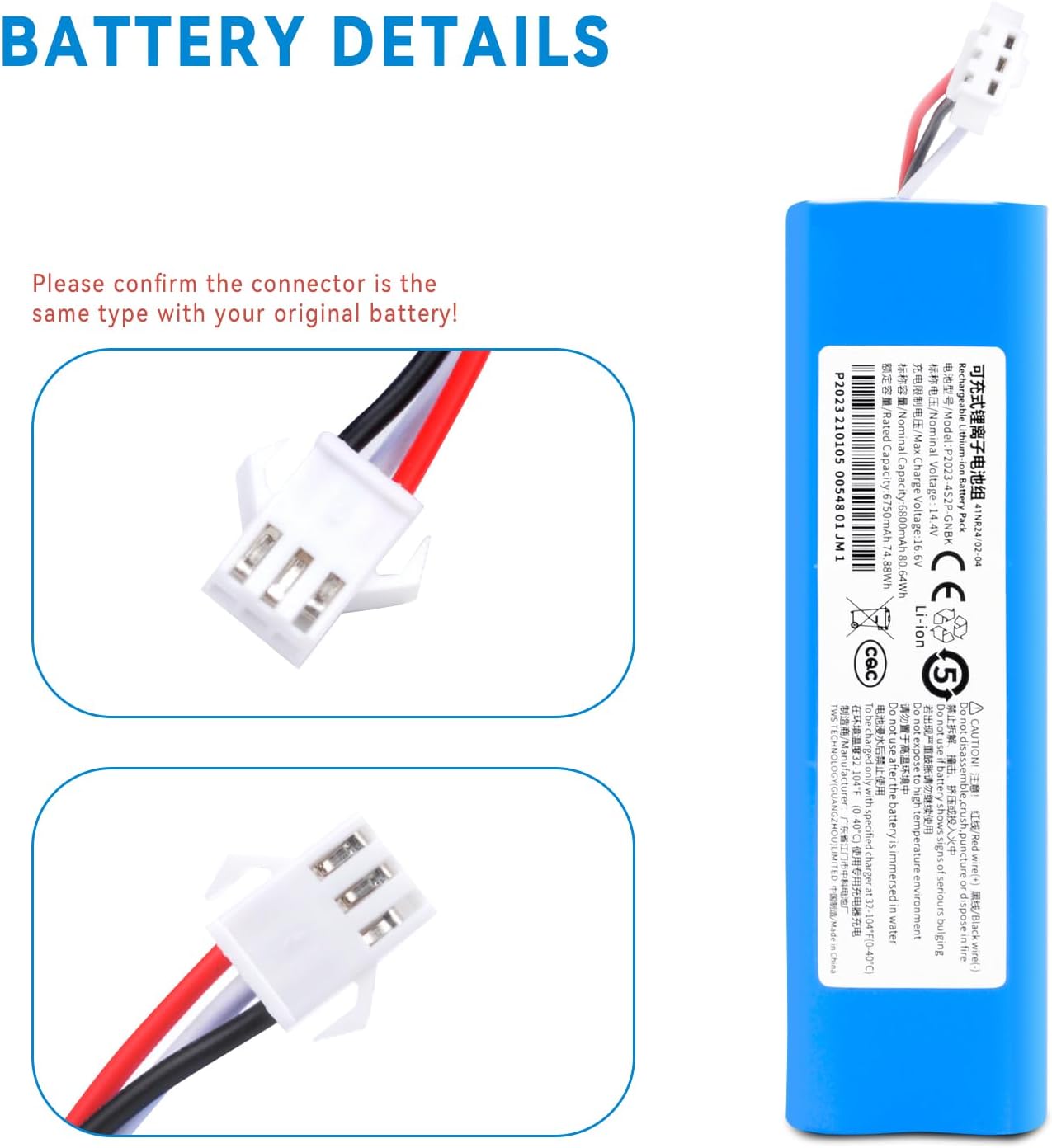
This image displays the key electrical specifications of the RDSJ 6800mAh Li-ion replacement battery, including its 14.4V nominal voltage and 80.64Wh capacity. It also shows regulatory markings.
- Battery Type: Li-ion
- Voltage: 14.4V / 14.8V
- Capacity: 6800mAh / 80.64Wh
- Cells: 8-Cell
- Weight: Approximately 14.08 ounces (400 grams)
- Replace Part Numbers: NR18650 M26-4S2P H18650CH-4S2P SUN-INTE-181
3. Compatibility
This replacement battery is compatible with a wide range of robot vacuum cleaner models. Please verify your vacuum cleaner's model number against the list below to ensure compatibility.

This image illustrates several robot vacuum cleaner models that are compatible with the RDSJ 6800mAh replacement battery, such as Kyvol Cybovac S31, Proscenic M7 Pro, and VIOMI S9, demonstrating its broad applicability.
Compatible Models:
- Proscenic M6, M6 Pro, M7 Pro, M7 Max, M8 Pro, U6
- Uoni S1, V980 Pro, V980 Max, V980 Plus
- LDS M7 Pro, M8 Pro
- ROIDMI EVE PLUS
- Lydsto R1, R1 Pro, S1, S1 Pro, G2
- VIOMI S9, alpha 2 Pro, alpha 2 Pro Plus, VXVC15-JC, VXVC16-JC, VXVC23
- Onson J30 Pro
- Lenovo LR1, LR1 S9 VXVC07 1112131415
- Kyvol S31 Cybovac S31
- Xiaomi Viomi S9, Viomi D800
- Viomi A1, Viomi ALPHA UV
- Coredy L900, L900W, L900X
- AIRROBO T10+
- NEABOT N2 Series
4. Safety Features
The RDSJ 6800mAh replacement battery incorporates multiple built-in protection mechanisms to ensure safe and reliable operation:
This image highlights the comprehensive safety features integrated into the RDSJ 6800mAh battery, including protection against over-charging, over-discharging, over-voltage, over-current, and over-temperature, ensuring safe operation.
- Over-Charge Protection: Prevents the battery from being charged beyond its safe voltage limit.
- Over-Discharge Protection: Protects the battery from being discharged below its safe voltage limit, extending battery life.
- Over-Voltage Protection: Safeguards against excessive voltage input.
- Over-Current Protection: Prevents damage from excessive current draw.
- Over-Temperature Protection: Monitors battery temperature and prevents overheating.
5. Installation Guide
Replacing your robot vacuum's battery is a straightforward process, typically taking around 2 minutes. Always ensure the robot vacuum is powered off and unplugged from its charging base before beginning.

This image provides a detailed view of the battery's connector, emphasizing the importance of matching it with the original battery's connector type for proper installation. The wiring includes red, black, and white leads.
- Power Off: Turn off your robot vacuum cleaner and disconnect it from its charging station.
- Access Battery Compartment: Flip the robot vacuum over. Locate the battery compartment cover, usually secured by screws. Use a screwdriver to remove the screws and open the cover.
- Remove Old Battery: Carefully disconnect the old battery's connector from the robot vacuum's port. Lift out the old battery.
- Install New Battery: Insert the new RDSJ 6800mAh battery into the compartment. Ensure the battery is oriented correctly.
- Connect Battery: Align the new battery's connector with the robot vacuum's port and firmly plug it in. Ensure a secure connection. Confirm the connector is the same type as your original battery.
- Close Compartment: Replace the battery compartment cover and secure it with the screws.
- Initial Charge: Place the robot vacuum back on its charging station and allow it to fully charge before its first use.
6. Operating Instructions
After successful installation, operate your robot vacuum cleaner as per its original manufacturer's instructions. The new battery is designed to provide extended runtime.
- First Use: For optimal performance, fully charge the battery before its initial use.
- Regular Charging: Always return the robot vacuum to its charging base after each cleaning cycle to ensure the battery remains charged and ready for the next use.
- Storage: If storing the robot vacuum for an extended period, ensure the battery is charged to approximately 50-60% and store it in a cool, dry place. Recharge every 3-6 months to prevent deep discharge.
7. Maintenance Tips
Proper maintenance can help extend the lifespan of your replacement battery:
- Avoid Extreme Temperatures: Do not expose the battery or robot vacuum to extreme heat or cold, as this can degrade battery performance and lifespan.
- Regular Cleaning: Keep the robot vacuum's charging contacts clean to ensure efficient charging.
- Deep Discharge Avoidance: Avoid completely draining the battery frequently. Modern Li-ion batteries perform best when kept within a charge range and not allowed to drop to 0% often.
8. Troubleshooting
If you encounter issues with your new battery, consider the following:
- Battery Not Charging:
- Ensure the battery connector is securely plugged in.
- Verify the robot vacuum is properly seated on its charging base and the base is powered.
- Check the charging contacts on both the vacuum and the base for cleanliness.
- Short Runtime:
- Ensure the battery has been fully charged.
- Confirm the battery is correctly installed and making good contact.
- Environmental factors (e.g., thick carpets, frequent obstacle encounters) can affect runtime.
- Robot Vacuum Not Powering On:
- Check battery installation and connection.
- Ensure the battery has sufficient charge.
- Refer to your robot vacuum's original manual for specific power-on procedures.
9. Warranty and Support
Your RDSJ replacement battery comes with a comprehensive warranty and dedicated customer support.
- Warranty Period: 12 months from the date of purchase.
- Money-Back Guarantee: 30-day money-back policy.
- Customer Support: 24/7 email support is available for any questions or concerns.
- Contact Information: Please refer to your purchase documentation or the seller's contact details for support.