
DEKELIFE MT43PRO
DEKELIFE MT43PRO Military Smart Watch User Manual
Model: MT43PRO | Brand: DEKELIFE
1. Introduction
The DEKELIFE MT43PRO Military Smart Watch is engineered for durability and functionality, designed to withstand challenging environments while providing comprehensive smart features. This tactical smartwatch offers military-grade toughness, 5 ATM waterproofing, and resistance to drops, shocks, and magnetic interference. It integrates advanced health monitoring, communication capabilities, and extensive sports tracking to support an active lifestyle.

Image 1: DEKELIFE MT43PRO Military Smart Watch, showcasing its rugged design and digital display.
2. What's in the Box
Please ensure all items are present upon unboxing:
- 1 x Military Bluetooth Smart Watch
- 1 x Watch Bands
- 1 x USB Magnetic Charging Cable
- 1 x User Manual
3. Setup Guide
3.1 Initial Charging
Before first use, fully charge the smartwatch. Connect the USB magnetic charging cable to the charging points on the back of the watch and to a standard USB power adapter. A full charge typically takes approximately 2 hours.
3.2 App Installation and Pairing
The smartwatch requires the Da Fit application for full functionality. Scan the QR code provided in the included user manual or search for "Da Fit" in your smartphone's app store (compatible with iOS 9.0 and Android 9.0 and above).
- Download and install the Da Fit app on your smartphone.
- Open the app and follow the on-screen instructions to create an account or log in.
- Ensure Bluetooth is enabled on your smartphone.
- In the Da Fit app, navigate to the device pairing section and select "Add Device".
- The app will search for nearby devices. Select "C28" or "MT43PRO" from the list to pair.
- Confirm the pairing request on both your smartphone and the smartwatch.
Once paired, the watch will synchronize time and data with your phone, and you can customize settings and watch faces through the app.
Video 1: An overview of the DEKELIFE MT43PRO Military Smart Watch, demonstrating its features and interface. This video is provided by the seller.
4. Operating the Smart Watch
4.1 Basic Navigation
- Swipe Up/Down: Scroll through menus and notifications.
- Swipe Left/Right: Access quick functions or different watch faces.
- Tap: Select an item or confirm an action.
- Side Buttons: Use for power on/off, back function, or quick access to sports modes.
4.2 Communication Features
The MT43PRO supports Bluetooth 5.3 for seamless communication:
- Make/Receive Calls: With a built-in Hi-Fi speaker and microphone, you can answer or make calls directly from your wrist.
- Message Alerts: Receive notifications for incoming calls, text messages, and SNS messages directly on the smartwatch screen.
- Music Playback/Control: Control music playing on your phone or listen directly through the watch's speaker.
- Voice Assistant: Access your smartphone's voice assistant for hands-free commands.
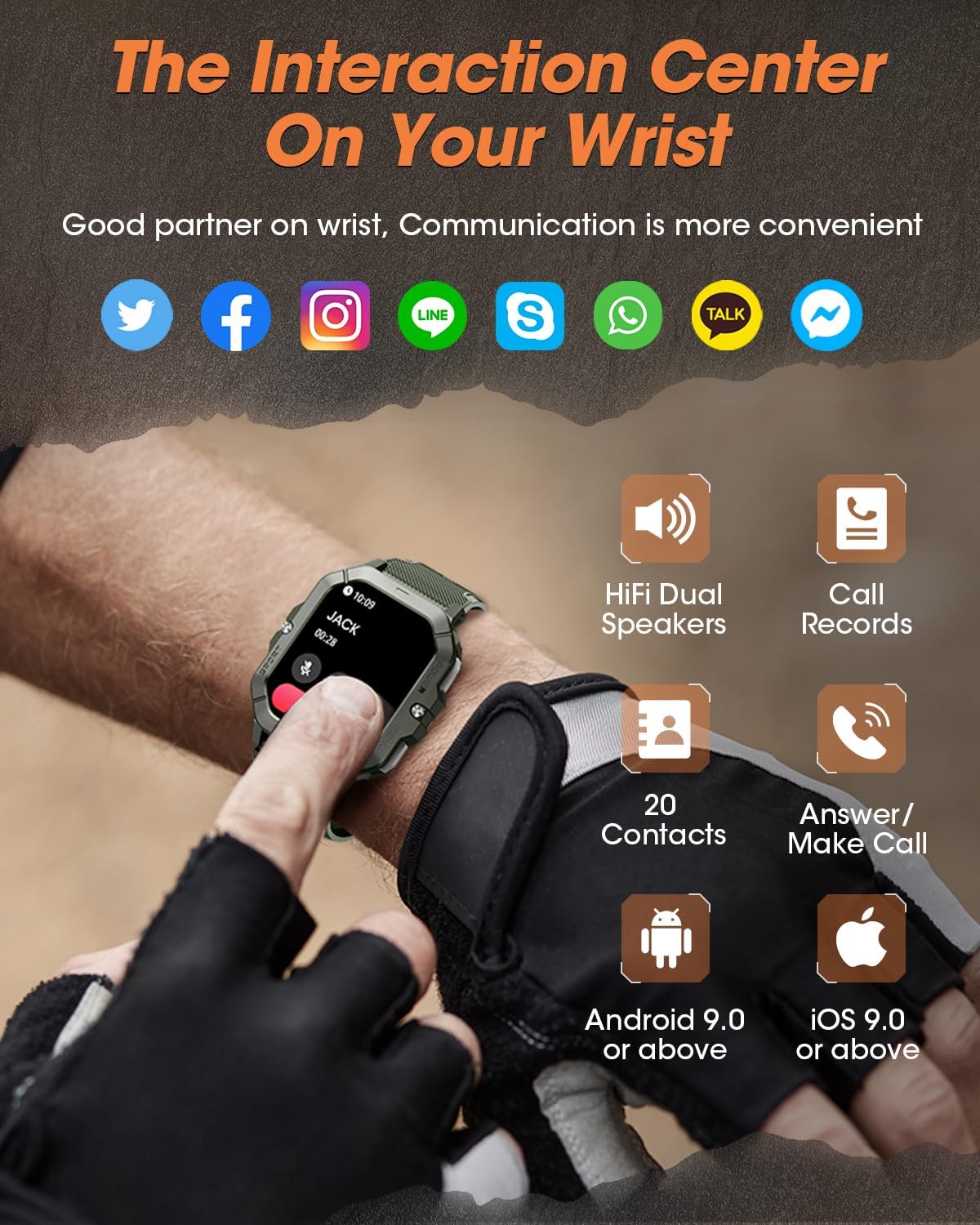
Image 2: The smartwatch screen showing an incoming call and various social media icons, highlighting its communication capabilities.
4.3 Health Monitoring
Equipped with advanced sensors, the watch tracks key health metrics:
- Heart Rate: Continuous heart rate monitoring.
- Blood Oxygen (SpO2): Measures blood oxygen saturation levels.
- Blood Pressure: Provides blood pressure data.
- Sleep Tracking: Monitors sleep patterns, including deep sleep, light sleep, REM time, and wake time, providing analysis for improved sleep quality.
- Stress Measurement: Helps monitor and manage stress levels.

Image 3: A visual representation of the smartwatch's health tracking features, including heart rate, blood oxygen, blood pressure, and sleep analysis.
4.4 Sports Modes
The smartwatch offers over 100 indoor and outdoor sport modes:
- Tracks steps, distance, and calories burned.
- Records exercise data tailored to your activity.
- Assists in achieving fitness goals.

Image 4: The smartwatch interface showing a selection of over 100 sports modes, such as walking, running, climbing, and cycling.
4.5 Other Functions
Additional features for daily convenience:
- Weather Forecast: Provides real-time weather updates.
- Camera Control: Remotely control your smartphone's camera.
- Timer & Alarm: Built-in timer and alarm clock functions.
- Sedentary Reminder: Alerts you to move after periods of inactivity.
- Drinking Water Reminder: Prompts you to stay hydrated.
- Find Phone: Helps locate your paired smartphone.
5. Maintenance
5.1 Battery Life & Charging
The MT43PRO features a 450mAh battery, offering:
- Up to 50 days of standby time.
- Up to 7 days of general use.
- Full charge in approximately 2 hours.
To ensure optimal battery performance, avoid extreme temperatures and use only the provided charging cable.

Image 5: The smartwatch connected to its magnetic charger, illustrating its battery capacity and charging time.
5.2 Cleaning and Care
Regularly clean your smartwatch and strap to prevent skin irritation and maintain functionality. Use a soft, damp cloth to wipe the screen and body. Ensure the charging contacts are clean and dry before charging.
5.3 Water Resistance
The watch is 5 ATM waterproof, suitable for swimming and showering. However, it is not recommended for diving or high-pressure water activities. Avoid exposing the watch to hot water or steam.

Image 6: A close-up of the smartwatch being splashed with water, highlighting its 5 ATM waterproof rating.
6. Troubleshooting
| Problem | Possible Solution |
|---|---|
| Watch not turning on/charging | Ensure the charging cable is securely connected to both the watch and a power source. Clean the magnetic charging contacts. Allow the watch to charge for at least 10-15 minutes before attempting to power on. |
| Cannot pair with smartphone | Ensure Bluetooth is enabled on your phone. Restart both the watch and your phone. Make sure the watch is within Bluetooth range. Try unpairing and re-pairing through the Da Fit app. |
| Inaccurate health data | Ensure the watch is worn snugly on your wrist, not too tight or too loose. Keep the sensor clean. Note that smartwatches are not medical devices and data is for reference only. |
| Notifications not received | Check app permissions for notifications on your phone. Ensure the Da Fit app is running in the background. Verify notification settings within the Da Fit app. |
| Screen unresponsive | Restart the watch by pressing and holding the power button. If unresponsive, allow the battery to drain completely and then recharge. |
If you encounter any problems during use, please contact customer service through Amazon.
7. Specifications
| Feature | Detail |
|---|---|
| Model Number | MT43PRO |
| Brand | DEKELIFE |
| Display Size | 2.02 Inches |
| Battery Capacity | 450 Milliamp Hours (Lithium Polymer) |
| Connectivity | Bluetooth 5.3 |
| Operating System Compatibility | iOS 9.0 and above, Android 9.0 and above |
| Water Resistance | 5 ATM |
| Special Features | Fitness Tracker, Phone Call, Sleep Monitor, Blood Oxygen (SpO2) Monitor, Heart Rate Monitor, Calorie Tracker, Alarm Clock, Stopwatch, Timer, Pedometer, Camera Control, Music Playback/Control, Sedentary Reminder, Weather, Waterproof, Notifications |
| Item Weight | 61.7 Grams (2.18 ounces) |
| Dimensions | 58.3 x 46.1 x 13.3 mm |
8. Warranty and Support
DEKELIFE offers a 365-day year-round guarantee for the MT43PRO Military Smart Watch. For any product issues or inquiries, please contact DEKELIFE customer service directly through Amazon. Our online 24/7 customer support team is available to assist you.
Ask a question about this manual
Ask about setup, troubleshooting, compatibility, parts, safety, or missing instructions. Manuals+ will review the question and use this page’s manual context to help answer it.