
1. Introduction
Thank you for choosing the Gtek Canada Universal TV Remote Control (Model RM-L1581). This remote is designed to provide a convenient and versatile solution for controlling a wide range of popular TV brands, including Samsung, LG, Sony, Sharp, Panasonic, Toshiba, Philips, Hisense, and Grundig Smart TVs. It serves as an ideal replacement for lost or damaged original remotes, offering essential functions and ease of use.
2. Key Features
- Versatile Compatibility: Designed as a replacement for various popular TV remote controls.
- Intuitive Controls: Features a user-friendly layout with dedicated buttons for power, volume, channel navigation, and more.
- Compact Design: Sleek and comfortable form factor for easy handling and storage.
- No Programming Required: Works right out of the box for many compatible TVs.
- Dedicated App Buttons: Quick access to popular streaming services like Netflix and Amazon.
- Battery Powered: Operates on standard AAA batteries (not included).
3. Setup
3.1. Battery Installation
The Gtek Canada Universal TV Remote Control requires two (2) AAA batteries (not included) for operation. Follow these steps to install the batteries:
- Locate the battery compartment cover on the back of the remote control.
- Slide the cover downwards or press the latch (if present) to open the compartment.
- Insert two AAA batteries, ensuring the positive (+) and negative (-) terminals align correctly with the markings inside the compartment.
- Slide the battery compartment cover back into place until it clicks securely.
Video: Demonstrates the process of installing AAA batteries into a universal remote control.
3.2. Initial Pairing/Programming
This remote control is designed to work with many TVs right out of the box. If it does not immediately control your TV, follow these simple pairing steps:
- Turn on your TV manually or with its original remote.
- On the Gtek Canada Universal Remote, press and hold the 'Power' button simultaneously with the number corresponding to your TV's brand (e.g., '1' for Samsung, '2' for LG, '3' for Sony, etc. - refer to the full code list in the included documentation if needed).
- Hold both buttons until the LED indicator on the remote flashes three times, then release them.
- Test the remote's functions (e.g., volume, channel, power). If it works, the remote is successfully paired.
- If the remote does not function correctly, repeat the process, trying a different number code for your TV brand if multiple are available, or consult the comprehensive code list provided with your remote.
4. Operating Instructions
The Gtek Canada Universal TV Remote Control features a standard layout for easy navigation and control of your television. Below is a general overview of the main buttons and their functions:
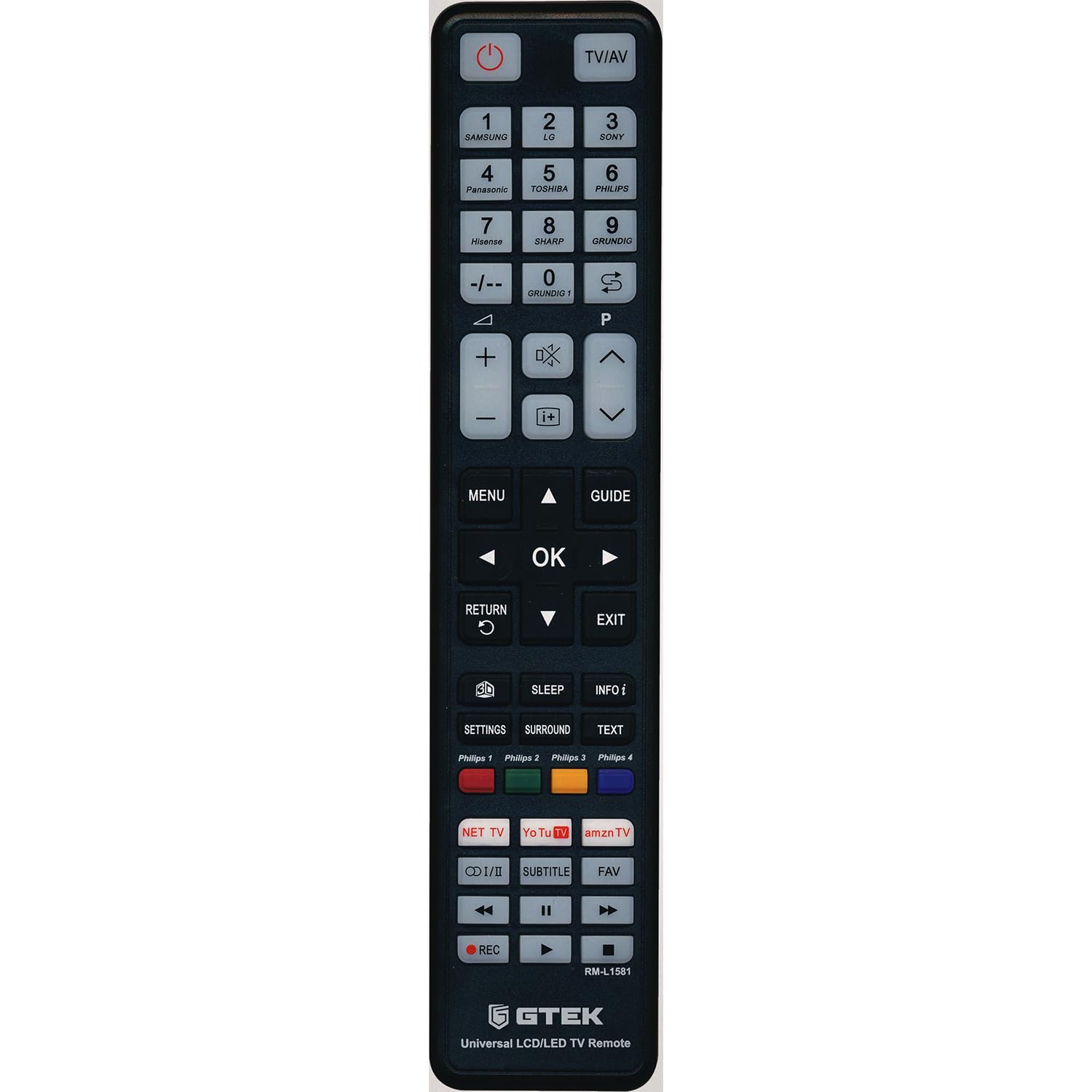
Image: Front view of the Gtek Canada Universal TV Remote Control, highlighting the button layout.
- Power Button (⏻): Turns the TV on or off.
- Number Pad (0-9): Directly select channels.
- Volume Up/Down (VOL +/-): Adjusts the sound volume.
- Channel Up/Down (CH +/-): Changes TV channels.
- Mute Button (🔇): Mutes or unmutes the TV sound.
- Navigation Buttons (Arrows & OK): Used to navigate menus and confirm selections.
- Back Button: Returns to the previous screen or menu.
- Exit Button: Exits the current menu or application.
- Menu Button: Accesses the TV's main menu.
- Info Button: Displays information about the current program or input.
- Dedicated App Buttons (Netflix, Amazon): Provides direct access to these streaming applications.
Video: Overview of a universal remote control, demonstrating its buttons and general functionality for LG Smart TVs.
5. Compatibility
The Gtek Canada Universal TV Remote Control is compatible with a wide range of television brands, including but not limited to:
- Samsung
- LG
- Sony
- Sharp
- Panasonic
- Toshiba
- Philips
- Hisense
- Grundig
Important Note:
This remote control is NOT compatible with Roku TV Models. Always check your specific TV model and the provided instructions for full compatibility details.
6. Maintenance
To ensure the longevity and optimal performance of your Gtek Canada Universal TV Remote Control, follow these maintenance guidelines:
- Cleaning: Wipe the remote with a soft, dry cloth. Do not use liquid cleaners or abrasive materials, as they may damage the surface or internal components.
- Battery Replacement: Replace batteries when the remote's response becomes sluggish or inconsistent. Always replace both batteries at the same time with new AAA batteries. Do not mix old and new batteries or different types of batteries.
- Storage: Store the remote in a cool, dry place away from direct sunlight and extreme temperatures.
- Avoid Drops: While designed to be durable, excessive drops or impacts can damage the remote.
7. Troubleshooting
If you encounter issues with your Gtek Canada Universal TV Remote Control, refer to the following common troubleshooting steps:
- Remote not responding:
- Ensure fresh AAA batteries are correctly installed.
- Check for any obstructions between the remote and the TV's infrared sensor.
- Point the remote directly at the TV.
- Limited functionality (e.g., only power/volume works, smart features not accessible):
- Universal remotes may not support all advanced or smart features of every specific TV model. Basic functions like power, volume, and channel should work.
- Ensure the remote is correctly paired to your TV using the appropriate brand code. Re-attempt the pairing process (Section 3.2).
- Some TV models may require specific input selection via the TV's own controls if the universal remote lacks a dedicated 'Input' button for that model.
- Not working with a specific TV brand:
- Verify that your TV brand is listed as compatible (Section 5).
- Re-attempt the pairing process (Section 3.2) carefully, ensuring you use the correct number code for your TV brand. If multiple codes are available, try each one.
- Remember, the remote is not compatible with Roku TV models.
8. Specifications
| Brand | Gtek Canada |
| Model | RM-L1581 |
| Compatible Devices | Television (Samsung, LG, Sony, Sharp, Panasonic, Toshiba, Philips, Hisense, Grundig, etc.) |
| Special Feature | Universal |
| Color | Black |
| Max Number of Supported Devices | 1 (programmed at a time) |
| Battery Type | AAA batteries (not included) |
| Connector Type | Infrared |
| Item Dimensions | 25 x 5.1 x 2.7 cm |
| Item Weight | 10 g |
9. Warranty & Support
For any questions, technical assistance, or warranty information regarding your Gtek Canada Universal TV Remote Control, please contact Gtek Canada customer support through the retailer where the product was purchased. Please retain your proof of purchase for warranty claims.
Online resources and additional support may be available on the Gtek Canada official website or through your product's specific Amazon listing page.