
Hasuit VDNF-05
Hasuit Farmhouse Vanity Desk with Mirror and Lights (Model VDNF-05) User Manual
Brand: Hasuit
1. Introduction
This manual provides essential instructions for the assembly, operation, and maintenance of your Hasuit Farmhouse Vanity Desk with Mirror and Lights, Model VDNF-05. This versatile vanity desk features a rustic farmhouse design, a mirror with adjustable lighting modes, a built-in charging station, and ample storage solutions. Please read this manual thoroughly before assembly and use to ensure safe and proper operation.

Image 1.1: Overview of the Hasuit Farmhouse Vanity Desk. This image displays the complete vanity desk, highlighting its white finish, wooden top, sliding barn doors, mirror with lights, and various drawers and cabinets.
2. Safety Information
Please observe the following safety precautions to prevent injury or damage to the product:
- Exercise caution around the sliding barn door to avoid sharp edges.
- Do not overload the built-in charging station or electrical outlets. Ensure all connected devices are within the specified voltage and current limits.
- Ensure the vanity desk is stable and securely placed on a level surface before use to prevent tipping.
- Follow all care and maintenance instructions for the engineered wood material to preserve the product's integrity and appearance.
- Keep all electrical components away from water or excessive moisture.
3. Setup and Assembly
The Hasuit Farmhouse Vanity Desk requires assembly. An instruction manual with clear part numbers and detailed installation steps, along with necessary assembly tools, is included with your purchase. Please follow these instructions carefully.
3.1 General Assembly Tips
- Review all parts: Before starting, verify that all components listed in the parts list are present and undamaged.
- Clear workspace: Assemble the vanity in a spacious, clean area to prevent loss of small parts and to protect the furniture.
- Tool usage: When using power tools, set them to a low torque to avoid overtightening screws and damaging the engineered wood. Manual screwdrivers are recommended for delicate steps.
- Part orientation: Pay close attention to the orientation of each piece as depicted in the assembly diagrams to ensure correct fit and prevent gaps.
- Mirror installation: Install the mirror and its associated components carefully, ensuring all connections are secure.

Image 3.1: Product dimensions and components. This image illustrates the overall dimensions of the vanity desk and highlights individual components like drawers and storage boxes with their respective measurements.
4. Operating Instructions
4.1 Sliding Barn Door Mirror and Storage
The vanity desk features sliding barn doors that conceal either the mirror or additional storage shelves. To access the mirror, slide the barn doors to the sides. To reveal the hidden shelves, slide the barn doors to the center.

Image 4.1: Sliding barn door functionality. This image demonstrates how the barn doors slide to either reveal the central mirror or conceal it to show the side storage shelves.
4.2 3-Color Lighting Modes
The mirror is equipped with LED lights offering three distinct color lighting modes to suit your preference for makeup application or general illumination.
- Warm Light (3000K): Provides a soft, warm glow.
- Natural Light (4500K): Offers a balanced, daylight-like illumination.
- Cold Light (6400K): Delivers a bright, cool white light.
Use the integrated control panel to switch between these modes and adjust the brightness up or down.

Image 4.2: Demonstration of the three lighting modes. This image shows the mirror lights set to Warm, Natural, and Cold light, along with their respective color temperatures (3000K, 4500K, 6400K) and brightness controls.
4.3 Built-in Charging Station
The vanity desk includes a convenient charging station located on the side, featuring two AC outlets and two USB ports. This allows for easy charging of electronic devices such as phones, tablets, hair dryers, or other beauty appliances.
- AC Outlets: 2 outlets, 120V/12A
- USB Ports: 2 ports, 5V/2A
- Power Cord: 5.0 feet long
Ensure devices are compatible with the provided power specifications before plugging them in. Avoid overloading the station.
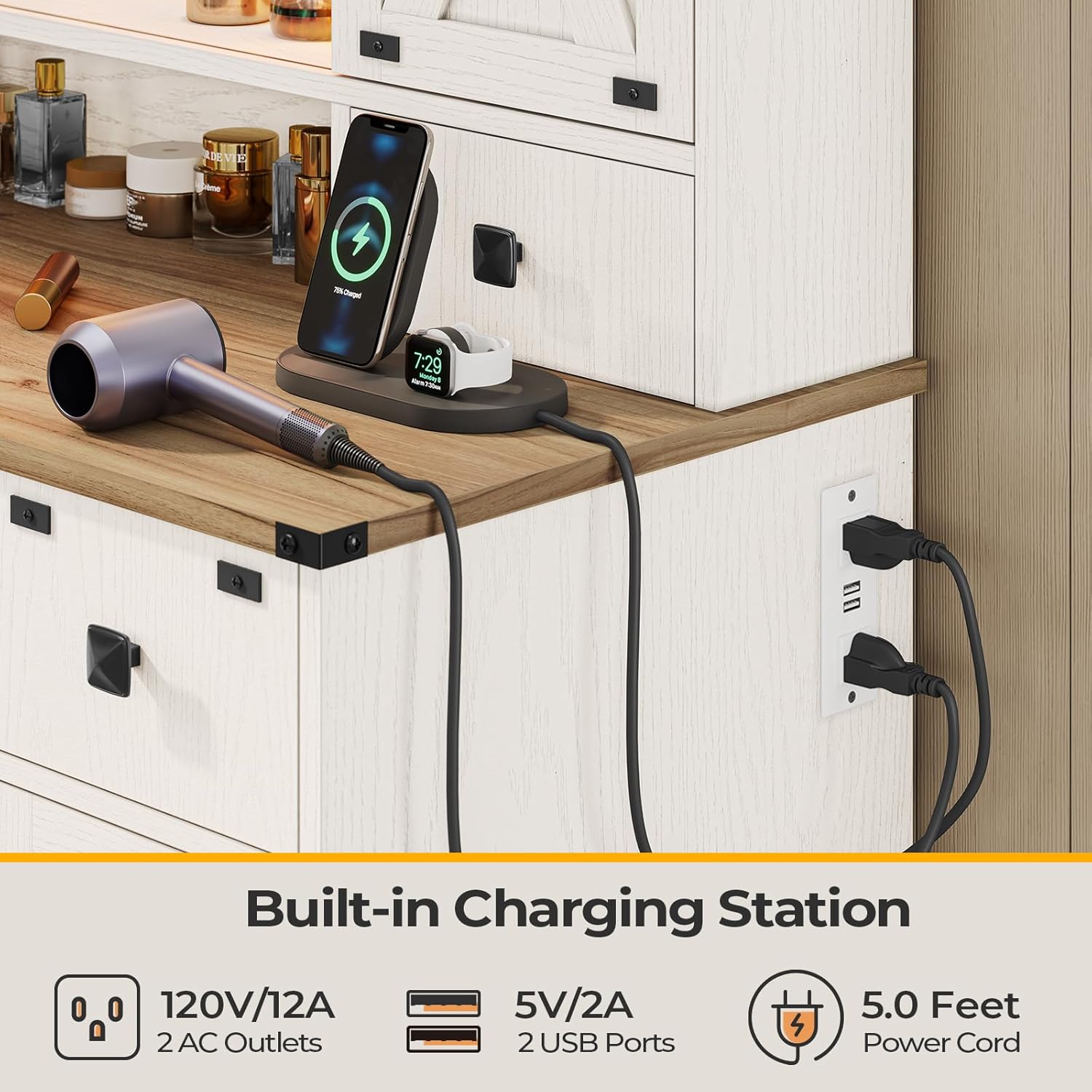
Image 4.3: Close-up of the built-in charging station. This image details the two AC outlets and two USB ports, along with the power cord, demonstrating its functionality for charging various devices.
4.4 Storage Features
The vanity desk offers multiple storage options to keep your items organized:
- Top Storage Space: A 5.5-inch wide area on top for frequently used items.
- Adjustable Shelves: Two adjustable storage shelves located behind the sliding barn doors.
- Tabletop Storage Boxes: Two small boxes on the tabletop for quick access.
- Large Drawer with DIY Grid: A spacious central drawer with a customizable grid for organizing cosmetics and accessories.
- Small Drawers: Two additional small drawers for smaller items.
- Storage Cabinets: Cabinets with adjustable shelves on each side of the desk base.
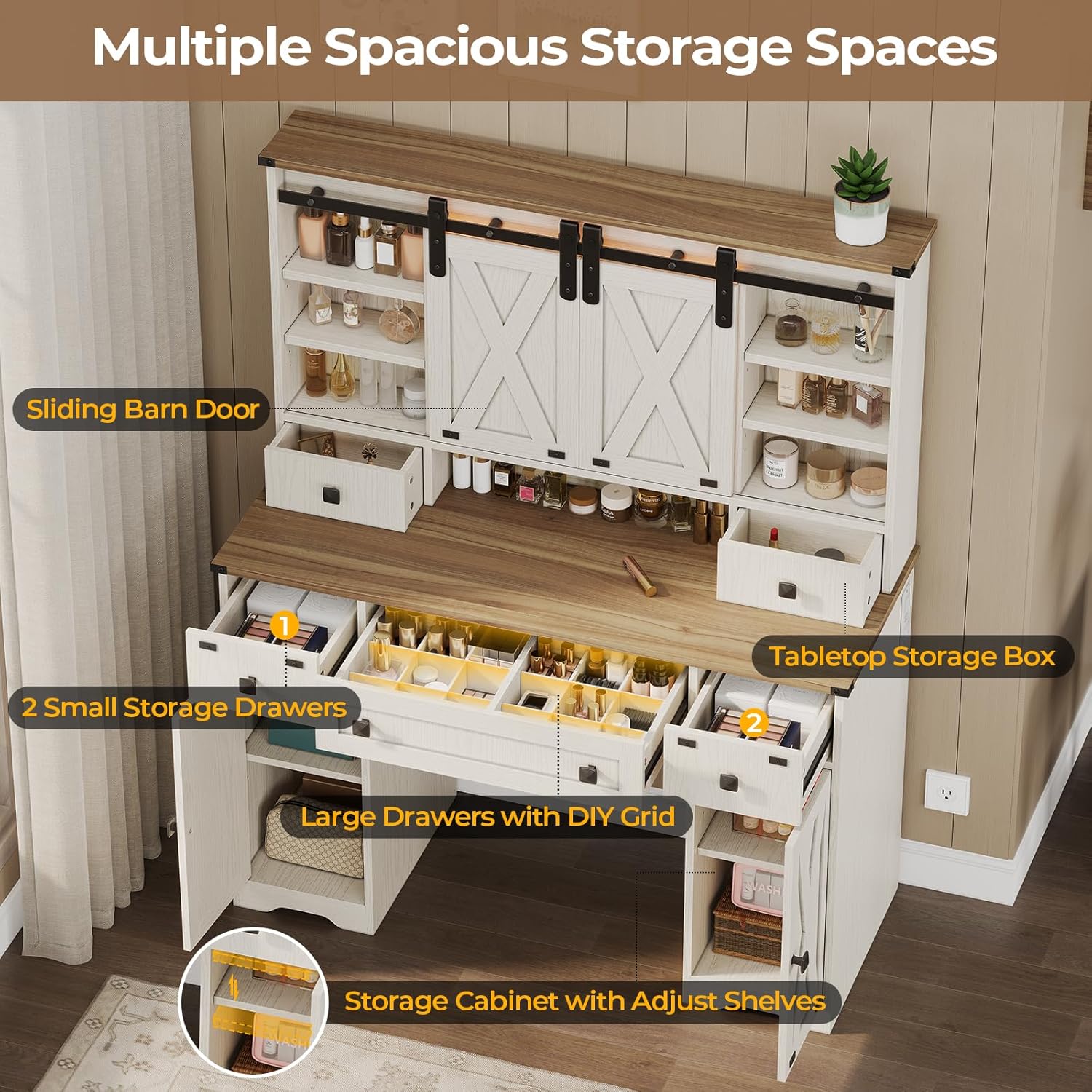
Image 4.4: Overview of storage compartments. This image provides an aerial view of the vanity desk, highlighting the various storage areas including the sliding barn door shelves, tabletop boxes, drawers with DIY grids, and side cabinets.

Image 4.5: Full extension drawer slides. This close-up image shows a drawer fully extended, illustrating the smooth operation and complete access provided by the full-extension drawer slides.
5. Maintenance
Proper care and maintenance will extend the life and appearance of your vanity desk.
- Cleaning: Wipe the surface with a dry, soft cloth. Avoid abrasive cleaners or harsh chemicals that may damage the finish.
- Spills: Immediately wipe up any spills to prevent staining or damage to the engineered wood.
- Mirror Care: Clean the mirror with a glass cleaner and a soft, lint-free cloth. Do not spray cleaner directly onto the mirror to avoid liquid seeping into the light components.
- Electrical Components: Ensure the charging station and light components remain dry. Disconnect power before cleaning around these areas.
- Hardware: Periodically check and tighten any loose screws or hardware to maintain stability.
6. Troubleshooting
If you encounter any issues with your vanity desk, refer to the following common troubleshooting steps:
- Lights Not Working:
- Ensure the power cord is securely plugged into a functional wall outlet.
- Check if the light control panel is properly connected and powered on.
- Verify that the brightness setting is not at its lowest level.
- Charging Station Not Functioning:
- Confirm the vanity desk's main power cord is plugged in.
- Test the AC outlets and USB ports with different devices to isolate the issue.
- Ensure devices are correctly plugged into the ports.
- Drawers Sticking or Not Closing Properly:
- Check for any obstructions within the drawer or along the slides.
- Ensure the drawer slides are properly aligned and free of debris.
- Verify that the drawers were assembled correctly according to the instructions.
- Gaps or Instability After Assembly:
- Re-check all screw connections and ensure they are tightened.
- Review the assembly instructions to confirm all parts are correctly oriented and installed.
- Ensure the vanity is placed on a flat, even surface.
If these steps do not resolve the issue, please contact Hasuit customer support for further assistance.
7. Specifications
| Feature | Detail |
|---|---|
| Brand | Hasuit |
| Model Number | VDNF-05 |
| Product Dimensions (L x W x H) | 15.8 x 43.3 x 55.1 inches |
| Item Weight | 94.8 pounds |
| Color | White |
| Furniture Finish | White |
| Frame Material | Engineered Wood |
| Assembly Required | Yes |
| Product Care Instructions | Wipe with Dry Cloth |
| Lighting Modes | 3 (Warm Light 3000K, Natural Light 4500K, Cold Light 6400K) |
| Charging Station | 2 AC Outlets (120V/12A), 2 USB Ports (5V/2A) |
| Power Cord Length | 5.0 feet |
8. Warranty and Support
Hasuit is committed to providing quality products and customer satisfaction. While specific warranty details are not provided in this manual, Hasuit offers long-term service for its products.
If you have any questions, concerns, or require assistance with your Hasuit Farmhouse Vanity Desk before or after purchase, please do not hesitate to contact Hasuit customer service. Refer to your purchase documentation or the official Hasuit website for contact information.
Contact Information: Please refer to the contact details provided with your product packaging or visit the official Hasuit website for support.
Ask a question about this manual
Ask about setup, troubleshooting, compatibility, parts, safety, or missing instructions. Manuals+ will review the question and use this page’s manual context to help answer it.