
AODK 150*102*76cm
AODK L-Shaped Gaming Desk Instruction Manual
Model: 150*102*76cm Black
1. Introduction
Thank you for purchasing the AODK L-Shaped Gaming Desk. This desk is designed to provide a versatile and ergonomic workspace for both gaming and office tasks. It features integrated power outlets, customizable RGB LED lighting, ample storage, and a monitor stand to enhance your experience.
Please read this manual carefully before assembly and use to ensure proper setup and to maximize the desk's functionality and lifespan.

Image 1.1: The AODK L-Shaped Gaming Desk in a gaming setup, showcasing its spacious design and integrated blue LED lighting.
2. Package Contents
Before beginning assembly, please verify that all components are present and undamaged. If any parts are missing or damaged, please contact customer support.
- Desk Panels (Main desktop, side desktop, monitor stands)
- Steel Frame Components
- Storage Rack Panels
- Power Outlet Unit (with AC and USB ports)
- RGB LED Light Strip
- Assembly Hardware (Screws, bolts, nuts, washers)
- Assembly Wrench
- Instruction Manual
3. Setup and Assembly
Assembly of this desk requires careful attention to detail. It is highly recommended that two adults perform the assembly to ensure stability and prevent damage. A wrench is included for your convenience.
3.1. Preparation
- Clear a spacious area for assembly.
- Lay out all components and hardware, comparing them against the package contents list.
- Keep the instruction manual accessible for reference.
3.2. Assembly Steps (General Guidelines)
- Begin by assembling the main steel frame structure. Ensure all connections are secure but do not overtighten screws initially.
- Attach the desk panels to the frame. Pay attention to the orientation of the L-shaped sections.
- Install the storage racks. Note that the main rack can be installed on either the left or right side to suit your preference.
- Mount the monitor stands onto the designated areas of the desk.
- Integrate the power outlet unit and LED light strip according to the specific instructions provided in the included diagram.
- Once all components are in place, gradually tighten all screws to ensure a stable and rigid structure. Avoid overtightening to prevent damage to the panels.
- Adjust the leveling feet at the bottom of the desk to ensure it sits flat and stable on uneven surfaces.

Image 3.1: Dimensional diagram of the AODK L-Shaped Gaming Desk, illustrating its overall size and component measurements.
4. Operating Instructions
4.1. Integrated Power Outlets
The desk is equipped with 2 AC outlets and 2 USB ports for convenient charging of your devices. Simply plug the desk's main power cord into a wall outlet. You can then connect your computer, monitor, smartphone, or other peripherals directly to the desk's integrated power strip.

Image 4.1: Detail of the desk's integrated power outlets and USB ports, along with the control panel for the RGB LED lighting.
4.2. RGB LED Lighting
The integrated RGB LED light strip offers 10 different lighting modes and 10 color adjustment modes to customize your workspace ambiance. Use the control panel located near the power outlets to cycle through modes and colors. The lighting system includes a memory function, which will recall your last selected mode when the lights are turned on again.

Image 4.2: The AODK L-Shaped Gaming Desk shown with orange LED lighting, creating an immersive atmosphere.
4.3. Monitor Stand
The elevated monitor stand helps to raise your display to an ergonomic viewing height. This can improve your posture and reduce strain on your neck and shoulders during extended periods of use.

Image 4.3: An illustration demonstrating how the monitor stand promotes better ergonomic posture compared to a lower monitor position.
4.4. Storage Racks
The integrated storage racks provide convenient space for books, documents, gaming accessories, or other items, helping to keep your desktop clear and organized.
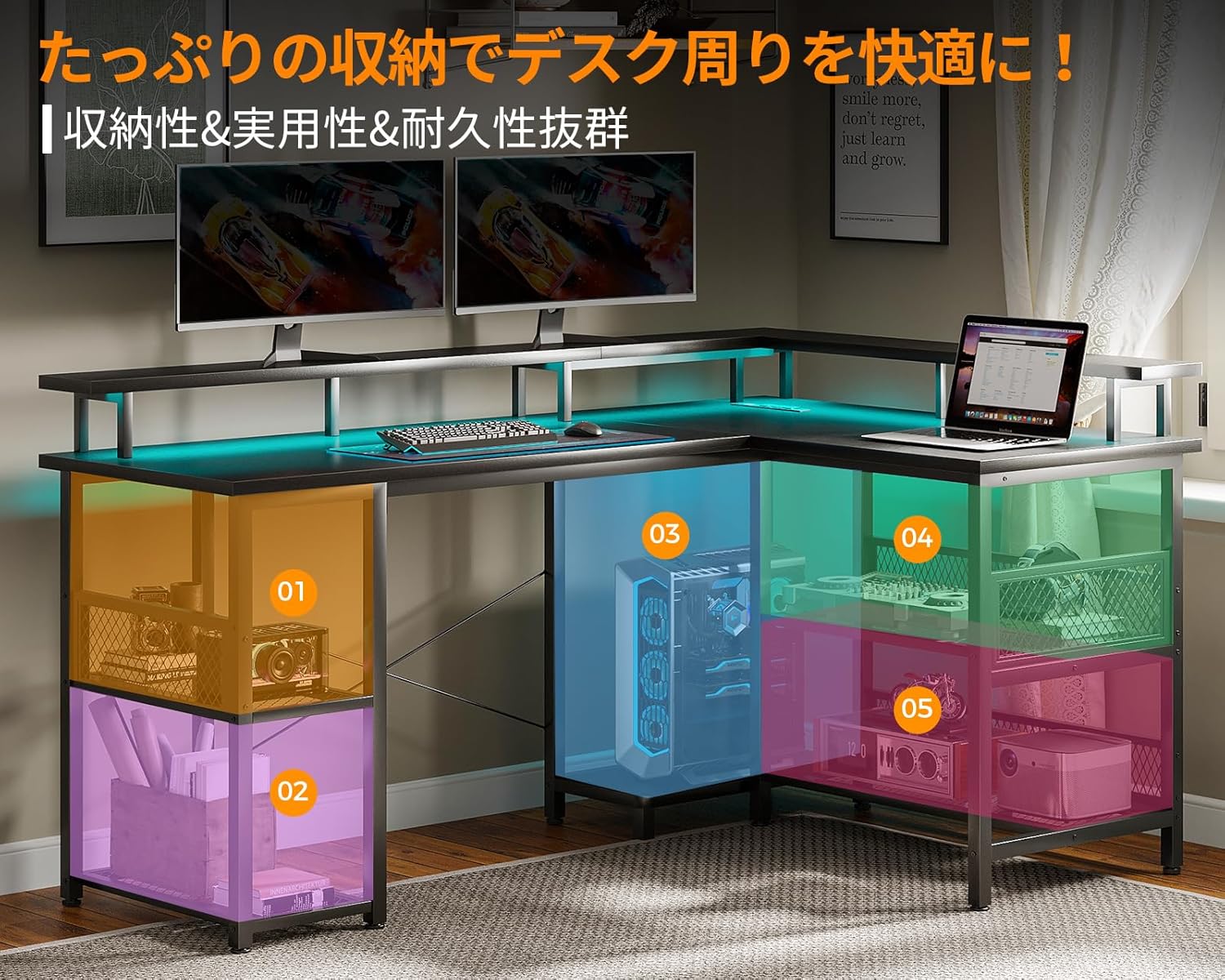
Image 4.4: The desk's storage capabilities are highlighted, showing designated areas for various items.
5. Maintenance
Regular maintenance will help preserve the appearance and functionality of your AODK L-Shaped Gaming Desk.
- Cleaning: Wipe the desk surfaces with a soft, damp cloth. Avoid abrasive cleaners or harsh chemicals, as they may damage the melamine coating.
- Hardware: Periodically check all screws and connections to ensure they remain tight. Retighten if necessary to maintain stability.
- Electrical Components: Ensure the power cord and integrated outlets are free from damage. Do not expose electrical components to liquids.
6. Troubleshooting
6.1. Desk is Unstable/Wobbly
- Ensure all assembly screws are securely tightened.
- Adjust the leveling feet at the bottom of the desk legs to compensate for uneven flooring.
- Verify that the cross-reinforcement hardware is correctly installed.
6.2. LED Lights Not Functioning
- Check if the desk's main power cord is securely plugged into a working wall outlet.
- Ensure the LED light strip is properly connected to the power outlet unit.
- Press the power button on the LED control panel to turn the lights on.
6.3. Difficulty During Assembly
- Refer back to the assembly diagrams and instructions carefully.
- Ensure components are oriented correctly (e.g., front/back, left/right for the L-shape and storage rack).
- Do not force parts together. If a part does not fit, re-check the instructions for correct placement.
- Having a second person assist can significantly ease the assembly process.
7. Specifications
| Brand | AODK |
| Model | L-Shaped Gaming Desk |
| Dimensions (W x D x H) | 150 cm x 102 cm x 76 cm |
| Weight | Approximately 24.7 kg |
| Color | Black |
| Material | High-strength Melamine Coated Board, Steel Frame |
| Load Capacity (Desktop) | Up to 50 kg |
| Power Outlets | 2 x AC Outlets, 2 x USB Ports |
| LED Lighting | RGB, 10 Lighting Modes, 10 Color Adjustment Modes, Memory Function |
| Features | L-shaped design, Integrated storage rack (reversible), Monitor stand, Adjustable feet |
8. Warranty and Support
AODK is committed to providing high-quality products. If you encounter any issues with your AODK L-Shaped Gaming Desk, or if you have questions regarding assembly or operation, please do not hesitate to contact our customer support team. We are available to assist you with any concerns.
Please refer to your purchase documentation or the retailer's website for specific warranty details and contact information.
Related documents150*102*76cm


Ask a question about this manual
Ask about setup, troubleshooting, compatibility, parts, safety, or missing instructions. Manuals+ will review the question and use this page’s manual context to help answer it.