
1. Introduction
This manual provides comprehensive instructions for the Haroar replacement remote control, designed for use with various LG air conditioner models. This remote offers a convenient and functional alternative to your original LG remote, ensuring full control over your air conditioning unit's features. Please read this manual carefully before use to ensure proper operation and longevity of your device.
Compatible LG Air Conditioner Models: AKB35149813, AKB35149806, AKB35149807, CS09AQ, A09AWG, AKB74375404, AKB35149702, CC07AWV.
2. Setup
2.1 Battery Installation
The remote control requires two AAA batteries (not included) for operation. Follow these steps to install the batteries:
- Locate the battery compartment cover on the back of the remote control.
- Gently slide the battery compartment cover downwards or press the latch and lift to open it.
- Insert two new AAA batteries, ensuring that the positive (+) and negative (-) terminals align correctly with the markings inside the compartment.
- Slide the battery compartment cover back into place until it clicks securely.

Figure 1: Back view of the remote control with the battery compartment.

Figure 2: Battery compartment open, ready for AAA battery insertion.
Important: Remove batteries if the remote control will not be used for an extended period to prevent leakage and damage.
3. Operating Instructions
Point the remote control directly at the infrared receiver on your LG air conditioner unit. Ensure there are no obstructions between the remote and the unit.

Figure 3: Front view of the remote control.
3.1 Basic Functions
- Power Button (ON/OFF): Press to turn the air conditioner on or off.
- Temperature Adjustment (Up/Down Arrows): Use these buttons to increase or decrease the desired temperature.
- Mode Button: Cycles through operating modes such as Cool, Heat, Fan, Dry, and Auto.
- Fan Speed Button: Adjusts the fan speed (e.g., Low, Medium, High, Auto).
- Swing Button: Controls the vertical louver movement for air distribution.
3.2 Advanced Functions (Under Sliding Cover)
Slide down the front cover of the remote to access additional functions.
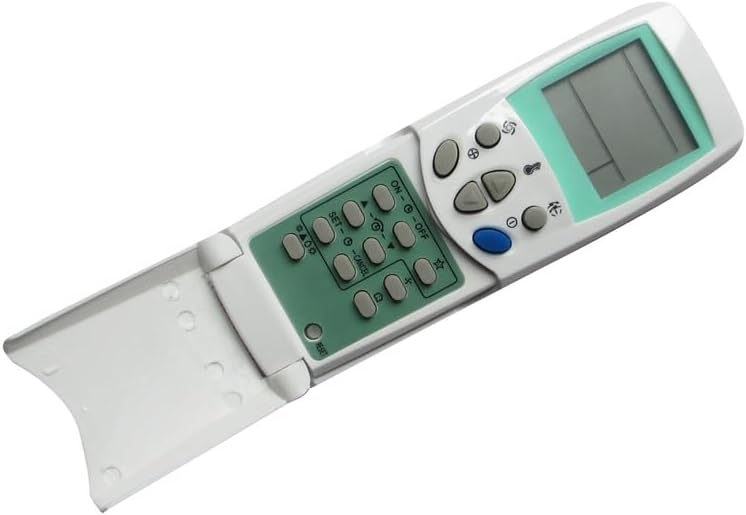
Figure 4: Remote control with sliding cover open, showing advanced controls.
- Timer ON/OFF: Set a specific time for the air conditioner to turn on or off. Refer to your LG air conditioner's original manual for detailed timer programming.
- Sleep Mode: Activates a quiet, energy-saving mode, often adjusting temperature gradually overnight.
- Light/Display: Toggles the display lights on the air conditioner unit.
- SET/CANCEL: Used for confirming or canceling timer settings and other programmable functions.
- S.ABO (Self Auto Blow Out): This function typically runs the fan for a short period after the unit is turned off to dry the internal components and prevent mold growth.
4. Maintenance
4.1 Cleaning
To clean the remote control, wipe it gently with a soft, dry cloth. Do not use liquid cleaners, abrasive materials, or chemical solvents, as these can damage the remote's surface or internal components.
4.2 Battery Replacement
Replace batteries when the remote's range decreases or if the air conditioner does not respond to commands. Always replace both batteries at the same time with new ones of the same type (AAA). Dispose of used batteries responsibly according to local regulations.
4.3 Storage
Store the remote control in a cool, dry place away from direct sunlight and extreme temperatures. If storing for an extended period, remove the batteries to prevent leakage.
5. Troubleshooting
- Remote not responding:
- Check if the batteries are inserted correctly with the correct polarity.
- Replace old batteries with new ones.
- Ensure there are no obstructions between the remote control and the air conditioner's receiver.
- Make sure you are within the effective operating range (typically 8-10 meters).
- Air conditioner functions incorrectly:
- Verify that your LG air conditioner model is listed as compatible.
- Some advanced functions may require specific settings on the air conditioner unit itself. Refer to your LG unit's original manual.
6. Specifications
| Brand | Haroar |
| Compatible Models | LG AKB35149813, AKB35149806, AKB35149807, CS09AQ, A09AWG, AKB74375404, AKB35149702, CC07AWV |
| Color | One Color (White) |
| Item Weight | 50 Grams |
| Number of Items | 1 |
| Power Source | 2 x AAA Batteries (not included) |
| Country of Origin | China |
7. Warranty and Support
This product is a replacement remote control. For any issues, questions, or support regarding this Haroar remote control, please contact the seller or retailer from whom you purchased the product. They will be able to provide assistance regarding returns, replacements, or troubleshooting specific to your purchase.