
ZEBRONICS Zeb-VITA BAR 200
ZEBRONICS VITA BAR 200 Mini Soundbar User Manual
Model: Zeb-VITA BAR 200
1. Introduction
Thank you for purchasing the ZEBRONICS VITA BAR 200 Mini Soundbar. This manual provides essential information for the proper setup, operation, and maintenance of your device. Please read this manual carefully before use to ensure optimal performance and to prevent damage.

Image 1.1: The ZEBRONICS VITA BAR 200 Mini Soundbar, showcasing its sleek design and integrated multicolor LED lighting.
2. What's in the Box
Please check the package contents to ensure all items are present:
- Speaker - 1 Unit
- Charging Cable - 1 Unit (Type-C)
- AUX Cable - 1 Unit
- QR code Guide - 1 Unit
3. Product Features
- Powerful Output: Delivers a robust 24W RMS output for immersive sound.
- Dual Passive Radiators: Enhances bass performance for deeper, richer low-frequency sounds.
- Multi-Connectivity: Supports Bluetooth v5.3, USB, and AUX for versatile audio source connections.
- Dual Drivers: Provides clear, dynamic sound across a wide frequency range.
- LED Indicator: Built-in LED provides visual cues for power and connectivity status.
- Longer Playtime: Integrated rechargeable battery offers up to 8 hours of playback (at 50% volume, LED off).
- Multicolor LED: Customizable LED modes add vibrant visual effects.
- Intuitive Controls: Easy adjustment of audio settings directly on the device.

Image 3.1: Illustration highlighting the 24W (12W + 12W) RMS output, dual passive radiators, and dual powerful drivers of the soundbar.

Image 3.2: The soundbar displaying various multicolor LED modes, enhancing the aesthetic appeal.

Image 3.3: Visual representation of the soundbar's built-in rechargeable battery, providing up to 8 hours of backup at 50% volume with LED off.
4. Setup
4.1 Charging the Soundbar
- Connect the provided Type-C charging cable to the charging port on the soundbar.
- Connect the other end of the cable to a USB power adapter (not included) or a computer's USB port.
- The LED indicator will illuminate to show charging status. It will change or turn off once fully charged.
4.2 Powering On/Off
- To power on, slide the ON/OFF switch to the 'ON' position.
- To power off, slide the ON/OFF switch to the 'OFF' position.
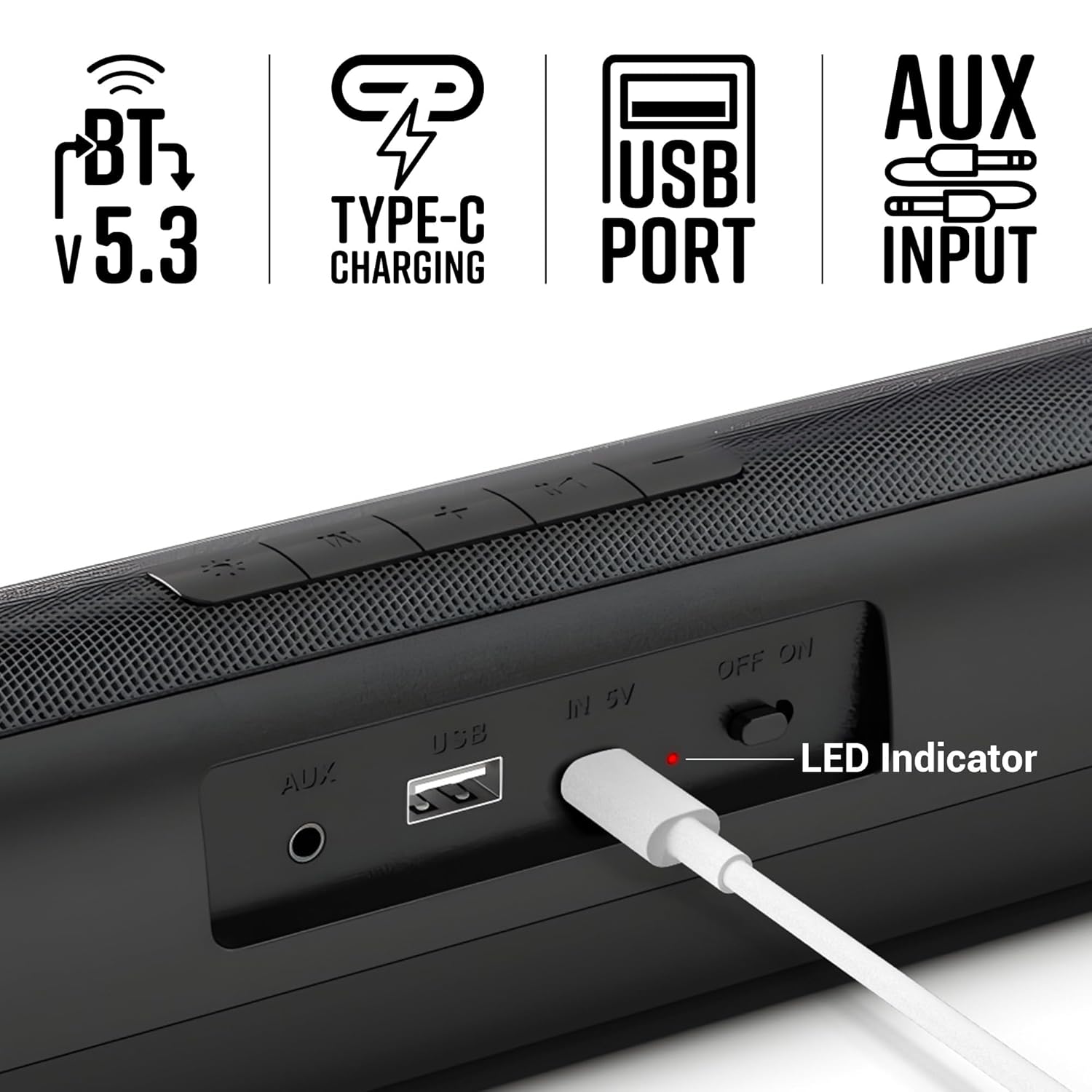
Image 4.1: Close-up view of the soundbar's rear panel, showing the AUX input, USB port, Type-C charging port, ON/OFF switch, and LED indicator.
5. Operating Instructions
5.1 Bluetooth Mode
- Turn on the soundbar. It will automatically enter Bluetooth pairing mode.
- Enable Bluetooth on your smartphone or other device.
- Search for "Zeb-VITA BAR 200" in the list of available devices and select it to pair.
- Once connected, the soundbar will indicate successful pairing.
5.2 USB Mode
- Insert a USB drive containing audio files into the USB port on the soundbar.
- The soundbar will automatically switch to USB mode and begin playing audio.
5.3 AUX Mode
- Connect one end of the provided AUX cable to the AUX input on the soundbar.
- Connect the other end to the audio output of your device (e.g., smartphone, TV, computer).
- The soundbar will automatically switch to AUX mode.
5.4 Controls
The soundbar features intuitive control buttons on its top panel:
- Volume Down (-): Decreases volume.
- Previous Track (<<): Skips to the previous track.
- Play/Pause (►▮▮): Plays or pauses audio.
- Next Track (>>): Skips to the next track.
- Volume Up (+): Increases volume.
- Mode (M): Switches between Bluetooth, USB, and AUX modes.
- LED Light Control (☀): Toggles or changes multicolor LED modes.
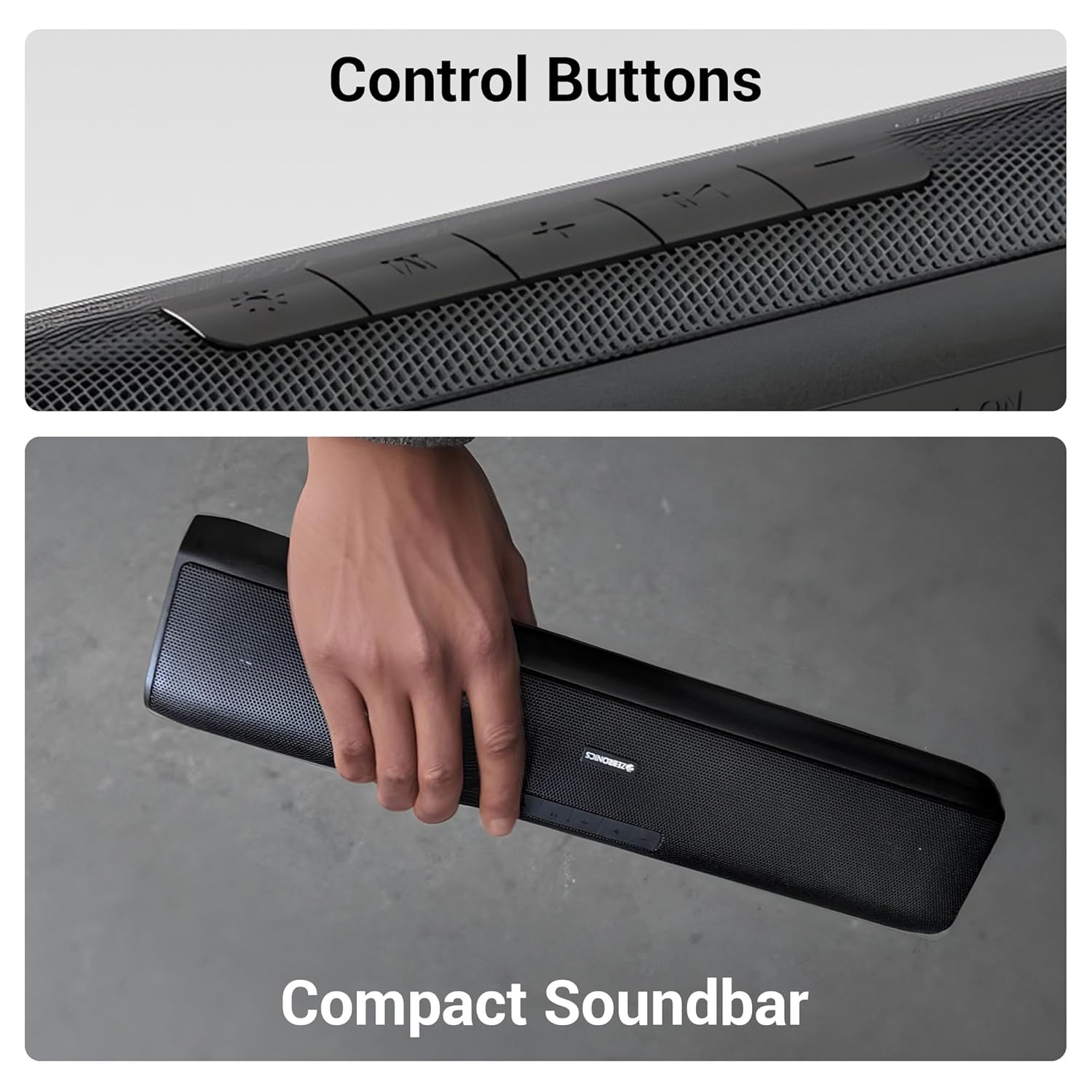
Image 5.1: Detailed view of the control buttons located on the top surface of the soundbar.
6. Maintenance
6.1 Cleaning
- Use a soft, dry cloth to clean the surface of the soundbar.
- Do not use liquid cleaners or aerosol sprays directly on the device.
6.2 Storage
- Store the soundbar in a cool, dry place away from direct sunlight and extreme temperatures.
- If storing for an extended period, charge the battery periodically to maintain its health.
6.3 Battery Care
- Avoid fully discharging the battery frequently.
- Do not expose the battery to high temperatures.
7. Troubleshooting
| Problem | Possible Cause | Solution |
|---|---|---|
| No power | Battery is drained | Charge the soundbar using the provided Type-C cable. |
| No sound | Volume is too low or muted | Increase the volume on the soundbar and your connected device. |
| Bluetooth not connecting | Soundbar not in pairing mode or too far | Ensure the soundbar is in Bluetooth mode and within range (10 meters). Forget the device on your phone and re-pair. |
| Distorted audio | Volume too high or poor source quality | Reduce volume. Try a different audio source or file. Ensure AUX cable is fully inserted. |
8. Specifications
| Feature | Detail |
|---|---|
| Model Name | Zeb-VITA BAR 200 |
| Speaker Type | Mini Soundbar |
| Output Power | 24 Watts RMS |
| Connectivity | Bluetooth v5.3, USB, AUX |
| Battery Life | Up to 8 Hours (at 50% volume, LED off) |
| Charging Type | Type-C |
| Product Dimensions (D x W x H) | 8.5D x 41W x 6.8H Centimeters |
| Item Weight | 857 Grams |
| Impedance | 3 Ohm |
| Control Method | Button |

Image 8.1: Diagram illustrating the physical dimensions of the ZEBRONICS VITA BAR 200 soundbar.
9. Warranty and Support
The ZEBRONICS VITA BAR 200 Mini Soundbar comes with a standard manufacturer's warranty. Please refer to the warranty card included in your package for specific terms and conditions, including the warranty period and coverage details.
For technical support, service, or warranty claims, please contact ZEBRONICS customer service through their official website or the contact information provided in your product documentation.
Manufacturer: Zebronics India Private Limited
Address: No.13/7, Smith Road, Royapettah, Chennai - 600 002
Ask a question about this manual
Ask about setup, troubleshooting, compatibility, parts, safety, or missing instructions. Manuals+ will review the question and use this page’s manual context to help answer it.