
1. Introduction
Thank you for choosing the COLAMY Wide Office Chair. This manual provides essential information for the safe assembly, operation, and maintenance of your new chair. Please read these instructions thoroughly before use and retain them for future reference.
Safety Information
- Maximum Weight Capacity: This chair is designed to support a maximum weight of 275 pounds (125 kg). Exceeding this limit may cause damage to the chair and potential injury.
- Assembly Required: Follow all assembly instructions carefully to ensure the stability and safety of the chair. Do not use power tools for assembly unless specifically instructed, as this may overtighten screws and damage components.
- Regular Inspection: Periodically check all bolts and screws to ensure they are tight. Retighten as necessary.
- Proper Use: Use the chair only for its intended purpose as an office or desk chair. Avoid standing on the chair or using it as a step stool.
- Floor Protection: While the casters are designed for various floor types, consider using a chair mat to protect delicate flooring.
2. Package Contents
Before beginning assembly, ensure all components are present and undamaged. If any parts are missing or damaged, please contact customer support.

Image: Exploded view of the COLAMY Wide Office Chair showing all individual components required for assembly. This includes the seat cushion, backrest, gas lift cylinder, five-star cross base, five casters, and various screws and tools.
- Seat Cushion (1)
- Backrest (1)
- Gas Lift Cylinder (1)
- Cross Base (1)
- Casters (5)
- Hardware Pack (Screws, Washers, Allen Wrench) (1)
3. Setup and Assembly Instructions
Follow these steps carefully to assemble your COLAMY Wide Office Chair. It is recommended to assemble the chair on a soft, clean surface to prevent damage.
- Attach Casters to Base: Insert each of the five casters into the holes at the end of each leg of the cross base. Push firmly until they click into place.
- Insert Gas Lift into Base: Place the gas lift cylinder into the center hole of the assembled cross base. Ensure it sits securely.
- Attach Backrest to Seat: Align the backrest with the mounting plate on the underside of the seat cushion. Secure with the provided screws and Allen wrench. Do not overtighten.
- Connect Seat Assembly to Gas Lift: Carefully place the assembled seat and backrest onto the top of the gas lift cylinder. Apply gentle downward pressure to secure it.
- Final Check: Ensure all connections are secure and the chair is stable before use.

Image: A fully assembled COLAMY Wide Office Chair, viewed from the side, highlighting its compact and armless design. The chair features a blue fabric upholstery, a black gas lift, and a black cross base with casters.
4. Operating Instructions
Your COLAMY Wide Office Chair offers several adjustable features for personalized comfort.

Image: An illustration detailing the adjustable features of the chair. It shows a 9.5 cm height adjustment range via a lever and a 100-115 degree reclining angle, indicating the chair's rocker function.
- Height Adjustment: To adjust the seat height, lift the lever located under the right side of the seat.
- To raise the seat: Lift the lever while taking your weight off the seat.
- To lower the seat: Lift the lever while remaining seated.
- Rocker Function (Tilt): The chair features a 115° rocker function for comfortable reclining.
- To activate the rocking motion: Pull the same lever (used for height adjustment) outwards.
- To lock the chair in an upright position: Push the lever inwards.
- Rotation: The chair seat can rotate 360 degrees for easy movement and access to your workspace.
- Armless Design: The armless design provides greater flexibility and allows the chair to be easily tucked under desks, saving space.
5. Maintenance
Regular maintenance helps prolong the life and appearance of your chair.
- Cleaning Fabric: For general cleaning, use a soft cloth dampened with mild soap and water. Blot spills immediately. Avoid harsh chemicals or abrasive cleaners.
- Cleaning Base and Casters: Wipe the metal base and casters with a damp cloth. For stubborn dirt on casters, you may need to remove them and clean any accumulated debris (hair, lint) from the axles.
- Hardware Check: Every 3-6 months, inspect all screws and bolts. Retighten any that have become loose to maintain stability and prevent squeaking.
- Avoid Direct Sunlight: Prolonged exposure to direct sunlight can cause fabric fading.
6. Troubleshooting
Refer to this section for common issues and their solutions.
| Problem | Possible Cause | Solution |
|---|---|---|
| Chair does not adjust height. | Gas lift lever not engaged or gas lift cylinder faulty. | Ensure the lever is fully pulled/pushed. If the issue persists, the gas lift may need replacement. Contact customer support. |
| Chair is wobbly or unstable. | Loose screws or improper assembly. | Check all assembly screws and tighten them securely. Ensure the gas lift is fully seated in the base. |
| Chair squeaks when moving. | Loose connections or friction between parts. | Tighten all screws. A small amount of silicone lubricant can be applied to moving parts (e.g., where the gas lift meets the mechanism) if tightening doesn't resolve it. |
| Casters do not roll smoothly. | Debris caught in casters or damaged casters. | Remove casters and clean any hair or debris from the wheels and axles. If damaged, casters may need replacement. |
7. Specifications
Detailed specifications for the COLAMY Wide Office Chair Model 7261+7261W.
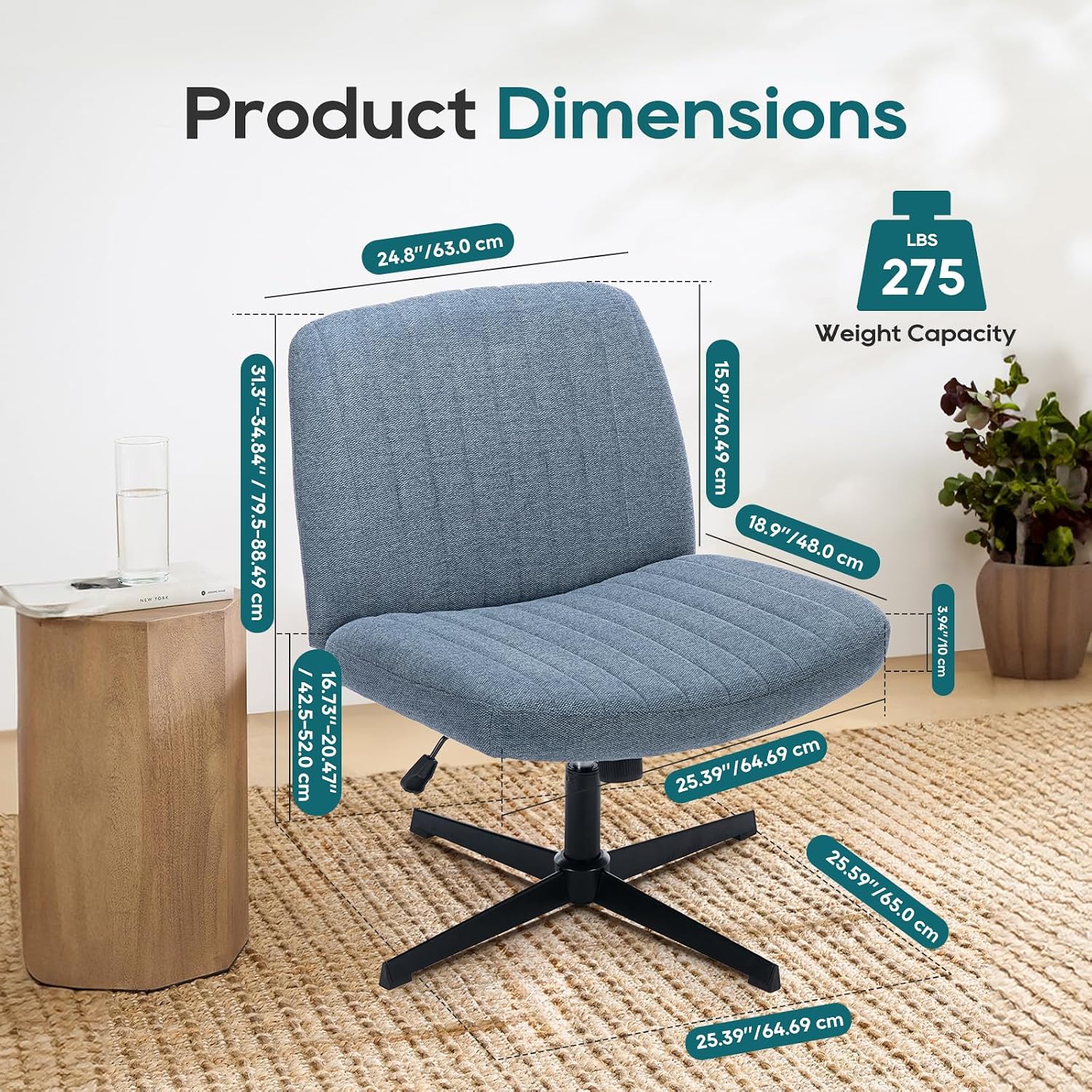
Image: A comprehensive diagram illustrating the dimensions of the COLAMY Wide Office Chair. Measurements are provided for seat width, seat depth, backrest height, and overall height range, in both inches and centimeters. The image also highlights the 275 lbs weight capacity.
- Brand: COLAMY
- Model Number: 7261+7261W
- Color: Blue
- Product Dimensions (Overall): 25.87"D x 25.39"W x 31.5"H (65.7 cm D x 64.5 cm W x 80 cm H)
- Seat Dimensions: Approximately 25.39"W x 18.9"D (64.5 cm W x 48 cm D)
- Adjustable Seat Height Range: Approximately 16.73" - 20.47" (42.5 cm - 52.0 cm)
- Back Style: Cross Back, Shell-shaped
- Arm Style: Armless
- Rocker Function: 100-115° Reclining Angle
- Base Style: Cross Base (Metal)
- Included Components: Casters
- Item Weight: 28.8 pounds (13.1 kg)
- Maximum Weight Capacity: 275 pounds (125 kg)
- Fabric Type: Breathable, Skin-friendly
8. Warranty and Support
For warranty information, technical support, or to order replacement parts, please contact COLAMY customer service. Refer to your purchase documentation for specific warranty terms and contact details.
You can also visit the official COLAMY store for more information: COLAMY Store on Amazon

