
Introduction
This manual provides comprehensive instructions for the ZWP RM-SRG660 Replacement Remote Control. This remote is specifically designed to be compatible with Sony Audio Systems MHC-RG440S and MHC-RG330, offering a direct replacement for your original remote control.
The RM-SRG660 remote control is engineered for ease of use, featuring a durable ABS construction and soft plastic buttons for comfortable operation. It utilizes infrared technology for reliable communication with your audio system.
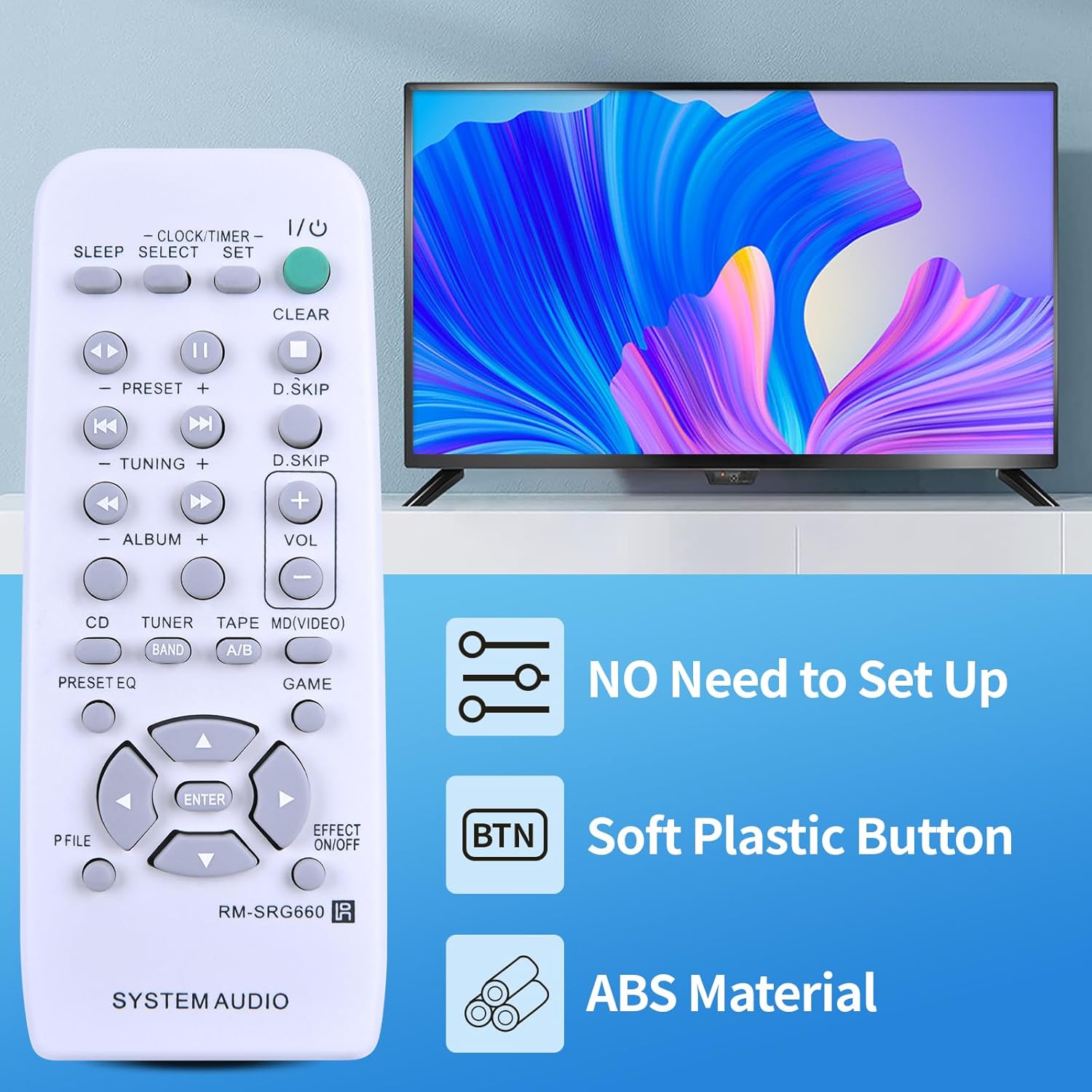
Image: The ZWP RM-SRG660 remote control, highlighting its key features: no setup required, soft plastic buttons, and durable ABS material construction.
Setup
The ZWP RM-SRG660 Replacement Remote Control is designed for immediate use without any complex programming or pairing. Simply install the batteries, and it will be ready to operate your compatible Sony Audio System.
Battery Installation
- Locate the battery compartment on the back of the remote control.
- Slide the battery compartment cover downwards or in the direction indicated by the arrow to open it.
- Insert two (2) AAA 1.5V batteries, ensuring the positive (+) and negative (-) terminals align correctly with the markings inside the compartment.
- Replace the battery compartment cover by sliding it back into position until it clicks securely.
Important: Batteries are not included with the remote control. Do not mix old and new batteries, or different types of batteries.

Image: Detailed view of the battery compartment, illustrating the correct orientation for inserting two AAA 1.5V batteries.
No Programming Required
This remote control is pre-programmed for the specified Sony Audio Systems. Once batteries are installed, it will function immediately without any additional setup steps.

Image: The remote control displayed with a clear message indicating that no programming or pairing is required; it works directly after battery insertion.
Operating Instructions
The RM-SRG660 remote control provides full functionality for your Sony Audio System. Ensure there is a clear line of sight between the remote control and the audio system's infrared receiver for optimal performance.
Key Functions Overview
- Power (I/O): Turns the audio system on or off.
- Volume (+/-): Increases or decreases the audio volume.
- Preset (+/-): Navigates through radio station presets or track presets.
- Tuning (+/-): Adjusts radio frequency manually.
- Album (+/-): Navigates between albums or folders.
- CD, Tuner, Tape, MD/Video (Band): Selects the input source (e.g., CD player, radio tuner, tape deck, MiniDisc/Video input).
- Play/Pause (►/⏸): Controls playback for media.
- Skip (◀◀ / ►►): Skips to the previous or next track/chapter.
- Clear: Clears current settings or selections.
- Clock/Timer/Set: Accesses clock and timer settings.
- Sleep: Activates the sleep timer function.
- Preset EQ: Cycles through equalizer presets.
- Effect On/Off: Toggles sound effects.
- Directional Arrows (▲ ◀ ▼ ►) and Enter: Used for menu navigation and selection.

Image: The remote control in action, demonstrating its capability for long-distance and precise control, effective up to 10 meters (33 feet).
Maintenance
Proper care and maintenance will ensure the longevity and reliable performance of your remote control.
Cleaning
- Wipe the remote control with a soft, dry cloth.
- For stubborn dirt, slightly dampen the cloth with water or a mild, non-abrasive cleaner. Do not use harsh chemicals or solvents.
- Avoid getting moisture into the battery compartment or around the buttons.
Battery Replacement
- Replace batteries when the remote control's response becomes sluggish or stops working.
- Always replace both batteries at the same time with new AAA 1.5V batteries.
- Dispose of used batteries according to local regulations.
Storage
- Store the remote control in a cool, dry place away from direct sunlight and extreme temperatures.
- If the remote control will not be used for an extended period, remove the batteries to prevent leakage and potential damage.
Troubleshooting
If you encounter issues with your remote control, please refer to the following common solutions:
- Remote Control Not Responding:
- Check if the batteries are inserted correctly with the correct polarity (+/-).
- Replace the batteries with fresh AAA 1.5V batteries.
- Ensure there is a clear line of sight between the remote control and the audio system's infrared receiver. Obstructions can block the signal.
- Make sure the remote control is pointed directly at the audio system.
- Limited Range or Intermittent Operation:
- The batteries may be low. Replace them.
- Ensure no strong light sources (like direct sunlight or bright fluorescent lights) are interfering with the infrared signal.
- Reduce the distance between the remote control and the audio system.
- Specific Buttons Not Working:
- Check for any debris or stickiness around the button. Gently clean the area.
- If only one or a few buttons are unresponsive after checking batteries and line of sight, the remote control may be faulty.
If these steps do not resolve the issue, please refer to the Support section for further assistance.
Specifications
| Model Number | RM-SRG660 |
| Brand | ZWP |
| Compatibility | Sony Audio Systems MHC-RG440S, MHC-RG330 |
| Connectivity Technology | Infrared (IR) |
| Power Source | 2 x AAA 1.5V Batteries (not included) |
| Material | High-quality ABS |
| Operating Range | Up to 10 meters (33 feet) |
| Color | Black |
| Item Weight | 2.4 ounces |

Image: Physical dimensions of the remote control, including length, width, and thickness, along with a view of the battery compartment.
Support
For any questions, concerns, or issues regarding your ZWP RM-SRG660 Replacement Remote Control, please do not hesitate to contact us. We are committed to assisting you and resolving any problems you may encounter.
Please reach out to the seller or manufacturer directly through the platform where you purchased the product for prompt support.