
Introduction
This manual provides comprehensive instructions for the surmen Full Size Creamy Keyboard, Model 104 Monster B. This 104-key RGB wired mechanical gaming keyboard features PBT keycaps and linear red switches, designed for enhanced typing and gaming experiences on laptops and desktop PCs. Please read this manual thoroughly to ensure proper setup, operation, and maintenance of your keyboard.
Key Features
- Smooth and Linear Keystrokes: Equipped with linear red switches, requiring approximately 45g actuation force for reduced finger fatigue and quiet operation, ideal for typing and gaming.
- OEM Profile and Full-Key Anti-Ghosting: Features an OEM profile stepped layout for ergonomic typing and full N-key rollover (all keys anti-ghosting) for accurate input without missed keystrokes.
- Useful Multimedia and Shortcut Keys: Access various functions via FN key combinations, including Windows Key Lock mode to prevent accidental interruptions during use.
- Advanced Ergonomic Comfort: Designed with a stair-step keycap layout, adjustable rear kickstands for customizable typing angles, and four rubber pads for stability.
- Dynamic RGB Backlighting: Offers 18 distinct RGB backlight modes to customize your desktop ambiance. Lighting can be easily turned on or off.
What's in the Box
- surmen Full Size Creamy Keyboard (Model 104 Monster B)
- Keycap Puller
- User Manual (this document)
Setup Guide
- Unpacking: Carefully remove the keyboard and all accessories from the packaging.
- Connection: Locate the USB-A cable attached to the keyboard. Insert the USB-A connector into an available USB port on your computer (laptop or desktop PC).
- Driver Installation: The keyboard is plug-and-play and typically does not require additional driver installation. Your operating system should automatically recognize and configure the device.
- Placement: Place the keyboard on a stable, flat surface. You may adjust the typing angle using the foldable rear kickstands located on the underside of the keyboard.

Figure 1: surmen Full Size Creamy Keyboard, showing its full layout and wired connection.
Operating Instructions
Basic Operation
Once connected, the keyboard is ready for immediate use. All 104 keys are fully functional and support anti-ghosting for simultaneous key presses, ensuring accuracy during fast-paced gaming or typing.

Figure 2: Illustration of the keyboard's full key conflict-free (N-key rollover) capability, ensuring all key presses are registered accurately.
Red Mechanical Switches
The keyboard features linear red mechanical switches, known for their smooth, consistent keystrokes and relatively quiet operation. These switches have a low actuation force, making them comfortable for extended typing and responsive for gaming.
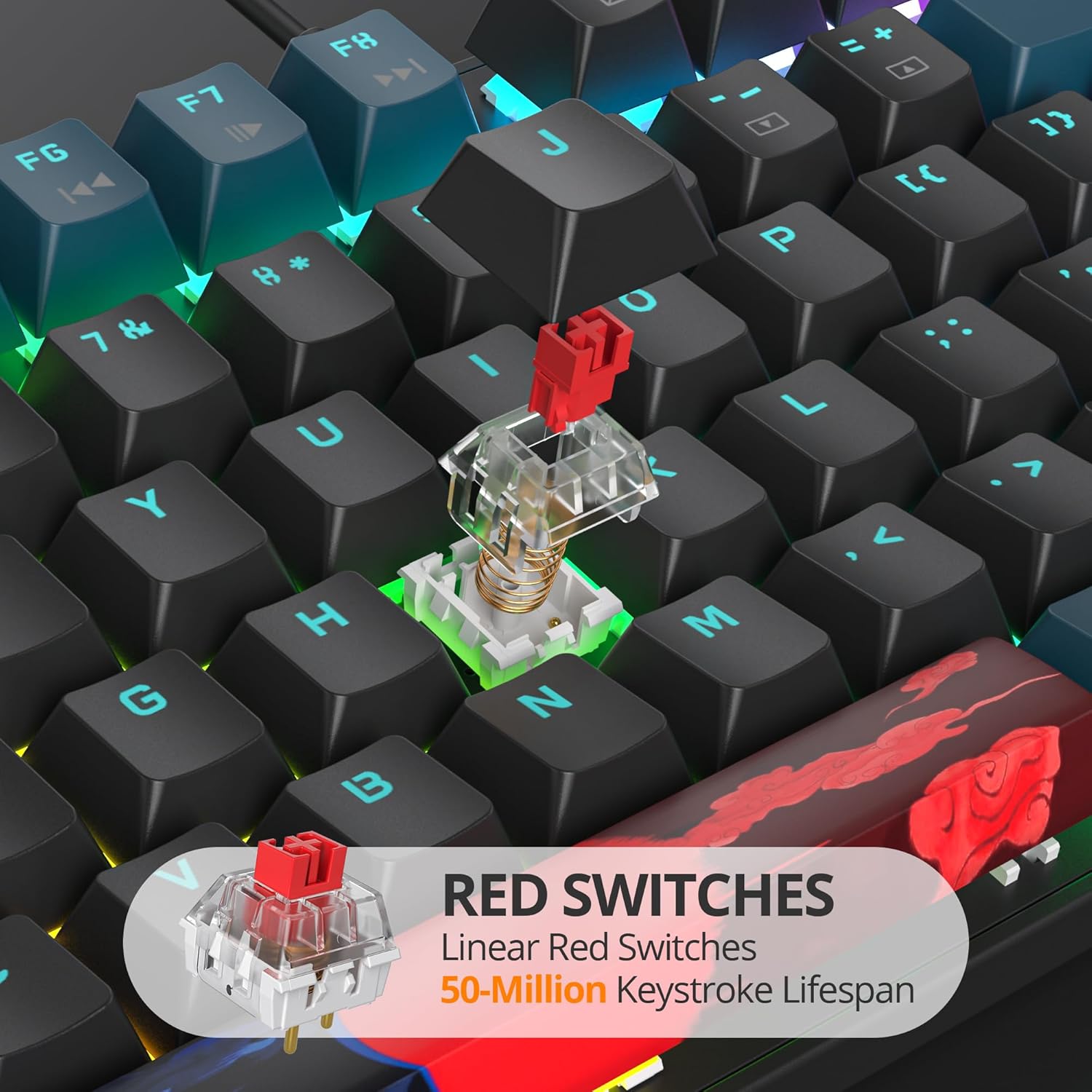
Figure 3: Close-up view of the linear red mechanical switches, highlighting their design and transparent housing.
Adjusting Typing Angle
For optimal ergonomic comfort, you can adjust the keyboard's typing angle. Flip out the two foldable rear kickstands located on the underside of the keyboard to elevate the back, providing a more inclined typing surface. The keyboard also features PBT keycaps and an OEM profile for comfortable finger positioning.

Figure 4: Side view of the keyboard demonstrating the adjustable rear feet for ergonomic typing angle and the OEM profile of the PBT keycaps.
Indicator Lights
The keyboard includes indicator lights for Num Lock (NumLK), Caps Lock (CapsLk), and Windows Key Lock (WinLock) to provide visual feedback on their active status.

Figure 5: Close-up of the keyboard's top right corner, showing the indicator lights for Num Lock, Caps Lock, and Win Lock.
RGB Backlighting Control
The keyboard features dynamic RGB backlighting with 18 different modes. You can control the backlighting using the following key combinations:
- Turn On/Off Backlight: Press FN + Pause.
- Switch Backlight Modes: Press FN + INSERT / DELETE / HOME / END to cycle through the 18 available RGB backlight modes.
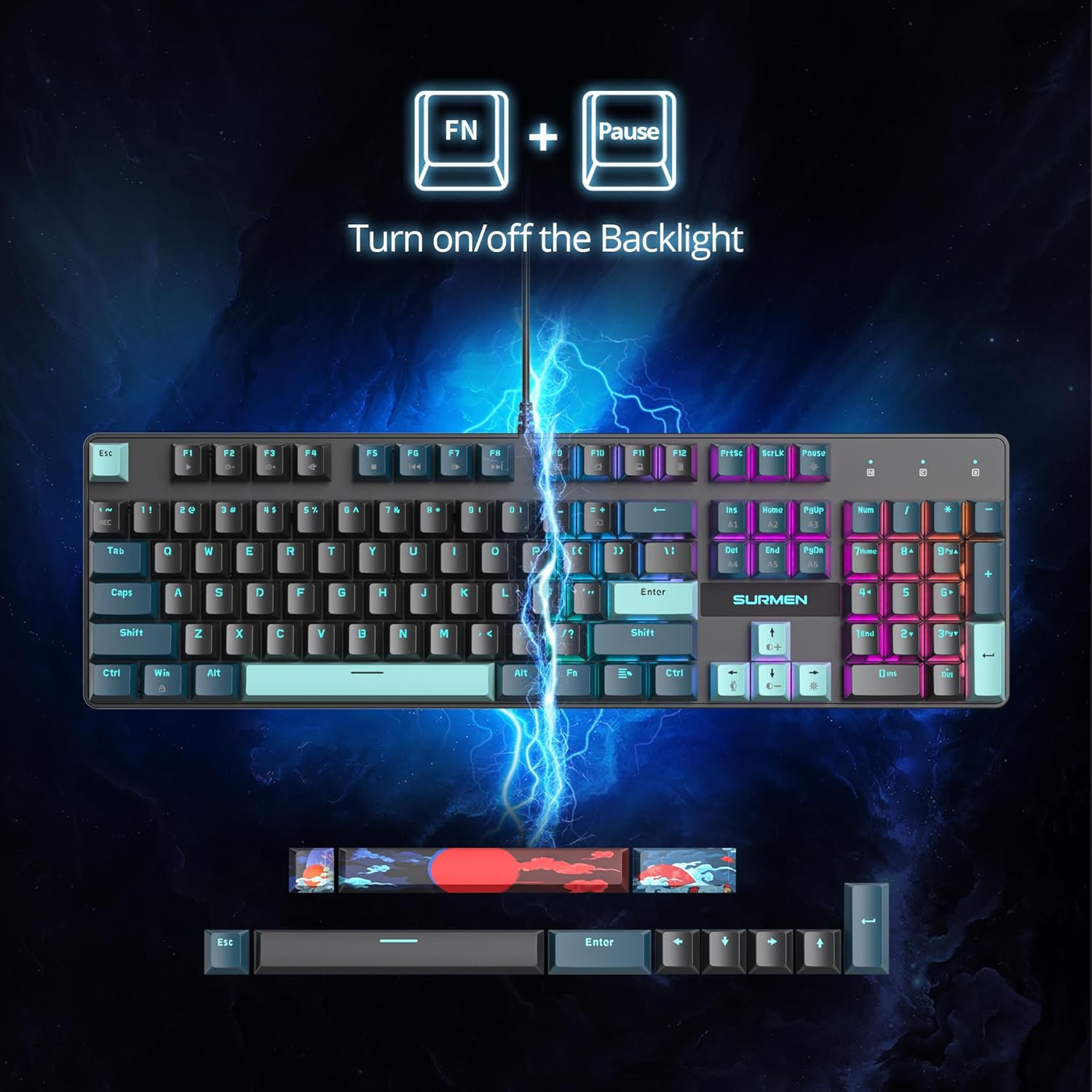
Figure 6: Diagram illustrating the FN + Pause key combination to toggle the keyboard backlight on or off.

Figure 7: Diagram showing the FN key combined with INSERT, DELETE, HOME, or END keys to switch between various backlight modes.
Multimedia and Shortcut Functions
Utilize the FN key in combination with the F1-F12 keys for quick access to multimedia controls and other shortcuts:
| Key Combination | Function |
|---|---|
| FN + F1 | Media Player |
| FN + F2 | Volume Down |
| FN + F3 | Volume Up |
| FN + F4 | Mute |
| FN + F5 | Stop Playback |
| FN + F6 | Previous Track |
| FN + F7 | Play/Pause |
| FN + F8 | Next Track |
| FN + F9 | |
| FN + F10 | Web Home |
| FN + F11 | My Computer |
| FN + F12 | Calculator |
| FN + ESC (hold 3s) then F1-F5 | Restore Settings |

Figure 8: Visual guide to the multimedia and shortcut functions accessible via the FN key combinations.
Maintenance
- Cleaning: Use a soft, dry cloth to wipe down the keyboard surface. For deeper cleaning, you may use a can of compressed air to remove dust and debris from between the keycaps.
- Keycap Removal: The included keycap puller can be used to carefully remove keycaps for thorough cleaning or replacement. Gently pull straight up on the keycap using the tool.
- Avoid Liquids: Do not spill liquids on the keyboard. If a spill occurs, immediately disconnect the keyboard from your computer and allow it to dry completely before reconnecting.
- Storage: When not in use for extended periods, store the keyboard in a clean, dry environment away from direct sunlight and extreme temperatures.
Troubleshooting
| Problem | Possible Cause | Solution |
|---|---|---|
| Keyboard not responding | Loose USB connection, faulty USB port, driver issue. |
|
| Keys not registering or ghosting | Debris under keycap, software conflict, hardware issue. |
|
| Backlight not working or stuck | Backlight turned off, software glitch, hardware malfunction. |
|
| Windows Key is disabled | Windows Key Lock is active. |
|
Specifications
| Feature | Detail |
|---|---|
| Brand | surmen |
| Model | 104 Monster B |
| Number of Keys | 104 |
| Keyboard Description | Mechanical |
| Switch Type | Linear Red Switch |
| Keycap Material | PBT |
| Connectivity Technology | Wired (USB-A) |
| Backlighting | RGB (18 modes) |
| Anti-Ghosting | Full-Key Rollover |
| Compatible Devices | Laptop, PC |
| Package Dimensions | 17.6 x 6.61 x 1.73 inches |
| Item Weight | 2.77 pounds |
| Manufacturer | GTSP |
| Date First Available | June 14, 2024 |
Warranty and Support
For warranty information and technical support, please refer to the documentation provided with your purchase or visit the official surmen website. Keep your proof of purchase for any warranty claims.