Introduction
This manual provides detailed instructions for the installation, operation, and maintenance of your TREEWELL 150W Low Voltage Landscape Transformer. This device is designed to convert 120V AC household voltage to a safe 12V or 15V AC for outdoor landscape lighting systems. Please read this manual thoroughly before installation and use to ensure proper function and safety.
Safety Information
- Always disconnect power before installing or servicing the transformer.
- This transformer is suitable for indoor or outdoor use.
- Do not use with dimmers.
- Risk of fire: Do not place insulation under the terminal plate. Check connections after installation.
- Do not connect two or more power supplies in parallel.
- Mount the transformer at least 1 foot (30 cm) above ground.
- Mounting orientation: Arrows on the unit should point upwards.
- Consult a qualified electrician if you have any doubts about wiring or installation.
Package Contents
- 1 x TREEWELL 150W Low Voltage Landscape Transformer
- Mounting screws and anchors
- Instruction Manual
Product Features
- Voltage Conversion: Converts 120V AC to 12V or 15V AC, with 15V output compensating for voltage drops over long wire runs.
- Photocell Sensor: Built-in dusk-to-dawn sensor automatically turns lights on at sunset and off at sunrise.
- Countdown Timer: Allows setting lights to turn off 1 to 9 hours after dusk.
- Durable Construction: Made with 304 stainless steel housing for scratch, corrosion, heat resistance, and rustproof performance.
- Ease of Use: Intuitive digital operation with UP/DOWN buttons for mode selection.
- Memory Function: Retains the last mode setting after a power outage.
- Safety Features: Integrated circuit breaker for overload and short-circuit protection.
- Multi-tap Terminals: Includes 2 common terminals, 2 terminals for 12V, and 2 for 15V, allowing multiple lines.
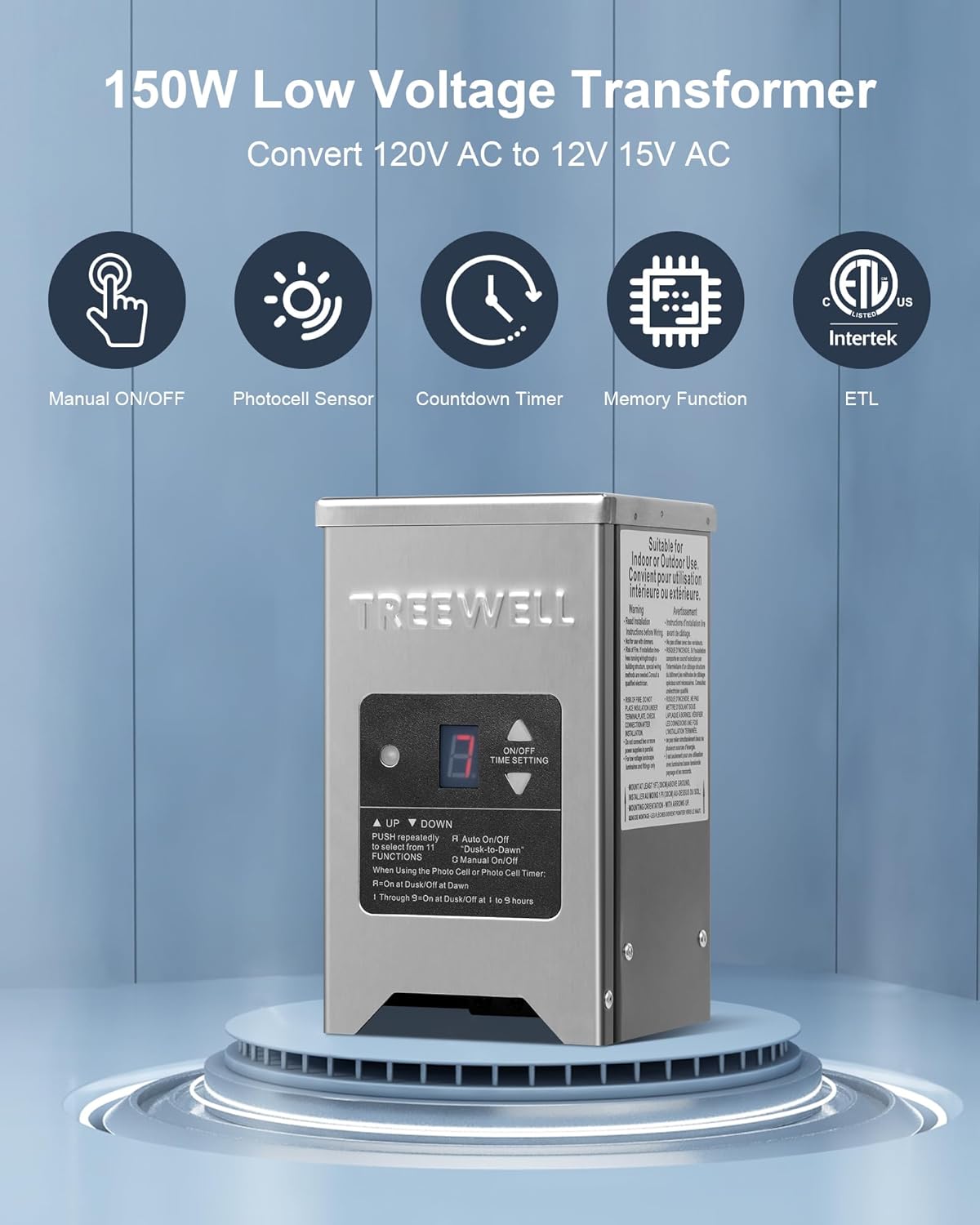
Image: Overview of the TREEWELL 150W Low Voltage Landscape Transformer highlighting its key features.
Setup
1. Mounting the Transformer
Select a suitable location for mounting the transformer. It must be mounted vertically at least 1 foot (30 cm) above ground level, with the arrows on the unit pointing upwards. Use the provided mounting hole template to mark the drilling points. Secure the transformer to a wall or sturdy surface using the included screws and anchors.

Image: Transformer dimensions, mounting template, and power cord details.
2. Wiring Connections
Ensure the transformer is unplugged from the power outlet before making any connections. The transformer features multi-tap voltage terminals for connecting your landscape lighting wires.
- Identify the common (COM), 12V, and 15V terminals.
- Connect your landscape lighting wires to the appropriate terminals. The 15V terminal is recommended for longer wire runs to compensate for voltage drop.
- The compression-style terminals can accept a maximum of four 10AWG wires. Ensure all connections are secure and tight.
- Verify that no insulation is placed under the terminal plate to prevent fire hazards.

Image: Close-up of the multi-tap voltage terminals and circuit breaker.

Image: Detailed view of the compression-style terminals for secure wiring.
Operating Instructions
The transformer features an intuitive digital display and control buttons for easy operation.
Mode Selection
Use the "UP" (▲) and "DOWN" (▼) buttons to cycle through the available operating modes. The current mode will be displayed on the digital screen.
- 0 = Always On: Lights remain on continuously.
- A = Auto On/Off ("Dusk-to-Dawn"): The built-in photocell sensor automatically turns lights on at dusk and off at dawn.
- 1-9 = Countdown Timer: Lights turn on at dusk and automatically turn off after the set number of hours (1 to 9 hours).
- OFF = Manual Off: Lights remain off.

Image: Intuitive visible operation display showing different mode settings.
Photocell Sensor Operation
When in "Auto On/Off" mode, the integrated photocell sensor detects ambient light levels. It will automatically activate your landscape lights when it gets dark and deactivate them when daylight returns.

Image: Illustration of the photocell sensor functionality, turning lights on at dusk and off at dawn.
Countdown Timer Operation
In countdown timer modes (1-9), the lights will turn on at dusk and remain on for the specified duration before automatically turning off.

Image: Visual representation of the countdown timer feature.
Memory Function
The transformer is equipped with a memory function. In the event of a power outage, the unit will retain its last selected operating mode once power is restored, eliminating the need for manual resetting.

Image: Highlighting the memory function of the transformer.
Maintenance
The TREEWELL landscape transformer is designed for durability with its 304 stainless steel housing, requiring minimal maintenance.
- Periodically inspect the transformer and wiring for any signs of damage or wear.
- Keep the photocell sensor clean and free from obstructions (e.g., leaves, dirt) to ensure accurate dusk-to-dawn operation.
- Clean the exterior of the transformer with a soft, damp cloth as needed. Do not use abrasive cleaners or solvents.
Image: The durable stainless steel housing of the transformer, suitable for outdoor environments.
Troubleshooting
| Problem | Possible Cause | Solution |
|---|---|---|
| Lights do not turn on. | No power to transformer, incorrect mode setting, tripped circuit breaker, faulty wiring, obstructed photocell. | Check power outlet, verify mode (0, A, or 1-9), reset circuit breaker, inspect wiring connections, clear photocell. |
| Lights stay on continuously. | Incorrect mode setting, faulty photocell. | Ensure mode is set to "A" (Auto On/Off) or a countdown timer (1-9). Check photocell for obstructions or damage. |
| Lights flicker or are dim. | Overload, loose connections, voltage drop on long runs. | Reduce total wattage of lights, tighten all wiring connections, use 15V output for longer runs. |
| Circuit breaker trips repeatedly. | Overload, short-circuit in wiring or lights. | Reduce total wattage of lights to below 150W. Inspect all wiring and light fixtures for short circuits. |
Specifications
| Specification | Detail |
|---|---|
| Model Number | TF150WST |
| Input Voltage | 120V AC |
| Output Voltage | 12V AC / 15V AC |
| Max Wattage | 150W |
| Housing Material | 304 Stainless Steel |
| Power Cord Length | 6ft SJTW 18AWG |
| Certifications | ETL Listed |
| Dimensions (L x W x H) | 10.16 x 7.05 x 7.05 inches (approximate) |
| Item Weight | 7.89 pounds (approximate) |
Warranty and Support
TREEWELL products are manufactured to high-quality standards and are backed by a limited warranty. For specific warranty details, technical support, or customer service inquiries, please refer to the contact information provided with your purchase or visit the official TREEWELL website. Please have your model number (TF150WST) and purchase date available when contacting support.