
BELIBUY XCQ-808
BELIBUY Portable Cordless Vacuum Cleaner User Manual
Model: XCQ-808
Introduction
Thank you for choosing the BELIBUY Portable Cordless Vacuum Cleaner. This versatile device is designed for efficient cleaning in various environments, including cars, homes, offices, and for specific tasks like cleaning keyboards or pet areas. Its compact and lightweight design, combined with powerful suction and blowing capabilities, makes it an indispensable tool for maintaining cleanliness. This manual provides detailed instructions on how to set up, operate, and maintain your vacuum cleaner to ensure optimal performance and longevity.

Image: The BELIBUY Portable Cordless Vacuum Cleaner shown with its main unit, multiple attachment nozzles, and a USB-C charging cable. It highlights both vacuuming and blowing functions.
Safety Instructions
Please read all safety instructions carefully before using the appliance. Failure to follow these instructions may result in electric shock, fire, or serious injury.
- Do not use the vacuum cleaner in wet conditions or to pick up liquids. This device is designed for dry use only.
- Keep the appliance away from heat sources, direct sunlight, and flammable materials.
- Do not allow children to operate the vacuum cleaner without supervision.
- Ensure the filter is properly installed before use to prevent damage to the motor.
- Do not block the air inlets or outlets during operation.
- Use only the provided charging cable and adapter (if applicable) to charge the device.
- Do not attempt to disassemble or repair the unit yourself. Contact customer support for assistance.
- Avoid vacuuming sharp objects, large debris, or hot ashes, as this can damage the vacuum and pose a fire hazard.
- Do not blow and vacuum at the same time.
Package Contents
Please check the package contents upon opening to ensure all items are present:
- BELIBUY Portable Cordless Vacuum Cleaner (Main Unit)
- Crevice Tool (for vacuuming)
- Brush Nozzle (for vacuuming)
- Round Nozzle (for blowing)
- Short Blow Nozzle (for blowing/inflating)
- USB Type-C Charging Cable
- HEPA Filter (pre-installed)
- User Manual (this document)
Product Overview
Familiarize yourself with the components of your BELIBUY Portable Cordless Vacuum Cleaner.

Image: A visual breakdown of the vacuum's components and their functions, including the waste bin, HEPA filter, and examples of blow and suction nozzles in use for various cleaning tasks like keyboards and car interiors.
- Main Unit: Contains the motor, battery, and control buttons.
- Dust Bin: Transparent container for collected debris.
- HEPA Filter: Located inside the dust bin, filters fine particles.
- Suction Inlet: Front opening for vacuuming.
- Air Outlet: Rear opening for blowing function.
- Power Button: To turn the device on/off.
- Charging Port: USB Type-C port for charging.
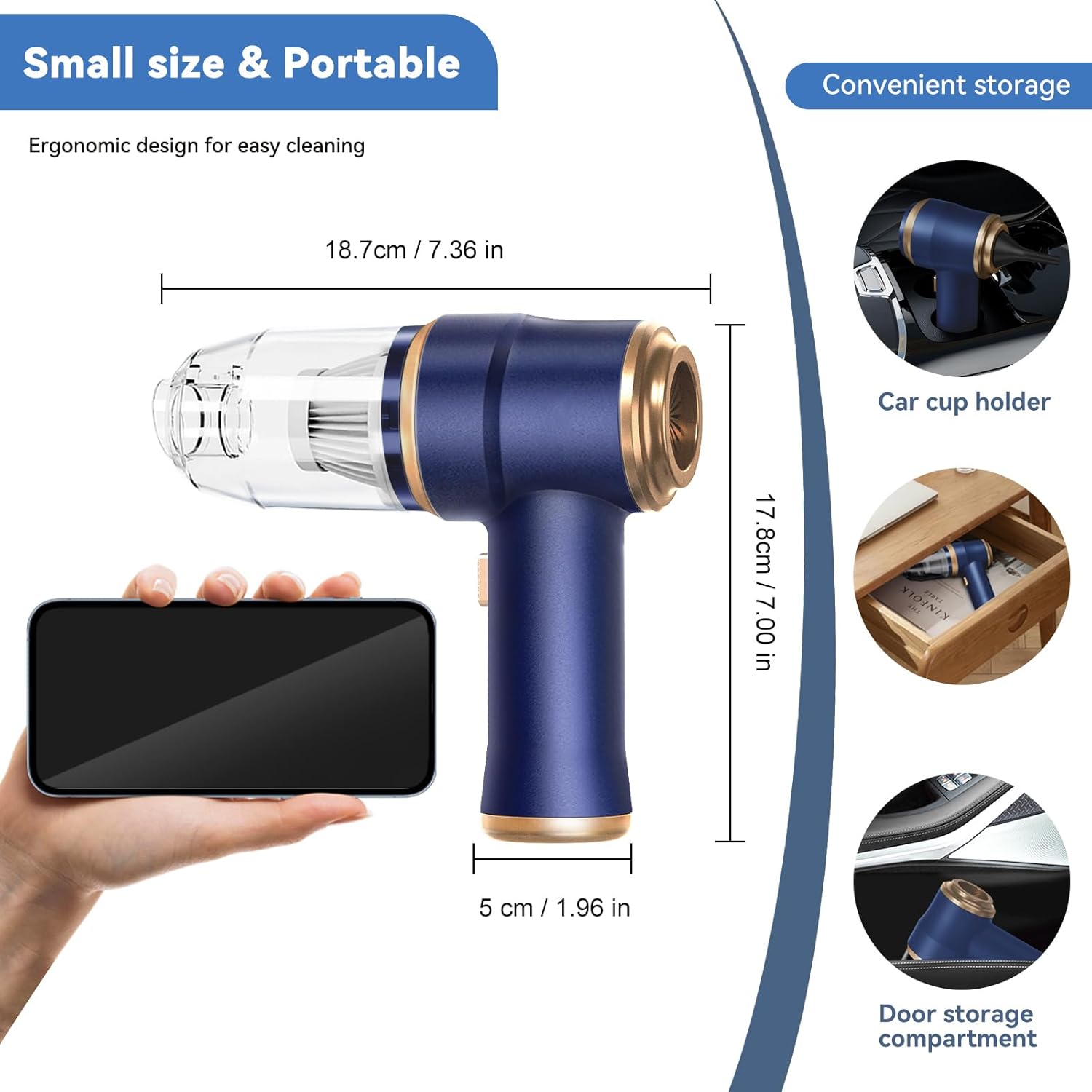
Image: This image illustrates the compact size and dimensions of the vacuum cleaner (18.7cm x 17.8cm x 5cm) and shows how it can be conveniently stored in a car cup holder or door storage compartment.
Setup
Charging the Device
Before first use, fully charge the vacuum cleaner. A full charge takes approximately 2.5 hours and provides 15-30 minutes of working time.
- Connect the provided USB Type-C charging cable to the charging port on the vacuum cleaner.
- Plug the other end of the USB cable into a compatible power source (e.g., car charger, power bank, computer charger, or adapter charger).
- The indicator light will show red during charging and turn green when fully charged.
- Once fully charged, disconnect the charging cable.
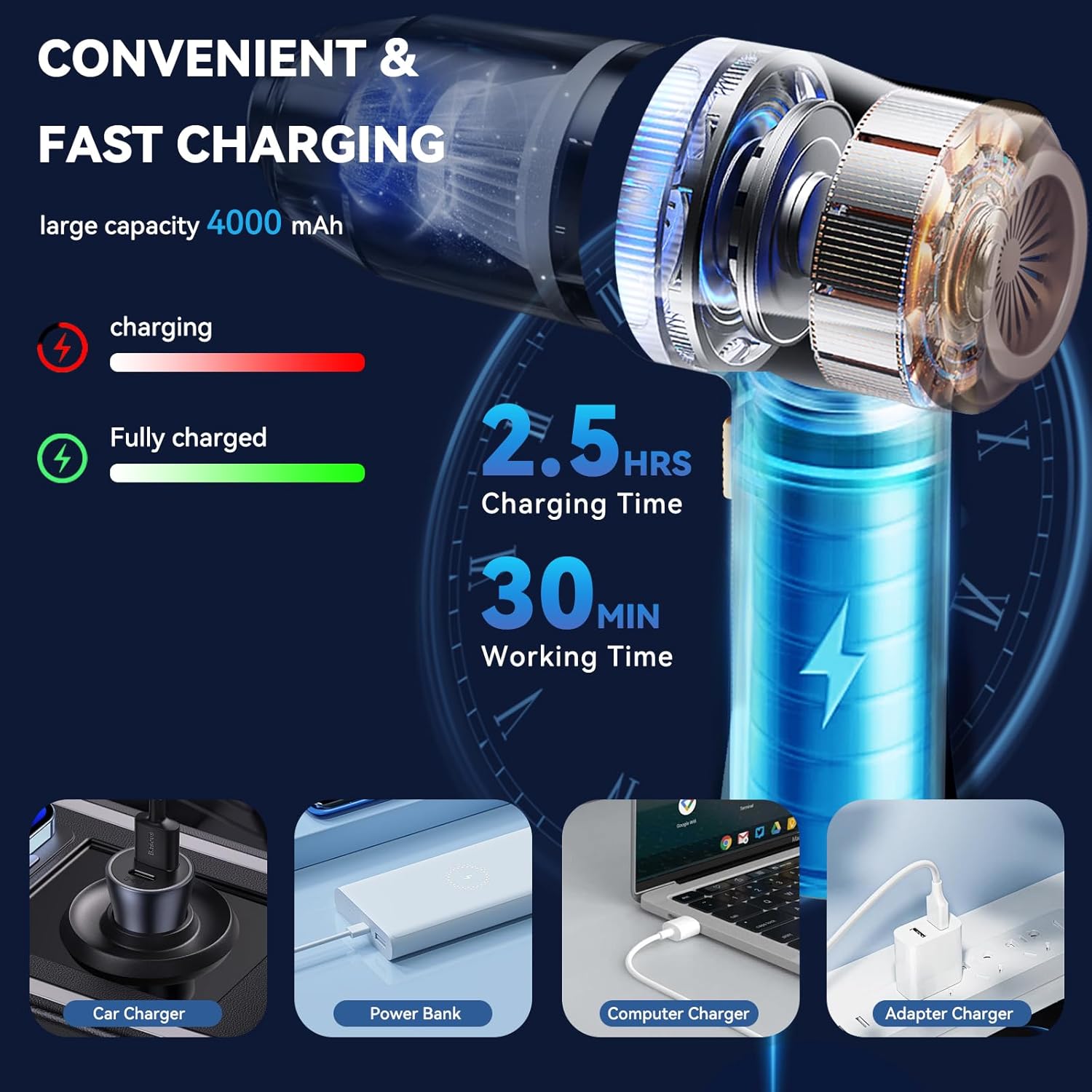
Image: An illustration detailing the charging process, showing the 4000mAh battery, charging indicator lights (red for charging, green for fully charged), and estimated charging time (2.5 hours) and working time (30 minutes). Various charging methods are also depicted.
Operating Instructions
Attaching Nozzles
The vacuum cleaner comes with multiple nozzles for different cleaning tasks. Ensure the device is off before attaching or detaching nozzles.
- For Vacuuming: Attach the crevice tool or brush nozzle to the front dust bin inlet. These are ideal for picking up dirt, dust, and debris from tight spaces, keyboards, and upholstery.
- For Blowing: Attach the round nozzle or short blow nozzle to the back air outlet. These are suitable for blowing away dust from surfaces, keyboards, or for inflating small items like lifebuoys.

Image: A visual guide demonstrating how to attach the crevice tool to the front dust bin for vacuuming and the round nozzle to the back air outlet for blowing. A warning is included not to vacuum and blow simultaneously.
Using the Vacuum Cleaner
- Ensure the device is fully charged.
- Select the appropriate nozzle for your cleaning task and firmly attach it to the desired inlet/outlet.
- Press the power button to turn on the vacuum cleaner.
- Direct the nozzle towards the area to be cleaned.
- After use, press the power button again to turn off the device.
- Empty the dust bin and clean the filter as needed (refer to Maintenance section).
Important: Do not attempt to use both the vacuuming and blowing functions simultaneously.
Maintenance
Regular maintenance ensures optimal performance and extends the lifespan of your BELIBUY vacuum cleaner.
Emptying the Dust Bin and Cleaning the HEPA Filter
The semi-transparent dust bin allows you to easily see when it needs emptying. The HEPA filter is washable and reusable.
- Ensure the vacuum cleaner is turned off.
- Twist the dust bin downwards to detach it from the main unit.
- Carefully remove the HEPA filter from the dust bin.
- Empty the collected debris from the dust bin into a waste receptacle.
- Rinse the dust bin and HEPA filter under running water. Use mild soap if necessary for the dust bin.
- Allow both the dust bin and HEPA filter to air dry completely before reassembling. Do not use the vacuum cleaner with a wet filter.
- Once dry, reinsert the HEPA filter into the dust bin and twist the dust bin back onto the main unit until it clicks securely into place.

Image: A step-by-step visual guide showing how to disassemble the vacuum cleaner, discard garbage from the dust bin, rinse the HEPA filter, and allow it to natural dry before reassembly.
Troubleshooting
If you encounter any issues with your BELIBUY Portable Cordless Vacuum Cleaner, please refer to the following common problems and solutions:
| Problem | Possible Cause | Solution |
|---|---|---|
| Device does not turn on. | Battery is low or depleted. | Charge the device fully. Ensure the charging cable is properly connected. |
| Weak suction/blowing power. | Dust bin is full. Filter is clogged. Nozzle is blocked. | Empty the dust bin. Clean or replace the HEPA filter. Check and clear any blockages in the nozzle or suction/air outlet. |
| Device stops working suddenly. | Battery depleted. Overheating protection activated. | Recharge the battery. Turn off the device and let it cool down for 15-30 minutes before resuming use. |
| Charging indicator light not working. | Faulty charging cable or adapter. Device already fully charged. | Try a different USB Type-C cable and power source. Check if the light turns green, indicating full charge. |
If the problem persists after trying these solutions, please contact BELIBUY customer support for further assistance.
Specifications
| Feature | Detail |
|---|---|
| Brand | BELIBUY |
| Model Number | XCQ-808 |
| Color | Blue |
| Dimensions (L x W x H) | 17.78 x 4.83 x 18.54 cm (7 x 1.9 x 7.3 inches) |
| Weight | 372 g (0.82 lbs) |
| Capacity | 80 Cubic Centimeters |
| Power | 20 Watts |
| Voltage | 8 Volts |
| Noise Level | 70 dB |
| Runtime | Up to 30 minutes |
| Battery Type | 2 Lithium-ion (included) |
| Filter Type | HEPA Filter |
| Power Source | Battery Powered |
| Special Feature | Portable, 2-in-1 (Vacuum & Blower) |
| Included Components | Accessory Kit |
Warranty and Support
BELIBUY products are manufactured to the highest quality standards. For information regarding warranty coverage, technical support, or replacement parts, please refer to the warranty card included with your purchase or visit the official BELIBUY website.
Please retain your proof of purchase for warranty claims.
Related documentsXCQ-808

Ask a question about this manual
Ask about setup, troubleshooting, compatibility, parts, safety, or missing instructions. Manuals+ will review the question and use this page’s manual context to help answer it.