
aonus A9 Max
aonus A9 Max Cordless Vacuum Cleaner User Manual
Model: A9 Max
1. Introduction
This user manual provides essential information for the safe and efficient operation, maintenance, and troubleshooting of your aonus A9 Max Cordless Vacuum Cleaner. Please read this manual thoroughly before first use and keep it for future reference.
Safety Information
WARNING: Always disconnect the appliance from the power supply before cleaning or performing maintenance. Do not use the vacuum cleaner to pick up water or wet substances, hot ashes, sharp objects, or flammable liquids.
2. Product Components
The aonus A9 Max Cordless Vacuum Cleaner comes with the following components:
- Main Unit (with dust bin and motor)
- Extension Wand
- Motorized Floor Brush
- 2-in-1 Brush Tool
- Long Crevice Tool
- Mite Brush (for upholstery)
- Wall-mounted Charging Dock
- Power Adapter
- User Manual
- Accessory Kit

3. Setup and Initial Use
Assembly
- Attach the extension wand to the main unit until it clicks into place.
- Connect the motorized floor brush to the other end of the extension wand, ensuring it locks securely.
- For handheld use, attach desired accessories (e.g., 2-in-1 brush, crevice tool, mite brush) directly to the main unit.

Initial Charging
Before first use, fully charge the vacuum cleaner's battery. The battery is detachable and can be charged separately or while attached to the main unit via the wall-mounted charging dock.
- Mount the charging dock to a wall using the provided hardware.
- Connect the power adapter to the charging dock and plug it into a power outlet.
- Place the vacuum cleaner onto the charging dock. The intelligent touchscreen display will show the charging status.
- A full charge takes approximately 4-5 hours and provides up to 70 minutes of runtime.

4. Operating Instructions
Power On/Off and Mode Selection
The aonus A9 Max features an intelligent touchscreen for easy control.
- Press the power button on the handle to turn the vacuum cleaner on or off.
- The touchscreen displays battery status and current power mode.
- Use the '+' and '-' buttons on the touchscreen to switch between different power modes:
- Automatic Mode: The built-in dust sensor automatically adjusts suction power (20-60 minutes runtime) based on the amount of dust detected for optimal cleaning.
- Energy-saving Mode: Provides up to 70 minutes of runtime for lighter cleaning tasks.
- Daily Mode: Offers 40 minutes of balanced cleaning power.
- Power Mode: Delivers maximum suction (20 minutes runtime) for stubborn dirt.

Cleaning Performance
- The 600W brushless motor provides strong 48Kpa suction for effective cleaning on various surfaces.
- The 26 cm wide floor nozzle offers broad coverage and features V-shaped bristles to effectively prevent hair tangling.
- Integrated LED lights on the floor brush illuminate dark areas, ensuring no dust is missed.
- The flexible design allows for 180-degree rotation, making it easy to clean around furniture and in tight corners.
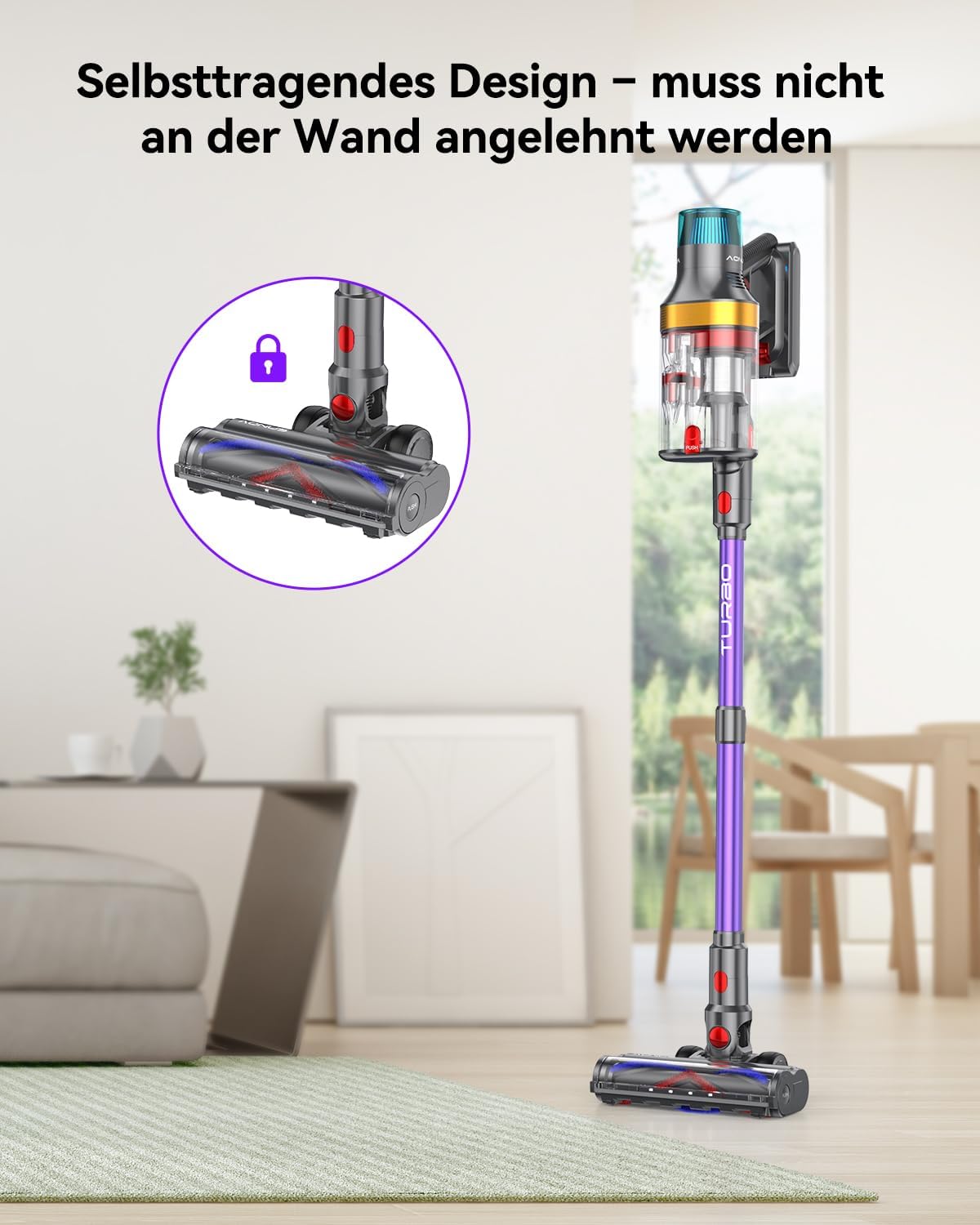
- The vacuum cleaner has a freestanding design, allowing it to stand upright on its own when paused during cleaning.

Using Attachments
The aonus A9 Max comes with various attachments for specialized cleaning:
- Long Crevice Tool: Ideal for reaching narrow gaps and corners, such as between sofa cushions or along baseboards.
- 2-in-1 Brush Tool: Use the brush for delicate surfaces like keyboards or tabletops, and the nozzle for general dusting.
- Mite Brush: Specifically designed for cleaning upholstery, mattresses, and pet beds to remove dust mites and allergens.
- Extension Wand: Use with various tools to clean high areas like curtains or ceiling corners.
Official Product Videos
Watch these official videos for a visual guide on using your aonus A9 Max:
Video 4.1: Overview of the aonus A9 Max Cordless Vacuum Cleaner features and usage.
Video 4.2: Detailed explanation of the aonus A9 Max dual dust bin system.
5. Maintenance
Emptying the Dust Bin
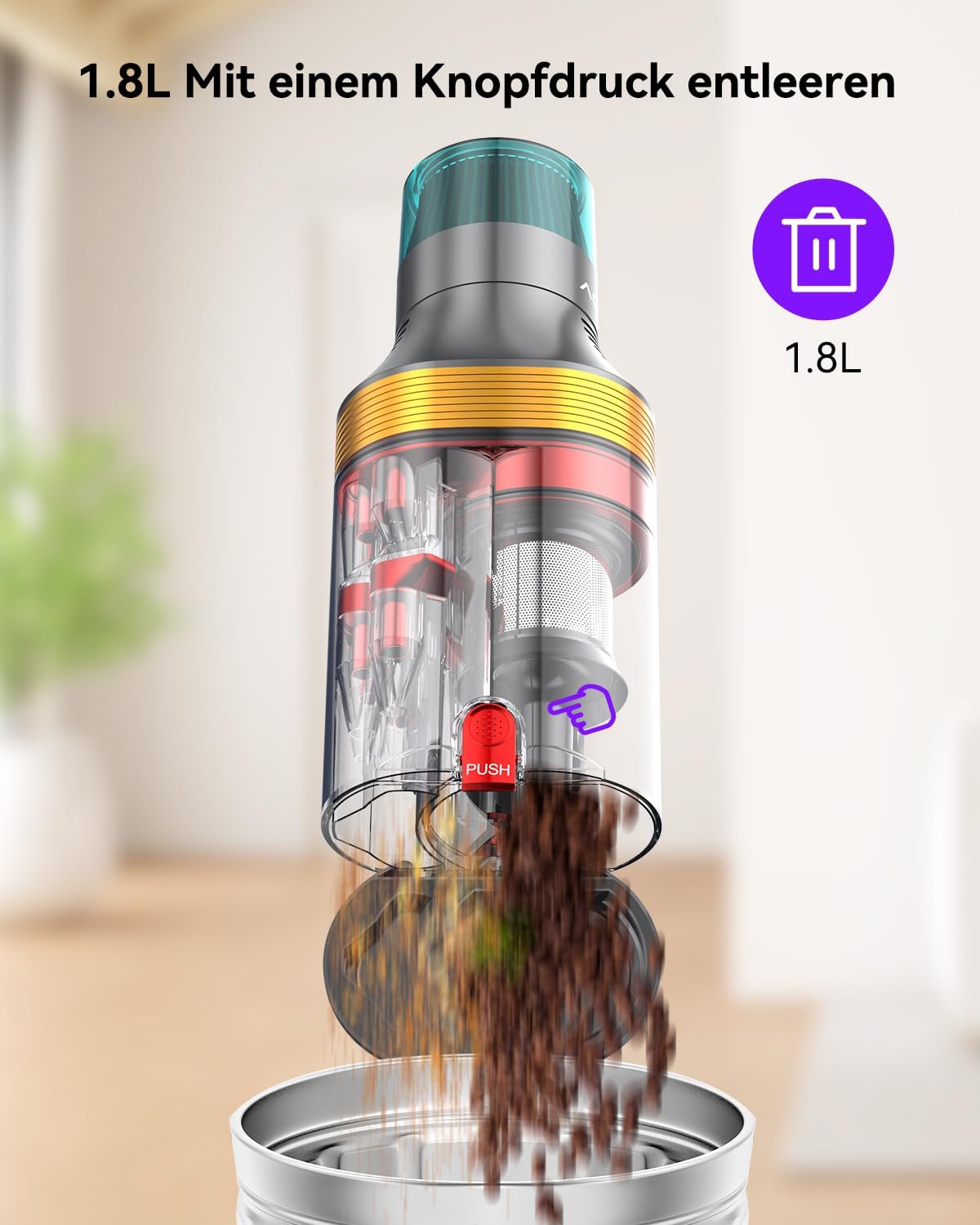
The 1.8L large dust bin features a double dust and air separation function, keeping dust and debris separated to prevent leaks and filter clogging. Empty the dust bin regularly to maintain optimal suction power.
- Ensure the vacuum cleaner is turned off.
- Locate the 'PUSH' button on the dust bin.
- Press the button to release the bottom flap and empty contents into a trash can.

Cleaning the Filters
The advanced 8-stage filtration system effectively filters fine dust and allergens. Regular cleaning of the filters is crucial for maintaining performance and air quality.
- Twist and remove the dust bin from the main unit.
- Remove the internal filter components, including the stainless steel filter and HEPA filter.
- Tap off loose dust from the filters. For thorough cleaning, rinse the filters under cold running water.
- Allow all filter components to air dry completely for at least 24 hours before reassembling. Do not use a dryer or direct heat.
- Reassemble the filters and dust bin, ensuring all parts are securely in place.
Cleaning the Brush Roll
Periodically check the brush roll for tangled hair or debris. Remove any obstructions to ensure effective cleaning.
- Turn off the vacuum cleaner and detach the floor brush.
- Locate the release mechanism for the brush roll (refer to the product diagram if unsure).
- Remove the brush roll and carefully cut away any tangled hair or fibers using scissors.
- Clean any debris from the brush roll housing.
- Reinsert the brush roll and secure it in place.
6. Troubleshooting
If you encounter any issues with your aonus A9 Max, please refer to the table below for common problems and solutions.
| Problem | Possible Cause | Solution |
|---|---|---|
| Vacuum cleaner does not turn on. | Battery is depleted or not properly installed. | Charge the battery. Ensure the battery is securely clicked into place. |
| Low suction power. | Dust bin is full, filters are clogged, or brush roll is obstructed. | Empty the dust bin. Clean or replace filters. Remove any tangled hair or debris from the brush roll. |
| Brush roll not spinning. | Obstruction in the brush roll or motor issue. | Remove any tangled hair or debris. If the problem persists, contact customer support. |
| Vacuum cleaner stops suddenly. | Overheating due to prolonged use or blockage. | Turn off the vacuum cleaner and allow it to cool down for at least 30 minutes. Check for and clear any blockages. |
7. Specifications
| Feature | Detail |
|---|---|
| Brand | aonus |
| Model | A9 Max |
| Color | Purple |
| Product Dimensions | 28 x 18 x 40 cm |
| Capacity | 1.8 Liters |
| Power | 600 Watts |
| Noise Level | 70 dB |
| Runtime | Up to 70 Minutes |
| Special Features | Detachable Battery, High-precision Sensors, Cordless, High Power, HEPA Filter |
| Item Weight | 2.03 Kilograms |
| Filter Type | HEPA Filter |
8. Warranty and Support
For warranty information, technical support, or to purchase replacement parts, please contact aonus customer service. Refer to the product packaging or the official aonus website for contact details.
Related documentsA9 Max


Ask a question about this manual
Ask about setup, troubleshooting, compatibility, parts, safety, or missing instructions. Manuals+ will review the question and use this page’s manual context to help answer it.