
1. Introduction
This manual provides essential information for the safe operation, assembly, maintenance, and troubleshooting of your Gyroor C1S Electric Scooter. Please read this manual thoroughly before using the scooter to ensure proper function and safety.
Important Safety Information
- Always wear a helmet and appropriate safety gear when riding.
- Familiarize yourself with local laws and regulations regarding electric scooter use.
- Perform a pre-ride check before each use, including brakes, tires, and battery level.
- Do not ride in adverse weather conditions or on slippery surfaces.
- Ensure the stem is securely locked before riding.
2. Product Overview
The Gyroor C1S is an electric scooter designed for adults, featuring a powerful motor, comfortable seating, and practical storage options. Key components include:
- 550W Motor: Provides power for speeds up to 18.6 MPH.
- 12" Pneumatic Tires: Offers shock absorption for a smooth ride.
- Adjustable Seat: Ensures comfort for various rider heights (5'1" to 6'1").
- Detachable Middle Basket & Rear Cargo Rack: For carrying personal items or small pets.
- Dual Disc Brake System: For reliable stopping power.
- LED Headlight & Rear Brake Light: Enhances visibility and safety.
- Foldable Design: For easy storage and transport.

Figure 2.1: Gyroor C1S Electric Scooter with seat and baskets.

Figure 2.2: Key components of the Gyroor C1S Electric Scooter.
3. Setup & Assembly
Your Gyroor C1S Electric Scooter requires some assembly before its first use. Follow these steps carefully:
3.1 Unboxing and Initial Inspection
- Carefully remove the scooter from its packaging.
- Remove all protective wrapping and ties.
- Inspect the scooter for any signs of damage during transit. Contact customer support immediately if any damage is found.
3.2 Handlebar Installation
- Locate the stem opening on the front frame.
- Align the handlebar stem with the opening, ensuring the front wheel is straight. There are alignment arrows on the stem and frame.
- Pull up the red lever on the handlebar stem, then pull the lever out and push the stem down into the frame until it locks into place.
- Tighten the stem using the provided Allen key.
- Center the handlebar by aligning the grooves on the handlebar with the bracket.
- Slide the bracket back into place, ensuring the curved washer piece is present.
- Insert the bolt with the washer through the bracket and tighten it securely.
3.3 Seat Installation
- Insert the seat post into the designated opening above the rear fender.
- Adjust the seat to your desired height.
- Tighten the seat post clamp securely.
3.4 Rear Basket Installation
- Remove the four bolts from the rear of the scooter frame, near the fender. Keep the washers.
- Align the rear basket with the holes on the frame.
- Re-insert the bolts with their washers and tighten them to secure the basket. Ensure the basket is centered with the rear fender.
3.5 Foot Pegs Installation
- Attach the foot pegs to the designated points on the side of the scooter, ensuring the sloped side faces you when sitting.
- Secure them with the locking nuts and tighten using the provided wrench.
Video 3.1: Official Gyroor C1S unboxing and assembly guide. This video demonstrates the step-by-step process of unboxing the scooter and assembling its main components, including the handlebar, seat, and baskets.
4. Operation
Operating your Gyroor C1S Electric Scooter is straightforward. Always ensure you are familiar with the controls before riding.
4.1 Controls and Display
- LCD Display: Shows current speed, battery level, and speed mode.
- Throttle: Located on the handlebar, used to accelerate.
- Brake Levers: Activates the dual disc brake system.
- Bell: For signaling other road users.
- Headlight/Taillight Control: To turn lights on/off for visibility.
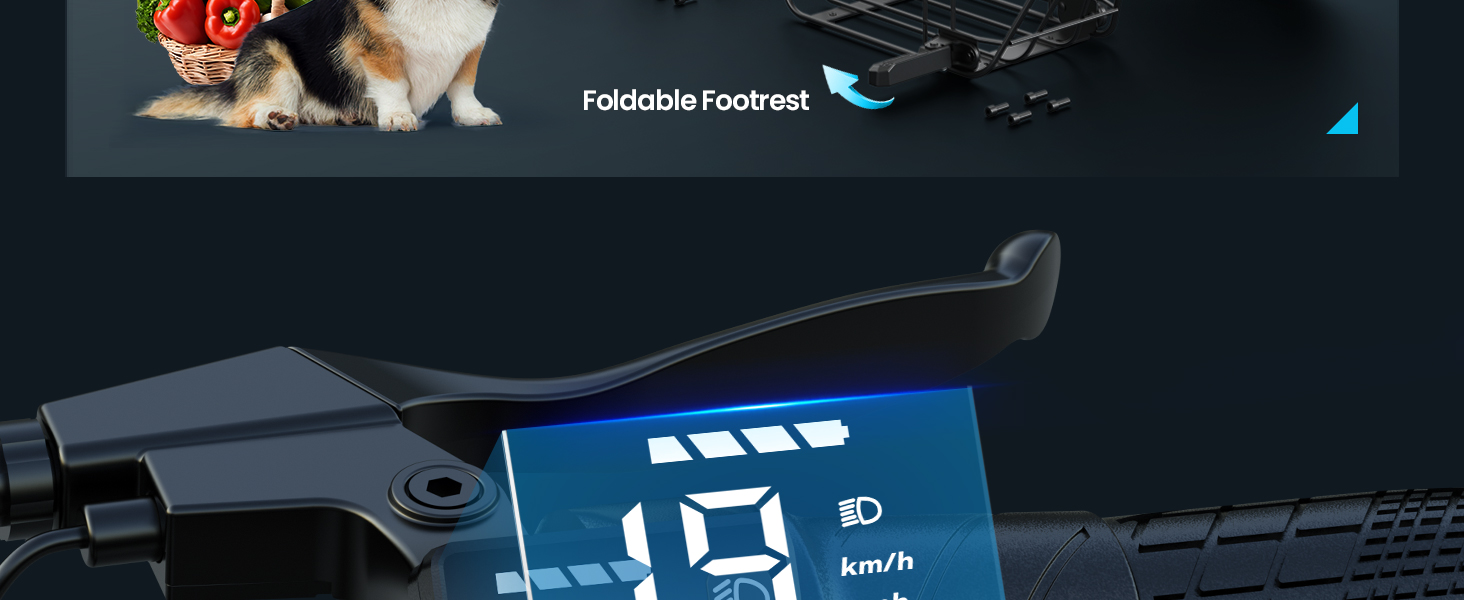
Figure 4.1: Smart LCD Display on the handlebar.

Figure 4.2: Detailed view of the LCD display.
4.2 Riding Instructions
- Power On: Press and hold the power button on the display.
- Start Riding: Place one foot on the deck and push off with the other foot to gain initial momentum. Gently press the throttle to accelerate.
- Speed Modes: The scooter typically has multiple speed settings. Select the appropriate mode for your environment and experience level.
- Braking: Use the brake levers to slow down or stop. Apply both brakes smoothly for optimal control.
- Turning: Lean slightly in the direction you wish to turn and gently steer the handlebars.
- Power Off: Press and hold the power button to turn off the scooter when finished riding.
Video 4.1: Gyroor C1S Adults E-scooter in use. This video showcases the scooter's features and how it operates in various settings, including carrying pets in the basket.
5. Charging
Ensure your scooter is fully charged before each ride for optimal performance and range.
5.1 Charging Procedure
- Locate the charging port on the scooter (typically near the bottom frame).
- Remove the rubber cover from the charging port.
- Connect the charger cable to the scooter's charging port.
- Plug the other end of the charger into a standard electrical outlet.
- The LED indicator on the charger will turn red during charging and green when fully charged.
- Charging time is approximately 5 hours for a full charge.
- Once charging is complete, disconnect the charger and replace the rubber cover on the charging port to protect it from dust and moisture.

Figure 5.1: Battery specifications and charging indicators.
6. Maintenance
Regular maintenance ensures the longevity and safe operation of your Gyroor C1S Electric Scooter.
6.1 General Care
- Keep the scooter clean. Wipe down with a damp cloth and avoid using high-pressure water jets.
- Store the scooter in a dry, cool place away from direct sunlight and extreme temperatures.
- If not using the scooter for an extended period, charge the battery once a month to maintain its health.
6.2 Tire and Brake Checks
- Tires: Regularly check tire pressure. Ensure tires are properly inflated to the recommended PSI for optimal performance and safety. Inspect for any punctures or excessive wear.
- Brakes: Periodically check the dual disc brake system for proper function. Ensure brake levers engage smoothly and the brakes provide adequate stopping power without rubbing when disengaged.

Figure 6.1: Key features for maintenance: Dual Disc Brake, Big Seat Cushion, Head & Tail Light, Durable Tires.

Figure 6.2: Dual Disc Braking system.

Figure 6.3: Bright Headlight and Red Taillight.
7. Troubleshooting
This section addresses common issues you might encounter with your Gyroor C1S Electric Scooter.
| Problem | Possible Cause | Solution |
|---|---|---|
| Scooter does not power on. | Low battery; loose connections. | Charge the battery fully. Check all visible cable connections. |
| Reduced range or power. | Under-inflated tires; low battery charge; heavy load. | Check tire pressure and inflate if necessary. Ensure battery is fully charged. Reduce load if possible. |
| Brakes feel loose or ineffective. | Brake cable adjustment needed; worn brake pads. | Adjust brake cable tension. Inspect and replace brake pads if worn. |
| Handlebar feels wobbly. | Stem not securely locked or tightened. | Ensure the red lever is fully engaged and the stem bolt is tightened. Refer to Section 3.2. |
8. Specifications
| Feature | Detail |
|---|---|
| Brand | Gyroor |
| Model Name | C1S |
| Motor Power | 550W |
| Top Speed | Up to 18.6 MPH |
| Maximum Distance Range | 20 Miles |
| Wheel Size | 12 Inches |
| Wheel Type | Pneumatic |
| Brake Style | Front Braking (Dual Disc) |
| Suspension Type | Dual Suspension |
| Weight Limit | 265 Pounds |
| Battery Charge Time | 5 Hours |
| Product Dimensions (L x W x H) | 21"L x 9"W x 44"H |
| Frame Material | Metal |
| Included Components | Scooter, Manual, Charger |
9. Warranty & Support
9.1 Warranty Information
The Gyroor C1S Electric Scooter comes with a limited warranty:
- Battery: 6-month warranty.
- Controller: 1-year warranty.
- Regular charging (once a month if not in use) is recommended to maintain battery health and warranty validity.
9.2 Customer Support
For any questions, technical assistance, or warranty claims, please contact Gyroor customer support. Refer to the contact information provided with your purchase or visit the official Gyroor website.


