Download PDFFree PDF. The Save button below keeps a bookmark and private notes in your account.
Loutoc RC802N Universal Replacement Remote Control
For TCL Smart TVs (Android/Google TV)
1. Introduction
This document provides instructions for the Loutoc RC802N Universal Replacement Remote Control. This remote is designed to function as a direct replacement for your original TCL Smart TV remote, supporting both Android TV and Google TV models. It requires no programming or complex setup; simply insert batteries and begin use.
The remote control requires two AAA batteries (not included). Follow these steps to install them:
Open the battery compartment cover on the back of the remote control.
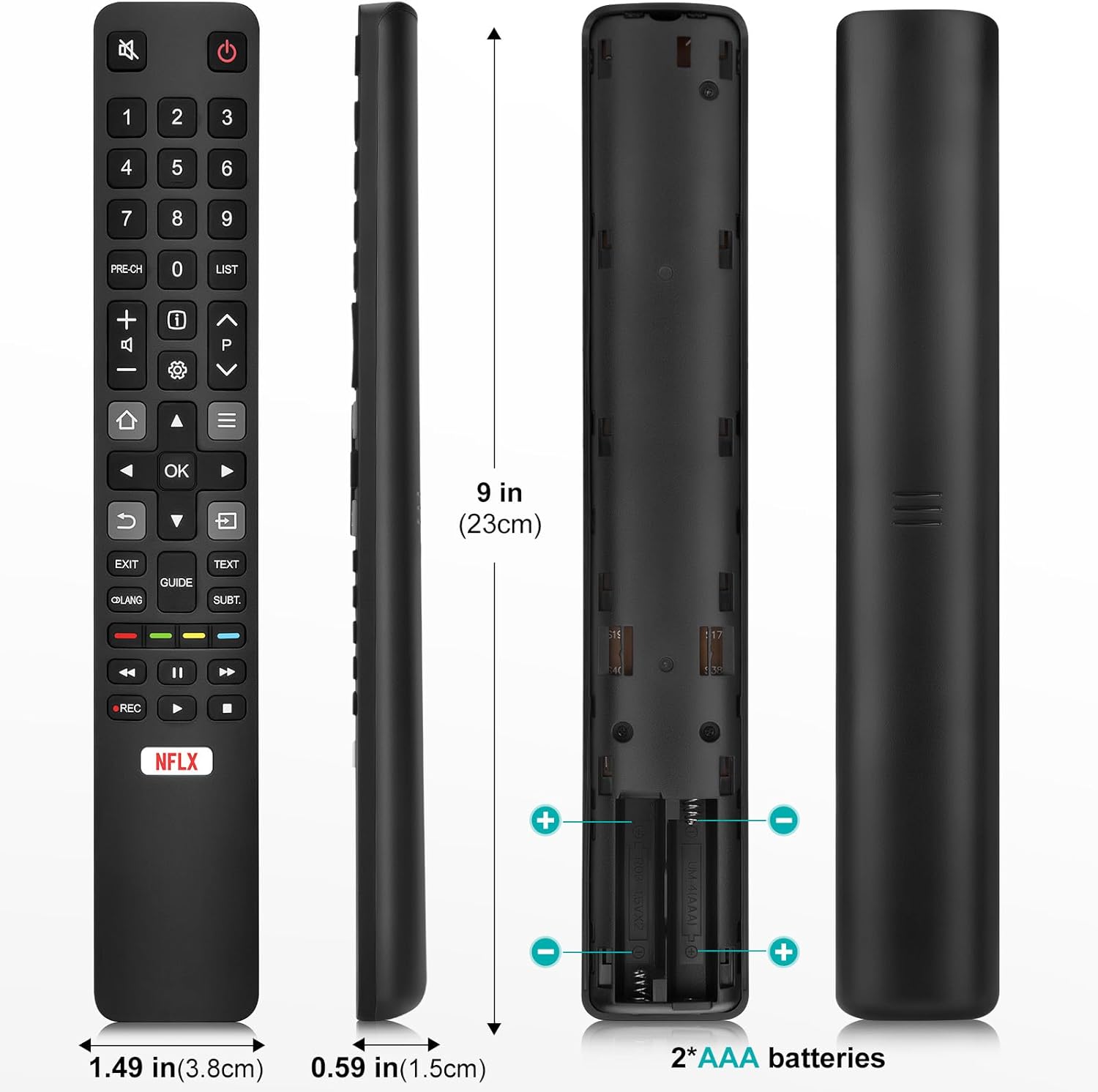
Insert two AAA batteries, ensuring the positive (+) and negative (-) terminals align correctly with the markings inside the compartment.
Close the battery compartment cover securely.
The remote is ready for use immediately after battery insertion. No additional programming or pairing is required for most TCL Smart TV models.
Image 2: Battery insertion diagram and button functions.
Image 3: Remote control dimensions and battery compartment details.
3. Operating Instructions
Point the remote control directly at your TCL Smart TV. The remote operates using infrared technology and has an effective range of over 8 meters (26 feet).
3.1 Button Functions
Button
Function
Power
Switches the TV sound on/off or enters/exits standby mode.
Numeric Keys (0-9)
Enter channel numbers or digits.
LIST
Displays the channel list.
Volume (+/-)
Adjusts the volume level.
PRE-CH
Returns to the previous channel.
Info
Displays program information (if available).
Settings
Accesses the TV set settings menu.
Channel Up/Down (P^/Pv)
Switches channels.
Home
Opens the Android TV homepage.
Menu
Displays the options menu.
Navigation Buttons (Arrows)
Navigates through menus and options.
OK
Confirms an entry or selection.
Back
Returns to the previous menu or exits the current application.
Source
Selects the input source.
EXIT
Exits the on-screen menu.
LANG
Selects the language for digital TV programs.
GUIDE
Switches the electronic program guide on/off (for digital channels).
TEXT
Switches teletext on/off.
SUBT.
Selects the subtitle language for digital TV programs.
Color Buttons (Red, Green, Yellow, Blue)
Used for recordings, teletext pages, or HbbTV functions.
Rewind
Starts fast reverse.
Play/Pause
Plays or pauses media.
Fast Forward
Starts fast forward.
REC
Records programs under DTV source.
Stop
Stops playback.
Netflix
Direct access to Netflix, if available on your TV.
4. Compatibility
The Loutoc RC802N remote control is compatible with a wide range of TCL Smart TVs, including various Android TV and Google TV series. This remote replaces several original TCL remote models such as RC902V1, RC802N5, RC802NU1, RC802N1, RC602S6, RC802N2, and RC802V5.
Image 4: Compatibility with TCL 4K Mini LED QLED HDR Android TV and Google TV.
5. Specifications
Feature
Detail
Brand
Loutoc
Model Name
rc802n
Connectivity Technology
Infrared
Compatible Devices
Television (TCL Smart TVs: Android TV, Google TV)
Maximum Supported Devices
1
Controller Type
Button Control
Number of Buttons
50
Special Feature
No programming required, Universal
Color
Black
Maximum Range
8 Meters (26 feet)
Item Weight
50 Grams
Batteries Required
2 AAA batteries
Country of Origin
China
6. Maintenance
6.1 Cleaning
To clean the remote control, use a soft, dry cloth. Do not use liquid cleaners, abrasive pads, or chemical solvents, as these may damage the surface or internal components.
6.2 Battery Replacement
Replace batteries when the remote's response becomes sluggish or it stops functioning. Always replace both batteries at the same time with new AAA alkaline batteries. Do not mix old and new batteries or different types of batteries.
7. Troubleshooting
7.1 Remote Not Responding
Check Batteries: Ensure batteries are inserted correctly with the correct polarity and are not depleted. Replace if necessary.
Line of Sight: Make sure there are no obstructions between the remote control and the TV's infrared receiver.
Remote Orientation: Point the remote directly at the TV.
7.2 Limited Range
Replace Batteries: Weak batteries can reduce the remote's effective range.
Remove Obstacles: Ensure no objects are blocking the signal path.
7.3 Specific Button Not Working
This remote is designed for broad compatibility. However, some specific advanced functions or buttons might not be supported by all TV models. Verify if the function is available on your TV's original remote or through its on-screen menu.
8. Warranty and Support
Specific warranty information is not provided in the product details. For any product inquiries, technical support, or warranty claims, please contact the manufacturer, Loutoc, directly through their official channels or the retailer where the product was purchased.
Ask a question about this manual
Ask about setup, troubleshooting, compatibility, parts, safety, or missing instructions. Manuals+ will review the question and use this page’s manual context to help answer it.