
Raddy WS-5 (492010799)
Raddy WS-5 2-Outlet Hose Watering Programmer User Manual
Model: WS-5 (492010799) | Brand: Raddy
Introduction
Thank you for choosing the Raddy WS-5 2-Outlet Hose Watering Programmer. This advanced device is designed to enhance your garden watering efficiency and reliability. Featuring two independent outlets, it allows for precise adjustment of watering schedules to meet the specific needs of your plants. With an improved IP55 waterproof rating and additional waterproof sealing, the WS-5 is built for dependable outdoor use. Please read this manual thoroughly before operation to ensure proper setup and optimal performance.
Safety Information
- Temperature Range: Do not use the device at temperatures below 4.5 °C (40 °F) to prevent damage from freezing.
- Battery Safety: Use only specified battery types (4 AA batteries). Do not mix old and new batteries, or different types of batteries. Remove batteries if the device will not be used for an extended period.
- Water Pressure: Ensure your water pressure is within the operating limits of the device to prevent leaks or damage.
- Installation: Install the device securely to prevent accidental detachment or damage.
- Maintenance: Do not attempt to disassemble or repair the device yourself. Refer to the troubleshooting section or contact customer support for assistance.
- Children: Keep the device out of reach of children.
Package Contents
Please check the package for the following items:
- Raddy WS-5 Watering Programmer Unit
- PTFE Tape (Teflon Tape)
- Quick Connectors (2)
- Replacement Gasket (1)
- User Manual

Product Overview
Familiarize yourself with the main components of your Raddy WS-5 watering programmer.

- Large LED Display: Clear interface for easy reading of time and settings.
- Rotary Dial: Used to select different programming modes (OFF, AUTO, SET CLOCK, START TIME, HOW LONG, HOW OFTEN).
- +/- Buttons: Adjust values and navigate settings.
- ZONE Button: Switches between Zone 1 and Zone 2 for independent programming.
- OK/MANUAL Button: Confirms settings or activates/deactivates manual watering.
- Water Inlet: Top connection for attaching to a standard garden faucet (fits 3/4" hose).
- Water Outlets (2): Bottom connections for attaching hoses to watering zones.
- Battery Compartment: Located on the back, sealed for water resistance.
Setup
1. Battery Installation
- Locate the battery compartment on the back of the unit.
- Open the battery cover.
- Insert 4 new AA (1.5V) alkaline batteries, ensuring correct polarity (+/-).
- Securely close the battery cover to maintain the waterproof seal.
2. Connecting to Water Source
- Apply the provided PTFE tape to the threads of your garden faucet for a leak-proof seal.
- Screw the Raddy WS-5 programmer onto the garden faucet, ensuring it is hand-tightened securely.
- Attach your garden hoses to the two independent outlets at the bottom of the programmer. Use the quick connectors if desired.
- Ensure all connections are tight to prevent leaks.

3. Setting the Clock
- Turn the rotary dial to SET CLOCK.
- Use the +/- buttons to set the current time.
- Press OK to confirm and move to the next setting (if applicable) or to exit the setting mode.
Operating Instructions
Programming Automatic Watering (AUTO Mode)
The Raddy WS-5 allows for independent programming of two watering zones.
- Select Zone: Press the ZONE button to switch between Zone 1 and Zone 2. The selected zone will be indicated on the display.
- Set Start Time:
- Turn the rotary dial to START TIME.
- Use the +/- buttons to set the desired start time for watering.
- Press OK to confirm.
- Set Watering Duration (HOW LONG):
- Turn the rotary dial to HOW LONG.
- Use the +/- buttons to set the watering duration from 1 minute to 5 hours and 59 minutes.
- Press OK to confirm.
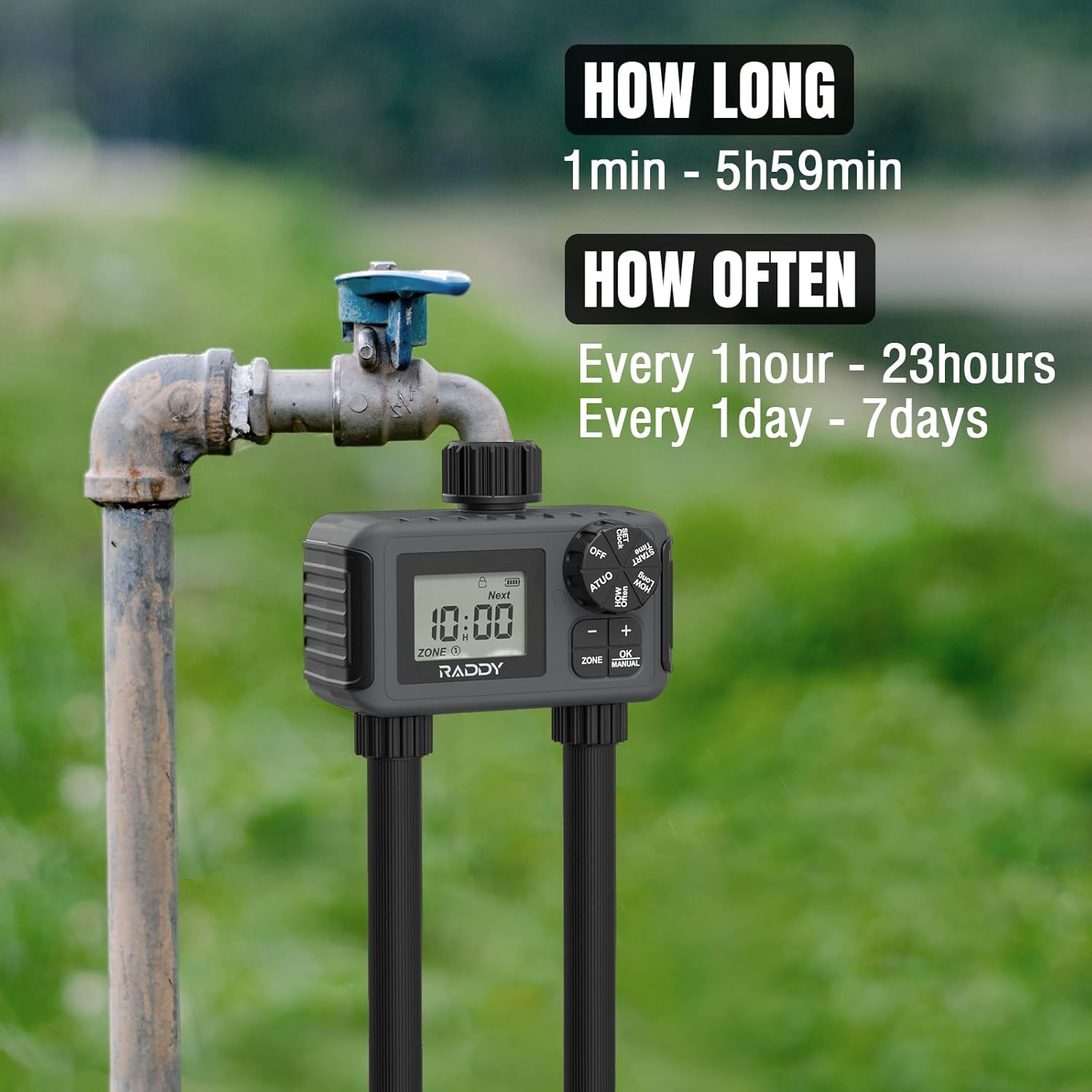
Image: The Raddy WS-5 watering programmer attached to an outdoor faucet, with text overlays indicating "HOW LONG: 1min - 5h59min" and "HOW OFTEN: Every 1 hour - 23 hours, Every 1 day - 7 days". - Set Watering Frequency (HOW OFTEN):
- Turn the rotary dial to HOW OFTEN.
- Use the +/- buttons to set the watering frequency:
- Every 1 hour to every 12 hours
- Every 1 day to every 7 days
- Press OK to confirm.
- Activate Auto Mode: Turn the rotary dial to AUTO. The programmer will now operate according to your set schedule for both zones.

Manual Watering Mode
For immediate watering outside of the programmed schedule:
- Ensure the rotary dial is in any position other than OFF.
- Press the OK/MANUAL button. The display will show the manual watering duration.
- Use the +/- buttons to adjust the desired manual watering duration.
- Press OK again to start manual watering.
- To stop manual watering, press OK/MANUAL again.

Rain Delay Function
The rain delay function allows you to pause watering for a set period to conserve water during rainy weather.
- Turn the rotary dial to AUTO.
- Press and hold the +/- buttons simultaneously for a few seconds until the rain delay option appears.
- Use the +/- buttons to select the delay duration (1 to 7 days).
- Press OK to confirm. Watering will resume automatically after the delay period.
- To cancel the rain delay, repeat the steps and set the delay to 0, or turn the dial to OFF and then back to AUTO.

Low Battery Alert
The device features a low battery indicator on the display. When the battery icon flashes or appears low, it's time to replace the batteries. Prompt battery replacement ensures the valve operates correctly and prevents watering interruptions.

Maintenance
- Cleaning: Wipe the exterior of the programmer with a soft, damp cloth. Do not use abrasive cleaners or solvents.
- Filter Screen: Periodically check the filter screen at the water inlet for debris. Clean it if necessary to ensure proper water flow.
- Battery Replacement: Replace batteries promptly when the low battery indicator appears.
- Winterization: Before the first frost, disconnect the programmer from the faucet and hoses. Remove the batteries. Store the unit indoors in a dry, protected area where temperatures will not drop below freezing. Failure to do so may result in damage to the internal components due to freezing water.
Troubleshooting
| Problem | Possible Cause | Solution |
|---|---|---|
| No display or unit not turning on. | Dead or incorrectly installed batteries. | Replace batteries with new AA alkaline batteries, ensuring correct polarity. |
| Watering does not start. |
|
|
| Water leaks from connections. |
|
|
| Water flow is weak or inconsistent. |
|
|
Specifications
| Feature | Detail |
|---|---|
| Brand | Raddy |
| Model Number | 492010799 (WS-5) |
| Color | Black |
| Material | Plastic |
| Product Dimensions | 14.4 x 13.6 x 8.3 cm (5.67 x 5.35 x 3.27 inches) |
| Item Weight | 570 grams (1.26 lbs) |
| Water Outlets | 2 Independent Zones |
| Watering Duration | 1 minute to 5 hours 59 minutes |
| Watering Frequency | Every 1 hour to 12 hours, or Every 1 day to 7 days |
| Rain Delay | 1 to 7 days |
| Waterproof Rating | IP55 |
| Power Source | 4 x AA (1.5V) Batteries (not included) |
Warranty and Support
Raddy products are manufactured to high-quality standards. For information regarding warranty coverage, technical support, or replacement parts, please refer to the warranty card included with your product or visit the official Raddy website. If you encounter any issues not covered in this manual, please contact Raddy customer service for assistance.
Contact Information: Please refer to the product packaging or the official Raddy website for the most up-to-date contact details.
Ask a question about this manual
Ask about setup, troubleshooting, compatibility, parts, safety, or missing instructions. Manuals+ will review the question and use this page’s manual context to help answer it.