1. Introduction
Thank you for choosing the Quansheng UV5R Plus Two-Way Radio. This device is a versatile and robust communication tool designed for various applications, including outdoor activities, professional use, and emergency preparedness. It operates on both VHF and UHF frequency bands, offering a maximum output power of 5W. This manual provides essential information for the proper setup, operation, and maintenance of your radio to ensure optimal performance and longevity.
2. Package Contents
Please verify that all items listed below are included in your package. If any items are missing or damaged, please contact your retailer.
- 1 x UV5R Plus Radio Body
- 1 x Rechargeable Lithium-ion Battery
- 1 x Antenna
- 1 x Belt Clip
- 1 x Lanyard
- 1 x USB Desktop Charger
- 1 x D-Shape Earpiece
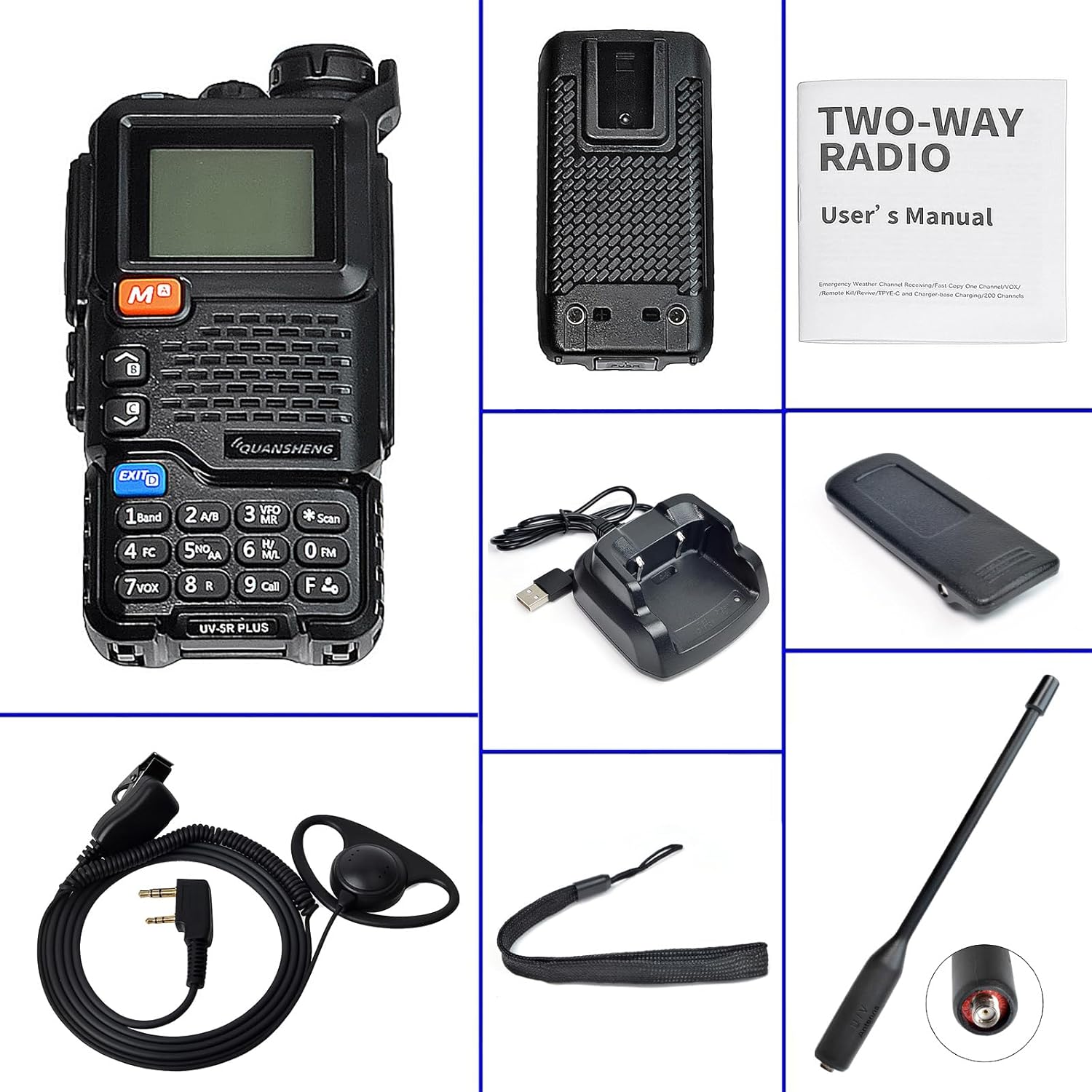
Image: All components of the Quansheng UV5R Plus package, including the radio, battery, antenna, belt clip, lanyard, USB desktop charger, and D-shape earpiece.
3. Product Overview
Familiarize yourself with the various parts and controls of your Quansheng UV5R Plus radio.

Image: Detailed view of the Quansheng UV5R Plus radio with key components labeled, including the antenna, power/volume switch, jacklight, PTT key, menu/confirm key, side keys, and exit key.
- Antenna: For transmitting and receiving radio signals.
- Power/Volume Switch: Rotates to turn the radio on/off and adjust volume.
- Jacklight: Built-in flashlight function.
- PTT (Push-to-Talk) Key: Press and hold to transmit, release to receive.
- Menu (Confirm) Key: Accesses the menu and confirms selections.
- Side Key 1 & 2: Programmable function keys.
- Up/Down Keys: Navigate menus and adjust frequencies/channels.
- Exit Key: Exits menus or functions.
- Keypad: For direct frequency input, channel selection, and function access.
- LCD Display: Shows frequency, channel, battery status, and other indicators.
4. Setup
4.1 Battery Installation
- Ensure the radio is powered off.
- Align the battery pack with the grooves on the back of the radio.
- Slide the battery pack upwards until it clicks securely into place.
- To remove, press the battery release latch (if present) and slide the battery downwards.
4.2 Charging the Battery
Before initial use, fully charge the battery. The radio uses a Lithium-ion battery.

Image: The USB desktop charging cradle for the Quansheng UV5R Plus radio, with a USB cable attached.
- Connect the USB cable to the desktop charger and a compatible USB power source (e.g., computer, USB wall adapter).
- Place the radio (with battery installed) into the charging cradle. Ensure proper contact between the radio and charger terminals.
- The charger indicator light will typically show red during charging and turn green when charging is complete.
4.3 Antenna Attachment
Screw the antenna clockwise into the connector on top of the radio until it is finger-tight. Do not overtighten.
4.4 Earpiece Connection
Insert the D-shape earpiece's dual-pin connector into the audio jack on the side of the radio. Ensure it is fully inserted for proper audio and microphone function.
5. Operating Instructions
5.1 Power On/Off and Volume
Rotate the Power/Volume switch clockwise to turn the radio on. Continue rotating clockwise to increase volume, and counter-clockwise to decrease volume. Rotate fully counter-clockwise until a click is heard to power off the radio.
5.2 Channel Selection (VFO/Memory Mode)
- VFO Mode (Frequency Mode): Allows direct frequency input. Use the Up/Down keys or the keypad to enter desired frequencies.
- Memory Mode (Channel Mode): Allows selection of pre-programmed channels. Use the Up/Down keys to cycle through stored channels.
- Press the 'VFO/MR' key to switch between VFO and Memory modes.
5.3 Transmitting and Receiving (PTT)
To transmit, press and hold the PTT key on the side of the radio. Speak clearly into the microphone. Release the PTT key to return to receive mode.
5.4 Keypad Functions
- MENU: Enters the main menu. Use Up/Down keys to navigate and MENU to confirm.
- EXIT: Exits the current menu or function.
- A/B: Switches between the upper and lower frequency displays.
- SCAN: Initiates frequency or channel scanning.
- FM: Activates the FM radio receiver.
- NOAA: Accesses NOAA weather channels (if available in your region).
5.5 Special Features
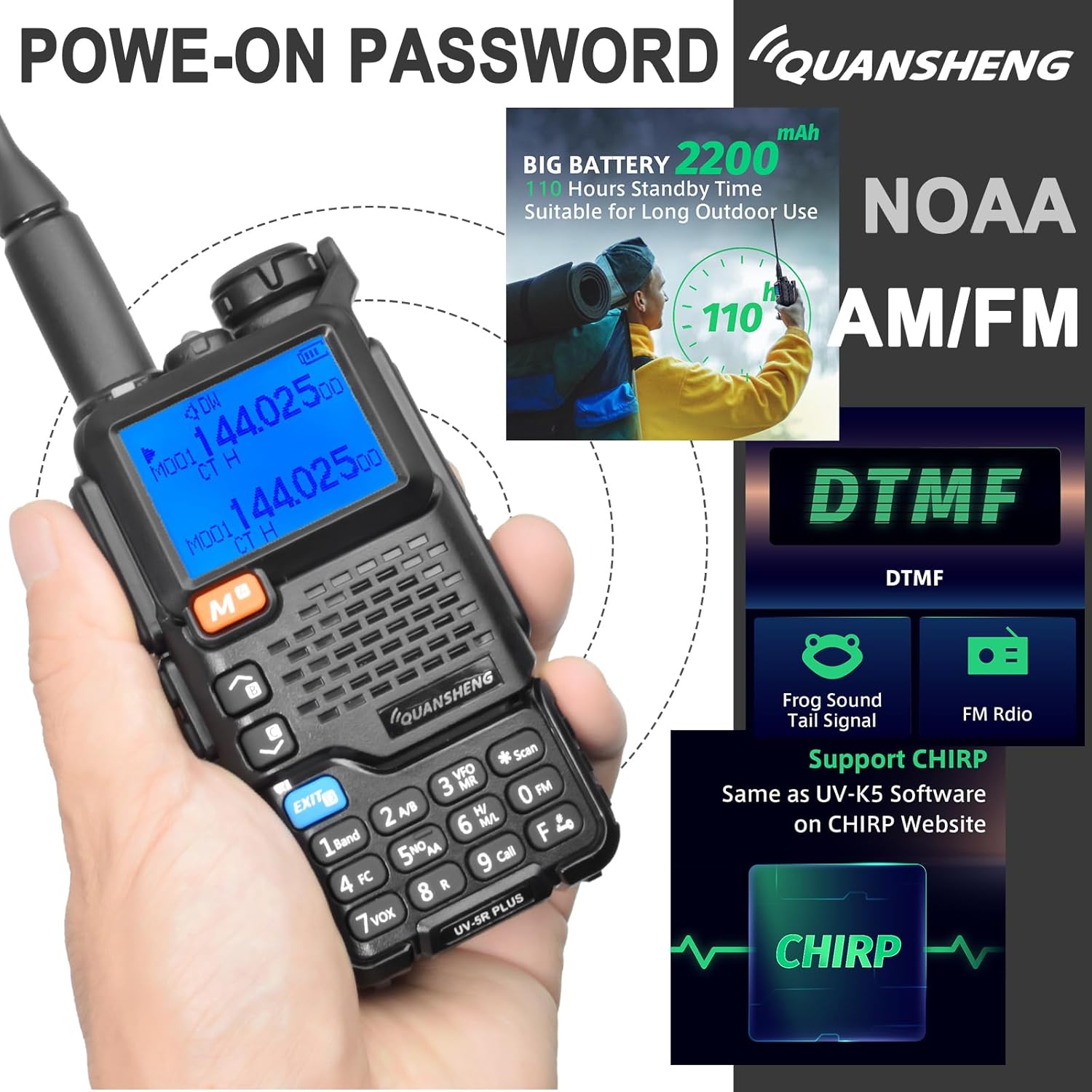
Image: The Quansheng UV5R Plus radio with graphical overlays illustrating key features such as NOAA weather reception, DTMF, Frog Sound tail tone, Power-on Password, and compatibility with CHIRP software.
- NOAA Emergency Weather Channel Reception: Allows reception of emergency weather alerts.
- Frog Sound Tail Tone: An audible tone indicating the end of a transmission, confirming the receiver has released the PTT.
- Power-on Password: Users can set a password via software to prevent unauthorized use.
- DTMF (Dual-Tone Multi-Frequency): For signaling and control functions.
- Multi-Scan: Scans multiple frequency ranges or channels.
- CTSS/DCS: Continuous Tone-Coded Squelch System / Digital Coded Squelch for filtering unwanted signals.
- Wireless Radio Replication: Allows copying channels between compatible radios without a computer.
- Frequency Counter: Can act as a frequency counter for other two-way radios and devices.
- AM/FM Aviation Band Reception: Capable of receiving signals on aviation bands.
- 10-Group Scrambler: Enhances communication privacy.
6. Maintenance
6.1 Cleaning
Clean the radio's surface with a soft, damp cloth. Do not use harsh chemicals or abrasive cleaners. Ensure the radio is dry before use.
6.2 Battery Care
- Avoid fully discharging the battery frequently to prolong its lifespan.
- Store the battery in a cool, dry place when not in use.
- If the radio will not be used for an extended period, remove the battery.
6.3 General Care
- Do not expose the radio to extreme temperatures, direct sunlight, or excessive moisture.
- Avoid dropping the radio or subjecting it to strong impacts.
- Keep the antenna and connectors clean and free from debris.
7. Troubleshooting
| Problem | Possible Cause | Solution |
|---|---|---|
| Radio does not power on | Battery not installed correctly or discharged | Ensure battery is securely installed and fully charged. |
| Cannot transmit or receive | Incorrect frequency/channel, antenna loose, low battery | Verify frequency/channel, check antenna connection, charge battery. |
| Poor audio quality | Volume too low/high, earpiece not fully inserted, interference | Adjust volume, re-insert earpiece, move away from sources of interference. |
| Charger indicator not working | Loose connection, faulty charger/cable | Check all connections, try a different USB power source or cable. |
8. Specifications

Image: A table detailing the general specifications of the Quansheng UV5R Plus, including number of channels, frequency stability, size, working temperature, FM radio count, modulation mode, weight, antenna impedance, and battery capacity.
| Feature | Specification |
|---|---|
| Brand | QUANSHENG (HYS) |
| Model Number | 5RPLUS |
| Frequency Range | VHF: 144-146 MHz, UHF: 430-440 MHz |
| Max Range | 5 Kilometers |
| Number of Channels | 1 (up to 200 channels can be programmed) |
| Output Power | 5W |
| Battery Type | Lithium-ion (18650, 2000mAh) |
| Voltage | 3 Volts (DC) |
| Water Resistance Level | Waterproof |
| Operating Temperature | -20°C to +60°C |
| Antenna Impedance | 50Ω |
| Weight | 234g |
| Compatible Devices | Other two-way radios operating on 144-146 MHz and 430-440 MHz, compatible earpieces. |
9. Warranty and Support
For warranty information and technical support, please refer to the documentation provided with your purchase or contact your retailer. Keep your proof of purchase for any warranty claims.


