
1. Introduction
The GoolRC Flysky Noble NB4 Pro+ is a 2.4GHz, third-generation automatic frequency hopping digital system radio transmitter. It includes the Noble NB4 Pro+ transmitter, an FGr8B receiver, and an FGr4B receiver. This system is designed for precise control of RC cars and boats.
The Noble NB4 Pro+ supports output in 18 channels, with extreme-speed output available on 2 channels. It features a 3.5-inch IPS touch screen for intuitive operation and includes a cell phone holder for real-time monitoring. A USB simulator function is enabled by default, allowing for practice and simulation.
Utilizing AFHDS3 (third-generation automatic frequency hopping digital system), this newly developed digital wireless system supports single antenna bidirectional real-time data packet transmission and data stream transmission. The advanced WS2A wireless system and new 2.4GHz chip allow dynamic adjustment of channel count, resolution, range, anti-interference requirements, and latency to suit various user needs.
2. Package Contents
Before setup, verify that all components are present in the package:
- 1x Flysky Noble NB4 Pro+ RC Transmitter
- 1x Aluminum Alloy Steering
- 1x Thin Hand Grip
- 1x Large Hand Grip
- 1x Flysky FGr4B Receiver
- 1x Flysky FGr8B Receiver
- 1x Receiver Cable Set
- 1x Wireless Charging Dock
- 1x Quick Operation Guide
- 2x Screwdriver
- 1x USB Cable
- 1x Strap
- 2x Logo Sticker
- 1x Aluminum Box

Image: All items included in the GoolRC Flysky Noble NB4 Pro+ package, displayed with the aluminum carrying case.
3. Setup
3.1 Battery Installation and Charging
The Noble NB4 Pro+ features a built-in battery that supports quick-detachment. It comes with a high-quality 18650 battery (3450mAh capacity) as standard. Ensure the battery is correctly inserted into the transmitter handle.
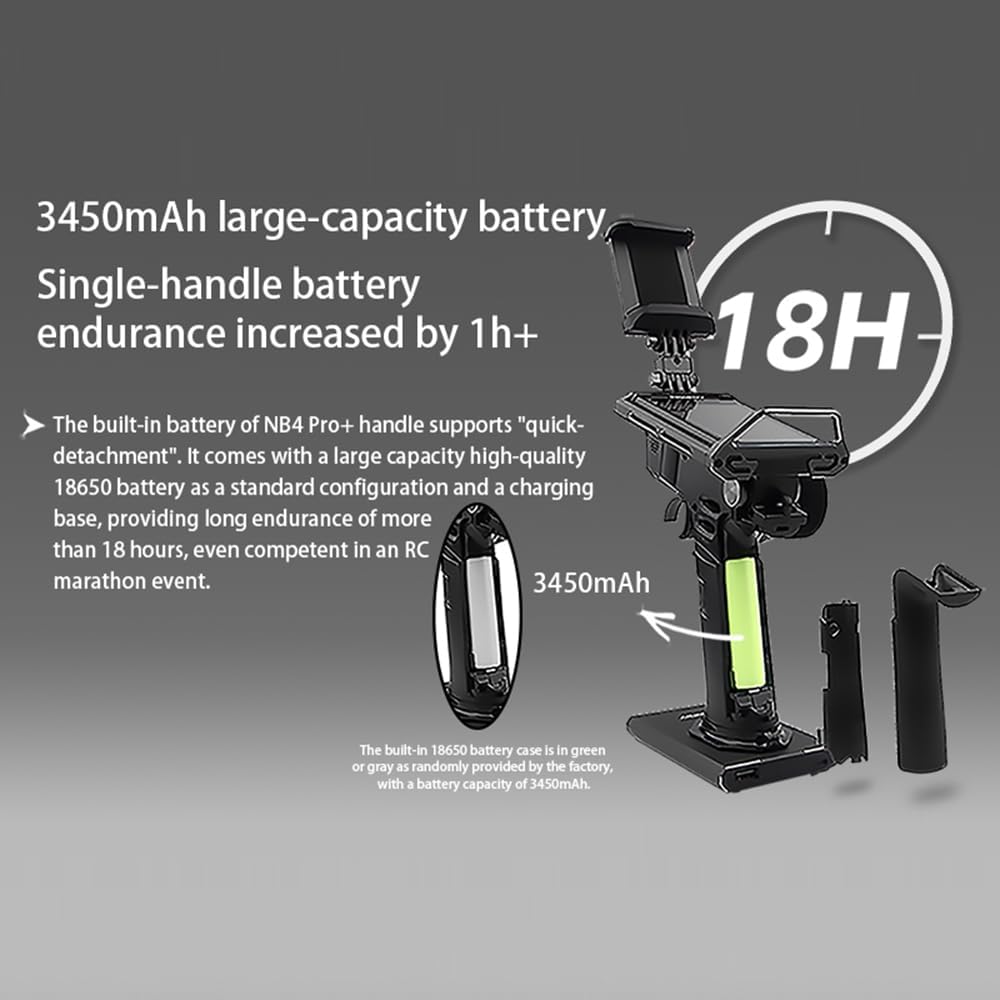
Image: Illustration of the 3450mAh battery installation in the transmitter handle, emphasizing its long endurance.
To charge the transmitter, use the provided USB cable and wireless charging dock. Connect the USB cable to a power source and place the transmitter on the charging dock. The screen will indicate charging status.
3.2 Receiver Binding
To establish communication between the transmitter and receiver(s), a binding process is required. Refer to the Quick Operation Guide for detailed steps on binding the FGr4B and FGr8B receivers to your Noble NB4 Pro+ transmitter.
3.3 USB Type-C Interface
The transmitter features an innovative USB Type-C interface with two concealed functions:
- Optimized Data Interface: Provides a stable connection for data transfer.
- Multiple Functions: A dual-head Type-C data cable supports teaching interaction in coach mode and enables head tracking functions when connected to a head tracking device.
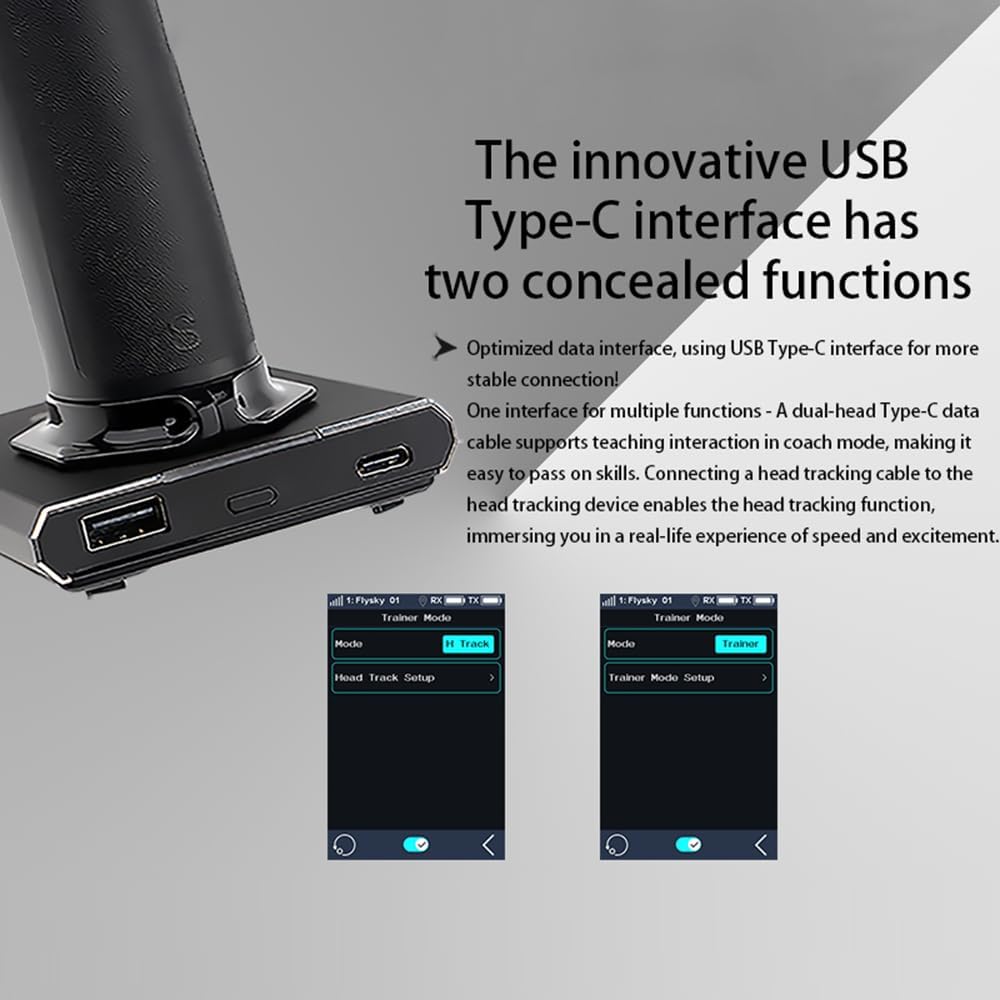
Image: The USB Type-C and standard USB ports on the transmitter base.
4. Operating Instructions
4.1 Basic Controls
The Noble NB4 Pro+ features a steering wheel and throttle trigger for primary control. The 3.5-inch IPS touch screen provides access to all advanced settings and real-time data.

Image: The Noble NB4 Pro+ transmitter with phone holder, highlighting rapid response and accessory compatibility.
4.2 Outdoor Display Screen
The 3.5-inch 320*480 IPS HB outdoor display screen offers increased brightness (up to 4 times) for clear visibility even under direct sunlight. It presents bright colors and clear picture details, enhancing outdoor usability.

Image: Comparison of screen brightness between NB4 Pro+ and NB4 Pro for outdoor use.
4.3 Handwheel and Grip
The transmitter features a high-density competition-grade handwheel sponge with a special surface treatment for a delicate and comfortable grip, providing precise feedback during operation.

Image: Close-up of the high-density handwheel sponge for enhanced grip and feedback.
4.4 Software Features
The Noble NB4 Pro+ offers a comprehensive suite of software features accessible via the touch screen:
- Robust Data Recording: Records operational data for analysis and efficiency improvement.
- Convenient i-BUS2 Parameter Settings: Allows for easy adjustment of various parameters.
- Thoughtful Fuel Consumption Calculation: Helps monitor and manage fuel usage.
- Customized Condition Mode: Enables real-time switching of settings based on conditions.
- Advanced Logic Switch Settings: Provides intelligent regulation capabilities.
- Cross-border Game Controller Functions: Supports diverse gaming needs.
- Rich GPS Functions: Facilitates advanced gameplay and navigation.
- Abundant Gyroscope Parameter Adjustment: Allows for precise control of vehicle posture.
- New Port Function: Doubles performance and enhances customization.
- Rich Adaptability: Fully compatible with MiniZ EVO and EVO2.

Image: Screenshots of the transmitter's data recording and i-BUS2 parameter settings.

Image: Screenshots demonstrating advanced software features including condition mode, logic switches, and gyroscope adjustments.
4.5 Video Overview
Video: An overview of the GoolRC Flysky Noble NB4 Pro+ Radio Transmitter, showcasing its features and design.
5. Maintenance
5.1 Cleaning
Regularly clean the transmitter with a soft, dry cloth. Avoid using harsh chemicals or solvents that could damage the screen or casing. Ensure no dust or debris accumulates in the ports or around the controls.
5.2 Battery Care
To prolong battery life, avoid fully discharging the battery frequently. Store the transmitter in a cool, dry place when not in use for extended periods. If storing for a long time, ensure the battery is charged to approximately 50-60%.
5.3 Software Updates
Periodically check the GoolRC official website for any available firmware or software updates for your Noble NB4 Pro+. Keeping the software updated ensures optimal performance and access to new features.
6. Troubleshooting
- No Power: Ensure the battery is fully charged and correctly installed. Check the power button.
- No Response from RC Model: Verify that the transmitter and receiver are properly bound. Check battery levels in both the transmitter and the RC model. Ensure the receiver is correctly connected to the model's components.
- Intermittent Signal: Check for potential interference sources in the operating environment. Ensure the transmitter antenna is positioned correctly.
- Screen Issues: If the touch screen is unresponsive, try restarting the transmitter. If issues persist, contact customer support.
For more detailed troubleshooting or issues not covered here, please refer to the comprehensive manual available on the GoolRC support website or contact GoolRC customer service.
7. Specifications
| Feature | Specification |
|---|---|
| Model | Noble NB4 Pro+ |
| Frequency System | 2.4GHz AFHDS3 (Third-Generation Automatic Frequency Hopping Digital System) |
| Channels | 18 Channels (2 channels with extreme-speed output) |
| Receivers Included | FGr4B, FGr8B |
| Display Screen | 3.5-inch 320*480 IPS HB Touch Screen |
| Battery Type | 18650 Nonstandard Battery (included) |
| Battery Capacity | 3450mAh |
| USB Interface | USB Type-C (for data and charging) |
| Simulator Function | Supported (enabled by default) |
| Compatibility | RC Cars, Boats, MiniZ EVO, EVO2 |
| Item Weight | 5.39 pounds (approx. 2.44 kg) |
| Package Dimensions | 12.68 x 11.42 x 5.08 inches (approx. 32.2 x 29 x 12.9 cm) |
8. Warranty and Support
For warranty information, technical support, or service inquiries, please contact GoolRC customer support directly. Details can typically be found on the official GoolRC website or within the product packaging. Keep your purchase receipt as proof of purchase for warranty claims.

