
1. Introduction
This manual provides essential information for the safe and effective operation and maintenance of your wheelfun 1:14 Double E RC Excavator Model E010 EC160E. Please read it thoroughly before first use and retain it for future reference.
Key Features:
- Full aluminum-zinc alloy structure for durability.
- 1:14 scale replica with realistic boom and arm extension (56cm).
- 360-degree turret rotation.
- Corrosion-resistant aluminum tracks (40mm).
- High lifting forces: 10kg boom, 7kg arm, 5kg shovel.
- Pre-set 2.4G Remote Controller for immediate operation.
- Interchangeable attachments: metal bucket, functional grapple, metal hammer.
2. Safety Information
- Recommended age: 21 years and up.
- Operate in open areas away from people, pets, and obstacles.
- Avoid operating near water or in wet conditions to prevent electrical damage.
- Do not touch moving parts during operation.
- Ensure batteries are correctly installed and charged before use.
- Supervise children during operation.
3. Setup
3.1. Package Contents
The package includes the RC Excavator, 2.4G Remote Controller, rechargeable battery, USB charging cable, and interchangeable attachments (metal bucket, functional grapple, metal hammer).
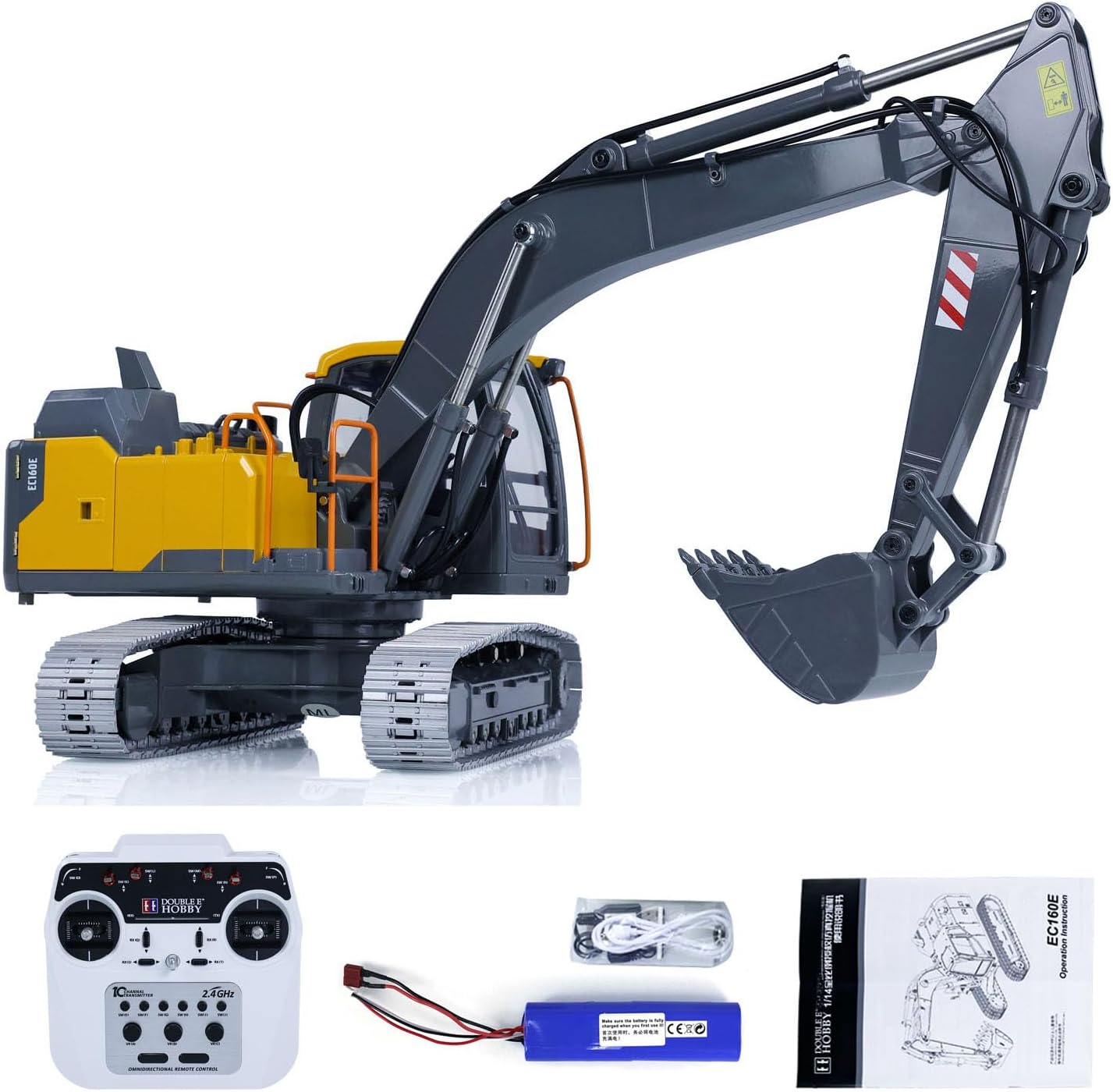
Image 1: The wheelfun 1:14 Double E RC Excavator, its remote control, battery, charger, and various attachments.
3.2. Battery Installation (Excavator)
- Locate the battery compartment on the underside of the excavator.
- Open the battery cover.
- Connect the rechargeable battery to the excavator's power port.
- Securely close the battery cover.

Image 2: Rear view of the excavator showing the open battery compartment with the battery plug clearly visible.
3.3. Battery Installation (Remote Controller)
- Open the battery compartment on the back of the remote controller.
- Insert 2 x AA batteries (not included), ensuring correct polarity.
- Close the battery cover securely.
3.4. Charging the Battery
- Connect the USB charging cable to the excavator's battery.
- Plug the USB cable into a power adapter (not included).
- The indicator light on the USB charger will show red during charging and turn green when fully charged.
- Charging time is approximately 5-7 hours for a full charge.
3.5. Pairing the Remote Controller
- Ensure both the excavator and the remote controller are powered off.
- Turn on the excavator.
- Turn on the remote controller. The indicator light on the remote will flash.
- Move the left joystick up and then down. The indicator light will become solid, indicating successful pairing.
4. Components Overview
4.1. Excavator Parts

Image 3: Side view of the wheelfun 1:14 Double E RC Excavator, highlighting its detailed construction.
- Boom: The main arm section.
- Arm: The secondary arm section, connected to the boom.
- Bucket: The digging attachment at the end of the arm.
- Tracks: Durable aluminum tracks for movement.
- Cab: Operator's cabin, featuring lights.
- Turret: The rotating upper structure of the excavator.
4.2. Remote Controller Functions

Image 4: A diagram illustrating the remote control layout and corresponding excavator movements, including 360-degree cab rotation.
- Left Joystick: Controls forward/backward movement of tracks and left/right turret rotation.
- Right Joystick: Controls boom up/down and arm extension/retraction.
- Buttons (Left Side): Controls bucket open/close.
- Buttons (Right Side): Controls sound effects (horn, mute).
4.3. Interchangeable Attachments
The excavator comes with three interchangeable attachments: a metal bucket, a functional grapple, and a metal hammer. These can be easily swapped to suit different tasks.

Image 5: A close-up view of the durable metal bucket attachment.
5. Operating Instructions
5.1. Basic Movement
- Forward/Backward: Push both joysticks forward/backward simultaneously.
- Turning: Push one joystick forward and the other backward to turn.
- Turret Rotation: Use the left joystick to rotate the cab 360 degrees left or right.
5.2. Arm and Bucket Control
- Boom Up/Down: Use the right joystick to raise or lower the main boom.
- Arm In/Out: Use the right joystick to extend or retract the arm.
- Bucket Dig/Dump: Use the dedicated buttons on the left side of the remote to control the bucket's action.
5.3. Using Attachments
To change attachments, carefully remove the current attachment by detaching its pins. Attach the desired tool (grapple or hammer) by aligning it and securing it with the pins. Ensure any electrical connections for the hammer or grapple are properly plugged in.
Video 1: Demonstration of the Double E 1:14 RC Excavator Model E010 EC160E in action, showcasing its various movements and functions.
Video 2: A user manual overview for an RC Excavator, demonstrating controller functions and basic operation.
6. Maintenance
- Clean the excavator after each use, especially if operated in dirt or sand, to prevent debris from affecting moving parts.
- Use a soft, dry cloth to wipe down the exterior. Avoid water or harsh chemicals.
- Regularly check all screws and connections for tightness.
- Store the excavator and remote in a cool, dry place away from direct sunlight.
- Remove batteries from the remote controller if not in use for extended periods.
7. Troubleshooting
- Excavator not responding: Ensure both excavator and remote are powered on and successfully paired. Check battery levels in both devices.
- Weak performance: Recharge the excavator battery fully. Ensure remote control batteries are fresh.
- Interference: Operate away from other 2.4Ghz devices or strong electromagnetic fields.
- Tracks not moving smoothly: Check tracks for debris or obstructions. Clean thoroughly.
8. Specifications
| Product Dimensions | 30 x 14 x 12.8 inches |
| Item Model Number | TH23137-AMZUS2 |
| Manufacturer Recommended Age | 21 years and up |
| Scale | 1:14 |
| Remote Control Frequency | 2.4 GHz |
| Material | Aluminum-zinc alloy (structure, boom, wheels), Plastic (cab, other parts) |
9. Warranty and Support
For warranty information or technical support, please refer to the product packaging or contact the retailer/manufacturer directly. Keep your purchase receipt as proof of purchase.