
1. Introduction
Thank you for choosing the Winnes 4G GPS Dog Collar Tracker, Model 4GTK919PRO. This device is designed to enhance the safety of your pet by providing real-time location monitoring, geofencing capabilities, and two-way communication. This manual will guide you through the setup, operation, and maintenance of your new GPS tracker to ensure optimal performance and peace of mind.
2. Package Contents
Please verify that all items listed below are included in your package:
- 1 x Winnes 4G GPS Tracker (Model 4GTK919PRO)
- 1 x Pet Collar
- 1 x USB Charging Cable
- 1 x User Manual

Image: The Winnes 4G GPS Dog Collar Tracker, showing the device and its components.
3. Setup Guide
3.1 SIM Card Requirements and Installation
The Winnes 4G GPS Tracker requires a 4G SIM card (not included) with active data, SMS, and call functions. Before inserting the SIM card, ensure the following:
- Disable the PIN code: Insert the SIM card into a mobile phone and disable its PIN code through the phone's security settings.
- Active services: The SIM card must have internet data (approximately 50MB per month), SMS, and call functions enabled.
- Voicemail disabled: Ensure that voicemail is turned off for the SIM card.
Recommended SIM card providers in Italy: Wind, Vodafone, Tim, Iliad, Coopvoce.
Installation Steps:
- Carefully open the SIM card slot cover on the tracker.
- Insert the prepared 4G SIM card into the slot with the metal contacts facing down and the notched corner aligned correctly.
- Gently push the SIM card until it clicks into place.
- Close the SIM card slot cover securely to maintain the device's IP67 waterproof rating.
Video: Detailed instructions on how to insert the SIM card into the Winnes 4G GPS Dog Collar Tracker and assemble the collar.
3.2 APN Configuration
To enable real-time tracking via the app/website, the APN (Access Point Name) must be correctly configured. The APN settings vary by SIM card operator. You can find your SIM card's APN online or by inserting the SIM into a phone and checking its network settings.
To set the APN, send an SMS command to the tracker's phone number:
- Format:
apn123456 [APN Name] - Example for Vodafone:
apn123456 mobile.vodafone.it - Example for Wind:
apn123456 internet.wind
Ensure there is a space between apn123456 and the APN name. After sending the command, the tracker should reply with "apn ok". If the device does not come online, remove and reinsert the SIM card to restart the device.
3.3 Charging the Device
Before first use, fully charge the tracker. Connect the provided USB charging cable to the device and a compatible 5V-1A USB power adapter. A full charge takes approximately 7 hours. The battery indicator lights will show the charging status.
The 3000mAh battery provides up to 25 days of standby time or 3-7 days of continuous tracking, depending on usage and tracking mode.
4. Operating Instructions
4.1 Downloading and Using the APP
The Winnes GPS tracker utilizes a free lifetime tracking platform and mobile application. You can download the "WINNES GPS" app from your device's app store (Google Play Store or Apple App Store) or visit the official website: www.mytkstar.net/download.htm.
App Login:
- Open the "WINNES GPS" app.
- Select "Login by ID".
- Enter the 10-digit Device ID (found on the back of the tracker).
- The default password is
123456. It is recommended to change this password after your first successful login.

Image: The Winnes GPS tracking application and web platform interface, showing login details and features.
4.2 Real-time Tracking
Once logged in, select the "Real-time tracking" option in the app to view your pet's current location. The tracker provides global signal coverage and can pinpoint the location with an accuracy of up to 5 meters.
Image: Screenshot of the mobile application displaying real-time tracking and historical route playback features.
4.3 Historical Route Playback
The app allows you to review your pet's historical routes for up to 6 months. Navigate to the "Historical route" section and select the desired date and time range to view the tracking data.
4.4 Two-Way Communication
The tracker supports two-way communication. You can call the SIM card number in the tracker, and it will automatically answer, allowing you to speak to your pet or listen to its surroundings through the high-sensitivity microphone.
4.5 Sound and Light Alarm (Seek Pet Function)
If you need to locate your pet in close proximity, use the "Seek pets" function in the app. This feature activates a sound and/or light alarm on the tracker, making it easier to find your pet, especially in low-light conditions or dense areas.

Image: The "Seek Pets" feature in the app, demonstrating how to activate the light and sound alarm on the tracker to locate a pet.
5. Key Features
- Real-time and Precise Positioning: Utilizes 4G, GSM/GPRS, and GPS satellite signals for accurate location tracking within 5 meters.
- Geofence (Safety Zone): Set up virtual boundaries (50m – 5000m radius) and receive automatic alerts when your pet enters or exits these predefined safe areas.
- Historical Route: Access up to 6 months of location history to review your pet's movements.
- Two-Way Communication: Call the tracker to speak to your pet or listen to its surroundings.
- Sound and Light Alarm: Activate a light and sound signal on the tracker to help locate your pet quickly.
- Activity Data Analysis: Monitor your pet's activity levels, including run/play time, walk/low activity, and rest periods.
- SOS Function: Send an emergency alert to pre-set contacts.
- IP67 Waterproof: Designed to withstand water exposure, making it suitable for various weather conditions.
- Long Battery Life: 3000mAh battery offers up to 25 days standby or 3-7 days continuous tracking.
- Free Lifetime App/Platform: No subscription fees for using the tracking application and web platform.

Image: The tracker device and a screenshot of the app showing activity data analysis for pets.
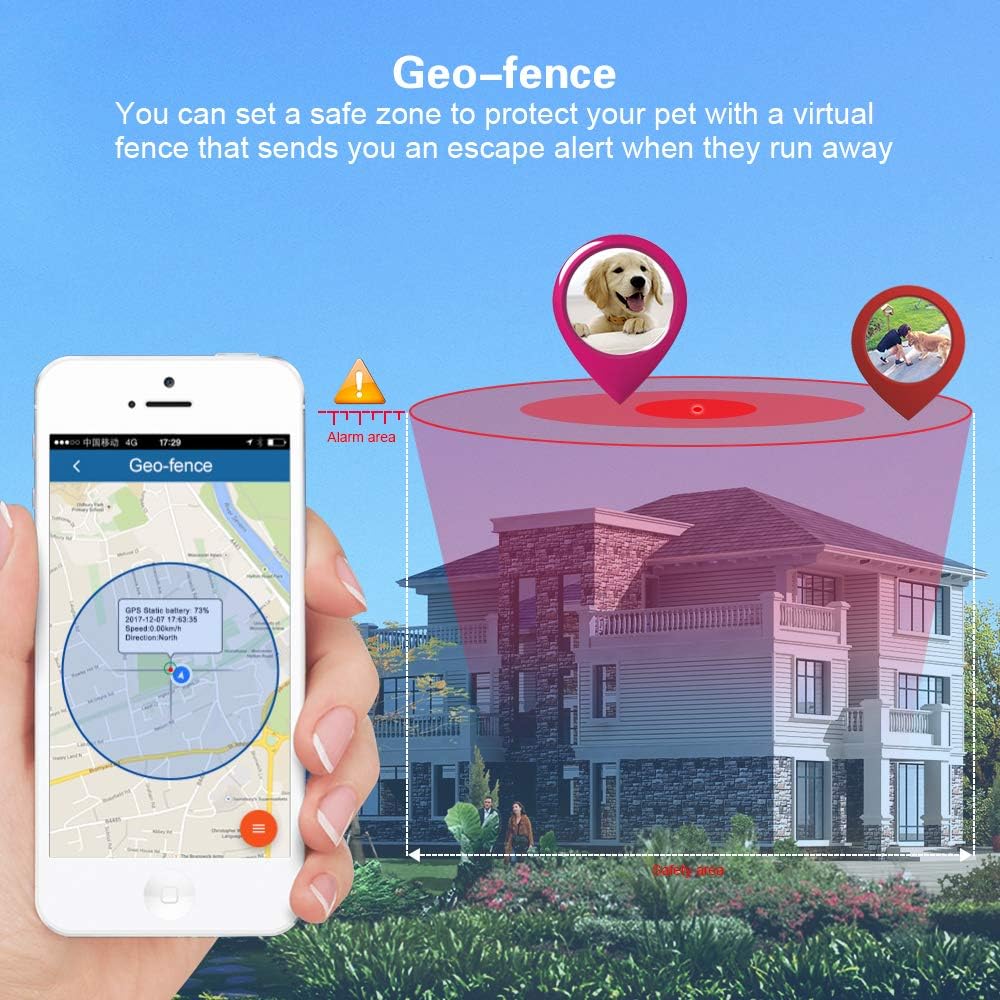
Image: The geofence feature displayed on the mobile application, illustrating how to set up a virtual safety zone.
6. Technical Specifications
| Model Number | 4GTK919PRO |
| Waterproof Rating | IP67 |
| Dimensions | 82 mm x 49 mm x 37 mm |
| Weight | 146 g |
| Network | 4G Version, GSM/GPRS/LTE (4GE LTE-FDD: B1/B3/B5/B7/B8/B20, GSM: 900/1800 MHz) |
| GPS Sensitivity | -159 dBm |
| GPS Accuracy | 5 meters |
| Charging Input | DC 5V - 1A |
| Battery | 3.7 V, 3000 mAh rechargeable lithium-ion battery |
| Charging Time | Approximately 7 hours |
| Storage Temperature | -40°C to +85°C |
| Operating Temperature | -20°C to +55°C |
7. Troubleshooting
If you encounter issues with your Winnes 4G GPS Dog Collar Tracker, please refer to the following common solutions:
- Device not online/No tracking data:
- Ensure the SIM card has an active data plan, SMS, and call functions.
- Verify that the SIM card's PIN code is disabled and voicemail is turned off.
- Confirm the APN settings are correctly configured via SMS (refer to section 3.2).
- Try removing and reinserting the SIM card to restart the device.
- Check for sufficient network signal in the device's location.
- Inaccurate GPS location:
- Ensure the device has a clear view of the sky for optimal GPS signal reception.
- GPS accuracy can be affected by dense urban areas, heavy foliage, or indoor environments.
- Short battery life:
- Ensure the device is fully charged (approximately 7 hours).
- Frequent real-time tracking updates consume more battery. Adjust the GPS working mode in the app settings to a standard or power-saving mode if longer battery life is desired.
- Extreme temperatures can affect battery performance.
- Cannot receive SMS replies:
- Verify the SIM card has active SMS services.
- Check if the tracker's SIM card has sufficient credit if it's a prepaid plan.
8. Maintenance
- Cleaning: Wipe the device with a soft, damp cloth. Do not use harsh chemicals or abrasive cleaners.
- Storage: Store the device in a cool, dry place when not in use. Avoid extreme temperatures.
- Battery Care: For optimal battery longevity, avoid fully discharging the battery frequently. Charge it regularly.
- Water Resistance: While IP67 waterproof, ensure the SIM card slot cover is always securely closed to prevent water ingress. Avoid prolonged submersion.
9. Support and Warranty
For further assistance or technical support, please contact Winnes customer service. You can find contact information on the official Winnes website or through your purchase platform.
Official Website for App Download and Information: www.mytkstar.net
WhatsApp Support: +86 15200963282
Please retain your proof of purchase for warranty claims. Specific warranty details may vary by region and retailer. Refer to the warranty card included in your package or contact customer support for more information.


