
1. Introduction
The XEAST XE-703S is a versatile 3-in-1 handheld device designed for professional and hobbyist use, integrating the functionalities of a 50MHz bandwidth oscilloscope, a 25000 counts digital multimeter, and a DDS signal generator. Featuring a 3.5-inch IPS display and a high real-time sampling rate of 280MSa/s, it provides precise measurements and accurate data analysis for a wide range of electrical and electronic applications. Its compact design and robust features make it an essential tool for diagnostics, testing, and development.

Figure 1.1: The XEAST XE-703S highlighting its three core functions: Multimeter, Signal Generator, and Oscilloscope.
2. Key Features
- Super Cost-Effective 3-in-1 Design: Combines oscilloscope, multimeter, and signal generator functions in a single portable unit.
- High Performance Oscilloscope: 2-channel, 50MHz bandwidth, 280MSa/s real-time sampling rate, 128kb recording depth, and ±400V max measuring voltage. Includes automatic measurement, XY function, and persistence mode.
- Accurate Digital Multimeter: 25000 counts, safety overload protection, continuity measurement, standard voltage, current, resistance, diode, line, and capacity tests. Features auto-range and relative measurement functions.
- Versatile Signal Generator: Capable of generating Sine, Square, Triangle, Half-wave, Full-wave, and Sawtooth waveforms.
- Excellent Ease of Use: Equipped with a 3.5-inch IPS display, 3400mA large capacity battery, USB Type-C for charging and data transfer. Supports waveform data storage, image export, PC transfer, brightness adjustment, and shutdown time settings.

Figure 2.1: Overview of the XEAST XE-703S's primary technical specifications and capabilities.
3. Setup
3.1 Package Contents
Before starting, verify that all items are present in the package:
- XEAST XE-703S Oscilloscope Multimeter
- Test Leads (Multimeter Probes)
- Oscilloscope Probes (x2)
- USB Type-C Charging Cable
- User Manual (this document)
- Carrying Case
- Small Screwdriver (for battery compartment, if applicable)

Figure 3.1: The XEAST XE-703S and its complete set of accessories.
3.2 Charging the Device
The XE-703S is powered by a built-in 3400mAh rechargeable 18650 Lithium-Ion battery. Before first use, it is recommended to fully charge the device. Connect the provided USB Type-C cable to the device's charging port and plug the other end into a standard USB power adapter (not included) or a computer's USB port. The charging indicator on the screen will show the charging status.

Figure 3.2: USB Type-C charging port and internal battery illustration.
3.3 Power On/Off
To power on the device, press and hold the power button (usually located on the side or top) until the screen illuminates. To power off, press and hold the same button until the screen turns off. The device also features an auto-power off function to conserve battery, which can typically be configured in the settings menu.
3.4 Connecting Probes
The XE-703S has dedicated input ports for oscilloscope probes (BNC connectors) and multimeter test leads (banana plug jacks). Ensure you connect the correct probes to the appropriate ports for the desired measurement mode. For oscilloscope measurements, connect the BNC probes to the CH1 and CH2 inputs. For multimeter functions, connect the red test lead to the VΩHz+ or mA/10A jack and the black test lead to the COM jack.
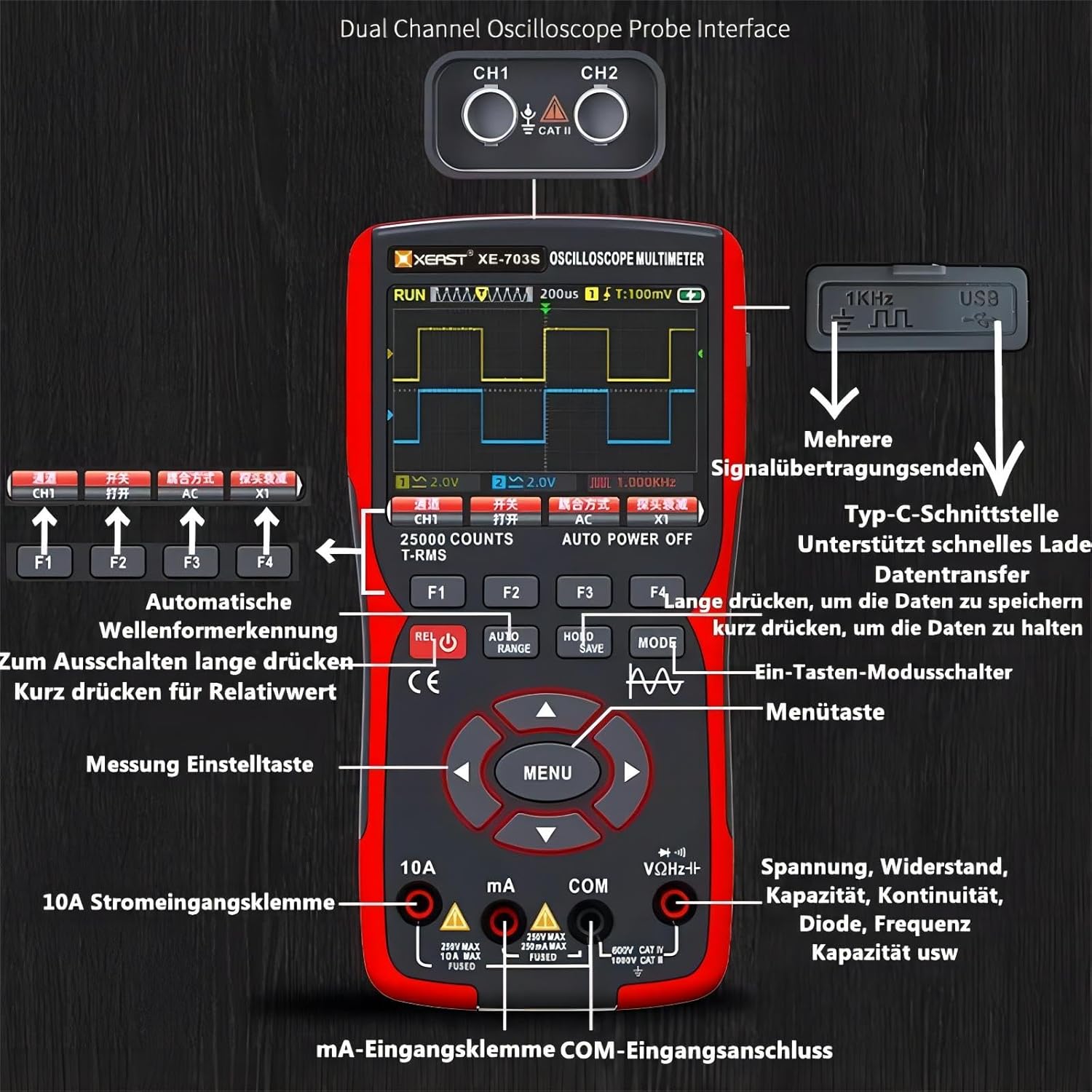
Figure 3.3: Input ports for oscilloscope probes and multimeter test leads.
4. Operating Modes
The XEAST XE-703S allows seamless switching between its three primary operating modes: Oscilloscope, Multimeter, and Signal Generator. Use the MODE button to cycle through these functions.
4.1 Oscilloscope Mode
In Oscilloscope mode, the device displays real-time waveforms, allowing for analysis of electrical signals. It supports dual-channel input, enabling simultaneous observation of two different signals.
- Channel Selection: Use the dedicated buttons (e.g., F1, F2) to enable/disable channels or adjust their settings.
- Time Base (VOL/TIME): Adjust the horizontal scale to view more or less of the waveform over time.
- Vertical Scale (VOL/TIME): Adjust the vertical scale (volts per division) to fit the signal amplitude on the screen.
- Trigger (TRIG): Set the trigger level and type (edge, slope) to stabilize the waveform display.
- Cursor (CURSOR): Use cursors to precisely measure voltage and time differences on the waveform.
- Auto Measurement: The device can automatically display key parameters like frequency, peak-to-peak voltage, and duty cycle.


Figure 4.1: Oscilloscope display showing dual-channel waveforms and a comparison of single vs. dual channel capabilities.
Video 4.1: A demonstration of the XEAST XE-703S operating as a handheld oscilloscope and multimeter, showcasing its dual-channel capabilities and user interface.
4.2 Multimeter Mode
The Multimeter mode provides precise digital measurements for various electrical parameters. Ensure the test leads are connected to the correct input jacks for the measurement type.
- Voltage (V): Measure DC and AC voltage.
- Current (A): Measure DC and AC current (mA and 10A ranges).
- Resistance (Ω): Measure resistance in Ohms.
- Capacitance (F): Measure capacitance in Farads.
- Diode Test: Check diode forward voltage drop.
- Continuity Test: Audible buzzer for circuit continuity.
- Auto Range: Automatically selects the appropriate measurement range for convenience.
- Hold/Save: Press HOLD/SAVE to freeze the current reading or save data.
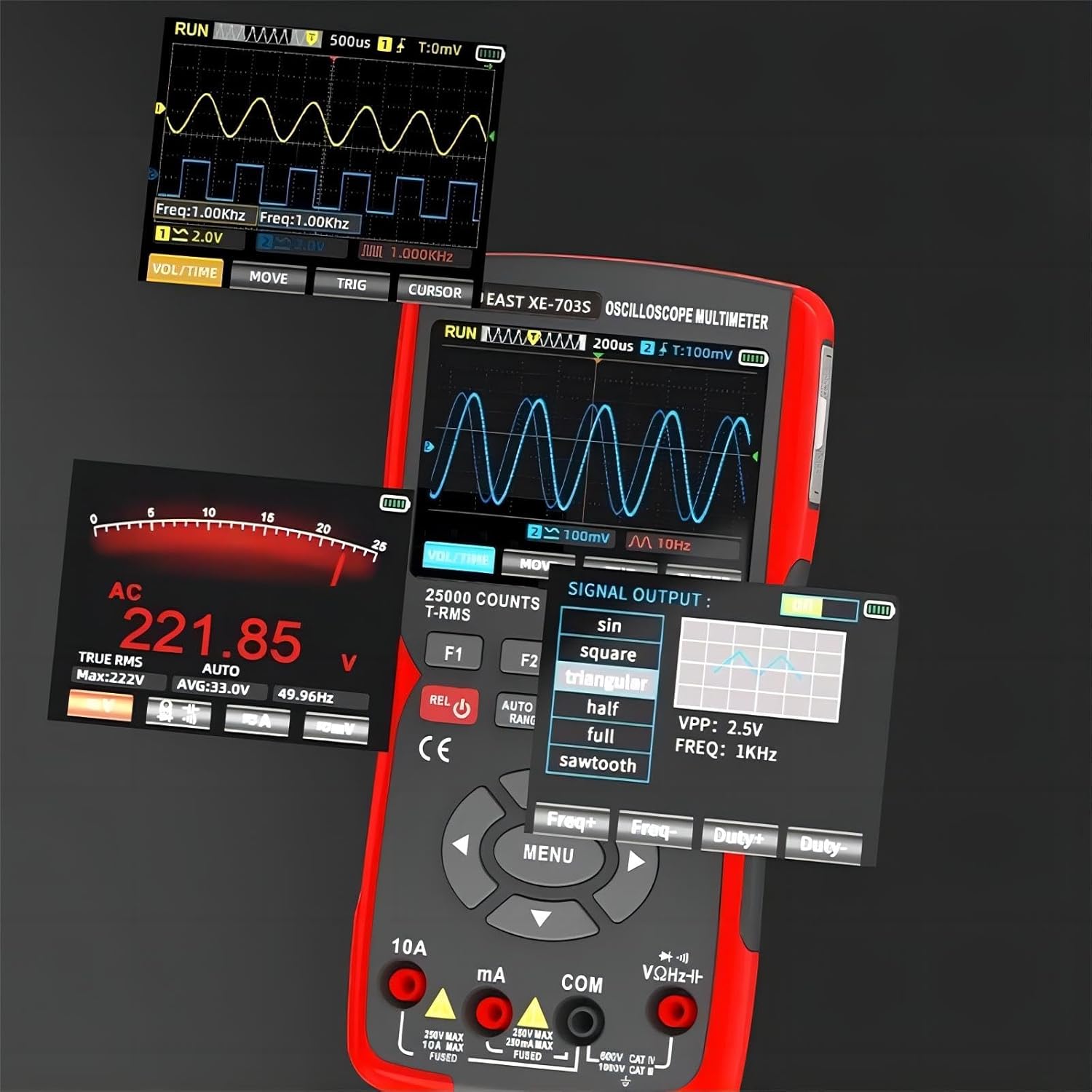
Figure 4.2: Multimeter display showing AC voltage measurement alongside oscilloscope and signal generator interfaces.
4.3 Signal Generator Mode
The DDS (Direct Digital Synthesis) Signal Generator mode allows you to output various waveforms at specified frequencies and amplitudes, useful for testing circuits and components.
- Waveform Selection: Choose from Sine, Square, Triangle, Half-wave, Full-wave, and Sawtooth waveforms.
- Frequency Adjustment: Set the desired output frequency.
- Amplitude (VPP) Adjustment: Control the peak-to-peak voltage of the output signal.
- Duty Cycle Adjustment: For square waves, adjust the duty cycle.

Figure 4.3: Signal Generator menu for waveform selection and parameter adjustment.
5. Maintenance
5.1 Cleaning
To maintain the device's performance and appearance, regularly clean its exterior with a soft, dry cloth. For stubborn dirt, a slightly damp cloth with mild detergent can be used, ensuring no liquid enters the device. Do not use abrasive cleaners or solvents.
5.2 Battery Care
The built-in Lithium-Ion battery is designed for long life. To maximize battery lifespan:
- Avoid fully discharging the battery frequently.
- Store the device in a cool, dry place when not in use for extended periods, ideally with the battery charged to about 50%.
- If the device will not be used for a long time, charge it every 3-6 months to prevent deep discharge.
5.3 Firmware Updates
Periodically check the XEAST official website for available firmware updates. Firmware updates can improve performance, add new features, or fix bugs. Follow the instructions provided with the firmware download carefully. Ensure the device is fully charged before attempting any firmware update.
6. Troubleshooting
This section addresses common issues you might encounter with your XEAST XE-703S. If the problem persists, please contact customer support.
| Problem | Possible Cause | Solution |
|---|---|---|
| Device does not power on. | Low battery; Power button not held long enough. | Charge the device fully. Press and hold the power button for at least 3 seconds. |
| Screen shuts off too quickly. | Auto-power off setting is too short. | Navigate to system settings (usually via MENU) and adjust the auto-power off time. |
| Inaccurate multimeter readings. | Incorrect probe connection; Damaged test leads; Out of range measurement. | Ensure test leads are correctly inserted into the appropriate jacks. Check leads for damage. Verify the measurement is within the device's specified range. |
| Oscilloscope waveform is unstable or flat. | Incorrect trigger settings; Probe not properly connected; Signal too small or too large. | Adjust trigger level and type. Ensure BNC probes are securely connected. Adjust vertical scale (VOL/TIME) to match signal amplitude. |
| Firmware update fails. | Insufficient memory; Incorrect firmware file; Low battery during update. | Ensure sufficient free space on the device. Download the correct firmware for your model. Fully charge the device before attempting an update. If issues persist, contact XEAST support. |
7. Specifications
| Parameter | Detail |
|---|---|
| Product Dimensions | 4 x 1.5 x 7 inches; 1.74 Pounds |
| Item Model Number | XE703S |
| Batteries | 1 Lithium Ion battery required (included), 3400mAh |
| Manufacturer | XEAST |
| Power Source | Battery Powered |
| Style | Oscilloscope, Multimeter, DDS Signal Generator |
| Color | XE-703S (Red/Black) |
| Display | 3.5 inch IPS LCD Display |
| Oscilloscope Bandwidth | 50MHz |
| Oscilloscope Channels | 2 Channel |
| Real-time Sampling Rate | 280MSa/s |
| Recording Depth | 128kb |
| Max. Measuring Voltage | ±400V (Oscilloscope) |
| Multimeter Counts | 25000 Counts |
| Multimeter Voltage Range | Up to 1000V DC / 750V AC |
| Multimeter Current Range | Up to 10A DC / 10A AC |
| Multimeter Resistance Range | Up to 250MΩ |
| Multimeter Capacitance Range | Up to 99.99mF |
| Signal Generator Waveforms | Sine, Square, Triangle, Half-wave, Full-wave, Sawtooth |
8. Warranty and Support
For warranty information, technical support, or service inquiries, please refer to the warranty card included with your product or visit the official XEAST website. Keep your purchase receipt as proof of purchase for warranty claims.
XEAST Official Store: Visit XEAST Store on Amazon
