
TONOR TW880
TONOR TW880 Wireless Microphone System User Manual
Model: TW880
1. Introduction
Thank you for choosing the TONOR TW880 Wireless Microphone System. This professional-grade system is designed to deliver outstanding audio quality and reliable performance for various applications, including church events, karaoke, stage performances, and public speaking. This manual provides detailed instructions for setting up, operating, and maintaining your system to ensure optimal performance and longevity.
The TONOR TW880 features 8 handheld dynamic microphones, a robust receiver with 4 antennas for enhanced transmission, and adjustable frequencies to minimize interference. Its durable metal construction ensures reliability for frequent use.
2. Package Contents
Please check the package carefully to ensure all items are present:
- 8 x Handheld Microphones
- 1 x UHF Wireless Receiver
- 8 x Anti-slip Rings (various colors)
- 8 x Microphone Foam Covers
- 1 x 6.35mm Audio Cable
- 1 x Power Adapter
- 1 x User Manual
- 16 x AA Batteries (2 per microphone)

Image: Complete TONOR TW880 Wireless Microphone System package contents.
3. Product Overview
3.1 UHF Wireless Receiver
The receiver is the central unit of your wireless microphone system, processing audio signals from the microphones and outputting them to your sound system. It features a robust metal build and a PRO-UHF chip for stable, interference-free reception.

Image: Detailed view of the UHF Wireless Receiver, highlighting its 4 high-gain antennas, individual volume adjustments, LCD display, and various audio output options (6.35mm and XLR).
3.2 Handheld Microphones
Each handheld microphone is constructed with durable metal materials, providing a comfortable grip and excellent resistance against impact. They feature a dynamic unidirectional capsule for clear audio pickup and a built-in display for channel and battery information.
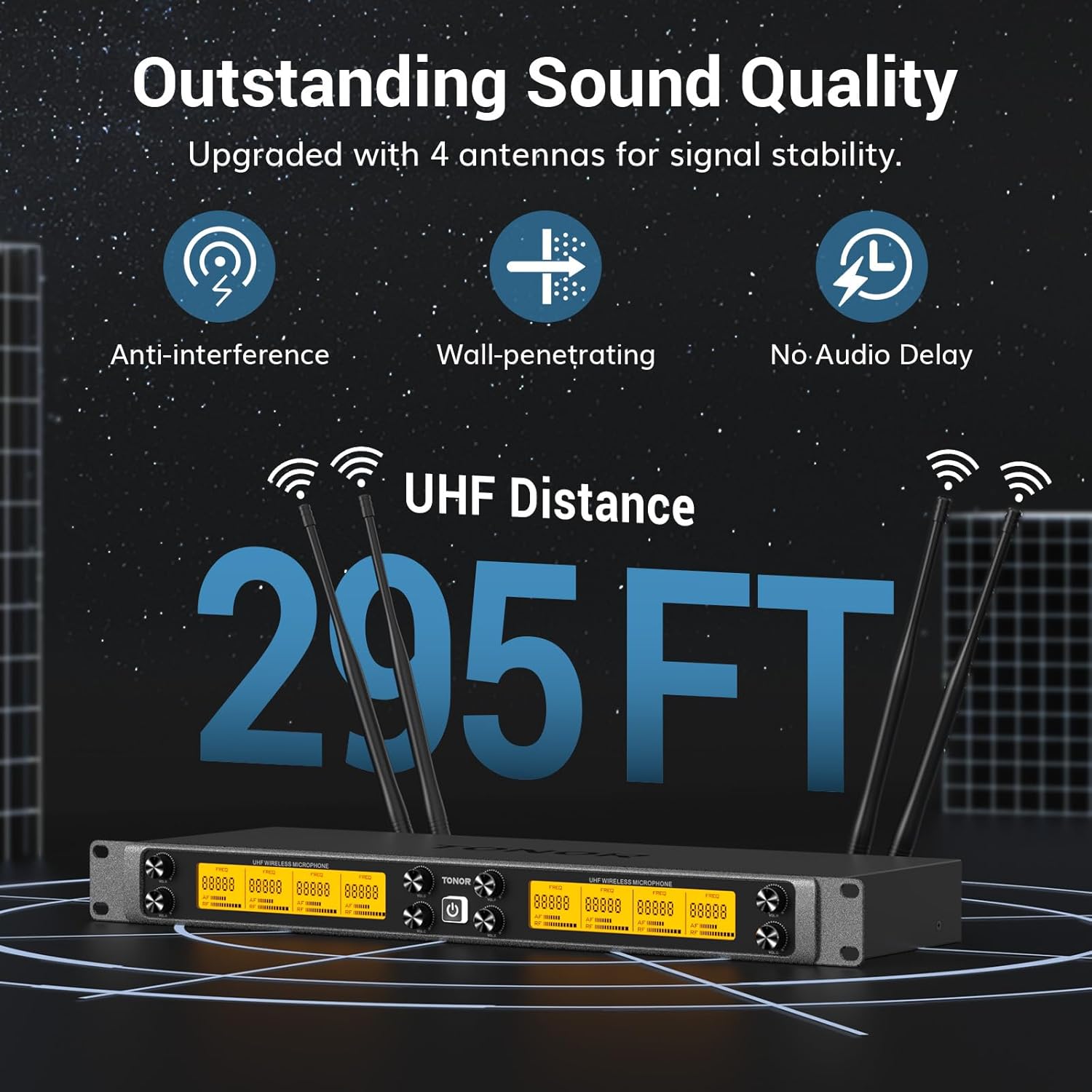
Image: Close-up of a UHF Handheld Wireless Microphone, detailing its rugged metal build, adjustable frequencies, comfortable grip, shatter-resistant steel mic, On/Off/Mute button, and channel switch button.
4. Setup Guide
4.1 Connecting the Receiver
- Place the receiver in a central location, away from large metal objects or other electronic devices that may cause interference.
- Attach the four high-gain antennas to the corresponding ports on the back of the receiver.
- Connect the power adapter to the receiver's DC IN port and plug it into a power outlet.
- Connect the receiver to your audio mixer, PA system, amplifier, or karaoke machine using the supplied 6.35mm audio cable or an XLR cable (not included) for balanced output.
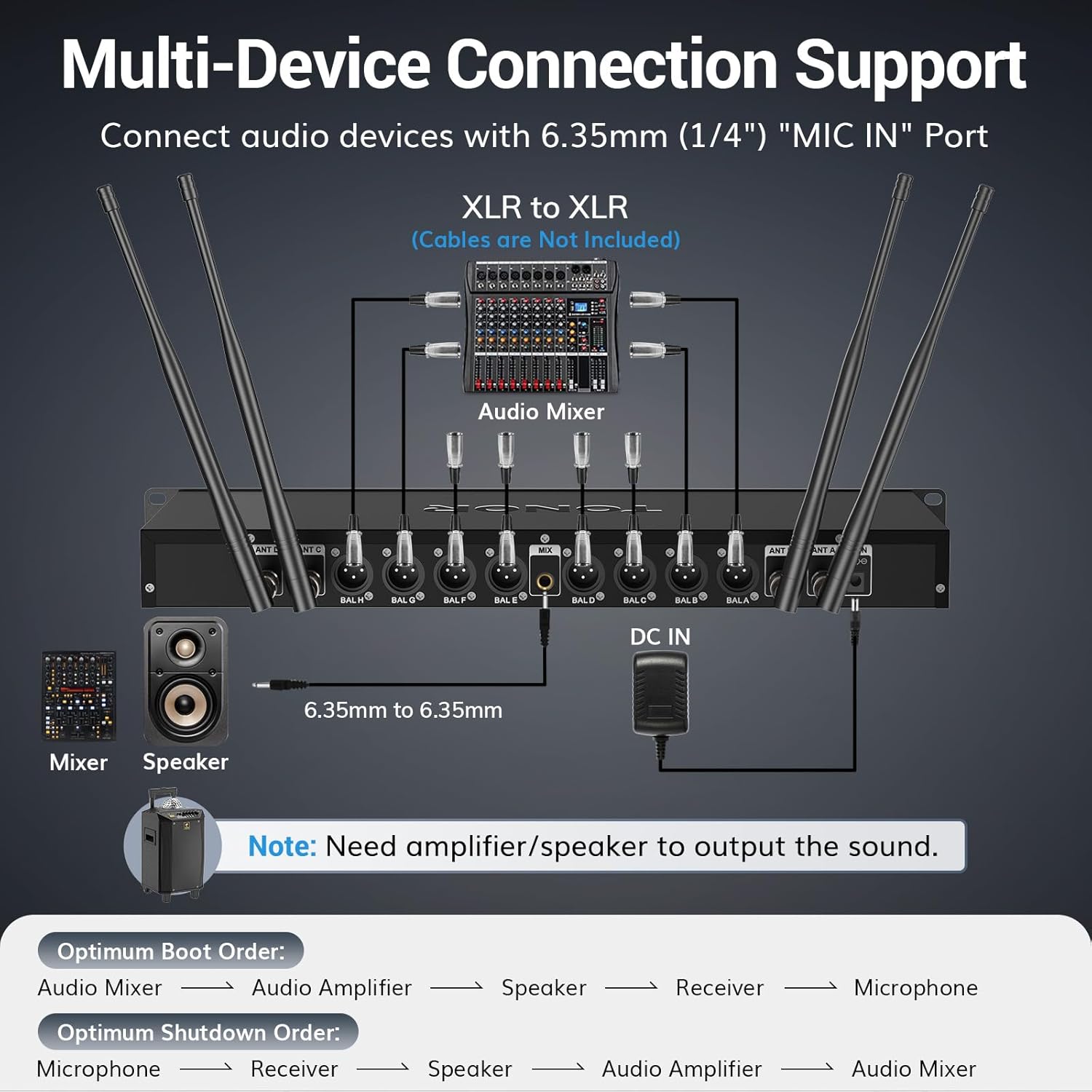
Image: Multi-Device Connection Support diagram, illustrating how to connect the receiver to an audio mixer, speakers, and other audio devices using 6.35mm or XLR cables.
4.2 Microphone Battery Installation
Each handheld microphone requires two AA batteries. To install:
- Unscrew the bottom part of the microphone to reveal the battery compartment.
- Insert two AA batteries, ensuring correct polarity (+/-).
- Screw the bottom part back on securely.
4.3 Powering On/Off
- Receiver: Press the power button on the front panel to turn the receiver on or off.
- Microphones: Press and hold the power button on the microphone handle for a few seconds to turn it on or off.
4.4 Channel Pairing and Switching
The microphones and receiver are pre-paired at the factory. If you experience interference or need to change channels, follow these steps:
Video: Instructions on how to switch between microphone channels (e.g., G and H mics) and re-pair the receiver and microphone if both mics have the same channels. This process involves turning off the microphone, long-pressing the power button until 'CH' displays, then short-pressing the 'HI-LO' button to select the desired channel, and finally re-pairing with the receiver.
Each wireless mic features 12 frequency options, totaling 96 options for 8 mics (8 x 12). This allows for the use of up to 96 systems simultaneously. With seamless frequency switching, you can rely on uninterrupted performance.
5. Operating Instructions
5.1 Adjusting Volume
Each microphone channel on the receiver has an independent volume control knob. Adjust these knobs to achieve the desired audio level for each microphone.
5.2 Mute Function
The handheld microphones feature a convenient mute function. Short press the power button on the microphone to toggle between active and mute modes. The microphone's display will indicate when it is muted.
5.3 Optimal Usage Range
The TONOR TW880 system offers an enhanced transmission range of up to 295 ft (90 m) in open areas. For optimal performance, ensure a clear line of sight between the microphones and the receiver. Walls and other obstacles can reduce the effective range.
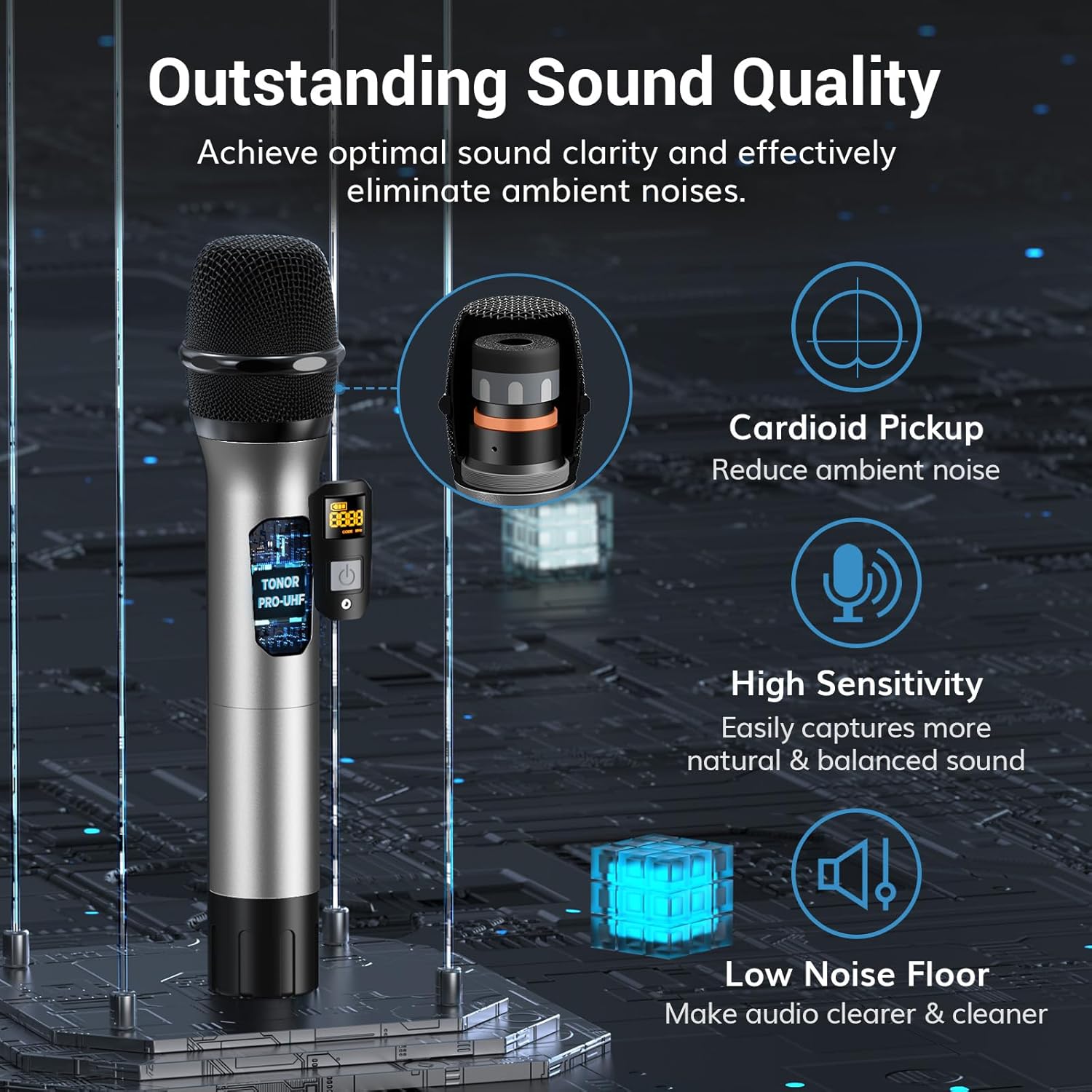
Image: Illustration of the system's 295ft UHF distance capability, highlighting anti-interference, wall-penetrating, and no-audio delay features for stable signal transmission.
6. Maintenance
- Cleaning: Use a soft, dry cloth to clean the receiver and microphones. Do not use liquid cleaners or abrasive materials.
- Battery Care: Remove batteries from microphones if they will not be used for an extended period to prevent leakage.
- Storage: Store the system in a cool, dry place, away from direct sunlight and extreme temperatures.
7. Troubleshooting
| Problem | Possible Cause | Solution |
|---|---|---|
| No sound output | Microphone or receiver not powered on; Volume too low; Incorrect cable connection; Muted microphone. | Ensure all devices are powered on. Check volume levels on both microphone and receiver. Verify audio cables are securely connected. Check if microphone is muted. |
| Interference or static noise | Other wireless devices on the same frequency; Obstacles blocking signal; Low battery. | Change the microphone channel (refer to Section 4.4). Relocate the receiver for better line of sight. Replace microphone batteries. |
| Microphone not pairing | Incorrect pairing procedure; Microphone out of range. | Follow the channel pairing and switching instructions in Section 4.4. Ensure microphone is within range of the receiver. |
| Short transmission range | Obstacles; Environmental interference. | Ensure clear line of sight between microphone and receiver. Avoid placing receiver near large metal objects or other strong signal sources. |
8. Specifications
| Feature | Detail |
|---|---|
| Model Name | TW880 |
| Microphone Form Factor | Handheld |
| Connectivity Technology | UHF |
| Number of Channels | 12 frequency options per mic (8 x 12 total) |
| Transmission Range | Up to 295 ft (90 m) |
| Material | Metal (Microphones and Receiver) |
| Polar Pattern | Unidirectional |
| Power Source | DC power (Receiver), 2 AA Batteries (Microphones) |
| Connector Type | 6.35 mm Jack, XLR |
| Special Features | Quick Mute, Excellent Signal Stability, All Metal Build |
| Compatible Devices | Audio Interface, Audio Mixer, PA System, Amplifier, Karaoke Machine |
9. Warranty and Support
TONOR products are designed for reliability and performance. For warranty information and technical support, please refer to the contact details provided with your purchase or visit the official TONOR website. Our customer service team is available to assist you with any questions or issues you may encounter.
For further assistance, please visit: TONOR Official Store on Amazon
Related Documents - TW880
 |
TONOR TW880 UHF Wireless Microphone Instruction Manual Comprehensive instruction manual for the TONOR TW880 UHF Wireless Microphone, covering setup, operation, specifications, troubleshooting, and compliance information. |
 |
TONOR TW450 UHF Wireless Microphone User Manual This user manual provides comprehensive instructions for the TONOR TW450 UHF Wireless Microphone system, covering setup, operation, specifications, and troubleshooting to ensure optimal performance for singing, speech, and events. |
 |
TONOR TW820, TW821, TW822 UHF Wireless Microphone Instruction Manual Comprehensive instruction manual for TONOR UHF wireless microphones, models TW820, TW821, and TW822. Learn about package contents, operating environments, specifications, and troubleshooting. |
 |
TONOR TW550 UHF Wireless Microphone Instruction Manual Comprehensive instruction manual for the TONOR TW550 UHF Wireless Microphone, covering setup, operation, specifications, pairing, troubleshooting, and compliance information for optimal audio performance. |
 |
TONOR TW840 UHF Wireless Microphone Instruction Manual Comprehensive instruction manual for the TONOR TW840 UHF Wireless Microphone system, detailing setup, operation, specifications, troubleshooting, and warranty information for optimal user experience. |
 |
TONOR UHF Wireless Microphone Instruction Manual for TW620, TW630, TW621, TW632 This comprehensive instruction manual provides essential information for the TONOR UHF Wireless Microphones, including models TW620, TW630, TW621, and TW632. It covers detailed operation instructions, technical specifications, and troubleshooting guidance to ensure optimal performance and user experience for these high-quality audio devices. |
Ask a question about this manual
Ask about setup, troubleshooting, compatibility, parts, safety, or missing instructions. Manuals+ will review the question and use this page’s manual context to help answer it.