
1. Introduction
This manual provides detailed instructions for the safe and efficient operation of your TKXEC SK90C Color Display Adjustable 90W DC DC Buck Boost Power Converter. Please read this manual thoroughly before use and retain it for future reference.
2. Safety Instructions
To ensure safe operation and prevent damage to the device or injury, please observe the following safety precautions:
- Input Voltage: Ensure the input voltage is within the specified range of DC 6-36V. Exceeding this range can damage the module.
- Polarity: Always verify correct input and output polarity before connecting the device. The module includes anti-reverse connection protection for the input, but incorrect output polarity can still cause damage to connected loads.
- Current and Power Limits: Do not exceed the maximum output current of 5A or maximum output power of 90W. Overloading the device can lead to overheating and failure.
- Ventilation: Ensure adequate ventilation around the module to dissipate heat, especially during high-power operation.
- Short Circuits: Avoid short circuits at the output. While the module has over-current protection, prolonged short circuits can stress components.
- Electrostatic Discharge (ESD): Handle the module with care to prevent electrostatic discharge, which can damage sensitive electronic components.
- Power Disconnection: Always disconnect power before making or changing any connections or adjustments to the module.
- Environment: Do not expose the module to moisture, dust, or extreme temperatures.
3. Product Overview
3.1 Features
- Input voltage range: DC 6-36V.
- Output voltage range: DC 0.5-36V, arbitrarily adjustable.
- Output current: 0-5A.
- Maximum output power: 90W.
- Safe Protection: Anti-reverse connection protection at input, anti-backflow protection at output (no need for external anti-backflow diode when charging).
- Multiple software protection mechanisms with adjustable thresholds (OVP, OCP, OPP, OAH, OHP). Output automatically turns off if thresholds are exceeded.
- Color LCD Display: 1.8-inch LCD for clear readings.
- Silicone Buttons: Comfortable and durable.
- Multifunction Display: Shows Voltage, Current, Power, Ah, Wh, Time, Temperature.
- Constant Current (CC) and Constant Voltage (CV) functions.
- Application: Can be used as a buck/boost module, high-power LED constant current driver, solar power controller, or for battery charging.
3.2 Components and Controls
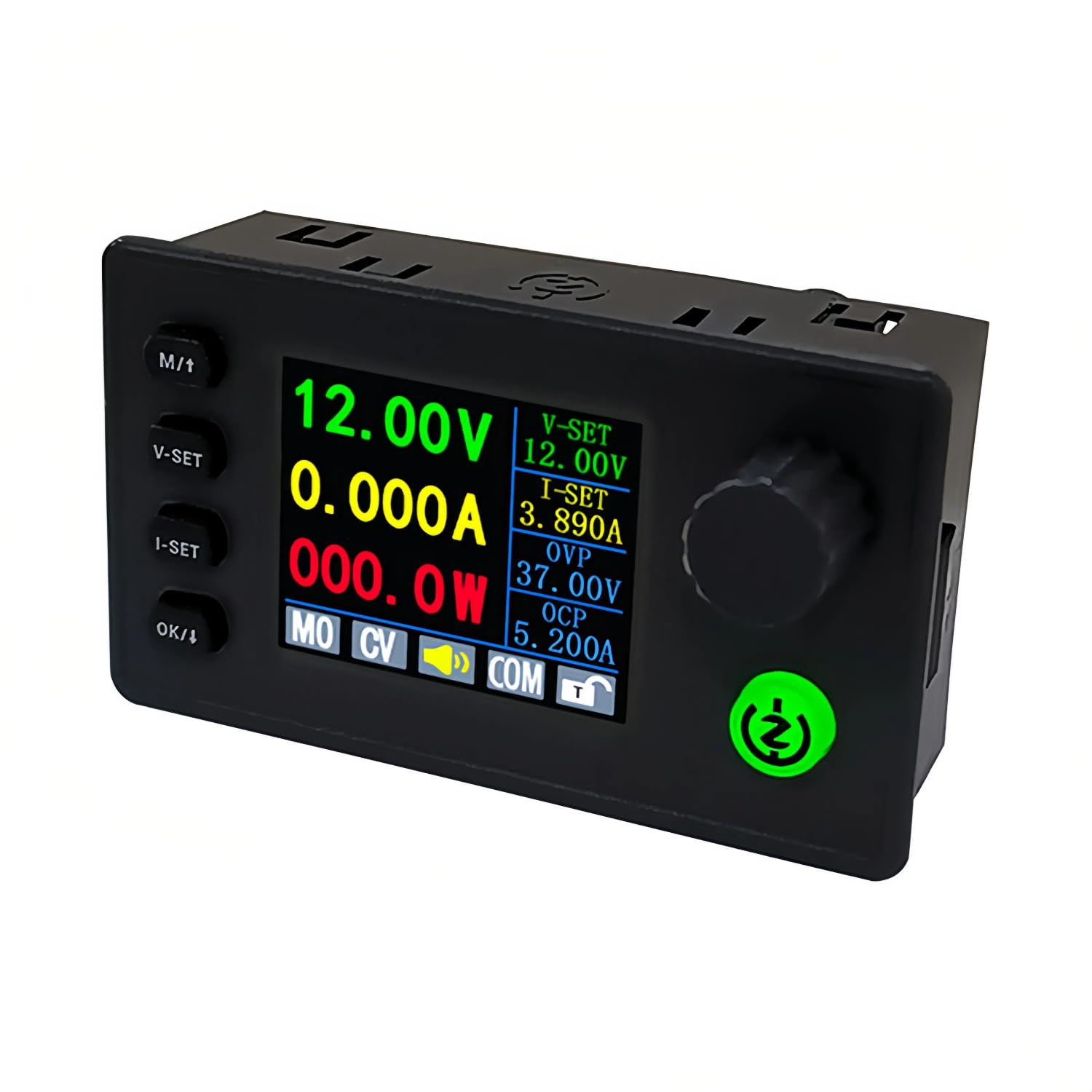
Figure 1: Front view of the TK90C power converter, showcasing its color LCD display and control buttons.

Figure 2: An overview of the TKXEC SK90C power converter, detailing its input/output voltage ranges, current, power, and memory settings.
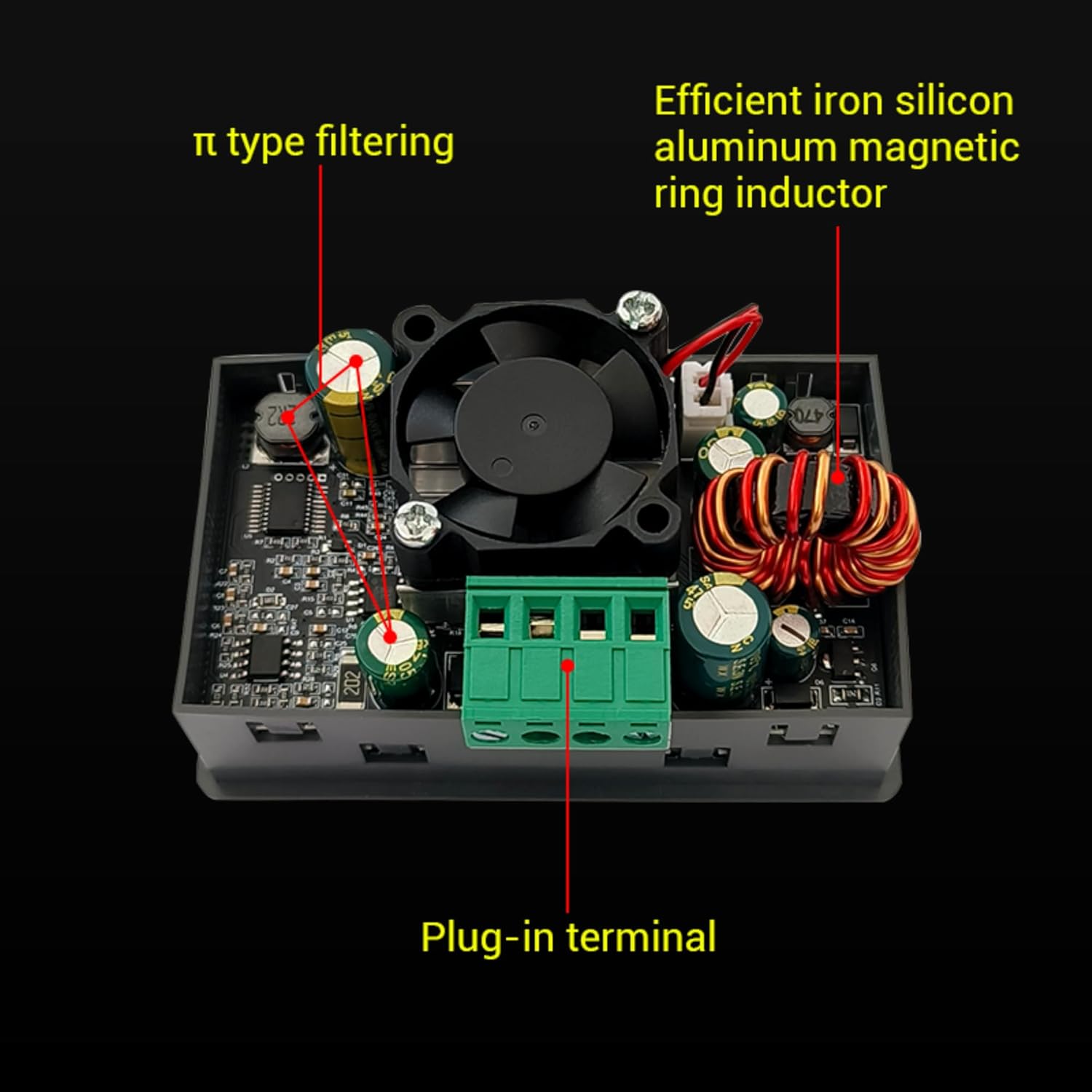
Figure 3: Detailed view of the internal components of the power converter, including the π-type filtering, efficient iron silicon aluminum magnetic ring inductor, and plug-in terminals.

Figure 4: A guide to the control interface, explaining the functions of the M/T, V-SET, I-SET, OK/↓ buttons, and the encoder knob for voltage, current, and system settings.

Figure 5: Physical dimensions of the power converter, highlighting the 1.8-inch large screen and the tactile silicone rubber keypads.
4. Setup
4.1 Assembly (Optional Case)
If your module came with an acrylic case, follow these steps for assembly:
- Carefully remove the protective film from all acrylic pieces.
- Mount the main circuit board onto the bottom acrylic plate using the provided standoffs and screws.
- Attach the top acrylic plate, ensuring all buttons and the display align correctly. Secure with remaining screws.
4.2 Initial Connection
- Identify the IN+ and IN- terminals for power input, and OUT+ and OUT- terminals for power output.
- Connect your DC power source (6-36V) to the IN+ (positive) and IN- (negative) terminals. Ensure correct polarity.
- Do not connect any load to the output terminals yet.
- Apply power to the input. The color LCD display should illuminate.
5. Operating Instructions
5.1 Setting Output Voltage and Current
The module allows precise adjustment of output voltage and current. Refer to Figure 4 for button locations.
- Setting Voltage: Short press the V-SET button. The voltage value on the display will blink. Turn the encoder knob to adjust the voltage. Short press V-SET again to move between digits for fine adjustment. Press OK/↓ to confirm the setting or wait a few seconds for it to auto-confirm.
- Setting Current: Short press the I-SET button. The current value on the display will blink. Turn the encoder knob to adjust the current limit. Short press I-SET again to move between digits for fine adjustment. Press OK/↓ to confirm the setting or wait a few seconds for it to auto-confirm.
- Enabling/Disabling Output: Short press the Power Key (green button) to turn the output ON or OFF. When the output is OFF, the display will show 0.000V and 0.000A.
5.2 Display Modes
The module can display various parameters. Short press the M/T button to cycle through different display modes:
- Output Voltage and Current
- Input Voltage and Output Current
- Temperature and Output Current
- Output Power and Output Current
- Amp-hours (Ah) and Output Current
- Watt-hours (Wh) and Output Current
- Time and Output Current
5.3 Protection Settings
The module features multiple protection functions. Long press the M/T button to enter the system settings interface. Use the encoder knob to navigate through the settings and short press OK/↓ to select. Turn the encoder knob to adjust values. Long press M/T again to exit.
- OVP (Over Voltage Protection): Set the maximum allowable output voltage.
- OCP (Over Current Protection): Set the maximum allowable output current.
- OPP (Over Power Protection): Set the maximum allowable output power.
- OAH (Over Amp-hour Protection): Set the maximum accumulated Amp-hours before output shutdown.
- OHP (Over Watt-hour Protection): Set the maximum accumulated Watt-hours before output shutdown.
- OTP (Over Temperature Protection): Set the maximum allowable operating temperature.
- CAL (Calibration): Allows for calibration of voltage and current readings if necessary. Consult advanced documentation or support for precise calibration procedures.
5.4 Video Demonstration
Video 1: This video demonstrates the basic operation of the TKXEC SK90C power converter, including setting output voltage and current, switching display modes, and navigating protection settings.
6. Specifications
| Feature | Value |
|---|---|
| Input Voltage Range | DC 6-36V |
| Output Voltage Range | DC 0.5-36V (Adjustable) |
| Output Current | 0-5A |
| Max Output Power | 90W |
| Display Type | Color LCD (1.8 inch) |
| Protection Features | Input Anti-reverse, Output Anti-backflow, OVP, OCP, OPP, OAH, OHP, OTP |
| Dimensions | 8.31 x 2.49 x 4.8 cm |
| Weight | 118 g |
| Certifications | CE, FCC, UL |
| Item Model Number | SK90C |
| UPC | 016392819359 |
7. Troubleshooting
If you encounter issues with your TKXEC SK90C module, refer to the following common problems and solutions:
- No Display/No Power:
- Check input power source connections and ensure it is supplying voltage within the 6-36V range.
- Verify input polarity.
- No Output Voltage:
- Ensure the output is enabled (green Power Key LED is ON).
- Check if any protection (OVP, OCP, OPP) has been triggered. The display may indicate a protection state.
- Verify output connections to the load.
- Incorrect Voltage/Current Readings:
- Compare readings with a calibrated multimeter.
- If discrepancies exist, the module may require calibration. Refer to the CAL setting in the protection settings menu (Section 5.3) or contact support for detailed calibration instructions.
- Overheating:
- Ensure adequate ventilation around the module.
- Check if the output current or power exceeds the module's specifications (5A, 90W). Reduce the load if necessary.
- Verify the OTP (Over Temperature Protection) setting.
- Display Language/Interface Issues:
- While the primary interface is English, if you encounter unexpected characters or menu navigation difficulties, try resetting the device (if a reset option is available in settings) or power cycling.
8. Maintenance
The TKXEC SK90C module is designed for reliable operation with minimal maintenance. Follow these guidelines:
- Cleaning: Keep the module clean and free from dust. Use a soft, dry cloth for cleaning. Do not use liquid cleaners or solvents.
- Connections: Periodically check all input and output connections to ensure they are secure and free from corrosion.
- Storage: When not in use for extended periods, store the module in a dry, cool environment away from direct sunlight and extreme temperatures.
9. Warranty and Support
For warranty information, technical support, or service inquiries, please contact your retailer or the manufacturer directly. Ensure you have your product model number (SK90C) and purchase details available when contacting support.