
WMK IDW20
WMK Smart Watch IDW20 User Manual
Model: IDW20
Introduction
This manual provides detailed instructions for setting up, operating, and maintaining your WMK Smart Watch IDW20. Please read this manual thoroughly before using the device to ensure proper function and to maximize your user experience. Keep this manual for future reference.
Package Contents
Verify that all items are present in your package:
- WMK Smart Watch IDW20
- Charging Cable (Magnetic)
- User Manual (This document)
Product Overview
The WMK Smart Watch IDW20 features a 1.91-inch HD color display and a high-quality metal frame. It is designed for both men and women, offering a range of health and fitness tracking capabilities.

Image: Front view of the WMK Smart Watch IDW20, showcasing its display and strap.
Key Components:
- Display: 1.91-inch HD Full Touch Screen
- Side Button: For power, menu access, and navigation.
- Sensors: Located on the back for heart rate, SpO2, etc.
- Charging Contacts: Magnetic contacts on the back for charging.
- Speaker/Microphone: For Bluetooth calls and Alexa interaction.
Setup
1. Charging the Device
Before initial use, fully charge your smartwatch. Connect the magnetic charging cable to the charging contacts on the back of the watch and plug the USB end into a power adapter (not included) or a computer's USB port. The watch will display a charging indicator. A full charge typically takes approximately 2 hours and provides 7-10 days of battery life, with a standby time of up to 30 days.
2. App Installation
To unlock the full functionality of your smartwatch, download and install the companion application on your smartphone. The app is named "VeryFit" (as indicated by user reviews). Search for "VeryFit" in the Apple App Store (for iOS devices) or Google Play Store (for Android devices).
- For iOS: Search "VeryFit" in the App Store.
- For Android: Search "VeryFit" in the Google Play Store.
Follow the on-screen instructions to complete the installation.
3. Device Pairing
After installing the app, open it and follow these steps to pair your smartwatch with your phone:
- Ensure your phone's Bluetooth is enabled.
- Open the VeryFit app and create an account or log in.
- Navigate to the "Device" or "Add Device" section within the app.
- The app will search for nearby devices. Select "IDW20" or the corresponding device name when it appears.
- Confirm the pairing request on both your phone and the smartwatch if prompted.
- Once paired, the watch will synchronize time and data with your phone.
Note: For full functionality, grant all necessary permissions requested by the app, including location, notifications, and contacts access.
Operating Instructions
Basic Navigation
- Swipe Up/Down: Scroll through menus or notifications.
- Swipe Left/Right: Access quick functions or widgets.
- Tap: Select an item or confirm an action.
- Side Button: Press to wake the screen, return to the watch face, or access the main menu.
Bluetooth Calling
The smartwatch allows you to make and receive calls directly from your wrist when connected to your smartphone via Bluetooth.
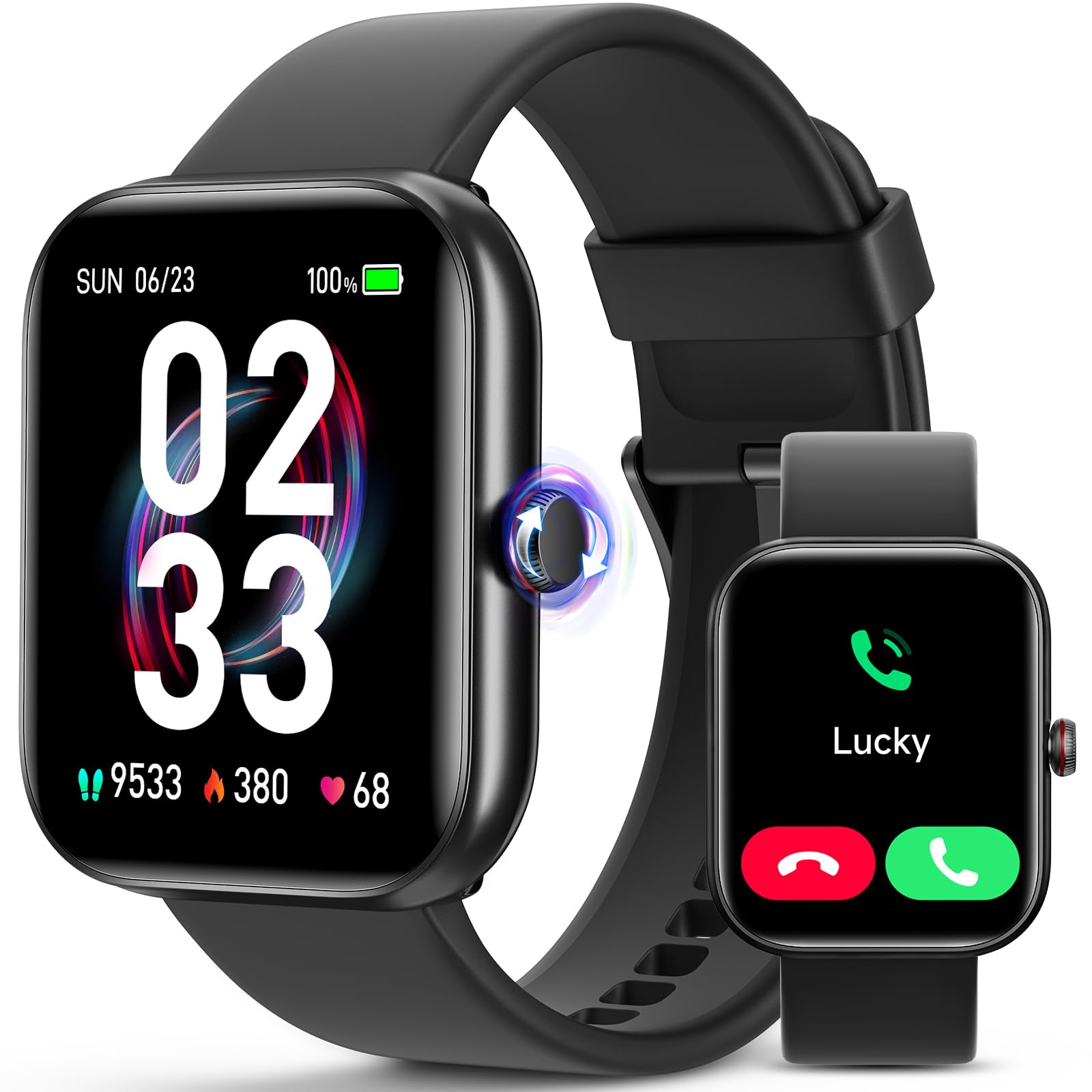
Image: The smartwatch displaying incoming call, AI voice assistant, and message notifications.
- Making Calls: Access the dial pad or contact list on the watch to initiate a call.
- Receiving Calls: When a call comes in, the watch will display the caller ID. Tap the green icon to answer or the red icon to reject.
- Call History & Contacts: The watch can store contacts and display call history after synchronization with the app.
Smart Notifications
Receive notifications from your smartphone directly on your watch. Ensure notification permissions are enabled in the VeryFit app and your phone's settings.

Image: The smartwatch showing notifications for activity reminders, hydration, steps, and alarms.
- Supported notifications include messages from apps like Facebook, WhatsApp, Instagram, and Twitter.
- The watch also provides reminders for sedentary alerts, meetings, and alarms.
Alexa Voice Assistant
The smartwatch has Alexa built-in. Activate Alexa at any time to check weather forecasts, control music, or perform other voice commands.
- To activate, tap the Alexa icon or use the designated voice command.
- Ensure your watch is connected to your phone and has an active internet connection for Alexa functionality.
Music Control
Control music playback on your smartphone directly from your watch. You can play, pause, skip tracks, and adjust volume.
Watch Face Customization
Personalize your watch with over 100 watch faces available through the VeryFit app. You can also upload your favorite photos to use as a custom dial.

Image: The smartwatch interface showing various functions including calculator, weather, music control, find phone, and calendar.
Health Monitoring
The WMK Smart Watch IDW20 offers comprehensive health tracking features to help you monitor your well-being.

Image: The smartwatch interface showing real-time data for heart rate, blood oxygen, sleep patterns, and menstrual cycle tracking.
Heart Rate Monitoring
The watch continuously monitors your heart rate throughout the day. View your real-time heart rate on the watch or detailed historical data in the VeryFit app.
Blood Oxygen (SpO2) Monitoring
Measure your blood oxygen saturation levels. This feature provides insights into your respiratory health. For accurate readings, ensure the watch is worn snugly on your wrist.
Sleep Tracking
The watch automatically tracks your sleep patterns, including deep sleep, light sleep, and awake times. Review your sleep quality analysis in the VeryFit app to understand your sleep habits.
Stress Monitoring
Monitor your stress levels throughout the day. The app provides insights and suggestions for managing stress.
Menstrual Cycle Tracking
For women, the watch offers tailored menstrual cycle tracking, providing personalized period management and fertility reminders. Set up this feature within the VeryFit app.
Sports Modes
The WMK Smart Watch IDW20 supports over 110 sports modes, designed for fitness enthusiasts. It accurately records your daily activities and real-time data.

Image: The smartwatch interface showing various sports modes like outdoor run, hiking, and pool swim, along with activity metrics.
- Track real-time data such as calories burned, distance covered, and steps taken.
- Select your desired sport mode on the watch before starting an activity.
- Examples of supported activities include running, swimming, hiking, and more.
Maintenance
Water Resistance (IP68)
The smartwatch has an IP68 waterproof rating, meaning it is resistant to dust and can withstand immersion in water up to 1.5 meters for up to 30 minutes. It is suitable for daily use, hand washing, and swimming. However, it is not recommended for hot showers, saunas, or diving, as steam and hot water can compromise the seal.
Cleaning
- Wipe the watch screen and body with a soft, damp cloth.
- Clean the charging contacts regularly to ensure efficient charging.
- Avoid using harsh chemicals or abrasive materials.
Strap Replacement
The watch features a removable strap and is compatible with various 22mm band options. To replace the strap, locate the quick-release pins on the underside of the strap and gently slide them to detach the strap. Attach a new 22mm strap by reversing the process.
Troubleshooting
Device Not Turning On
- Ensure the watch is fully charged. Connect it to the charger for at least 30 minutes.
- Press and hold the side button for several seconds to power on.
Cannot Pair with Phone
- Make sure Bluetooth is enabled on your phone.
- Ensure the VeryFit app is installed and running.
- Place the watch close to your phone during pairing.
- Restart both your phone and the watch, then try pairing again.
- Check if the watch is already paired with another device. Disconnect if necessary.
Notifications Not Received
- Verify that notification permissions are granted to the VeryFit app in your phone's settings.
- Ensure the watch is connected to your phone via Bluetooth.
- Check the notification settings within the VeryFit app to ensure desired apps are enabled.
- Disable "Do Not Disturb" mode on both your phone and watch.
Inaccurate Health Data
- Ensure the watch is worn snugly on your wrist, not too tight or too loose.
- Keep the sensor area clean and free from obstructions.
- Environmental factors and individual physiology can affect readings. The watch is not a medical device.
Alexa Not Responding
- Confirm the watch is connected to your phone and your phone has an active internet connection.
- Ensure Alexa is properly set up and logged in within the VeryFit app.
- Check microphone access permissions for the app.
Specifications
| Model Name: | IDW20 |
| Brand: | WMK |
| Screen Size: | 1.91 Inches |
| Operating System: | Android and iOS compatible |
| Connectivity: | Bluetooth |
| Water Resistance: | IP68 (Waterproof) |
| Battery Capacity: | 350 mAh (Lithium Polymer) |
| Battery Life: | 7-10 days (typical use), 30 days (standby) |
| Memory Storage: | 128 MB |
| Special Features: | Heart Rate Monitor, SpO2 Monitor, Sleep Monitor, Stress Monitor, Activity Tracker, Notifications, Alexa Assistant, Bluetooth Calling, 110+ Sports Modes, Menstrual Cycle Tracking |
| Item Weight: | 0.1 Kilograms |
| Item Dimensions: | 15 x 3 x 1 inches |

Image: Visual comparison highlighting the 1.91-inch display and 320*385 resolution of the WMK Smart Watch IDW20 against a smaller, lower-resolution display.
Warranty and Support
WMK provides a 3-year extended service for this product. If you encounter any issues or have questions regarding your WMK Smart Watch IDW20, please contact our dedicated customer support team. Refer to the product packaging or the official WMK website for contact information.
Related documentsIDW20


Ask a question about this manual
Ask about setup, troubleshooting, compatibility, parts, safety, or missing instructions. Manuals+ will review the question and use this page’s manual context to help answer it.