
1. Introduction
The HIXX Smart Bird Feeder with Camera (Model PC0022) offers an advanced birdwatching experience, combining a high-definition camera with artificial intelligence for bird identification. This manual provides detailed guidance to ensure optimal performance and enjoyment of your smart bird feeder.

Figure 1.1: HIXX Smart Bird Feeder with Camera and CoolFly App Interface.
2. Product Features
- 2K HD Camera with 150° Wide-Angle Lens: Captures clear, detailed video of birds.
- Color Night Vision: Provides full-color observation even in low-light conditions.
- AI Bird Identification: Utilizes the CoolFly app to identify over 10,000 bird species without subscription.
- Real-time Notifications: Sends instant alerts to your smartphone when birds are detected.
- Two-Way Audio: Features a built-in dual-channel microphone for interaction.
- Solar Powered: Equipped with a solar panel for continuous outdoor operation.
- IP65 Weatherproof Rating: Designed for outdoor use in various weather conditions.
- CoolFly App Integration: Offers interactive birding features, video sharing, and a bird database.
- ChirpChat AI: An AI assistant within the app to answer bird-related questions.
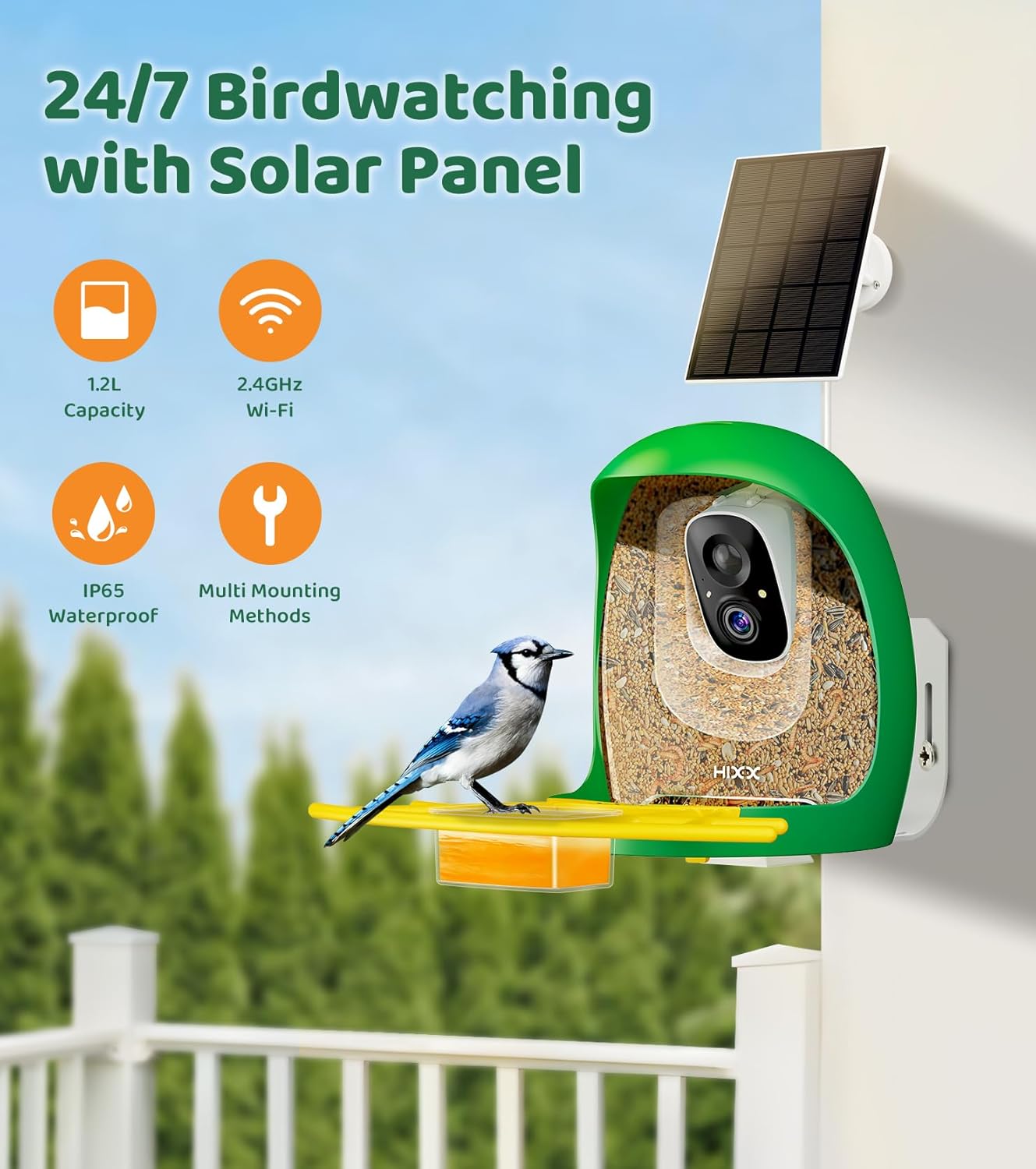
Figure 2.1: Key features of the HIXX Smart Bird Feeder, including solar power and weather resistance.

Figure 2.2: Camera specifications: 2K HD and 150° wide-angle lens.
3. Package Contents
Verify that all components are present in the package:
- HIXX Smart Bird Feeder with integrated camera
- Solar Panel
- Mounting Bracket and Screws
- USB Charging Cable
- User Manual (this document)
- Optional DIY accessories (e.g., fruit forks, water tray)
4. Setup Instructions
4.1. Charging the Device
Before initial use, fully charge the bird feeder's internal battery using the provided USB charging cable. Connect the cable to the charging port on the feeder and a standard USB power adapter (not included). The solar panel will maintain the charge during outdoor use, but an initial full charge is recommended.
4.2. App Installation and Connection
- Download the "CoolFly" app from the App Store (iOS) or Google Play Store (Android).
- Open the CoolFly app and create an account or log in.
- Follow the in-app instructions to add your HIXX Smart Bird Feeder. Ensure your smartphone is connected to a 2.4GHz Wi-Fi network during the setup process, as the feeder only supports 2.4GHz Wi-Fi.
- Position the feeder within range of your Wi-Fi signal for stable connectivity.

Figure 4.1: CoolFly App interface for AI ChirpChat.
4.3. Mounting the Feeder
The feeder can be mounted using various methods (e.g., pole mount, wall mount). Choose a location that provides a clear view for the camera, is easily accessible for refilling and cleaning, and receives adequate sunlight for the solar panel.
- Attach the mounting bracket securely to your chosen surface (pole, wall, tree).
- Mount the bird feeder onto the bracket.
- Position the solar panel to maximize sun exposure throughout the day. Ensure the cable connecting the solar panel to the feeder is protected from potential damage, such as from squirrels.
5. Operating Instructions
5.1. Filling the Feeder
To fill the feeder, gently pull back the top cover. Pour bird seed into the main compartment. Ensure the cover is tightly closed after filling to prevent moisture ingress and protect internal components.

Figure 5.1: Steps for adding bird seed to the feeder.
5.2. Using the CoolFly App
- Live View: Access real-time video streaming from the camera.
- AI Bird Identification: The app automatically identifies bird species visiting the feeder. You can review identified birds and learn more about them.
- Event Recording: The camera automatically records short video clips when motion is detected. These clips are stored in the app's gallery.
- Notifications: Receive instant alerts on your phone when a bird visits the feeder.
- Two-Way Communication: Use the app to activate the microphone and speaker to deter unwanted visitors like squirrels or to listen to bird sounds.
- ChirpChat AI: Engage with the AI assistant to ask questions about birds, their habits, and more.
- Community Features: Share your bird sightings, interact with other bird enthusiasts, and explore content from the global birdwatching community.

Figure 5.2: CoolFly App features for bird identification and community interaction.

Figure 5.3: Bird Highlight Log in the CoolFly App.
6. Maintenance
6.1. Cleaning the Feeder
Regular cleaning is essential to prevent mold and maintain a healthy environment for birds. To clean the feeder:
- Remove the feeder from its mounting.
- Open the feeder and discard any old or wet bird seed.
- Detach the feeding tray and other removable parts.
- Clean all parts with warm, soapy water and a brush. Rinse thoroughly.
- Ensure all components are completely dry before reassembling and refilling with fresh seed.

Figure 6.1: Easy cleaning steps for the HIXX Smart Bird Feeder.
6.2. Solar Panel and Battery Care
Periodically check the solar panel for dirt or debris and clean it gently to ensure efficient charging. If the feeder is in a shaded area or experiences prolonged cloudy weather, the battery may drain. In such cases, manually charge the feeder using the USB cable.
7. Troubleshooting
| Problem | Possible Cause | Solution |
|---|---|---|
| No Power/Camera Not Working | Low battery; solar panel not receiving enough sunlight; damaged charging cable. | Fully charge the feeder via USB. Ensure the solar panel is in direct sunlight and clean. Check the charging cable for damage. |
| Wi-Fi Connectivity Issues | Feeder too far from router; incorrect Wi-Fi password; 5GHz Wi-Fi network used; app glitch. | Move the feeder closer to the Wi-Fi router. Verify Wi-Fi password. Ensure you are connecting to a 2.4GHz network. Restart the app and try reconnecting. |
| Bird Seed Gets Wet/Moldy | Top cover not securely closed; heavy rain exposure. | Ensure the top cover is tightly sealed after refilling. Consider placing the feeder under an overhang or adding a larger rain guard if persistent. Regularly clean out wet or moldy seed. |
| Small Birds Trapped Inside | Low seed level allowing birds to enter the main compartment. | Keep the feeder adequately filled with seed to prevent small birds from entering the internal cavity. |
| Squirrels Damaging Wires | Exposed solar panel cable. | Protect the solar panel cable with a durable conduit or position it out of reach of squirrels. Use the in-app warning button or flashing light to deter squirrels. |
8. Specifications
| Brand | HIXX |
| Model Number | PC0022 |
| Product Dimensions | 10.43"L x 7.87"W x 9.45"H |
| Item Weight | 4.4 pounds |
| Power Source | Solar Powered |
| Special Features | Built-In Camera, Long Lasting, Rain Proof, Squirrel Proof, Weatherproof |
| Mounting Type | Pole Mount |
| Connectivity | 2.4GHz Wi-Fi |
| Camera Resolution | 2K HD |
| Lens Angle | 150° Wide-Angle |
| Waterproof Rating | IP65 |

Figure 8.1: Product dimensions.
9. Warranty and Support
The HIXX Smart Bird Feeder is covered by a standard return policy. For specific warranty details, please refer to your purchase documentation or contact the seller directly.
Customer Service
For any questions or assistance, please contact HIXX customer service. You can reach support through the following methods:
- Via Amazon: Navigate to your order details on Amazon and select "Contact Seller" for HIXX Smart Birding Essentials.
- Via CoolFly App: In the CoolFly app, go to "Profile" > "More Settings" > "Customer Service".
- Email: support@hixxhome.com
When contacting support, please provide your product model number (PC0022) and a detailed description of your issue, including any relevant screenshots or video clips.

Figure 9.1: Customer service contact options.
