
Introduction
Thank you for choosing the HYDONG YK32 Rechargeable Light Bulbs. These battery-operated LED bulbs are designed to provide versatile lighting solutions for areas without hardwired electrical connections. Featuring multiple color temperatures, RGB color-changing modes, remote control, and a magnetic base, these bulbs offer convenience and adaptability for various applications.

Image: Overview of the HYDONG YK32 rechargeable light bulbs and included accessories.
Safety Instructions
Please read all safety instructions carefully before using the product. Failure to follow these instructions may result in electric shock, fire, or other hazards.
- INGESTION HAZARD: This product contains a button or coin cell battery. A swallowed button or coin battery can cause internal chemical burns in as little as 2 hours and lead to death. Keep new and used batteries OUT OF REACH OF CHILDREN. If you suspect a battery has been swallowed or inserted inside any part of the body, seek immediate medical attention.
- Do not expose the bulbs to water or excessive moisture.
- Do not attempt to disassemble, repair, or modify the bulbs. This will void the warranty.
- Use only the provided Type-C USB cable for charging.
- Ensure the charging voltage is 5V DC.
- Keep the product away from direct heat sources and open flames.
- This product is intended for indoor use only.

Image: Safety instructions and warnings from the product packaging.
Package Contents
Verify that all items are included in your package:
- Rechargeable Light Bulbs (2 units)
- Remote Controls (2 units)
- E26 Screw Bases (2 units)
- E12 Screw Bases (2 units)
- Type-C USB Charging Cables (2 units)
- Sticky Iron Sheets for magnetic mounting (2 units)
- User Manual (this document)
Product Features
- USB Detachable Rechargeable Design: Built-in 2200mAh battery. Magnetic base allows easy removal for charging without unscrewing the fixture.
- Multiple Color Temperatures: Offers 3 color temperatures for daily use: 3000K Warm White, 4000K Natural White, and 6000K Cool White.
- RGB Color Changing: Features 12 static color night light modes and 4 dynamic RGB combination effects for ambiance.
- Dual Control Methods: Operate via included remote control or the multi-function button on the bulb.
- Adjustable Brightness: Dimmable from 15% to 100%.
- Timer Function: Set automatic shut-off for 30, 60, or 120 minutes.
- Memory Mode: Bulb automatically turns on to the last used lighting mode.
- Versatile Installation: Compatible with E26 and E12 screw bases. Can be magnetically attached to metal surfaces or hung using the portable hook.

Image: Multi-function button and remote control capabilities.
Setup
1. Charging the Bulb
- Remove the bulb from its base if already installed.
- Connect the provided Type-C USB cable to the charging port on the bulb.
- Connect the other end of the USB cable to a 5V DC power source (e.g., USB wall adapter, computer USB port).
- The charging indicator light will be red during charging.
- A full charge takes approximately 4 hours. The indicator light will turn blue when fully charged.
- A fully charged bulb can operate for up to 6 hours at the highest white light level or up to 24 hours at the lowest brightness setting.

Image: Charging the rechargeable light bulb via Type-C USB.
2. Installing the Bulb
The HYDONG YK32 bulbs offer multiple installation options:
- Into a Fixture (E26/E12):
- Select the appropriate screw base (E26 for standard, E12 for candelabra).
- Screw the chosen base into your lamp fixture (e.g., wall sconce, table lamp, chandelier).
- Align the magnetic base of the charged bulb with the installed screw base and attach it. The magnetic connection allows for easy removal for charging.

Image: Magnetic design for easy installation and removal from fixtures.
- Magnetic Surface Attachment:
- If attaching to a non-magnetic surface, peel the backing from a sticky iron sheet and adhere it to the desired location (e.g., inside a cabinet, wardrobe).
- Attach the magnetic base of the bulb directly to the metal surface or the sticky iron sheet.

Image: Bulbs used as puck lights under kitchen cabinets.
- Using the Portable Hook:
- Extend the portable hook located at the top of the bulb.
- Hang the bulb in desired locations such as inside a tent, closet, or for outdoor use.
Operating Instructions
Using the Remote Control
The remote control operates within a 10-meter range. Ensure the remote is pointed towards the bulb for optimal response.
- On/Off: Press the ON or OFF button to power the bulb on or off.
- Brightness Adjustment: Use the + or - buttons to adjust brightness from 15% to 100%.
- Color Temperature Selection: Press the 3000K (Warm White), 4000K (Natural White), or 6000K (Cool White) buttons for desired white light.
- RGB Color Modes:
- Press any of the 12 color buttons to select a static color.
- Press the FLASH, STROBE, FADE, or SMOOTH buttons for dynamic RGB effects.
- Timer Function: Press 30min, 60min, or 120min to set the bulb to automatically turn off after the selected duration.
- Memory Mode: The bulb will automatically recall the last used lighting mode (color, brightness, and effect) when turned back on.
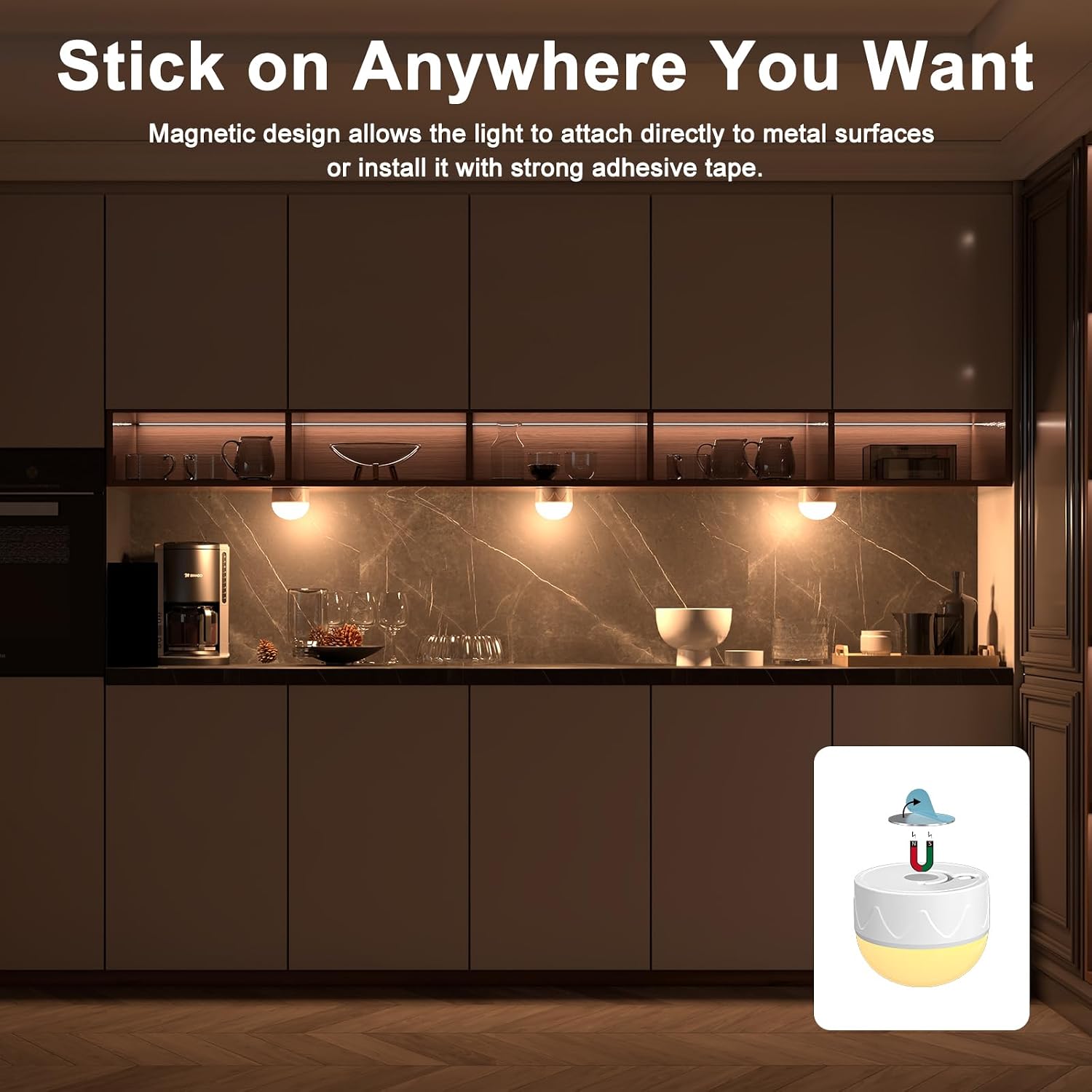
Image: Examples of RGB color changing modes for various atmospheres.
Using the Multi-function Button on the Bulb
In case the remote control is unavailable, the bulb can be operated directly:
- Press once: Turns the bulb On/Off.
- Press twice: Cycles through color temperatures (Warm White, Natural White, Cool White) and RGB color modes.
- Long press: Adjusts brightness.
Maintenance
- Charging: Recharge the bulbs when the light output diminishes. Frequent charging is normal for battery-operated devices.
- Cleaning: Wipe the bulb with a soft, dry cloth. Do not use liquid cleaners or abrasive materials.
- Storage: If storing the bulbs for an extended period, ensure they are fully charged and store them in a cool, dry place. Recharge every 3-6 months to maintain battery health.
Troubleshooting
| Problem | Possible Cause | Solution |
|---|---|---|
| Bulb does not turn on. | Battery is depleted. | Charge the bulb using the provided USB cable. |
| Remote control not working. | Remote battery is dead or remote is too far/not aimed correctly. | Replace the CR2032 battery in the remote. Ensure remote is within 10m and pointed at the bulb. Try operating the bulb using its multi-function button. |
| Bulb not charging. | Charging cable or power source issue; bulb defect. | Ensure the USB cable is securely connected and the power source is functional. Try a different cable or power adapter. If problem persists, contact customer support. |
| Short battery life. | High brightness settings or frequent use of RGB modes consume more power. | Reduce brightness or use white light modes for longer battery duration. Ensure the bulb is fully charged before use. |
| Bulb detaches from base easily. | Weak magnetic connection. | Ensure the bulb is properly aligned with the magnetic base. Check for any obstructions between the bulb and the base. |
Specifications
| Feature | Detail |
|---|---|
| Model Name | YK32 |
| Brand | HYDONG |
| Light Type | LED |
| Wattage | 3 watts |
| Brightness | 300 Lumens (White Light) |
| Bulb Shape Size | A19 |
| Bulb Base Compatibility | E26 Medium, E12 Candelabra |
| Color Temperature | 3000K (Warm White), 4000K (Natural White), 6000K (Cool White) + RGB |
| Battery Capacity | 2200mAh |
| Charging Method | Type-C USB, 5V DC |
| Charging Time | Approx. 4 hours |
| Operating Time (Max/Min Brightness) | 6 hours (highest white light) / 24 hours (lowest brightness) |
| Control Method | Remote Control, Bulb Button |
| Remote Control Range | 10 meters |
| Product Dimensions | 2.76"W x 3.74"H |
| Material | Plastic |
| Indoor/Outdoor Usage | Indoor |
| Remote Battery | 1 CR2032 (included) |
For more detailed energy information, please refer to the EU EPREL database: https://eprel.ec.europa.eu/qr/1854868
Warranty and Support
HYDONG offers a 1-year free replacement warranty for the remote and bulb. If you encounter any issues or have questions regarding your HYDONG YK32 Rechargeable Light Bulbs, please do not hesitate to contact our customer support team. We are committed to providing assistance and ensuring your satisfaction.
For support, please refer to the contact information provided with your purchase or visit the official HYDONG store on Amazon: HYDONG Amazon Store.