
LASER TREE LT-80W-F45
LASER TREE LT-80W-F45 24V 10W Laser Module Instruction Manual
Model: LT-80W-F45 24V
1. Safety Information
This device is a Class 4 laser product. Improper use can result in serious injury. Always follow safety guidelines.
- Eye Protection: Always wear appropriate laser safety goggles (included) when operating the laser module. Never look directly into the laser beam.
- Skin Protection: Avoid direct exposure of skin to the laser beam.
- Ventilation: Operate the laser in a well-ventilated area to prevent inhalation of fumes and particles generated during engraving or cutting.
- Fire Hazard: Be aware that laser processing can ignite flammable materials. Keep a fire extinguisher nearby and never leave the machine unattended during operation.
- Children and Pets: Keep children and pets away from the laser machine during operation.
- Power Disconnection: Always disconnect power before performing any maintenance or setup procedures.
2. Package Contents
Verify that all items are present in the package:
- LASER TREE LT-80W-F45 24V Laser Module
- Spare Protective Lens (⌀13*1.1mm)
- Focus Fixing Plate (3 pieces)
- Eye Protection Goggles
- 3PIN Input Cable
- Air Pipe
- Mounting Screws and Hex Key

Image: Contents of the LT-80W-F45 package, showing the laser module and accessories.
3. Setup Instructions
Follow these steps to install your LASER TREE LT-80W-F45 laser module on a compatible CNC machine (e.g., 3018/3018 Pro).
- Disconnect Power: Ensure the CNC machine is completely powered off and unplugged from the power source.
- Mount the Laser Module: Loosen the screw on the side of the CNC machine's bracket. Carefully insert the LT-80W-F45 laser module into the bracket. The cylindrical housing design is specifically made for easy installation. Secure the module by tightening the screws.
- Connect Cables: Connect the 3-pin input cable (VCC, GND, PWM) from the laser module to the corresponding ports on your CNC control board. Ensure correct polarity.
- Install Protective Cover: Always install the laser protective cover back onto the module after mounting.
- Connect Air Assist: Attach the provided air pipe to the air assist nozzle on the laser module. Connect the other end to an external air pump (not included) if you plan to use the air assist feature.
Video: Installation guide for the LASER TREE LT-80W-F45 laser module on a CNC 3018 machine, demonstrating mounting and connections.

Image: The LT-80W-F45 module designed for a perfect fit in 3018/3018 Pro CNC machine brackets.
4. Operating Instructions
The LASER TREE LT-80W-F45 module is designed for both engraving and cutting various materials.
4.1 Focusing
This module features a built-in FAC (Fast Axis Collimation) lens, creating a double ultra-fine compressed spot (0.08*0.08mm) for precise work. It is generally focus-setting free for common applications, simplifying operation.
4.2 Material Compatibility & Performance
The 10W optical power output allows for processing a wide range of materials:
- Cutting: Wood, MDF board, plywood, pinewood, black acrylic, paper.
- Engraving: Wood, MDF board, leather, bamboo, black acrylic, stainless steel, rock slabs, fabric, tile.
Example Cutting Parameters (approximate, may vary by material and machine):
- 8mm Plywood: Cut in one pass at 1.5mm/s (with 45mm focus length).
- 3mm MDF: Cut in one pass at 240mm/min.
- 8mm Acrylic: Cut in one pass at 40mm/min.
- 20mm Pinewood: Cut in 6 passes at 100mm/min (with air assist).

Image: Cutting capabilities of the 10W laser module on various materials.
4.3 Air Assist Benefits
Utilizing the air assist feature significantly improves cutting and engraving quality:
- Cleaner Edges: Reduces charring and discoloration, resulting in sharper cuts.
- Reduced Smudging: Prevents smoke and debris from settling on the material, keeping the work area cleaner.
- Enhanced Cutting Efficiency: Helps clear away molten material, allowing the laser to penetrate deeper and faster.
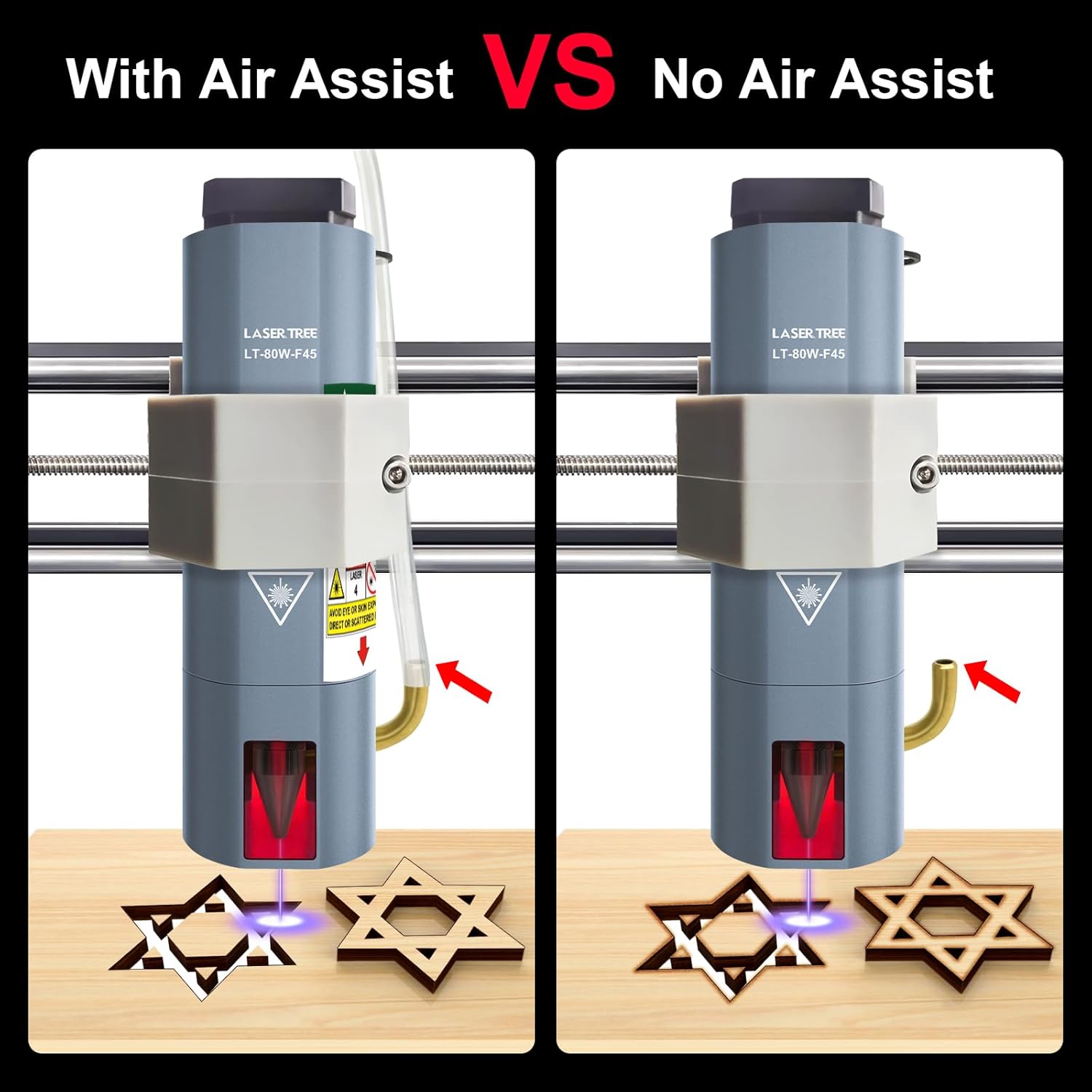
Image: Visual comparison of engraving with and without air assist, highlighting the improved clarity with air assist.
5. Maintenance
Proper maintenance ensures optimal performance and longevity of your laser module.
- Protective Window Glass: The laser module's protective window glass must be kept clean and free of fingerprints or debris. Contamination can significantly affect cutting ability and power output. Clean gently with a soft, lint-free cloth and appropriate lens cleaner if necessary.
- Fan Cleaning: Periodically inspect and clean the cooling fan to ensure proper airflow and prevent overheating. Use compressed air to remove dust and debris.
- General Cleaning: Keep the exterior of the laser module clean. Avoid using harsh chemicals that could damage the housing.

Image: Detail of the protective lens, which requires regular cleaning.
6. Troubleshooting
If you encounter issues with your LASER TREE LT-80W-F45 laser module, consider the following:
- No Laser Output: Check all cable connections (power, GND, PWM) to ensure they are secure and correctly oriented. Verify that the CNC machine's control board is supplying the correct voltage (24V) and that the PWM signal is active.
- Weak Engraving/Cutting: Ensure the protective window glass is clean. Check the focus of the laser. Verify that the laser power settings in your software are correct and that the material is suitable for the chosen parameters.
- Poor Cut Quality (Smudging/Charring): Ensure air assist is properly connected and functioning. Adjust cutting speed and power settings.
- Overheating: Ensure the cooling fan is operating correctly and is free from obstructions.
For further assistance or complex issues, please contact LASER TREE customer support. Our professional engineer team is available to troubleshoot and resolve problems.
7. Specifications
| Feature | Specification |
|---|---|
| Optical Power Output | 10W (10000mW) |
| Laser Wavelength | 450nm |
| Input Voltage | DC 24V |
| Input Current | 1.7-2A |
| Input Connector | XH2.54-3P |
| Beam Spot Size (at focus) | 0.08*0.08mm (with FAC) |
| Power Modulation | Supports 5V PWM modulation |
| Laser Class | Class 4 |
| Cooling Fan Speed | 10000 rpm |
| Diode Lifetime | Up to 20,000 hours |
| Compatibility | 3018/3018 Pro CNC machines and similar brackets |
| Package Dimensions | 7.64 x 4.57 x 3.03 inches |
| Item Weight | 1.26 pounds |
8. Warranty and Support
LASER TREE is committed to providing high-quality products and excellent customer service. If you have any questions, require pre-sale consultation, or encounter any problems during installation or operation, please do not hesitate to contact us directly. Our professional engineer team is ready to assist you with troubleshooting and problem resolution.
Please refer to your purchase documentation for specific warranty terms and contact information.
Related documentsLT-80W-F45


Ask a question about this manual
Ask about setup, troubleshooting, compatibility, parts, safety, or missing instructions. Manuals+ will review the question and use this page’s manual context to help answer it.