
Introduction
Welcome to the SkyCaddie PRO 4X, your advanced handheld golf GPS device designed to provide unparalleled precision and comprehensive course information. This manual will guide you through the setup, operation, and maintenance of your device, ensuring you maximize its features to improve your game.
Setup
1. Unboxing and Initial Charge
Carefully unpack your SkyCaddie PRO 4X bundle. The package includes:
- SkyCaddie PRO 4X Golf GPS Handheld
- PlayBetter #Z05 5000mAh Powerbank
- PlayBetter Protective Hard Case
- USB-C Cable
- Wall Charger
- 1-Year Pre-Paid Double Eagle Membership Plan
Before first use, fully charge your SkyCaddie PRO 4X using the provided USB-C cable and wall charger. Connect the USB-C cable to the charging port located at the bottom of the device. The device features an 18-hour battery life, ensuring extended play.

Image: Close-up of the SkyCaddie PRO 4X showing the USB-C charging port at the bottom.

Image: The PlayBetter #Z05 5000mAh Powerbank, a portable charger included in the bundle.
2. Powering On/Off
To power on the device, press and hold the power button until the screen illuminates. To power off, press and hold the power button and follow the on-screen prompts. For optimal GPS signal acquisition, it is recommended to power on the device outdoors with a clear view of the sky. However, for syncing and updates via Wi-Fi, the device can be powered on indoors.
3. Initial Setup and Course Download
Upon first use, the device will guide you through basic setup. Utilize the built-in Wi-Fi capabilities to download new courses and updates directly to your device. The SkyCaddie PRO 4X comes preloaded with over 35,000 professionally verified course maps, ensuring you always have the latest data.
Operating Your SkyCaddie PRO 4X
1. Basic Navigation and Display
The SkyCaddie PRO 4X features a 4-inch LCD color touch screen. Navigate through menus and course views by tapping and swiping. The responsive interface provides a crystal-clear view of all data, even under direct sunlight.

Image: The SkyCaddie PRO 4X displaying a detailed view of Hole 18 on a golf course.
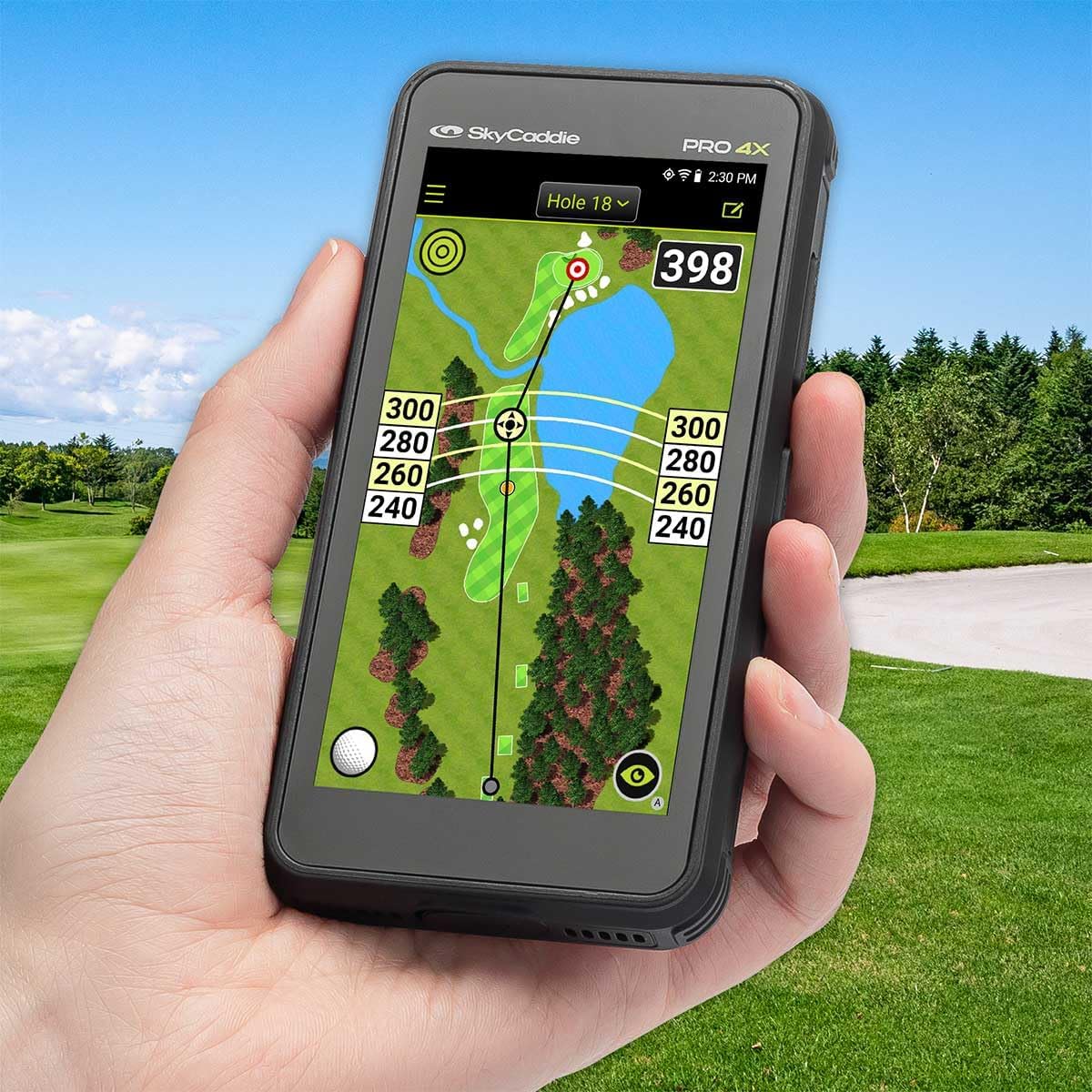
Image: A hand holding the SkyCaddie PRO 4X, showcasing the Hole 18 display in an outdoor golf setting.
2. Dynamic HoleVue
Dynamic HoleVue provides a bird's-eye view of the entire hole, complete with hazards, fairways, and greens. This feature helps you understand the hole design and strategize your shots effectively. Tap on different areas of the screen to get distances to specific points.

Image: The SkyCaddie PRO 4X displaying a detailed view of Hole 3, showing distances to various points on the fairway.
3. TruePoint Precision Positioning Technology
Benefit from TruePoint Precision Positioning Technology, delivering unmatched accuracy for your shots. This ensures every swing is calculated with pinpoint precision, helping you lower your score and elevate your game with confidence.
4. Green View and Pin Placement
The intelligent green technology offers shapes, contours, and distances to the green. You can often adjust the pin placement on the screen to get more accurate distances to the flag, aiding in precise putting strategies.
5. Scoring and Shot Tracking
The device includes a digital scorecard to record your game. Track your shots and analyze your performance using the included 1-Year Pre-Paid Double Eagle Membership Plan, which provides access to advanced features and statistics.

Image: The SkyCaddie PRO 4X displaying a scorecard with current hole, par, and handicap information.
6. Hazard Information
The device provides detailed information on course hazards, including distances to bunkers, water hazards, and other obstacles, allowing you to plan your shots to avoid them.
Maintenance
1. Cleaning
Wipe the device with a soft, damp cloth. Avoid using harsh chemicals or abrasive materials that could damage the screen or casing.
2. Software Updates
Regularly check for and install software updates via the built-in Wi-Fi. Updates ensure your device has the latest course data and features, optimizing performance.
3. Battery Care
To prolong battery life, avoid fully discharging the device frequently. Store the device in a cool, dry place when not in use. The battery provides up to 18 hours of continuous use.
Troubleshooting
1. GPS Signal Issues
If the device struggles to acquire a GPS signal, ensure you are outdoors with a clear view of the sky. Moving to an open area away from tall buildings or dense trees can improve signal reception.
2. Display Not Responding
If the touch screen is unresponsive, try restarting the device. If the issue persists, ensure the screen is clean and free of moisture or debris.
3. Device Not Syncing via Wi-Fi
Ensure the device is powered on and connected to a stable Wi-Fi network. If syncing issues occur, try restarting both the device and your Wi-Fi router. Remember to press the SYNC button on the device to initiate sync mode when connecting to a computer or using Wi-Fi for syncing.
4. Battery Draining Quickly
Reduce screen brightness or disable unnecessary features like Wi-Fi when not in use to conserve battery. Ensure the device is fully charged before each round.
Specifications
| Brand | PlayBetter |
| Model Name | PRO 4X |
| Screen Size | 4 Inches |
| Display Type | LCD |
| Human-Interface Input | Touchscreen |
| Connectivity Technology | Bluetooth, Wi-Fi |
| Supported Satellite Navigation System | GPS |
| Map Type | Worldwide (35,000+ preloaded courses) |
| Battery Life | 18 Hours |
| Mounting Type | Handheld |
| Item Weight | 164 Grams |
| Item Dimensions L x W x H | 2"L x 0.62"W x 4.5"H |
| Model Number | SG-RGF-ASM-PRO4X |
| UPC | 724901597901 |
Warranty and Support
The SkyCaddie PRO 4X comes with a SkyGolf 1 Year Manufacturer Warranty. For warranty claims, technical support, or any questions regarding your device, please refer to the contact information provided in your product packaging or visit the official SkyGolf website.