
1. Introduction
Thank you for choosing the XINDADA S52 Smartwatch. This device is designed to enhance your daily life with advanced health monitoring, fitness tracking, and smart communication features. Please read this manual carefully to understand the proper use and maintenance of your smartwatch.
What's in the Box
- XINDADA S52 Smartwatch
- Magnetic Charging Cable
- User Manual
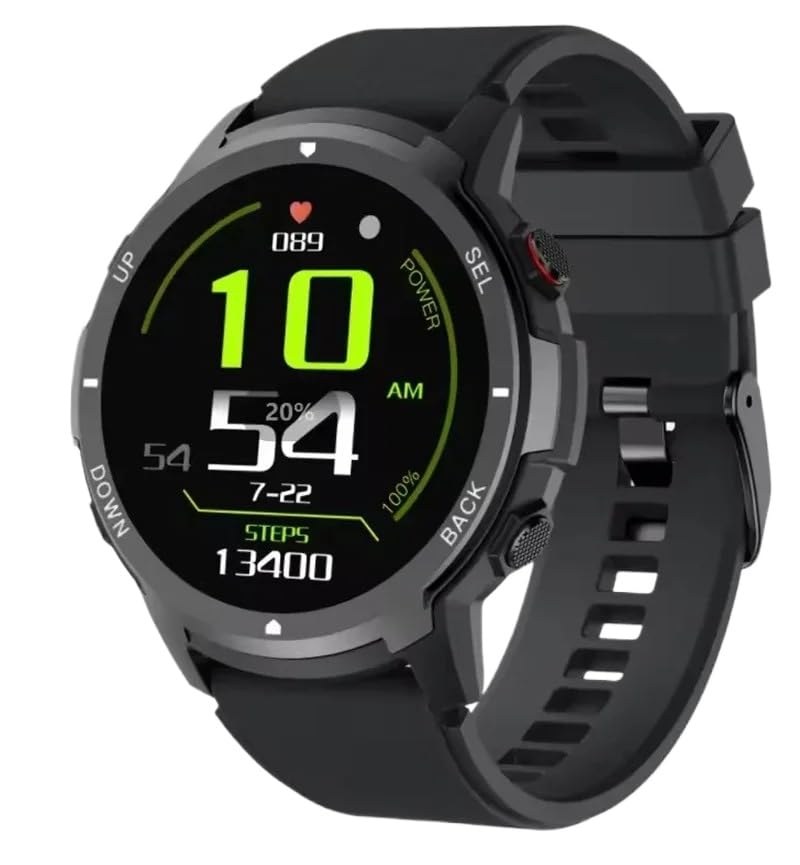
Image: The XINDADA S52 Smartwatch in black and blue variants.
2. Setup
2.1 Charging the Smartwatch
Before first use, fully charge your smartwatch. Connect the magnetic charging cable to the charging points on the back of the watch and plug the USB end into a power adapter (not included) or a computer's USB port. The watch display will indicate charging status.
2.2 App Installation
To unlock all features and synchronize data, download the companion app on your smartphone. Scan the QR code provided in the quick start guide or search for the app name (usually mentioned in the packaging or quick start guide) in your phone's app store (App Store for iOS, Google Play Store for Android).
2.3 Pairing with Your Smartphone
- Ensure your smartwatch is charged and powered on.
- Enable Bluetooth on your smartphone.
- Open the companion app and follow the on-screen instructions to add a new device.
- Select 'S52' from the list of available devices.
- Confirm the pairing request on both your phone and smartwatch if prompted.
3. Operating Instructions
3.1 Basic Navigation
- Touch Screen: Swipe left/right, up/down to navigate through menus and functions. Tap to select.
- Side Buttons: The smartwatch features multiple side buttons (UP, DOWN, SEL, POWER, BACK) for quick access to functions or returning to the previous screen. Refer to the on-screen prompts for specific button functions.
- Wake Screen: Raise your wrist or press any side button to wake the screen.

Image: The smartwatch display showing current time and step count.
3.2 Health Monitoring
The S52 Smartwatch offers comprehensive health tracking:
- Heart Rate: Real-time heart rate detection and continuous monitoring.
- Blood Pressure: Measure your blood pressure directly from your wrist.
- Blood Oxygen (SpO2): Monitor your blood oxygen levels.
- Sleep Monitoring: Tracks your sleep patterns, including deep sleep, light sleep, and awake times.
Note: Health monitoring data is for reference only and should not be used for medical diagnosis or treatment. Consult a medical professional for health concerns.
3.3 Fitness Tracking
Track your daily activity and workouts:
- Step Counter: Automatically records your daily steps.
- Distance: Calculates the distance covered based on your steps.
- Calories Burned: Estimates calorie expenditure during activity.
- Sports Modes: Select from various sports modes for more accurate tracking during specific activities.
3.4 Music Player Control
Once paired with your smartphone, you can control your phone's music playback directly from the smartwatch. Play, pause, skip tracks, and adjust volume without taking out your phone.
3.5 Call Functionality
The S52 Smartwatch allows you to receive incoming call notifications. With its built-in high-fidelity speaker, you can answer calls directly from your wrist, ensuring you don't miss important communications.

Image: The smartwatch displaying an incoming call.
3.6 Customizable Watch Faces
Personalize your smartwatch with a variety of built-in watch faces. You can also download additional dials through the companion app to match your style and preferences.

Image: Examples of various watch faces available for customization.
4. Maintenance
4.1 Cleaning Your Smartwatch
Regularly clean your smartwatch to ensure optimal performance and hygiene. Use a soft, lint-free cloth to wipe the screen and strap. For stubborn dirt, slightly dampen the cloth with water. Avoid using harsh chemicals or abrasive materials.
4.2 Water Resistance
The S52 Smartwatch is designed for outdoor sports and daily use. While it can withstand splashes and sweat, it is not recommended for swimming or showering. Avoid prolonged exposure to water or submersion.
4.3 Storage
When not in use for extended periods, store the smartwatch in a cool, dry place. Avoid extreme temperatures and direct sunlight.
5. Troubleshooting
5.1 Smartwatch Not Turning On
- Ensure the watch is fully charged. Connect it to the magnetic charging cable and a power source for at least 30 minutes.
- Press and hold the Power button for several seconds.
5.2 Unable to Pair with Smartphone
- Make sure Bluetooth is enabled on your smartphone and the smartwatch.
- Ensure the smartwatch is within Bluetooth range of your phone.
- Restart both your smartphone and the smartwatch.
- Clear the Bluetooth cache on your phone (if applicable) and try pairing again.
- Ensure the companion app is updated to the latest version.
5.3 Inaccurate Health Readings
- Ensure the smartwatch is worn snugly on your wrist, not too tight or too loose.
- Keep the sensor clean and free from dirt or sweat.
- Remain still during measurements for best accuracy.
6. Specifications
| Feature | Specification |
|---|---|
| Model Number | 04f78003-19d1-4508-a2c1-d5817ae24ac4 |
| Main Chip | Realtek8763EW |
| Accelerometer | STK8321 |
| PPG Heart Rate Sensor | LC11S |
| Touch IC | CST816D |
| Touch Method | Full touch screen |
| Motor | Flat motor |
| Display Size | 1.39 inches |
| Resolution | 360 x 360 pixels |
| Flash Size | 128MB |
| Bluetooth Version | BLE5.2 |
| Bluetooth Antenna | FPC |
| Battery Type | Lithium polymer battery |
| Battery Capacity | 300 mAh |
| Charging Method | Magnetic cable charging |
| Compatible Devices | Smartphone (iOS/Android) |
| Special Feature | Advanced Health Monitoring |
| GPS | No GPS |
| Shape | Round |
| Color | Black |
7. Warranty Information
The XINDADA S52 Smartwatch comes with a standard manufacturer's warranty. Please refer to the warranty card included in your product packaging for specific terms, conditions, and duration. Keep your proof of purchase for warranty claims.
8. Support
For technical support, troubleshooting assistance, or any questions regarding your XINDADA S52 Smartwatch, please contact XINDADA customer service. Contact details can typically be found on the official XINDADA website or on the product packaging.