
1. Introduction
Thank you for choosing the Ebitcam 3MP Smart Outdoor WiFi Camera. This device is designed to provide reliable outdoor surveillance with advanced features such as 3MP resolution, IP66 waterproofing, motion and sound detection, two-way audio, and color night vision. This manual will guide you through the installation, operation, and maintenance of your new camera to ensure optimal performance and security for your home or property.
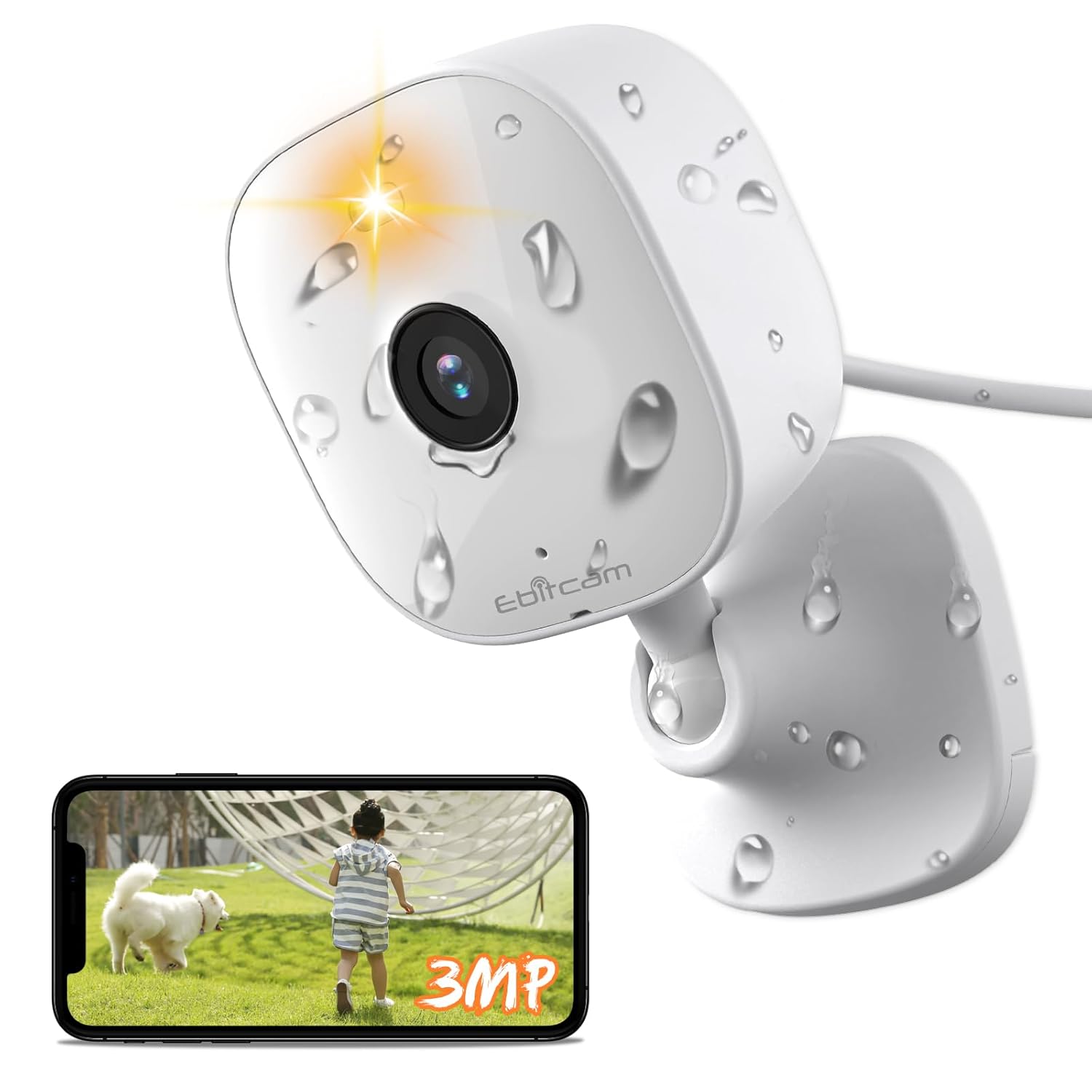
Image: The Ebitcam 3MP Smart Outdoor WiFi Camera, showcasing its compact design and waterproof capabilities, alongside a smartphone displaying its live monitoring feature.
2. Product Features
- 3MP High-Resolution Video: Capture clear and detailed footage with 2K (2560*1440 OHD) resolution.
- IP66 Waterproof Rating: Designed for outdoor use, resistant to dust and powerful water jets.
- Motion & Sound Detection: Advanced AI human detection and sound detection for accurate alerts.
- Smart Spotlight & Color Night Vision: Provides illumination and full-color video even in low-light conditions up to 10 meters.
- Two-Way Audio: Communicate with visitors or deter intruders using the built-in microphone and speaker.
- Alexa Enabled: Seamless integration with Amazon Alexa for voice control and live view on compatible devices.
- Flexible Storage Options: Supports cloud storage and local storage via TF card (up to 512GB).
- 360-Degree Viewing Angle: Offers comprehensive coverage of your surveillance area.
- 8x Digital Zoom: Zoom in on details for closer inspection.

Image: The Ebitcam camera demonstrating its IP66 waterproof capability, suitable for various weather conditions.

Image: A visual comparison highlighting the superior clarity and detail of 2K resolution (2560*1440 OHD) captured by the Ebitcam camera compared to 1080P.
3. What's in the Box
Upon unboxing your Ebitcam Smart Outdoor WiFi Camera, please verify that all the following components are included:
- 1 x Ebitcam 3MP Smart Outdoor WiFi Camera
- 1 x Power Adapter
- 1 x Power Cable
- 1 x Mounting Plate
- 1 x Quick Service Guide
- 3 sets of Screw Package (for mounting)
4. Setup Guide
4.1. Installation and Mounting
The Ebitcam camera offers versatile mounting options to suit your needs:
- Wall Mounting: Secure the mounting plate to a suitable outdoor wall using the provided screws. Attach the camera to the plate.
- Tabletop Placement: The camera can be placed on any flat surface, such as a table or shelf, for indoor or covered outdoor use.
- Ceiling Mounting: Similar to wall mounting, the camera can be inverted and attached to a ceiling for overhead surveillance.
Ensure the chosen location provides a clear view of the area you wish to monitor and is within range of your Wi-Fi network and a power outlet.
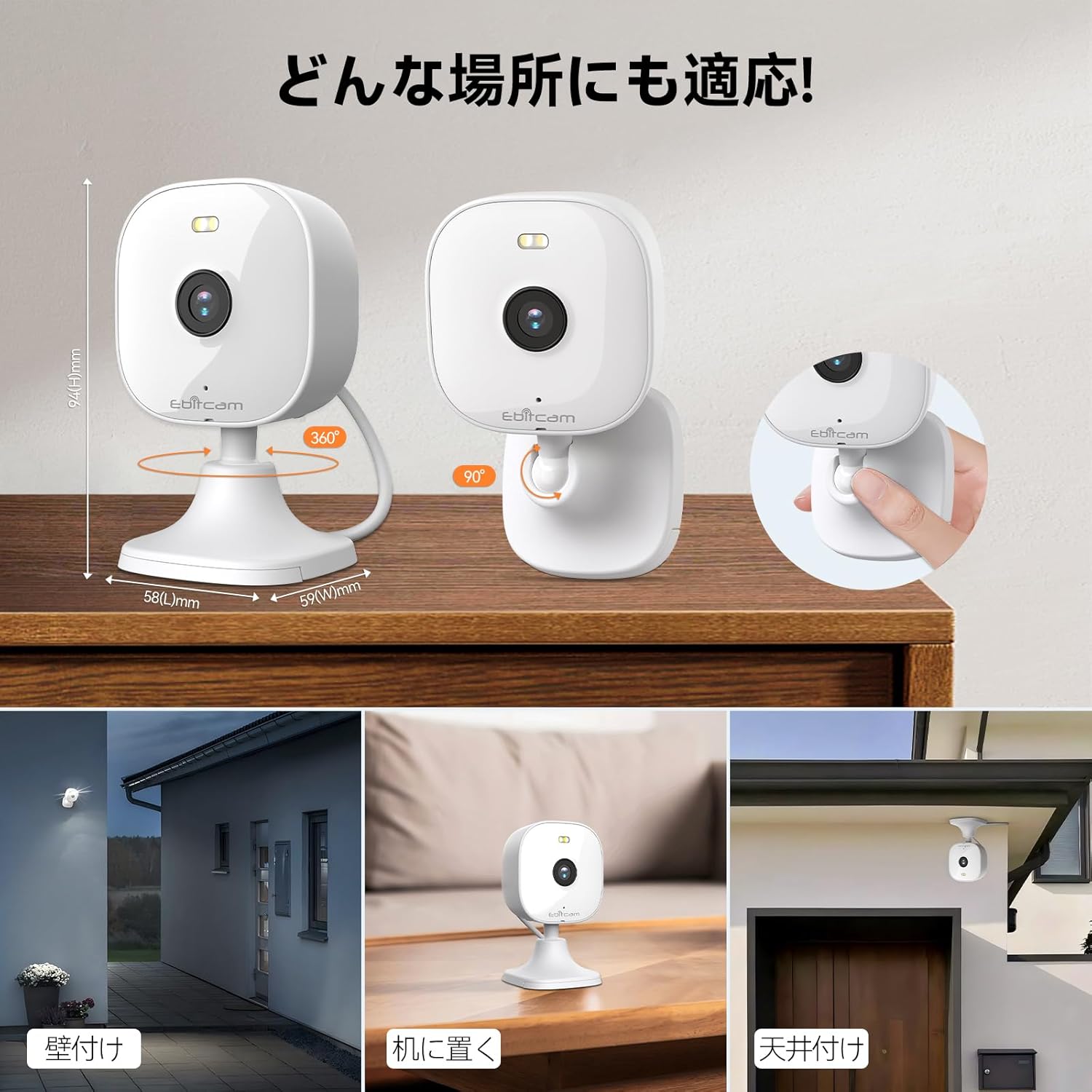
Image: Illustrations of the Ebitcam camera's flexible installation methods, including wall, tabletop, and ceiling mounting, demonstrating its adaptability to various environments.
4.2. App Installation and Account Creation
- Download the Ebitcam app from your smartphone's app store (available for Android and iOS).
- Open the app and follow the on-screen instructions to create a new account.
- Log in to your newly created account.
4.3. Network Connection
- Power on the Ebitcam camera using the provided power adapter and cable.
- In the Ebitcam app, tap the '+' icon to add a new device.
- Select your camera model and follow the in-app prompts to connect the camera to your 2.4G Wi-Fi network (IEEE802.11b/g/n).
- Ensure your Wi-Fi signal is strong at the camera's installation location for stable connectivity.
5. Operating Instructions
5.1. Live View
Once connected, you can access the live video feed from your camera anytime, anywhere via the Ebitcam app. The app provides clear and smooth video browsing, intelligently adapting to network conditions.
5.2. Two-Way Audio
The camera supports two-way voice intercom. To use this feature:
- Open the live view in the Ebitcam app.
- Tap the microphone icon to speak through the camera's speaker.
- Tap the speaker icon to hear audio from the camera's microphone.

Image: A visual representation of the Ebitcam camera's real-time two-way audio feature, allowing communication with individuals at your doorstep.
5.3. Motion Detection & Alerts
The camera features intelligent motion detection and optional AI human detection and sound detection. When motion or sound is detected, the camera can:
- Trigger a smart alarm (sound and light).
- Send real-time notifications to your smartphone.
- Record video clips or capture photos.
You can customize alert sensitivity and notification methods within the app.

Image: The Ebitcam camera's advanced AI human detection feature, accurately identifying human figures while minimizing false alarms from other movements like pets or swaying plants.
5.4. Night Vision Modes
The camera offers 24-hour monitoring with advanced night vision capabilities:
- Smart Night Vision: Automatically switches between infrared and color night vision based on ambient light.
- Color Night Vision: Utilizes the smart spotlight to provide full-color video in low-light conditions.
- Infrared Night Vision: Provides clear black-and-white video using infrared lamps (up to 10 meters).
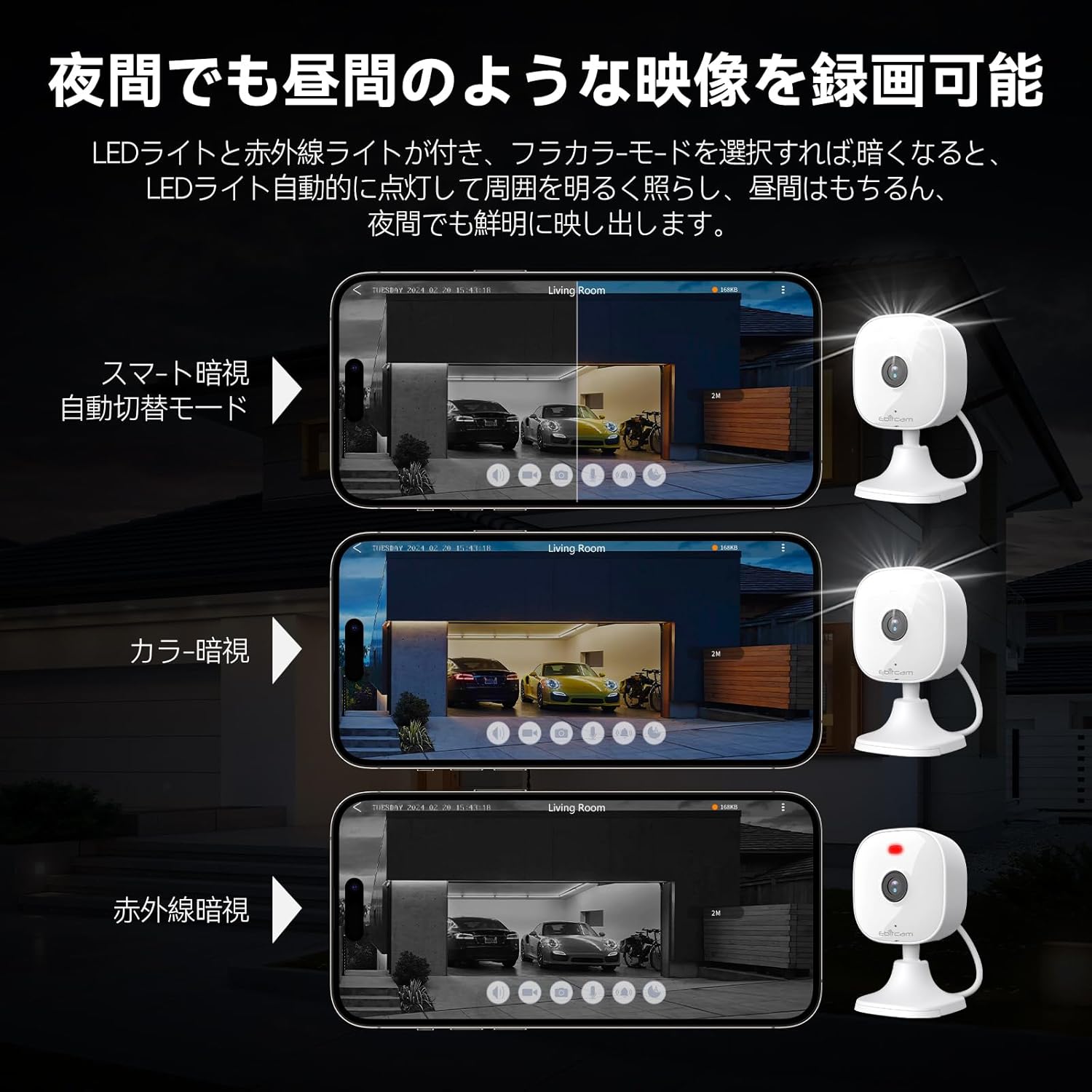
Image: A demonstration of the Ebitcam camera's versatile night vision modes, including smart automatic switching, full-color night vision, and traditional infrared night vision, ensuring clear visibility in various lighting conditions.
5.5. Recording and Storage
The camera supports multiple recording and storage options:
- TF Card Storage: Insert a TF card (maximum 512GB, not included) into the camera's slot for local video storage.
- Cloud Storage: Subscribe to Ebitcam's cloud storage service for secure, off-site video backup.
The camera uses H.264 and H.265 video compression algorithms for efficient storage and smooth playback.
5.6. Digital Zoom
Utilize the 8x digital zoom function within the app to magnify specific areas of the live or recorded video for more detailed viewing.
5.7. Alexa Integration
The Ebitcam camera is compatible with Amazon Alexa. You can use voice commands to view the camera feed on compatible Alexa-enabled devices (e.g., Echo Show).

Image: A user demonstrating the seamless integration of the Ebitcam camera with Amazon Alexa, allowing for convenient voice-controlled viewing of the camera feed on a smart display.
6. Maintenance
- Cleaning: Regularly wipe the camera lens and body with a soft, damp cloth to remove dust and dirt. Do not use harsh chemicals or abrasive cleaners.
- Firmware Updates: Keep your camera's firmware updated through the Ebitcam app. Online firmware upgrades ensure you have the latest features and security enhancements.
- Network Stability: Ensure your Wi-Fi network is stable and strong to maintain consistent camera performance.
- Storage Management: Periodically review your recorded footage and manage your storage (TF card or cloud) to prevent it from filling up.
7. Troubleshooting
| Problem | Possible Cause | Solution |
|---|---|---|
| Camera offline/Cannot connect to Wi-Fi | Weak Wi-Fi signal, incorrect Wi-Fi password, camera too far from router. | Move camera closer to router, ensure correct Wi-Fi password, restart camera and router. |
| Poor video quality | Insufficient bandwidth, dirty lens, low light conditions. | Check internet speed, clean lens, ensure adequate lighting or use night vision modes. |
| Motion detection not working | Detection sensitivity too low, detection area not set correctly, firmware outdated. | Adjust sensitivity in app, redefine detection zones, update firmware. |
| Two-way audio issues | Microphone/speaker blocked, network latency. | Ensure clear path for audio, check network connection. |
| SD card not recognized | SD card not inserted correctly, incompatible card, card corrupted. | Reinsert SD card, try a different compatible card, format card in app if possible. |
8. Specifications
| Feature | Detail |
|---|---|
| Model Number | 8311 |
| Video Capture Resolution | 3MP (2K) |
| Effective Still Resolution | 3 MP |
| Frame Rate | 25 fps |
| Video Compression | H.264, H.265 |
| Connectivity Technology | Wi-Fi (2.4G, IEEE802.11b/g/n) |
| International Protection Rating | IP66 (Waterproof) |
| Viewing Angle | 360 Degrees |
| Night Vision Range | 10 Metres |
| Low Light Technology | Night Color |
| Optical Zoom | 8x (Digital Zoom) |
| Storage Support | TF Card (Max 512GB), Cloud Storage |
| Audio | 2-Way Audio (Built-in Mic & Speaker) |
| Alert Type | Motion Only (with AI human/sound detection options) |
| Control Method | Voice (Alexa), App (Smartphone) |
| Power Source | Power Adapter (No Batteries Required) |
| Product Dimensions | 10 x 5 x 5 cm |
| Item Weight | 190 g |
| Indoor/Outdoor Usage | Outdoor |
9. Warranty and Support
For warranty information and technical support, please contact Ebitcam directly. You can reach the Ebitcam Service team at: customer@ebitcam.com.
Please retain your purchase receipt as proof of purchase for warranty claims.

