
Product Overview
The Dyson V11 Complete cordless vacuum cleaner is engineered with the power, versatility and run time for a whole-home deep clean. Dyson's de-tangling Motorbar cleaner head deep cleans carpets and hard floors with hair removal vanes that clear long hair and pet hair from the brush bar making it perfect for homes with pets. The LCD screen displays remaining runtime countdown, cleaning modes and maintenance alerts. The Dyson V11 Complete has advanced, whole-machine filtration that captures pet allergens and fine dust, expelling cleaner air. Thanks to the cordless format and 6 tools and accessories including the Floor Dok for tool storage, it also transforms into a handheld vacuum so you can clean up high, down low and everywhere in between.
What's Included
Your Dyson V11 Complete package includes the following components:
- Dyson V11 Complete Cordless Vacuum Unit
- Dyson Floor Dok (free-standing design for storage and charging)
- Motorbar Cleaner Head (for deep cleaning carpets and hard floors with hair removal vanes)
- Hair Screw Tool (picks up long hair and pet hair on upholstery and in tight spaces with an anti-tangle conical brush bar)
- Combination Tool
- Crevice Tool
- Dusting Brush
- Wand Clip
- Stubborn Dirt Brush
- Charger

Figure 1: Dyson V11 Complete with Floor Dok and included accessories.
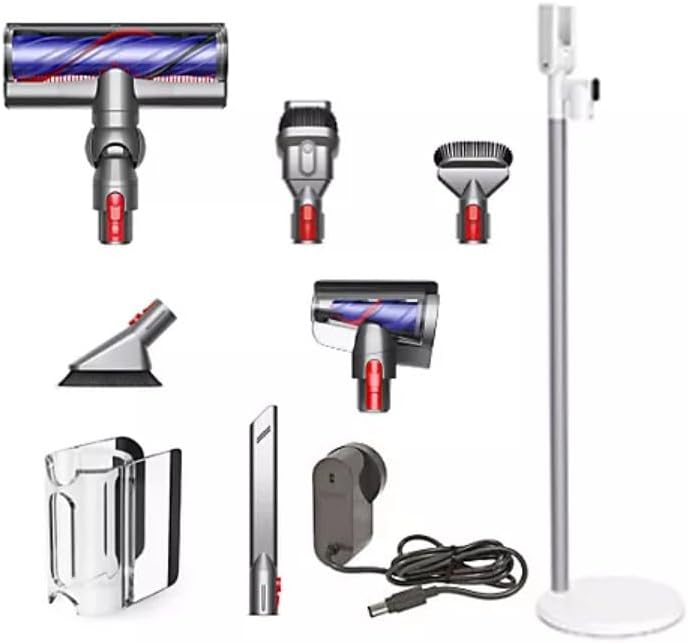
Figure 2: All components of the Dyson V11 Complete laid out for easy identification.
Setup
The Dyson V11 Complete is designed for quick and easy assembly. Simply snap the main vacuum unit, wand, and desired cleaner head together until they click into place. For convenient storage and charging, utilize the included Floor Dok. The Floor Dok is a free-standing unit that holds your vacuum and tools, keeping them organized and ready for use.
Charging the Battery
Before first use, fully charge your Dyson V11 Complete. Connect the charger to the charging port on the main unit or the Floor Dok. The LCD screen will display the charging status. A full charge provides up to 60 minutes of run time in Eco mode.
Operating Instructions
Powering On and Off
To power on the vacuum, pull the trigger. Release the trigger to power off. The vacuum operates only when the trigger is pulled.
Cleaning Modes
The Dyson V11 Complete features three intelligent cleaning modes, selectable via the button on the end of the main unit:
- Auto Mode: Automatically adapts suction power between carpets and hard floors for optimal cleaning. The LCD screen will display "Auto" and the remaining run time.
- Eco Mode: Provides the longest run time (up to 60 minutes) for everyday cleaning tasks. Ideal for extended cleaning sessions. The LCD screen will display "Eco" and the remaining run time.
- Boost Mode: Delivers maximum suction power for intensive spot cleaning and stubborn dirt. This mode offers the shortest run time. The LCD screen will display "Boost" and the remaining run time.
Using Attachments
The Dyson V11 Complete comes with a variety of tools engineered for specific cleaning tasks. To attach a tool, align it with the end of the wand or the main unit (for handheld use) and push until it clicks securely.
- Motorbar Cleaner Head: Designed for all floor types, it deep cleans carpets and hard floors. Its de-tangling vanes automatically clear hair from the brush bar.
- Hair Screw Tool: Perfect for upholstery and tight spaces, this tool features an anti-tangle conical brush bar that picks up long hair and pet hair without tangling.
- Combination Tool: A versatile tool with a wide nozzle and brush, suitable for switching between cleaning surfaces and dusting.
- Crevice Tool: Ideal for cleaning around edges and narrow gaps.
- Dusting Brush: For gentle dusting of delicate surfaces.
- Stubborn Dirt Brush: Features stiff bristles to dislodge dried-on and stubborn dirt.

Figure 3: The Dyson V11 Complete effectively cleaning debris from a hard floor.

Figure 4: The versatile handheld mode is ideal for cleaning car interiors and other confined spaces.
Maintenance
Regular maintenance ensures optimal performance of your Dyson V11 Complete.
Emptying the Dust Bin
To empty the dust bin, first ensure the vacuum is switched off. Hold the machine over a trash bin, then push the red lever down firmly to release the bin flap and eject the dirt. Close the bin flap securely until it clicks.
Cleaning the Filter
The Dyson V11 Complete features a washable filter. When the LCD screen indicates a filter maintenance alert, or if you notice reduced suction, it's time to clean the filter. Twist the filter counter-clockwise from the top of the main unit to remove it. Rinse the filter under cold running water until the water runs clear. Squeeze and twist the filter to remove excess water. Allow the filter to air dry completely for at least 24 hours in a warm, dry place before reattaching it to the vacuum. Do not use a tumble dryer, microwave, or open flame to dry the filter.
De-tangling the Motorbar Cleaner Head
The Motorbar cleaner head is designed to automatically clear hair from the brush bar. However, if you notice any remaining tangled hair, you can manually remove it. Refer to the visual guides in the full manual for detailed instructions on removing the brush bar for deeper cleaning if necessary.
Troubleshooting
If you encounter issues with your Dyson V11 Complete, refer to the following general troubleshooting tips:
- No Power: Ensure the battery is fully charged. Check the charger connection.
- Reduced Suction: Empty the dust bin. Check and clean the filter as described in the Maintenance section. Inspect the cleaner head and wand for blockages.
- Cleaner Head Not Spinning: Check for obstructions in the brush bar. Ensure the cleaner head is securely attached.
- Error Messages on LCD: The LCD screen provides maintenance alerts. Follow the on-screen instructions or consult the full Dyson support resources for specific error codes.
For more detailed troubleshooting or persistent issues, please contact Dyson Customer Support.
Specifications
| Feature | Detail |
|---|---|
| Brand | Dyson |
| Model Name | V11 Complete |
| Item Model Number | 419640-01 |
| UPC | 885609029252 |
| Color | Iron |
| Form Factor | Stick |
| Is Cordless? | Yes |
| Capacity | 0.77 Liters |
| Wattage | 350 watts |
| Runtime | Up to 60 minutes (in Eco mode) |
| Filter Type | HEPA Filter (Whole-Machine Filtration) |
| Item Weight | 6.6 pounds |
| Product Dimensions | 10.3"L x 9.8"W x 49.6"H |
Warranty and Support
The Dyson V11 Complete comes with a 2-year warranty, ensuring peace of mind regarding manufacturing defects and performance issues. Dyson also provides lifetime support for your product.
For warranty claims, technical assistance, or general inquiries, please visit the official Dyson website or contact their customer support line. Keep your proof of purchase for warranty validation.
