1. Introduction
The Canal Toys Pad Creator is an innovative all-in-one creative tablet designed to unleash creativity through instant printing. This device allows users to capture photos, personalize them, draw, create fun cards and photo montages, write in a diary, and browse the internet securely. All creations can be instantly printed in black and white using the integrated thermal printer.
The 8-inch screen facilitates drawing with fingers or the included stylus. The tablet features 6 creative modes, offering hours of engaging activities. It is equipped with 32GB of internal memory, expandable via a micro-SD card (not included, max 32GB). Parental controls are integrated to manage sensitive settings and screen time.
2. Safety Information
Please read all safety warnings and instructions before using the Pad Creator. Keep this manual for future reference.
- Age Recommendation: Recommended for children aged 8 years and older.
- Thermal Paper: The included thermal paper is BPA-free. Use only BPA-free thermal paper refills.
- Charging: Use only the provided USB-C charging cable. Do not use damaged cables or chargers.
- Water Exposure: Keep the tablet away from water and other liquids.
- Cleaning: Clean the tablet with a soft, dry cloth. Do not use abrasive cleaners.
- Disassembly: Do not attempt to disassemble or repair the tablet yourself. Contact customer support for assistance.
- Parental Supervision: Adult supervision is recommended, especially when children are using the internet browser.
3. Package Contents
Ensure all items are present in the package:
- 1 x Pad Creator Tablet with Integrated Printer
- 1 x Smart Stylus
- 1 x USB-C Charging Cable
- 4 x Thermal Paper Rolls (BPA-free)
- 1 x Sheet of Stickers
- 1 x Instruction Manual
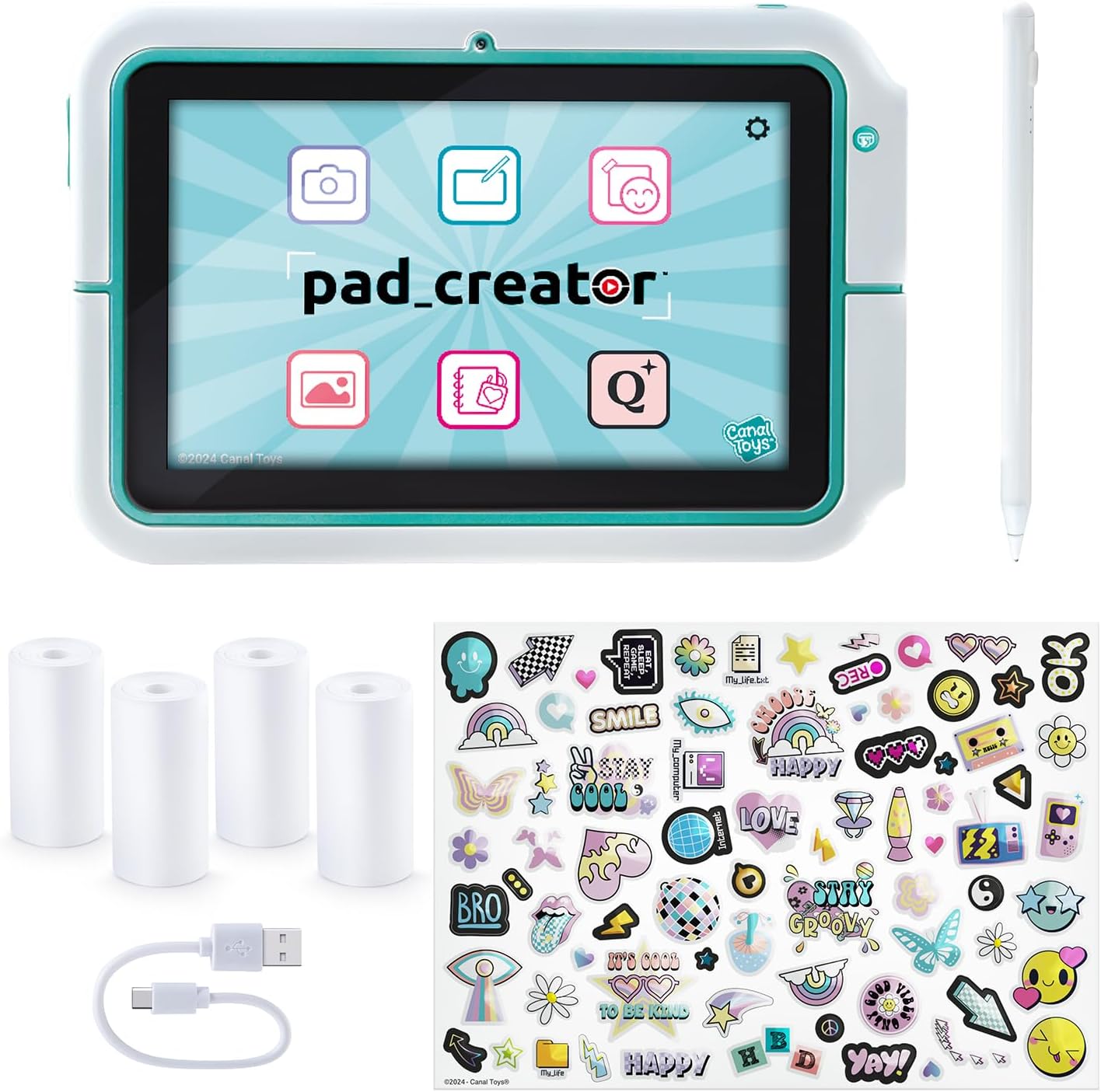
Image: Pad Creator tablet and included accessories.
4. Setup
4.1 Initial Charging
Before first use, fully charge the Pad Creator. Connect the provided USB-C cable to the tablet's charging port and the other end to a compatible USB power adapter (not included) or a computer's USB port. The charging indicator light will show the charging status.
4.2 Powering On/Off
- To Power On: Press and hold the power button located on the side of the tablet until the screen lights up.
- To Power Off: Press and hold the power button until a power-off menu appears on the screen. Select "Power Off" to shut down the device.
4.3 Inserting Thermal Paper
The thermal printer is integrated at the back of the tablet. To insert a new paper roll:
- Locate the printer compartment cover on the back of the tablet.
- Open the cover.
- Place a new thermal paper roll into the compartment, ensuring the paper feeds out from the top.
- Pull a small length of paper out and close the cover, making sure the paper protrudes through the slot.

Image: Back of the Pad Creator box, showing the printer mechanism.
5. Operating Instructions
The Pad Creator offers 6 creative modes for various activities:
5.1 Photo and Video Mode
Capture memories with the dual cameras (front and rear). This mode allows you to take photos and record videos, applying various fun filters.

Image: Children using the tablet for photo capture.
5.2 Drawing and Graphic Design Mode
Unleash your imagination with a wide range of tools. Draw, add images, stickers, text, and utilize various functions to create unique artworks. The included stylus provides precision for detailed work.

Image: Child using the stylus for drawing.
5.3 Creative Projects Mode
Explore numerous templates for creating cards, collages, calendars, fun photo montages, and fill-in lists. These projects can then be printed instantly.
5.4 Secret Journal Mode
Keep your secrets safe with a password-protected journal. Once unlocked, you can add entries to the integrated calendar to record daily adventures.

Image: Using the tablet for journaling.
5.5 Gallery
All your photos, videos, and creations are stored in the gallery for easy review and access.
5.6 Secure Search Engine (Qwant Junior)
Access thousands of educational images, videos, and content safely through the Qwant Junior search engine. The Wi-Fi function is restricted to this secure browser, preventing third-party app downloads.
For more information, visit the official website: Qwant Junior
5.7 Instant Printing
Print your projects instantly in black and white at any time. The thermal transfer printing technology requires no ink and has no drying time, making it easy and economical.

Image: Pad Creator showcasing instant print capability.
5.8 Memory and Storage
The tablet comes with 32GB of internal memory. Storage can be expanded by inserting a micro-SD card (not supplied) with a maximum capacity of 32GB.
5.9 Parental Control
Integrated parental controls allow adults to protect access to sensitive settings (Wi-Fi, password) and manage screen time or duration. The interface is designed to prevent third-party application downloads.
6. Maintenance
6.1 Cleaning the Tablet
Wipe the tablet screen and body with a soft, lint-free cloth. For stubborn marks, slightly dampen the cloth with water. Avoid using harsh chemicals or abrasive materials.
6.2 Replacing Thermal Paper
When the printer runs out of paper, follow the instructions in Section 4.3 to insert a new thermal paper roll. Ensure you use BPA-free thermal paper.
7. Troubleshooting
| Problem | Possible Cause | Solution |
|---|---|---|
| Tablet does not power on. | Battery is depleted. | Connect the tablet to the charger and allow it to charge for at least 30 minutes before attempting to power on again. |
| Printer is not printing. | No thermal paper, paper incorrectly inserted, or printer jam. | Check if paper roll is correctly inserted and not empty. Clear any paper jams. Ensure the printer cover is closed properly. |
| Screen is unresponsive. | Temporary software glitch. | Perform a soft reset by holding the power button for 10-15 seconds until the tablet restarts. |
| Cannot connect to Wi-Fi. | Incorrect password, out of range, or parental control settings. | Verify Wi-Fi password. Move closer to the Wi-Fi router. Check parental control settings for Wi-Fi access. Remember Wi-Fi is only for Qwant Junior. |
8. Specifications
| Brand | Canal Toys |
| Model Number | CLK 023 |
| Operating System | Android |
| Screen Size | 8 Inches |
| Connectivity | USB, Bluetooth (for stylus) |
| Special Features | Instant Print Capability, Dual Camera, Smart Stylus, Secure Search Engine |
| Internal Memory | 32 GB |
| Expandable Memory | Micro-SD (max 32 GB, not included) |
| Product Dimensions (L x W x H) | 23.5 x 4.3 x 15.8 cm (Tablet) |
| Box Dimensions (L x W x H) | 34 x 6 x 25.4 cm |
| Display Type | LCD |
| Color | Multicolor |

Image: Product packaging with dimensions.
9. Warranty and Support
For warranty information or technical support, please refer to the contact details provided on the product packaging or visit the official Canal Toys website. Keep your proof of purchase for warranty claims.
Product developed in France.


