
XtremepowerUS 75019
XtremepowerUS 1.5HP Variable Speed Inground Pool Pump Instruction Manual
Model: 75019
1. Introduction
Thank you for choosing the XtremepowerUS 1.5HP Variable Speed Inground Pool Pump. This manual provides essential information for the safe installation, operation, and maintenance of your pool pump. Please read this manual thoroughly before installation and operation to ensure proper function and longevity of the product. Keep this manual for future reference.
2. Product Overview
The XtremepowerUS 1.5HP Variable Speed Pool Pump is designed for efficient water circulation in inground swimming pools. It features a corrosion-proof housing for durability and an intelligent control panel for customizable performance.
Key Features:
- 1.5 HP self-priming motor with corrosion-proof housing.
- Variable speed operation with ECO, CLEAN, and BOOST modes (1000–3450 RPM).
- LCD display showing speed and wattage.
- 24-hour timer for managing flow and energy use.
- Compatible with most inground pool systems.
- Includes 2-piece 2-inch fittings for plumbing connections.

Image 2.1: Main view of the XtremepowerUS 1.5HP Variable Speed Pool Pump, showing the black pump housing and the gold-colored motor with the intelligent control panel.
3. Specifications
| Feature | Specification |
|---|---|
| Brand | XtremepowerUS |
| Model Number | 75019 |
| Horsepower | 1.5 HP |
| Voltage | 230 Volts |
| Material | Metal, PPGF30 |
| Product Dimensions (L x W x H) | 24.5" x 11" x 14" |
| Item Weight | 40 Pounds |
| Maximum Flow Rate | 101 Gallons Per Minute |
| Maximum Lifting Height | 59 Feet |
| Speed Range | 1000-3450 RPM (Variable) |
| Fitting Size | 2-inch |
4. Safety Instructions
Always follow basic safety precautions to reduce the risk of fire, electric shock, and injury to persons, including the following:
- Electrical Safety: This pump operates on 230V. All electrical wiring must be performed by a qualified electrician and comply with local and national electrical codes. Ensure the power supply is disconnected before any service or maintenance.
- Grounding: The pump must be properly grounded to reduce the risk of electric shock.
- Water and Chemicals: Do not operate the pump if there is a risk of freezing. Handle pool chemicals with care and away from the pump.
- Installation: Install the pump in a well-ventilated area, protected from direct sunlight and excessive moisture. Ensure adequate clearance around the pump for air circulation and service.
- Children: Keep children away from the pump and all electrical connections.
- Read All Instructions: Read and follow all instructions in this manual and on the equipment.
5. Installation
5.1 Pre-Installation Checks
- Location: Choose a dry, well-drained, and well-ventilated location as close to the pool as possible. Ensure the pump is protected from rain and direct sunlight.
- Mounting: Mount the pump on a firm, level base to prevent vibration and noise. Secure it using appropriate fasteners.
- Power Supply: Verify that the electrical supply matches the pump's requirements (230V).
5.2 Electrical Connection
WARNING: All electrical wiring must be performed by a licensed electrician and conform to all local and national electrical codes. Disconnect power at the circuit breaker before wiring.
- The pump is factory-wired for 230V operation.
- Connect the power supply wires to the appropriate terminals in the motor's terminal box. Refer to the wiring diagram located on the motor or inside the terminal box cover.
- Ensure a proper ground connection is made.

Image 5.1: Rear view of the pump motor, showing the electrical connection warning label indicating factory connection for 230V.
5.3 Plumbing Connections
- Use the provided 2-inch fittings for connecting to your pool's plumbing system.
- Apply thread sealant (Teflon tape or pipe dope) to all threaded connections to prevent leaks.
- Ensure all connections are tight but do not overtighten.
- Install a union on the suction and discharge sides of the pump for easy removal during maintenance.
5.4 Priming the Pump
Before starting the pump for the first time, it must be primed:
- Ensure the pool water level is above the skimmer opening.
- Open all suction and discharge valves in the plumbing system.
- Remove the strainer pot lid and fill the strainer pot with water.
- Replace the lid, ensuring it is securely tightened to create an airtight seal.
- Turn on the pump. The pump should prime within a few minutes. If it does not, turn off the pump, recheck all connections for air leaks, and repeat the priming process.
6. Operation
6.1 Control Panel Overview
The intelligent control panel allows you to manage pump speed, set timers, and monitor performance.
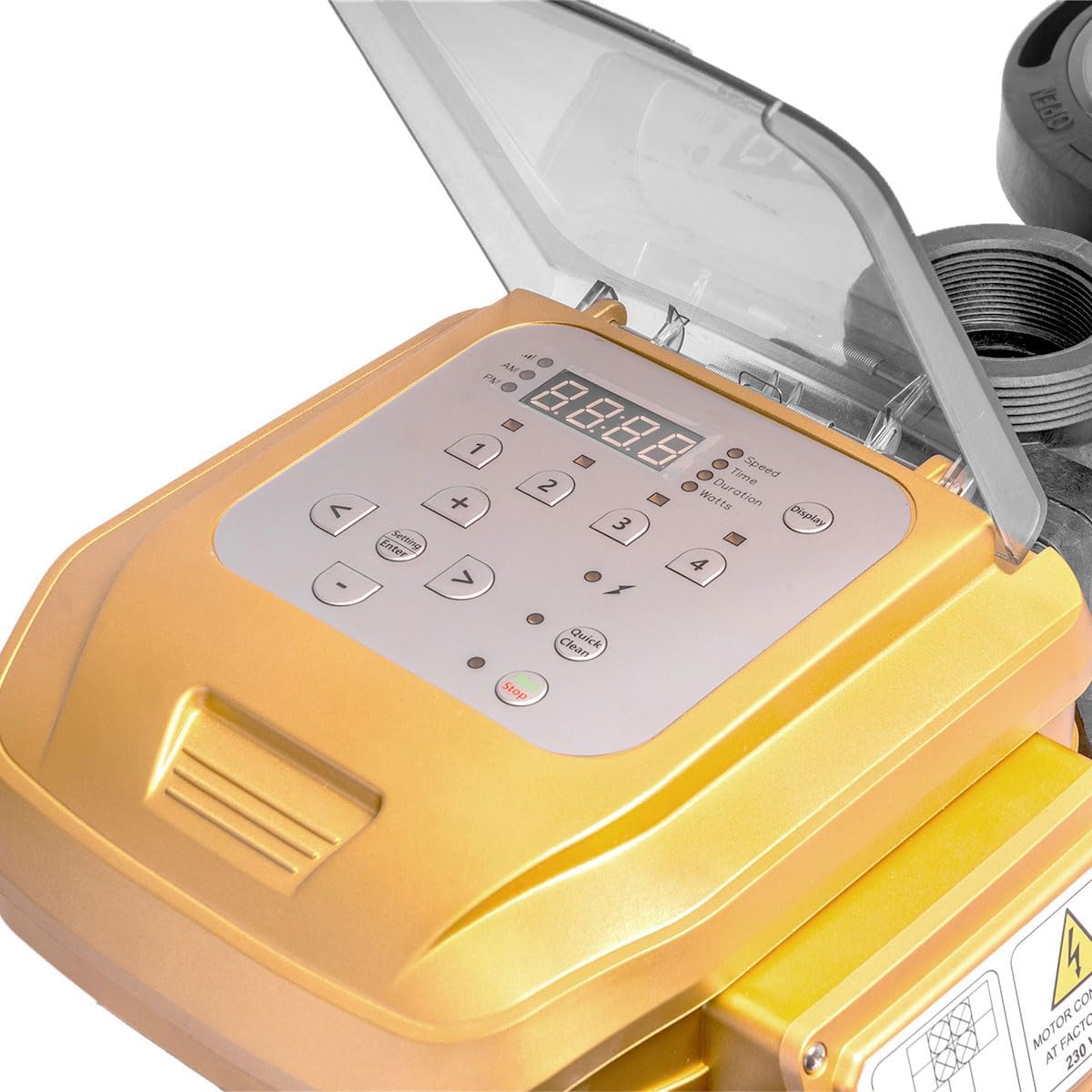
Image 6.1: Close-up view of the intelligent control panel with an LCD display and various buttons for speed, time, duration, and wattage settings.
6.2 Operating Modes
The pump offers variable speed settings to optimize energy consumption and performance:
- ECO Mode: Lower RPM for continuous, energy-efficient filtration. Ideal for maintaining water clarity.
- CLEAN Mode: Medium RPM for routine cleaning and circulation.
- BOOST Mode: Higher RPM (up to 3450 RPM) for demanding tasks like vacuuming, backwashing, or rapid water turnover.
6.3 Setting Speed and Timer
- Power On/Off: Press the 'Power' button to turn the pump on or off.
- Adjusting Speed: Use the '+' and '-' buttons to adjust the RPM. The LCD will display the current speed.
- Setting Timer: Press the 'Setting/Enter' button to access timer settings. Use '+' and '-' to set the desired operating duration for each speed mode.
- Display Information: Press the 'Display' button to cycle through different information shown on the LCD, such as speed, time, duration, and wattage.
- Quick Clean: Use the 'Quick Clean' button for a temporary boost in speed for quick cleaning tasks.
7. Maintenance
7.1 Strainer Basket Cleaning
Regularly inspect and clean the strainer basket to ensure optimal pump performance and prevent damage.
- Turn off the pump and disconnect power at the circuit breaker.
- Rotate the clear strainer pot lid counter-clockwise to remove it.
- Remove the basket and empty any debris.
- Rinse the basket with water.
- Inspect the O-ring on the lid for cracks or wear. Replace if necessary.
- Place the basket back into the strainer pot.
- Ensure the O-ring is properly seated and lubricated with a silicone-based lubricant (do not use petroleum-based products).
- Replace the lid and tighten it securely by hand. Do not overtighten.

Image 7.1: Close-up view of the clear strainer pot lid and the internal basket, indicating the area for debris collection.
7.2 Winterization
In areas subject to freezing temperatures, the pump must be drained and stored properly for winter.
- Turn off the pump and disconnect power.
- Drain all water from the pump by removing the drain plugs.
- Store the pump in a dry, protected area, or cover it to protect from elements.
8. Troubleshooting
| Problem | Possible Cause | Solution |
|---|---|---|
| Pump does not start | No power; tripped breaker; faulty wiring; motor overload. | Check power supply, reset breaker, inspect wiring (by electrician), allow motor to cool. |
| Low water flow | Clogged strainer basket; clogged impeller; air leak in suction line; low water level in pool. | Clean strainer basket, inspect/clean impeller, check for air leaks, ensure adequate pool water level. |
| Pump loses prime | Air leak in suction line; low water level; loose strainer pot lid. | Check all suction connections, ensure proper pool water level, tighten strainer pot lid. |
| Excessive noise/vibration | Unsecured mounting; cavitation (air in pump); worn bearings. | Secure pump to base, check for air leaks, contact customer support if bearings are suspected. |
| Water leaks | Loose plumbing connections; damaged O-rings/seals. | Tighten connections, inspect and replace O-rings/seals as needed. |
9. Warranty and Support
For warranty information, please refer to the warranty card included with your product at the time of purchase. This card outlines the terms and conditions of your warranty coverage.
For technical support, replacement parts, or further assistance, please contact XtremepowerUS customer service. Contact details can typically be found on the product packaging or the official XtremepowerUS website.
Ask a question about this manual
Ask about setup, troubleshooting, compatibility, parts, safety, or missing instructions. Manuals+ will review the question and use this page’s manual context to help answer it.