
Introduction
This manual provides comprehensive instructions for the safe and efficient operation, maintenance, and troubleshooting of your Nivona NIVO 8103 Titan Automatic Coffee Machine. Please read this manual thoroughly before using the appliance and keep it for future reference.
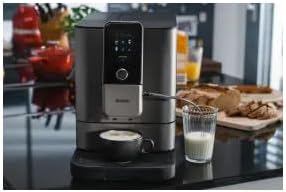
Image: The Nivona NIVO 8103 Titan Automatic Coffee Machine in operation, preparing a coffee beverage.
Safety Instructions
Always follow basic safety precautions when using electrical appliances to reduce the risk of fire, electric shock, and injury to persons.
- Read all instructions carefully.
- Do not immerse the appliance, cord, or plug in water or other liquids.
- Close supervision is necessary when any appliance is used by or near children.
- Unplug from outlet when not in use and before cleaning. Allow to cool before putting on or taking off parts, and before cleaning the appliance.
- Do not operate any appliance with a damaged cord or plug, or after the appliance malfunctions or has been damaged in any manner.
- The use of accessory attachments not recommended by the appliance manufacturer may result in fire, electric shock, or injury to persons.
- Do not use outdoors.
- Do not let cord hang over edge of table or counter, or touch hot surfaces.
- Do not place on or near a hot gas or electric burner, or in a heated oven.
- Always attach plug to appliance first, then plug cord into the wall outlet. To disconnect, turn any control to "off", then remove plug from wall outlet.
- Do not use appliance for other than intended use.
Setup
Unpacking and Initial Placement
- Carefully remove the coffee machine and all accessories from the packaging.
- Place the machine on a stable, level, and heat-resistant surface. Ensure adequate space around the machine for ventilation and access to the water tank and bean container.
- Remove all protective films and packaging materials.
First Use Preparation
- Fill Water Tank: Open the water tank lid and fill with fresh, cold tap water up to the MAX mark. Close the lid securely.
- Fill Bean Container: Open the bean container lid and fill with whole coffee beans. Close the lid securely.
- Connect Power: Plug the power cord into a grounded electrical outlet.
- Initial Rinse Cycle: The machine will prompt you to perform an initial rinse cycle. Follow the on-screen instructions. This cleans the internal components and prepares the machine for use.

Image: The Nivona NIVO 8103 Titan Automatic Coffee Machine, showcasing its modern design on a kitchen counter.
Operating Instructions
Basic Coffee Preparation
- Turn On: Press the power button to turn on the machine. The display will show the startup sequence.
- Select Beverage: Use the intuitive display and buttons to select your desired coffee beverage (e.g., Espresso, Coffee, Cappuccino).
- Adjust Settings (Optional): For some beverages, you can adjust parameters like coffee strength, volume, or temperature via the display.
- Place Cup: Position a cup or mug under the coffee spout.
- Start Brewing: Press the start button to begin the brewing process. The machine will grind the beans, brew the coffee, and dispense it into your cup.
- Enjoy: Once brewing is complete, remove your cup and enjoy your fresh coffee.
Milk Frothing (for milk-based beverages)
- Ensure the milk frothing system is properly connected and clean.
- Place a container with cold milk under the milk spout.
- Select a milk-based beverage (e.g., Cappuccino, Latte Macchiato) from the menu.
- The machine will automatically froth and dispense the milk, then brew the coffee.

Image: The intuitive display of the Nivona NIVO 8103, showing various coffee beverage selections.

Image: The Nivona NIVO 8103 preparing two cappuccinos, demonstrating its dual dispensing capability.
Maintenance
Regular cleaning and maintenance are crucial for the longevity and optimal performance of your Nivona NIVO 8103.
Daily Cleaning
- Drip Tray and Coffee Grounds Container: Empty and rinse the drip tray and coffee grounds container daily.
- Milk System: After each use of milk, perform the automatic milk system cleaning cycle as prompted by the machine.
- Exterior: Wipe the exterior of the machine with a soft, damp cloth.
Weekly / Bi-Weekly Cleaning
- Brewing Unit: The brewing unit is removable for easy cleaning. Remove it from the machine and rinse thoroughly under lukewarm running water. Allow it to air dry before reinserting.

Image: The removable brewing unit being rinsed under water, demonstrating ease of cleaning.

Image: The brewing unit being removed from the Nivona NIVO 8103 for maintenance.
- Water Tank: Clean the water tank with a mild detergent and rinse thoroughly.
Descaling
The machine will prompt you when descaling is necessary. Use only Nivona descaling solution and follow the on-screen instructions precisely. Descaling removes mineral deposits and ensures optimal heating performance.
Filter Replacement
If you are using a water filter, replace it as indicated by the machine or every two months, whichever comes first. Refer to the filter's instructions for specific replacement procedures.
Troubleshooting
| Problem | Possible Cause | Solution |
|---|---|---|
| Machine does not turn on. | No power supply. | Check if the power cord is securely plugged into the machine and the wall outlet. Check the circuit breaker. |
| No coffee is dispensed. | Water tank empty; coffee beans empty; brewing unit blocked. | Fill water tank. Fill bean container. Clean the brewing unit. |
| Coffee tastes weak. | Insufficient coffee grounds; grind setting too coarse. | Adjust coffee strength setting. Adjust grinder to a finer setting. |
| Milk does not froth properly. | Milk system dirty; milk not cold enough; wrong type of milk. | Clean the milk system thoroughly. Use cold milk (4-8°C). Try a different type of milk (e.g., fresh whole milk). |
| Error message on display. | Specific internal issue. | Refer to the specific error code in the full user manual or contact customer support. |
For more detailed troubleshooting, please consult the comprehensive user manual available on the Nivona website or contact customer support.
Specifications
- Model: NIVO8103
- Dimensions (L x W x H): 48 x 24 x 34 cm (18.9 x 9.4 x 13.4 inches)
- Weight: 12.14 kg (26.76 lbs)
- Water Tank Capacity: 1.8 Liters
- Color: Titan
- Material: Titanium
- Coffee Maker Type: Automatic Espresso Machine
- Operation Mode: Automatic
- Interface: Buttons with display
- Power Source: AC Adapter
- Filter Type: Reusable
- Included Components: Filter, User Manual
- Special Features: New technology, removable brewing unit
- Dishwasher Safe: No
Warranty and Support
Your Nivona NIVO 8103 Titan Automatic Coffee Machine comes with a manufacturer's warranty. Please refer to the warranty card included in your product packaging for specific terms and conditions, including warranty duration and coverage.
For technical support, service, or to order spare parts, please visit the official Nivona website or contact their customer service department. Keep your proof of purchase and model number (NIVO8103) ready when contacting support.
Nivona Official Website: www.nivona.com (Note: This is a placeholder link, please verify the actual official website for Nivona.)