
1. Introduction
This manual provides detailed instructions for the installation, operation, and maintenance of your addlon 42-inch ceiling fan with lights and remote control. This fan features a low-profile flush mount design, dimmable 3CCT LED lighting, a quiet 6-speed reversible DC motor, and dual-sided blades. Please read this manual thoroughly before installation and use to ensure safe and efficient operation.

Image 1.1: Overview of the addlon 42-inch ceiling fan's multi-function capabilities.
2. Safety Information
Always follow basic safety precautions when installing and operating electrical appliances to reduce the risk of fire, electric shock, and personal injury.
- Read all instructions: Before beginning installation, read all instructions carefully.
- Electrical Safety: Ensure the power is turned off at the circuit breaker or fuse box before installation or servicing. All wiring must be in accordance with national and local electrical codes.
- Qualified Electrician: If you are unfamiliar with electrical wiring, consult a qualified, licensed electrician.
- Mounting: The ceiling fan must be mounted to a structurally sound ceiling joist or outlet box capable of supporting the fan's weight (minimum 35 lbs).
- Blade Clearance: Ensure there is adequate clearance from the fan blades to any obstacles.
- Voltage: This fan is designed for 120V AC input. Do not connect to 220V voltage.
- Wiring: This fan does not support separate wiring for the fan and light.
- Dimmer Switches: Do not connect the fan to a dimmer switch or a fan gear switch. Use the provided remote control for speed and light adjustments.
- Outdoor Use: Suitable for outdoor spaces like patios or gazebos, but not to be exposed directly to rain.
3. Package Contents
Verify that all components are present before beginning installation. If any parts are missing or damaged, contact customer support.
- Ceiling Fan Motor Assembly
- Fan Blades (5)
- Light Kit (LED)
- Remote Control
- Mounting Hardware (bracket, screws, wire nuts, etc.)
- User Manual
4. Setup and Installation
The addlon 42-inch ceiling fan is designed for flush mount installation and includes detailed instructions and videos to assist with the setup process.
4.1 Before You Begin
- Turn off power at the circuit breaker.
- Ensure the mounting location is suitable for a ceiling fan.
- Gather necessary tools (screwdriver, wire strippers, ladder, etc.).
4.2 Step-by-Step Installation
- Mounting Bracket: Secure the mounting bracket to the ceiling junction box. Ensure the box is rated for fan support.
- Wiring: Connect the fan's electrical wires to the household wiring according to the wiring diagram in the manual. Use appropriate wire nuts.
- Attach Fan Body: Carefully lift the fan motor assembly and attach it to the mounting bracket.
- Install Blades: Attach the five fan blades to the motor housing. The blades are dual-sided, allowing you to choose between black and dark wood grain finishes.
- Install Light Kit: Connect the light kit wiring and secure the LED light panel and diffuser to the fan body.

Image 4.1: Illustration of the easy installation process for the addlon ceiling fan.
Important Note: Do not connect this fan to a dimmer switch or a fan gear switch. Use only the provided remote control for operation.
5. Operating Instructions
Your addlon ceiling fan is operated using the included remote control, offering various functions for comfort and convenience.
5.1 Remote Control Functions
The remote control allows you to manage all fan and light settings.
- Power On/Off: Turns the fan and light on or off.
- Fan Speed: Adjusts the fan speed through 6 available settings.
- Timer: Sets the fan to turn off automatically after 1, 2, or 4 hours.
- Light Control: Turns the light on/off, adjusts brightness (dimmable 10%-100%), and changes color temperature (3000K, 4000K, 6000K).
- Reverse Function: Changes the direction of blade rotation for summer or winter modes.
5.2 Fan Speed Settings
The fan offers 6 distinct speed settings to suit your preference and room conditions.

Image 5.1: Explanation of the 6-speed settings for the fan.
- Levels 1-2: Low, comfortable wind for sleeping or gentle ventilation.
- Levels 3-4: Medium, natural wind for daily use.
- Levels 5-6: High, strong cooling wind for exercise or hot weather.
5.3 Reversible DC Motor
The DC motor allows for reversible blade rotation, optimizing air circulation for different seasons.

Image 5.2: Visual representation of the reversible DC motor's summer and winter modes.
- Summer Mode: Blades rotate counter-clockwise, pushing air downward to create a cooling breeze.
- Winter Mode: Blades rotate clockwise, drawing air upward to circulate warm air near the ceiling, balancing indoor heating.
5.4 Customizable Lighting
The integrated LED light offers adjustable brightness and color temperature to suit various activities and moods.
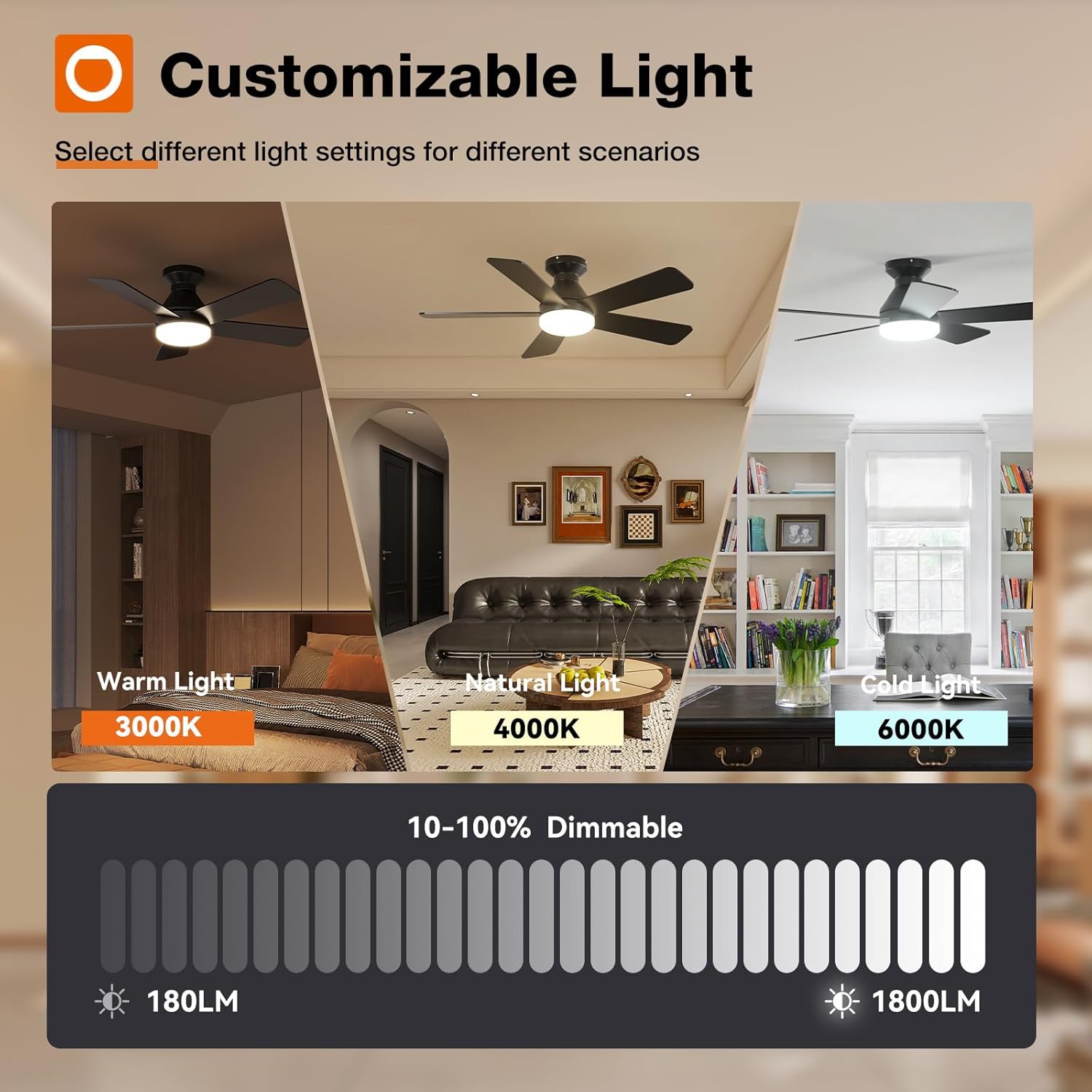
Image 5.3: Demonstration of customizable light settings (color temperature and dimming).
- Dimmable: Adjust brightness from 10% to 100%.
- Color Temperature: Select from 3000K (warm white), 4000K (natural white), or 6000K (cold white).
5.5 Memory Function
The fan and light settings include a memory function, allowing the unit to recall your last chosen settings.

Image 5.4: How the fan and light memory function operates.
To activate the memory function for light settings, choose your desired brightness and color temperature, then turn off the light. Ensure the light remains off for at least 10 seconds. The next time you turn it on, the light will resume the saved settings. The fan will also maintain its last operating speed.
5.6 Wall Switch Control
The fan is compatible with conventional wall switches for basic on/off control of both the fan and light simultaneously.

Image 5.5: Wall switch compatibility for the addlon ceiling fan.
Note: The fan does not support separate wiring for fan and light control from a wall switch, nor is it compatible with dimmer or fan gear switches.
6. Care and Maintenance
Regular maintenance helps ensure the longevity and optimal performance of your ceiling fan.
- Cleaning: Clean the fan and blades periodically with a soft, damp cloth. Do not use abrasive cleaners or solvents.
- Blade Inspection: Check fan blade screws for tightness annually. Loose screws can cause noise.
- Electrical Connections: Periodically check all electrical connections for tightness.
- LED Light Kit: The LED light kit is replaceable. Contact customer support for replacement parts if needed.
7. Troubleshooting Guide
Refer to the table below for common issues and their solutions.
| Problem | Possible Cause | Solution |
|---|---|---|
| Fan does not start | No power to the fan; Loose wire connections; Remote control battery low or not paired. | Check circuit breaker; Verify all wire connections are secure; Replace remote battery or re-pair remote. |
| Fan makes noise | Loose fan blade screws; Loose mounting hardware; Fan not properly balanced. | Tighten all blade screws; Ensure mounting hardware is secure; Check blade balance. |
| Light does not work | Loose wire connection to light kit; Faulty LED light kit; Remote control issue. | Check light kit wiring; Contact customer support for replacement LED kit; Check remote battery/pairing. |
| Remote control not responding | Low or dead batteries; Remote not paired with receiver; Obstruction between remote and fan. | Replace batteries; Re-pair remote with fan receiver (refer to pairing instructions in full manual); Ensure clear line of sight. |

Image 7.1: The addlon ceiling fan operates quietly, typically around 24dB.
8. Product Specifications
| Feature | Specification |
|---|---|
| Model Number | KFM42PLY5B01R1-CA |
| Brand | addlon |
| Size | 42 inch |
| Product Dimensions (D x W x H) | 102D x 102W x 25H centimetres |
| Colour | Black |
| Material Type | Engineered Wood (Blades) |
| Motor Type | Brushless DC Motor |
| Number of Blades | 5 |
| Number of Speeds | 6 |
| Noise Level | 35 dB (typical, can be lower) |
| Wattage | 45 watts |
| Voltage | 120 volts |
| Air Flow Capacity | 3469 cubic feet per minute |
| Light Type | LED (Dimmable, 3000K/4000K/6000K) |
| Mounting Type | Flush Mount |
| Indoor/Outdoor Usage | Indoor, Outdoor (not exposed to direct rain) |
| Included Components | Ceiling Fan, Light Kit, Mounting Hardware, Remote |
| UPC | 850064717402 |

Image 8.1: EnergyGuide label for the addlon 42-inch ceiling fan.
8.1 Key Components
- DC Motor: Reduces electricity costs by up to 80% compared to conventional AC motors.
- Fan Blades: Dual-sided blades available in black and dark wood grain to complement various interior designs.
- Replaceable LED Light Kit: Provides bright, even lighting. Replacement LED light boards are available.

Image 8.2: Illustration of the energy-efficient DC motor.

Image 8.3: Detail of the dual-sided fan blade.

Image 8.4: The replaceable LED light kit.
9. Warranty and Customer Support
addlon is committed to providing quality products and support.
9.1 Warranty Information
- Motor Warranty: 120 months (10 years)
- Whole Fan Warranty: 2 years (excluding motor)
9.2 Customer Support
For any questions regarding installation, operation, or warranty claims, please contact addlon customer support. We offer 24-hour customer support to assist you.

Image 9.1: addlon customer support team.
Please have your model number (KFM42PLY5B01R1-CA) and purchase information ready when contacting support.