
1. Important Safety Instructions
Please read all instructions carefully before operating the dehumidifier. Keep this manual for future reference.
- This appliance is for indoor residential use only.
- Always place the unit on a level, stable surface to prevent tipping.
- Ensure the power outlet matches the voltage requirements of the unit.
- Do not operate the dehumidifier with a damaged power cord or plug. If damaged, contact customer support.
- Keep children and pets away from the unit during operation.
- Do not block the air inlet or outlet. Maintain at least 8 inches (20 cm) of clearance around the unit.
- Unplug the unit before cleaning, moving, or performing any maintenance.
- Do not use the unit in areas where flammable gases or liquids are stored.
- Operating Temperature: The unit operates optimally between 41°F (5°C) and 95°F (35°C).
- Initial Setup: After transport, allow the unit to stand upright for at least 24 hours before first use to stabilize the compressor.
- For optimal efficiency, keep doors and windows closed in the room where the dehumidifier is operating.
2. Product Overview
The FRESHDEW 30-Pint Dehumidifier is designed to efficiently remove excess moisture from your home, improving air quality and comfort.
2.1 Package Contents
- 1 x FRESHDEW Dehumidifier
- 4 x Swivel Casters
- 1 x User Manual
- 1 x Drain Hose (3.3 ft)
2.2 Unit Components
Familiarize yourself with the main parts of your dehumidifier.
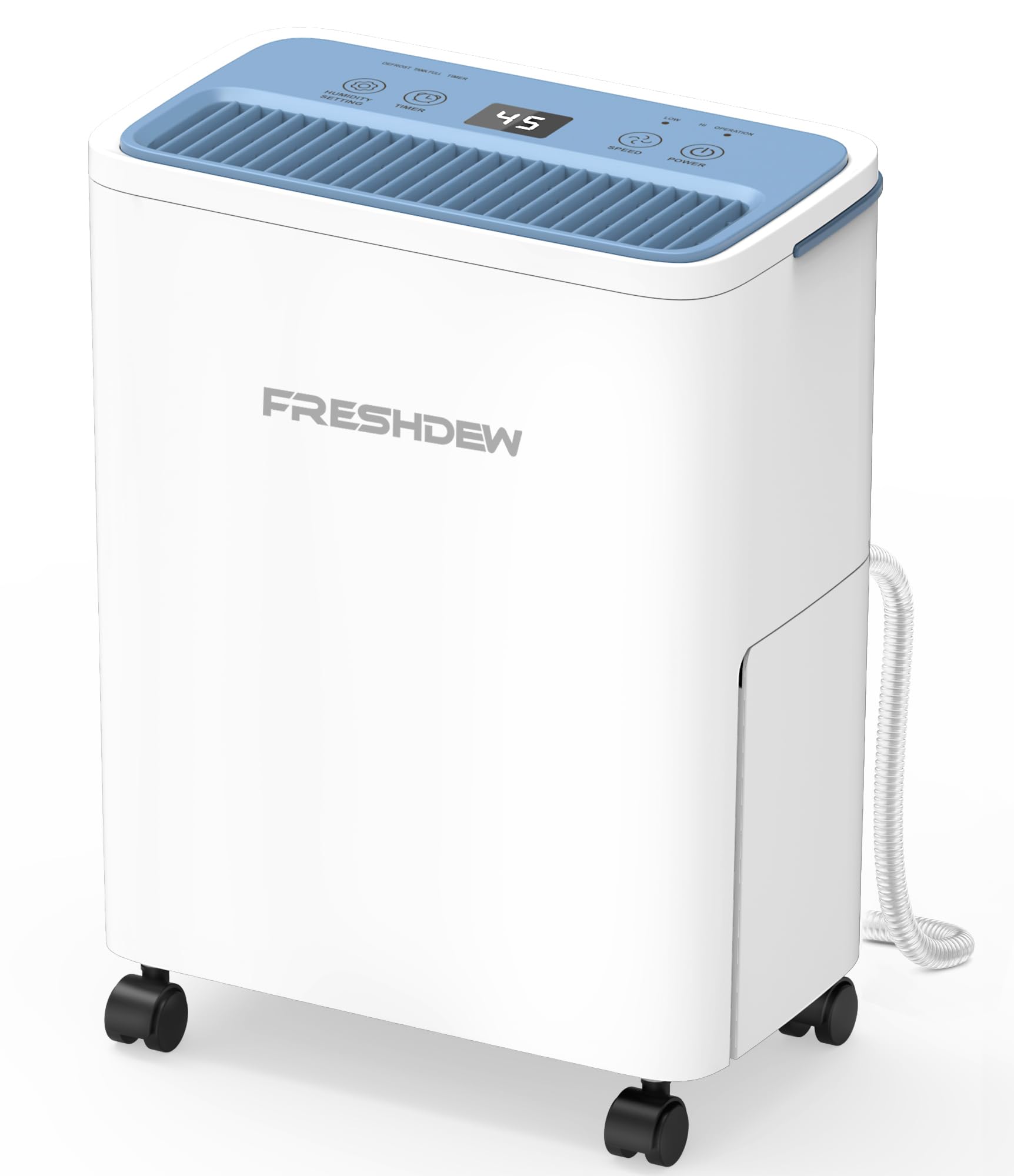
Image: Front view of the FRESHDEW 30-Pint Dehumidifier, showing its compact design and control panel.
2.3 Control Panel
The intuitive control panel allows for easy operation and monitoring.
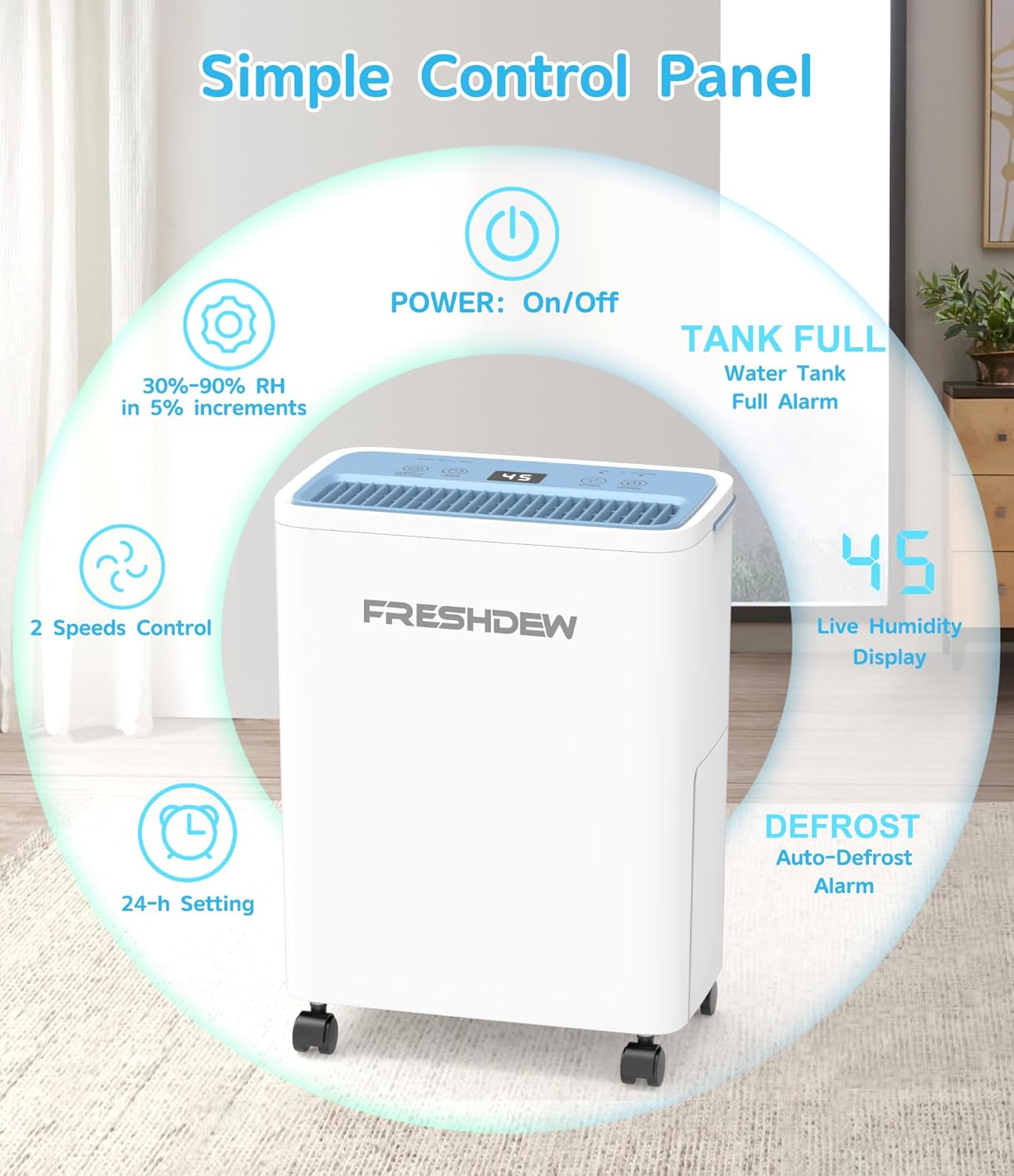
Image: Detailed view of the control panel with indicators for Power, Humidity Setting, Fan Speed, Timer, Tank Full, Live Humidity Display, and Defrost Alarm.
- POWER Button: Turns the unit On or Off.
- Humidity Setting: Adjusts the desired relative humidity (RH) from 30% to 90% in 5% increments.
- Fan Speed Control: Selects between two fan speeds (High/Low).
- 24-h Setting (Timer): Sets the auto-on or auto-off timer for up to 24 hours.
- TANK FULL Indicator: Illuminates when the water tank is full and needs to be emptied. An audible alarm will also sound.
- Live Humidity Display: Shows the current ambient humidity level.
- DEFROST Indicator: Illuminates when the unit is performing an auto-defrost cycle.
3. Setup
3.1 Unpacking
- Carefully remove the dehumidifier from its packaging.
- Remove all packing materials, including any tape or protective films.
- Inspect the unit for any shipping damage. If damaged, do not operate and contact customer support.
3.2 Caster Installation
The dehumidifier comes with removable 360° swivel casters for easy mobility.
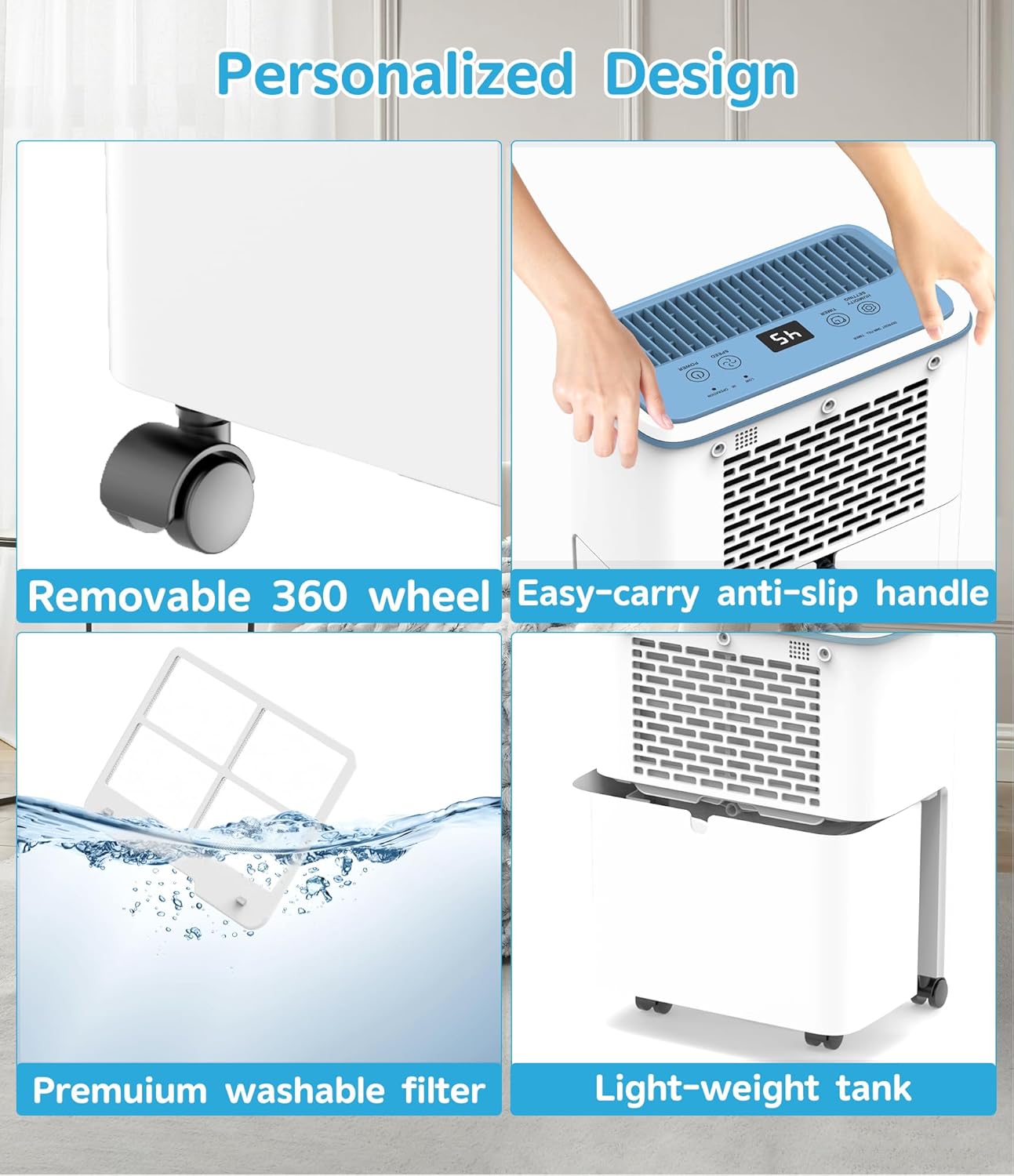
Image: Close-up of the removable 360° wheel, easy-carry anti-slip handle, premium washable filter, and light-weight water tank.
- Turn the dehumidifier upside down carefully.
- Insert each caster into the designated holes at the bottom corners of the unit until they click securely into place.
- Return the dehumidifier to an upright position.
3.3 Placement
- Place the dehumidifier on a firm, level surface that can support its weight.
- Ensure there is at least 8 inches (20 cm) of space around the unit for proper airflow. Do not place it against a wall or furniture that would obstruct the air intake or exhaust.
- Avoid placing the unit near heat sources (e.g., heaters, dryers) or in direct sunlight.
- For optimal performance, place the unit in the center of the room or area where dehumidification is most needed.
4. Operating Instructions
4.1 Power On/Off
- Plug the power cord into a grounded electrical outlet.
- Press the POWER button to turn the unit on. The display will show the current humidity level.
- Press the POWER button again to turn the unit off.
4.2 Setting Desired Humidity Level
- When the unit is on, press the Humidity Setting button (up/down arrows) to adjust the desired humidity level.
- You can set the target humidity between 30% RH and 90% RH in 5% increments.
- The unit will operate until the set humidity level is reached, then it will automatically turn off. It will restart when the humidity rises above the set level (typically +3% RH).
4.3 Fan Speed Control
- Press the Fan Speed button to cycle between High and Low fan speeds.
- High speed provides faster dehumidification, while Low speed offers quieter operation.
4.4 Timer Function
- Auto-Off Timer: With the unit running, press the Timer button to set the desired number of hours (1-24) after which the unit will automatically turn off.
- Auto-On Timer: With the unit off, press the Timer button to set the desired number of hours (1-24) after which the unit will automatically turn on.
- To cancel the timer, press the Timer button until '00' appears or turn the unit off and on again.
4.5 Operating Modes
The dehumidifier offers versatile modes for different scenarios.

Image: Illustration of multi-scenario dehumidification, showing CO Mode for drying clothes, AU Mode for restoring bedding, and Self-Setting Mode for storage spaces.
- CO Mode (Continuous Drying): Ideal for drying clothes quickly. The unit will run continuously regardless of the humidity level.
- AU Mode (Automatic): Maintains a comfortable humidity level, suitable for general living spaces and restoring the fluffy state of bedding.
- Self-Setting Mode: Allows you to set a specific humidity level, perfect for storage spaces like basements or closets.
4.6 Special Features
- Auto-Defrost: If frost builds up on the evaporator coils, the unit will automatically enter defrost mode. The DEFROST indicator will illuminate, and the compressor will temporarily stop until the frost melts.
- Tank Full Alarm & Auto-Shutoff: When the water tank is full, the TANK FULL indicator will light up, an alarm will sound (3 beeps), and the unit will automatically shut off to prevent overflow.
- Smart Humidity Sensor Technology: The built-in sensor detects concentrated moisture, allowing the compressor to cycle efficiently. It stops when humidity is 3% below the setpoint and restarts when 3% above, balancing energy savings with consistent control.
- Ultra-Quiet Operation: Designed with advanced noise reduction technology for quiet performance.

Image: Illustration showing the quiet operation of the dehumidifier, with noise levels around 35dB in Sleep Mode, comparable to falling leaves.
5. Drainage Options
Your FRESHDEW dehumidifier offers two convenient ways to remove collected water.

Image: Comparison of Manual Drain (emptying the water tank) and Auto Drain (continuous drainage via hose).
5.1 Manual Drainage (Water Tank)
The unit has a 0.52 Gallon (2 Liter) water tank. When full, the unit will stop operating and alert you.
- When the TANK FULL indicator lights up and the alarm sounds, gently pull out the water tank from the back of the unit.
- Carefully carry the tank to a sink or drain and empty the water.
- Slide the empty water tank back into the unit until it clicks into place. The unit will resume operation automatically.
5.2 Continuous Drainage
For long-term operation without needing to empty the tank, use the continuous drainage option.
- Locate the drain outlet at the back of the dehumidifier.
- Remove the rubber stopper from the drain outlet.
- Connect the provided 3.3-ft drain hose to the outlet, ensuring a secure fit.
- Route the other end of the hose to a suitable drain (e.g., floor drain, large bucket), ensuring the hose is sloped downwards to allow gravity to drain the water. Do not allow the hose to be kinked or blocked.
- Once connected, water will continuously drain from the unit, bypassing the internal water tank.
6. Maintenance
Regular maintenance ensures optimal performance and extends the lifespan of your dehumidifier.
6.1 Cleaning the Air Filter
The washable air filter should be cleaned every two weeks or more frequently depending on usage and air quality.
- Turn off the dehumidifier and unplug it from the power outlet.
- Locate the air filter cover at the back of the unit. Gently pull it out to remove the filter.
- Rinse the filter under running tap water (not hot water) or use a vacuum cleaner to remove dust and debris.
- Allow the filter to air dry completely before reinstalling it. Do not expose it to direct sunlight or use a dryer.
- Once dry, reinsert the filter into its slot and close the cover.
6.2 Cleaning the Unit
- Always unplug the unit before cleaning.
- Wipe the exterior of the dehumidifier with a soft, damp cloth. Do not use harsh chemicals, abrasive cleaners, or solvents, as these may damage the surface.
- Clean the water tank regularly to prevent mold and mildew growth. Wash it with mild detergent and rinse thoroughly. Ensure it is completely dry before reinserting.
6.3 Storage
If the unit will not be used for an extended period:
- Turn off the unit and unplug it.
- Empty the water tank and clean it thoroughly.
- Clean the air filter and ensure it is dry.
- Allow the unit to dry for at least 24 hours in a well-ventilated area to prevent mold and mildew.
- Store the dehumidifier in an upright position in a cool, dry place, away from direct sunlight and extreme temperatures.
7. Troubleshooting
Before contacting customer support, please refer to the following troubleshooting guide for common issues.
| Problem | Possible Cause | Solution |
|---|---|---|
| Dehumidifier does not turn on. |
|
|
| Unit is running but not removing much moisture. |
|
|
| Unit is noisy. |
|
|
| Water leaks from the unit. |
|
|
8. Specifications
| Feature | Specification |
|---|---|
| Brand | FRESHDEW |
| Model Number | PD8R-05AE |
| Dehumidification Capacity | 30 Pints/Day (at 95°F, 90% RH) |
| Coverage Area | Up to 1500 sq. ft. |
| Water Tank Capacity | 0.52 Gallons (2 Liters) |
| Operating Temperature Range | 41°F – 95°F (5°C – 35°C) |
| Humidity Setting Range | 30% – 90% RH |
| Noise Level | <40dB (approx. 35dB in Sleep Mode) |
| Fan Speeds | 2 (High, Low) |
| Timer | 24-Hour Programmable |
| Product Dimensions (D x W x H) | 11.42" x 16.33" x 6.7" |
| Special Features | Automatic Shutoff, Auto-Defrost, Continuous Drainage, Washable Filter, Swivel Casters |
9. Warranty and Customer Support
FRESHDEW is committed to providing high-quality products and excellent customer service.
- For warranty information, please refer to the warranty card included with your product or contact FRESHDEW customer support.
- If you have any questions, concerns, or require assistance with your dehumidifier, please contact our customer support team.
- Please have your model number (PD8R-05AE) and purchase information ready when contacting support.
