
1. Safety Information
Please read and understand all instructions before beginning installation. Improper installation or operation can lead to electric shock, fire, or personal injury.
- Always disconnect power at the main circuit breaker before installation or servicing.
- Ensure all electrical connections comply with local codes and ordinances.
- Consult a qualified electrician if you are unfamiliar with electrical wiring.
- Mount the fan to a ceiling outlet box marked 'Acceptable for Fan Support of 35 lbs (15.9 kg) or less'.
- Do not use the fan with a dimmer switch or a fan's gear switch, as this may damage the motor or cause malfunction.
- This fan is suitable for indoor and outdoor use, but should not be directly exposed to rain.
2. Package Contents
Verify that all components are present and undamaged before proceeding with installation.
- Fan Motor Assembly
- Fan Blades (5 pieces, dual-sided: white and yellow wood grain)
- Downrod
- Canopy
- Mounting Bracket
- Remote Control
- LED Light Kit
- Hardware Pack (screws, washers, wire nuts, etc.)

Image: Two addlon 52-inch white ceiling fans with light, illustrating the product and the dual-sided blade options.
3. Specifications
| Brand | addlon |
| Model Name | KDM52PLY5B03R1-2P |
| Product Dimensions | 51.97"D x 51.97"W x 15.75"H |
| Size | 52 inch |
| Color | White |
| Power Source | AC |
| Motor Type | DC Motor |
| Wattage | 50 watts |
| Airflow | 4879 CFM |
| Noise Level | 35 Decibels |
| Number of Power Levels | 6 |
| Light Type | LED |
| Luminous Flux | 1800 Lumen |
| Color Temperature | 3000K (Warm White), 4000K (Natural White), 6000K (Cold White) |
| Dimmable | 10%-100% |
| Control Method | Remote |
| Installation Type | Downrod Mount (Maximum angle up to 15°) |
| Batteries | 2 AAA batteries required (included) |

Image: Detailed dimensions and key specifications of the ceiling fan.

Image: Illustration of the DC motor, which reduces electricity costs by 80% compared to conventional AC motors.
4. Installation
The installation process is designed to be straightforward. For detailed visual guidance, please refer to the provided installation video and diagrams.
- Prepare for Installation: Turn off power at the circuit breaker. Ensure the mounting surface is structurally sound.
- Install Mounting Bracket: Secure the mounting bracket to the ceiling outlet box.
- Assemble Fan Motor: Attach the downrod to the fan motor assembly.
- Wiring: Connect the electrical wires from the ceiling to the fan's wiring, following the color-coded instructions.
- Mount Fan: Carefully lift the fan assembly and hang it on the mounting bracket.
- Attach Canopy: Secure the canopy to cover the wiring and mounting bracket.
- Install Fan Blades: Attach the five fan blades to the motor housing. Choose between the white or yellow wood grain side to match your decor.
- Install LED Light Kit: Connect and secure the LED light kit to the bottom of the fan motor assembly.
Important Note on Wall Switches: This fan is compatible with conventional on/off wall switches. It is not designed to be connected to a dimmer switch or a fan's gear switch, as this can cause damage or improper operation.

Image: Illustration of the easy installation process, typically completed in about 30 minutes.
Video: Official addlon video demonstrating the features of the 5-blade downrod mount ceiling fan with light. This video provides a visual overview of the product's capabilities.

Image: Guidance on compatible wall switches (conventional on/off) and incompatible types (dimmer or gear switches).
5. Operating Instructions
The addlon ceiling fan is operated using the included remote control.
Remote Control Functions:
- Power On/Off: Press the power button to turn the fan and light on or off.
- Fan Speed Adjustment: Select from 6 distinct wind speeds. Levels 1-2 provide a low, comfortable wind for sleeping or ventilation. Levels 3-4 offer a medium, natural wind for daily use. Levels 5-6 deliver a high, cooling wind for exercise or hot weather.
- Timer Setting: Set the fan to automatically turn off after 1, 2, or 4 hours.
- Reversible Function: Switch between forward (downward airflow for cooling in summer) and reverse (upward airflow for circulating warm air in winter) rotation directly from the remote.
- Light On/Off: Control the light independently from the fan.
- Light Dimmable: Adjust the light brightness from 10% to 100%.
- Color Temperature Selection: Choose between 3000K (warm white), 4000K (natural white), and 6000K (cold white).

Image: Overview of the fan's multi-functional capabilities, including remote control, timer, reversible motor, 6 speeds, and customizable light.

Image: Explanation of the 6-speed settings for various scenarios, from comfortable low wind to high cooling wind.
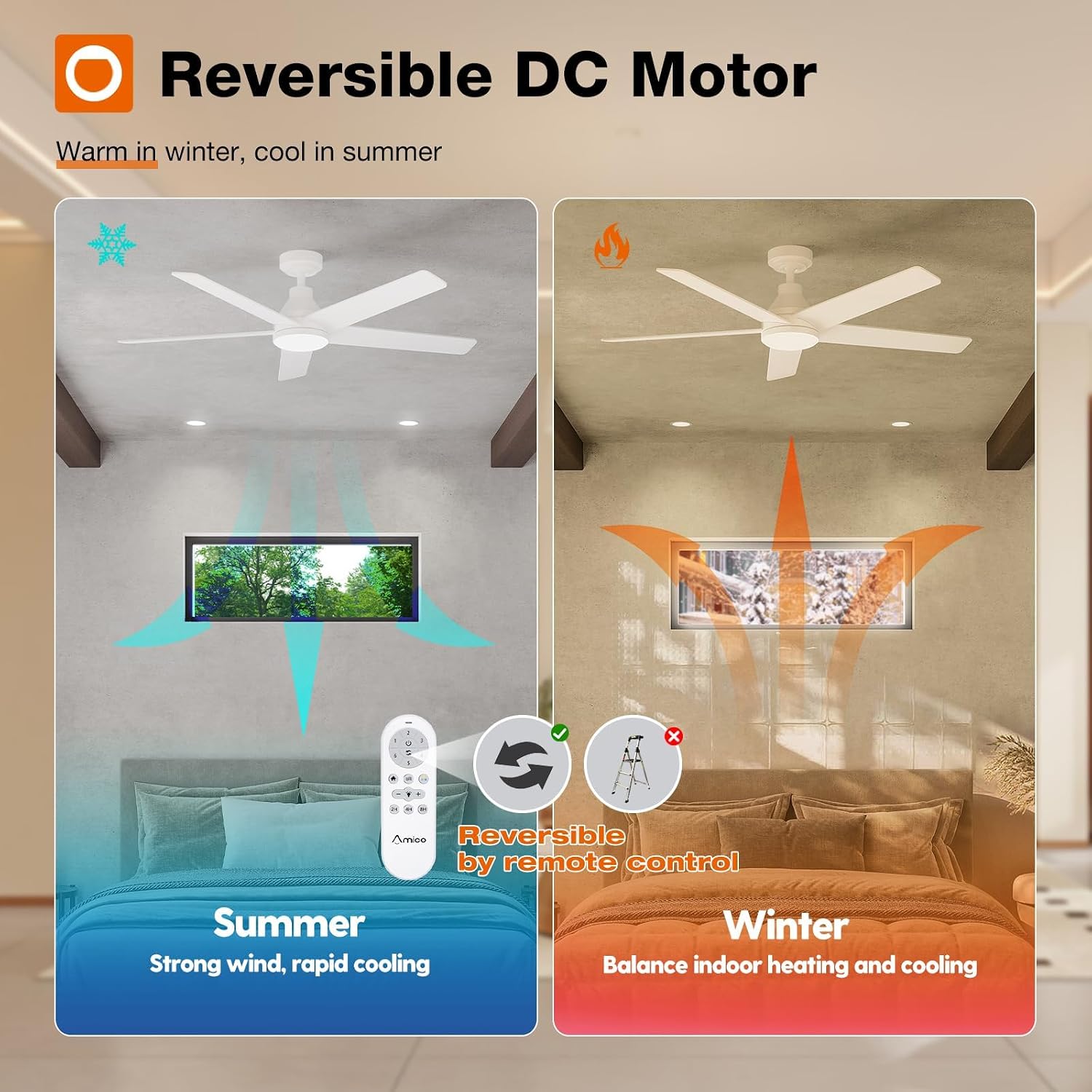
Image: Visual representation of the reversible DC motor, providing strong wind for rapid cooling in summer and balancing indoor heating in winter.

Image: Details on the customizable light, offering dimmable brightness (10-100%) and three color temperature options.
Memory Function:
The fan features a memory function that retains your last light brightness, color temperature, and fan speed settings. To activate the memory function for the light, select your desired brightness and color temperature, then turn off the light and ensure it remains off for at least 10 seconds. When the light is turned on again, it will recall the previous settings. If the light is turned on within 10 seconds of being turned off, the color temperature may switch. The fan will also resume its last operating speed when turned back on.

Image: Step-by-step guide to using the memory function for light settings.

Image: Illustration of the timer function, allowing the fan to turn off automatically after a set period, up to 4 hours.
6. Maintenance
Regular maintenance ensures optimal performance and longevity of your addlon ceiling fan.
- Cleaning: Periodically clean the fan blades and motor housing with a soft, damp cloth. Do not use abrasive cleaners or solvents.
- Tighten Fasteners: Check all screws and fasteners on the fan and mounting hardware at least twice a year to ensure they are secure.
- LED Light Kit: The fan features a replaceable LED light kit. If replacement is needed, contact customer support for assistance.

Image: Noise level comparison, highlighting the fan's quiet operation at 24dB, suitable for peaceful environments.

Image: Illustration of the replaceable LED light kit, ensuring long-term usability without needing to replace the entire fixture.
7. Troubleshooting
If you encounter issues with your fan, refer to the following common problems and solutions:
| Problem | Possible Cause | Solution |
|---|---|---|
| Fan does not start | No power to the fan; Loose wire connections; Remote control battery low or dead. | Check circuit breaker and wall switch. Ensure all wiring is secure. Replace remote control batteries. |
| Light does not work | Loose wire connection to light kit; Faulty LED light kit; Remote control issue. | Check light kit wiring. Contact customer support for a replacement LED kit if necessary. Check remote battery. |
| Fan wobbles | Loose fan blades; Uneven blade balance; Loose mounting hardware. | Ensure all blade screws are tight. Use a balancing kit (not included) if needed. Tighten mounting bracket screws. |
| Noisy operation | Loose screws; Motor housing rubbing. | Check and tighten all screws. Ensure no parts are rubbing against each other. |
If you are unable to resolve an issue, please contact addlon customer support for further assistance.
8. Warranty and Support
addlon is committed to providing high-quality products and excellent customer service.
- Motor Warranty: The fan motor is covered by a 10-year warranty.
- Other Parts Warranty: All other components of the fan are covered by a 2-year warranty.
- Customer Support: We offer 24-hour customer support. For any questions regarding installation, operation, or warranty claims, please contact us.

Image: Warranty information, including 10 years for the motor and 2 years for other parts.

Image: Representation of the 24-hour customer service team available for support.