
1. Introduction
Thank you for choosing the Dowinx Gaming Chair LS-6668D-02. This chair is designed to provide superior comfort and support for extended periods of sitting, whether for gaming, studying, or working. Featuring a breathable fabric material, pocket coil seating, and multiple adjustable functions, this chair aims to enhance your seating experience. Please read this manual thoroughly before assembly and use to ensure proper setup and operation.
2. Safety Information
- Ensure all components are securely fastened before use.
- Do not stand on the chair or use it as a step stool.
- Do not exceed the maximum weight capacity of 135 kg (297 lbs).
- Keep children and pets away from the chair during assembly.
- Avoid exposing the chair to direct sunlight or extreme temperatures.
- Use only original Dowinx replacement parts if needed.
3. Package Contents
Before beginning assembly, please verify that all parts are present and undamaged. If any parts are missing or damaged, please contact Dowinx customer support.
- Backrest
- Seat Base with Armrests and Ottoman
- Five-star Base
- Gas Lift Cylinder
- Casters (5 pcs)
- Headrest Pillow
- Lumbar Support Pillow (with USB vibration function)
- Assembly Hardware (screws, washers, Allen wrench)
- User Manual

Image: Exploded view of Dowinx Gaming Chair components, showing the backrest, seat base, armrests, five-star base, gas lift, casters, and cushions.
4. Setup (Assembly)
Assembly is designed to be straightforward and can typically be completed by one person in about 1.5 hours. A dedicated tool and a detailed instruction manual in both English and Japanese are included to assist you.
- Attach Casters to Base: Insert the five casters into the holes at the end of each leg of the five-star base.
- Install Gas Lift: Place the gas lift cylinder into the center hole of the five-star base.
- Attach Mechanism to Seat: Secure the seat mechanism to the underside of the seat base using the provided screws. Ensure the front of the mechanism faces the front of the seat.
- Connect Seat to Gas Lift: Carefully place the assembled seat onto the gas lift cylinder.
- Attach Backrest to Seat: Align the backrest with the mounting brackets on the seat base and secure it with screws.
- Install Cushions: Attach the headrest pillow to the top of the backrest and the lumbar support pillow to the lower back area. The lumbar pillow has a USB cable for its vibration function; connect it to a USB power source.
Tip: For visual guidance, an assembly video may be available online. Refer to the Dowinx official website or search for "Dowinx Gaming Chair Assembly" on video platforms.
5. Operating Instructions
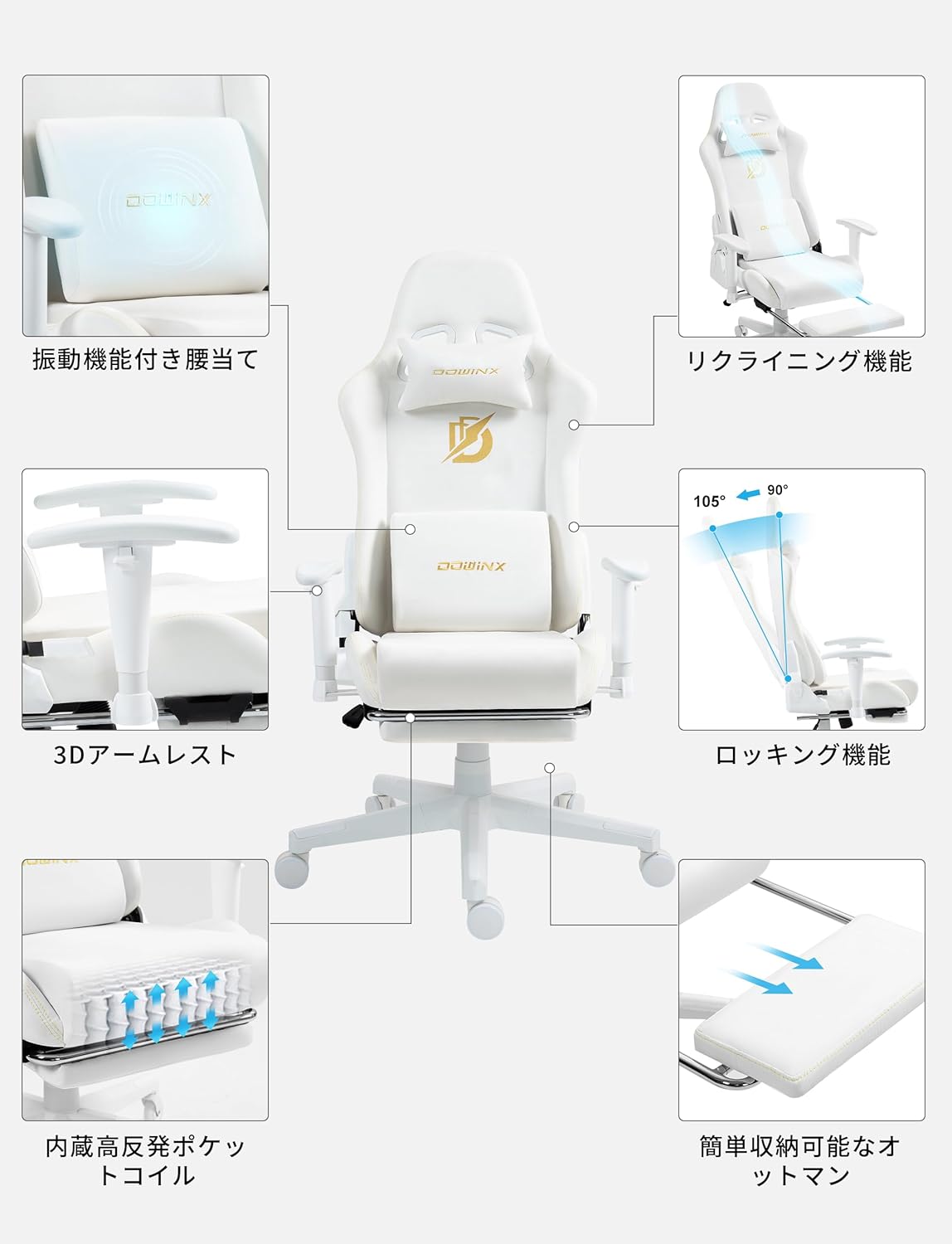
Image: Overview of Dowinx Gaming Chair features including reclining, rocking, armrests, and ottoman.
- Seat Height Adjustment: Pull the lever on the right side of the seat upwards to adjust the seat height. Release the lever at your desired height.
- Reclining Function: Pull the lever on the right side of the seat (separate from height adjustment) upwards and lean back to recline the backrest. The chair can recline up to approximately 170 degrees. Release the lever to lock the backrest in place.
- Rocking Function: The chair features a rocking function with a range of approximately 15 degrees. To enable rocking, pull out the lever located under the seat. Push it back in to lock the chair in an upright position. The tension of the rocking mechanism can be adjusted by turning the knob located under the seat.
- 3D Armrest Adjustment: The armrests can be adjusted in multiple directions:
- Height: Press the button on the side of the armrest and move it up or down.
- Forward/Backward: Slide the armrest pad forward or backward.
- Swivel: Rotate the armrest pad left or right.

Image: Detailed view of the 3D armrests, illustrating height, forward/backward, and swivel adjustments.
- Retractable Ottoman: Pull the ottoman from underneath the seat to extend it. Push it back in to store it when not in use. This feature allows for comfortable resting positions.
- Lumbar Support Massage: Connect the USB cable from the lumbar support pillow to a USB power source (e.g., power bank, computer USB port) to activate the vibration massage function.
6. Maintenance
Proper care will extend the life and appearance of your Dowinx Gaming Chair.
- Cleaning: The fabric material of the chair should be cleaned by hand only. Use a soft cloth dampened with mild soap and water for general cleaning. Avoid harsh chemicals or abrasive cleaners.
- Regular Checks: Periodically check all screws and bolts to ensure they are tight. Re-tighten if necessary to maintain stability and safety.
- Avoid Direct Sunlight: Prolonged exposure to direct sunlight can cause the fabric to fade.
- Lubrication: If the casters or gas lift become stiff, a small amount of silicone spray lubricant can be applied to the moving parts.
7. Troubleshooting
| Problem | Possible Cause | Solution |
|---|---|---|
| Chair is wobbly or unstable. | Loose screws or improper assembly. | Check and tighten all assembly screws. Ensure all parts are correctly installed according to the manual. |
| Gas lift not adjusting height. | Lever not fully engaged or gas lift malfunction. | Ensure the height adjustment lever is fully pulled. If the issue persists, the gas lift may need replacement. Contact support. |
| Chair makes creaking noises. | Loose connections or friction between parts. | Tighten all screws. Apply a small amount of silicone spray to moving parts or joints if necessary. |
| Armrests are loose or difficult to adjust. | Loose armrest mounting screws or internal mechanism issue. | Check and tighten the screws securing the armrests to the seat. Ensure no obstructions are present. |
| Ottoman does not extend or retract smoothly. | Obstruction or misaligned rails. | Check for any obstructions. Ensure the rails are clean and free of debris. |
8. Specifications

Image: Visual representation of the Dowinx Gaming Chair's dimensions, including height, width, and depth.
- Model: LS-6668D-02
- Brand: Dowinx
- Color: White (as per current product variant)
- Material: Fabric
- Product Dimensions (D x W x H): Approximately 49 cm x 52 cm x 118.5 cm (19.3 in x 20.5 in x 46.7 in)
- Package Dimensions: Approximately 82.5 x 57.5 x 24.7 cm (32.5 x 22.6 in x 9.7 in)
- Product Weight: Approximately 20 kg (44 lbs)
- Package Weight: Approximately 21.88 kg (48.2 lbs)
- Maximum Weight Capacity: 135 kg (297 lbs)
- Recline Angle: Up to 170 degrees
- Rocking Angle: Approximately 15 degrees
- Armrests: 3D Adjustable
- Special Features: Retractable Ottoman, Lumbar Support with Vibration Function, Pocket Coil Seating
9. Warranty and Support
Dowinx provides a standard manufacturer's warranty for this product. For specific warranty details, claims, or technical support, please refer to the warranty card included with your purchase or visit the official Dowinx website. You can also contact Dowinx customer support directly for assistance.
For after-sales support, please visit the Dowinx Brand Store on Amazon.


