
BAILONGJU HCP045
BAILONGJU Permanent Outdoor String Lights 50ft User Manual
Model: HCP045
1. Introduction
Thank you for choosing the BAILONGJU Permanent Outdoor String Lights. This 50ft smart RGB LED lighting system is designed for outdoor use, offering app control, 30 individual LEDs, and IP67 waterproof protection. This manual provides essential information for safe installation, operation, and maintenance of your new lighting system.
2. Safety Information
- Read all instructions carefully before installation and use.
- Ensure the power supply is disconnected before installation or maintenance.
- This product is designed for outdoor use and is IP67 waterproof. However, the power adapter and control box may have different ratings; ensure they are protected from direct water exposure if their rating is lower.
- Use only the provided power adapter and components. Using incompatible parts may cause damage or safety hazards.
- Do not attempt to repair or modify the product. Contact customer support for assistance.
- Keep out of reach of children.
- Avoid installing near heat sources or in areas with extreme temperatures outside the specified operating range (-20°C to 60°C / -4°F to 140°F).
3. Package Contents
Verify that all components are present in the package:
- 50ft LED String Lights (30 LEDs)
- Power Adapter (ETL Certified)
- Control Box (IP65 Waterproof)
- Remote Control
- Mounting Screws
- Securing Clips
- Screwdriver
- User Manual
4. Specifications
| Feature | Detail |
|---|---|
| Model Number | HCP045 |
| Light Length | 50 feet |
| Number of LEDs | 30 |
| Light Type | SMD5056 High Brightness LED |
| Color | RGB Multicolor |
| Control Method | Smart App (Magic Lantern), Wireless Remote Control |
| Waterproof Rating (Lights) | IP67 |
| Waterproof Rating (Control Box) | IP65 |
| Power Source | Corded Electric (24V Low Voltage) |
| Operating Temperature | -20°C to 60°C (-4°F to 140°F) |
| Lifespan | Approximately 50,000 hours |
| Product Dimensions | 10 x 8 x 3 inches (packaging) |
| Item Weight | 2.03 pounds |

Image: Detail of an LED bead with specifications including 50,000 hours service life, -20° to 60° operation temperature, and IP67 waterproof level.
5. Setup and Installation
Follow these steps for proper installation of your outdoor string lights:
- Planning: Determine the desired path for your lights. Ensure the installation surface is clean and dry. It is recommended to install the string lights 5-10 cm (approximately 2-4 inches) away from the wall surface for optimal light dispersion.
- Surface Preparation: Clean the installation surface (e.g., eaves) thoroughly with a cloth or tissue to remove any dust or debris. A clean surface ensures proper adhesion.
- Adhesive Application: Peel off the protective film from the VHB adhesive on the back of each light unit.
- Initial Placement: Press each light unit firmly against the prepared surface for more than 5 seconds to ensure strong adhesion.
- Secure with Clips: For long-term stability and to prevent falling, attach 4 screw clips to each string light unit. Use the provided screws and screwdriver to secure the clips firmly.
- Connect Adapter: Connect the string lights to the power adapter via the connectors. Ensure the connection is secure and screw on the protective cap if available to maintain waterproofing.
- Power On: Plug the power adapter into a suitable outdoor power outlet.

Image: A six-step installation diagram illustrating how to install the string lights, including cleaning the surface, peeling adhesive, pressing firmly, securing with clips, and connecting the adapter.

Image: A detailed installation diagram showing the components (adapter, control box, eave light) and recommended installation distance from the wall (5-10cm).
6. Operating Instructions
6.1. Smart App Control (Magic Lantern)
The "Magic Lantern" application allows comprehensive control over your lights.
- Download the App: Search for "Magic Lantern" in your smartphone's app store (iOS or Android) and download it.
- Connect to Lights: Follow the in-app instructions to connect your smartphone to the string lights. This typically involves ensuring Bluetooth is enabled on your phone and the lights are powered on.
- Control Features:
- Color Selection: Choose from 16 million colors using the color wheel or preset options.
- Scene Modes: Select from 54 pre-programmed scene modes for various occasions (e.g., Party, Halloween, Christmas).
- Brightness Adjustment: Adjust the light intensity.
- Timer Function: Set schedules for the lights to turn on/off automatically.
- DIY Mode: Create and save custom lighting effects.
- Music Rhythm: Synchronize lights with music.
- Voice Control: If supported by your device and app version, use voice commands.

Image: A smartphone screen displaying the "Magic Lantern" app interface with a color wheel and various control options for the lights, including 16 million colors and 54 scene modes.
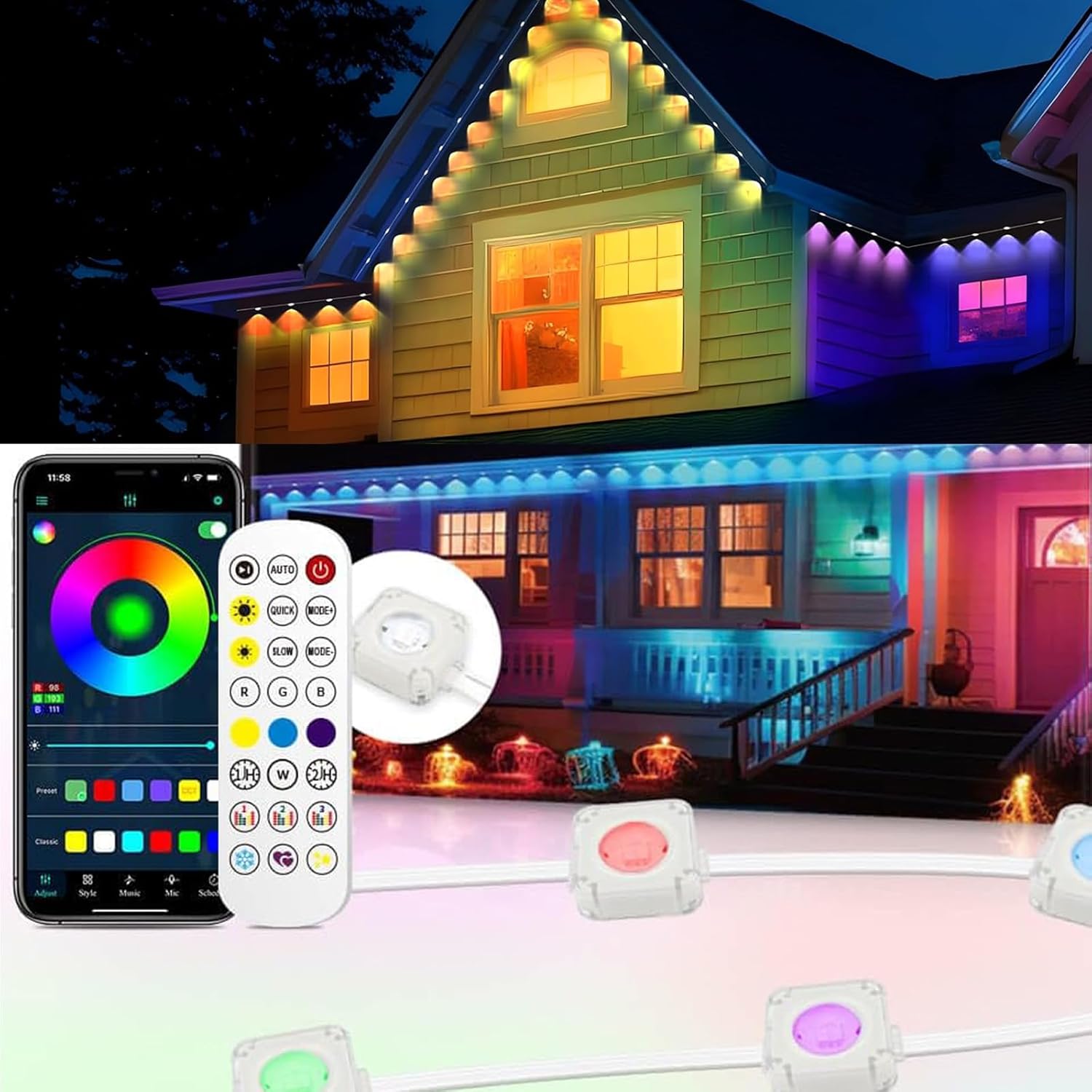
Image: A house illuminated with colorful outdoor string lights, with a smartphone displaying the control app and a physical remote control in the foreground.
6.2. Wireless Remote Control
The included wireless remote control provides convenient access to basic functions.
- Power Button: Turn the lights on or off.
- Color Buttons: Select specific static colors (e.g., Red, Green, Blue, White).
- Mode Buttons: Cycle through various dynamic lighting modes (e.g., AUTO, QUICK, SLOW, FADE).
- Brightness Buttons: Increase or decrease the brightness level.
- The 2.4G remote control offers signal transmission and operation within 20 meters, providing coverage without dead corners.

Image: A hand holding a white wireless remote control with various buttons for color, mode, and brightness adjustments, superimposed over a house illuminated with colorful string lights.
7. Maintenance
- Cleaning: Disconnect power before cleaning. Wipe the lights and control box with a soft, damp cloth. Do not use harsh chemicals or abrasive cleaners.
- Inspection: Periodically inspect the lights, cables, and connections for any signs of damage, wear, or loose fittings. Address any issues promptly.
- Storage: If storing the lights for an extended period, clean them thoroughly, coil them neatly, and store in a cool, dry place away from direct sunlight.
8. Troubleshooting
| Problem | Possible Cause | Solution |
|---|---|---|
| Lights do not turn on. | No power, loose connection, faulty adapter. | Check power outlet. Ensure all connections are secure. Test with a different outlet. Verify adapter is working. |
| Remote control not working. | Battery depleted, remote out of range, signal obstruction. | Replace remote battery. Move closer to the control box (within 20 meters). Ensure no major obstructions. |
| App cannot connect to lights. | Bluetooth off, lights not in pairing mode, app issue. | Ensure Bluetooth is enabled on your phone. Restart the app and lights. Follow in-app pairing instructions. |
| Lights falling off after installation. | Improper surface preparation, insufficient pressure during adhesion, clips not used. | Ensure surface is clean and dry before applying. Apply firm pressure for at least 5 seconds. Always use the provided screw clips for permanent installation. |
| Inconsistent light colors or patterns. | Software glitch, connection issue. | Restart the lights and the app. Check for app updates. Ensure all light units are properly connected. |
9. Warranty and Support
BAILONGJU products are manufactured with quality and reliability in mind. For warranty information, technical support, or any questions regarding your product, please contact BAILONGJU customer service through the retailer where the product was purchased or visit the official BAILONGJU store on Amazon: BAILONGJU Store.
Ask a question about this manual
Ask about setup, troubleshooting, compatibility, parts, safety, or missing instructions. Manuals+ will review the question and use this page’s manual context to help answer it.