
TesPower 144016
TesPower WLtoys 144016 Remote Control Car User Manual
Model: 144016
1. Introduction
This manual provides essential information for the proper operation, maintenance, and troubleshooting of your TesPower WLtoys 144016 Remote Control Car. Please read this manual thoroughly before operating the vehicle to ensure safe and optimal performance.
The WLtoys 144016 is a 1:14 scale electric 4WD racing car designed for high-speed performance across various terrains. It features a powerful 390 Strong Magnetic Carbon Brush Motor and a 2.4GHz radio system for precise control.
2. Safety Information
WARNING:
- For use by persons over 14 years of age. This product is not a toy for children under 14.
- Always operate the RC car in open areas, away from people, pets, and obstacles.
- Do not operate near public roads, power lines, or water bodies.
- Ensure batteries are charged correctly and handled with care. Do not overcharge or short-circuit batteries.
- Always turn off the RC car and remote controller when not in use.
- Keep small parts out of reach of young children to prevent choking hazards.
- Do not modify or disassemble the product, as this may cause damage or injury and void the warranty.
3. Package Contents
Please verify that all items listed below are included in your package:
- 1 x RC Car
- 1 x Remote Controller
- 2 x 7.4V 1500mAh Lithium Battery (for car)
- 1 x Charging Cable
- 1 x Screwdriver
- 1 x User Manual (this document)
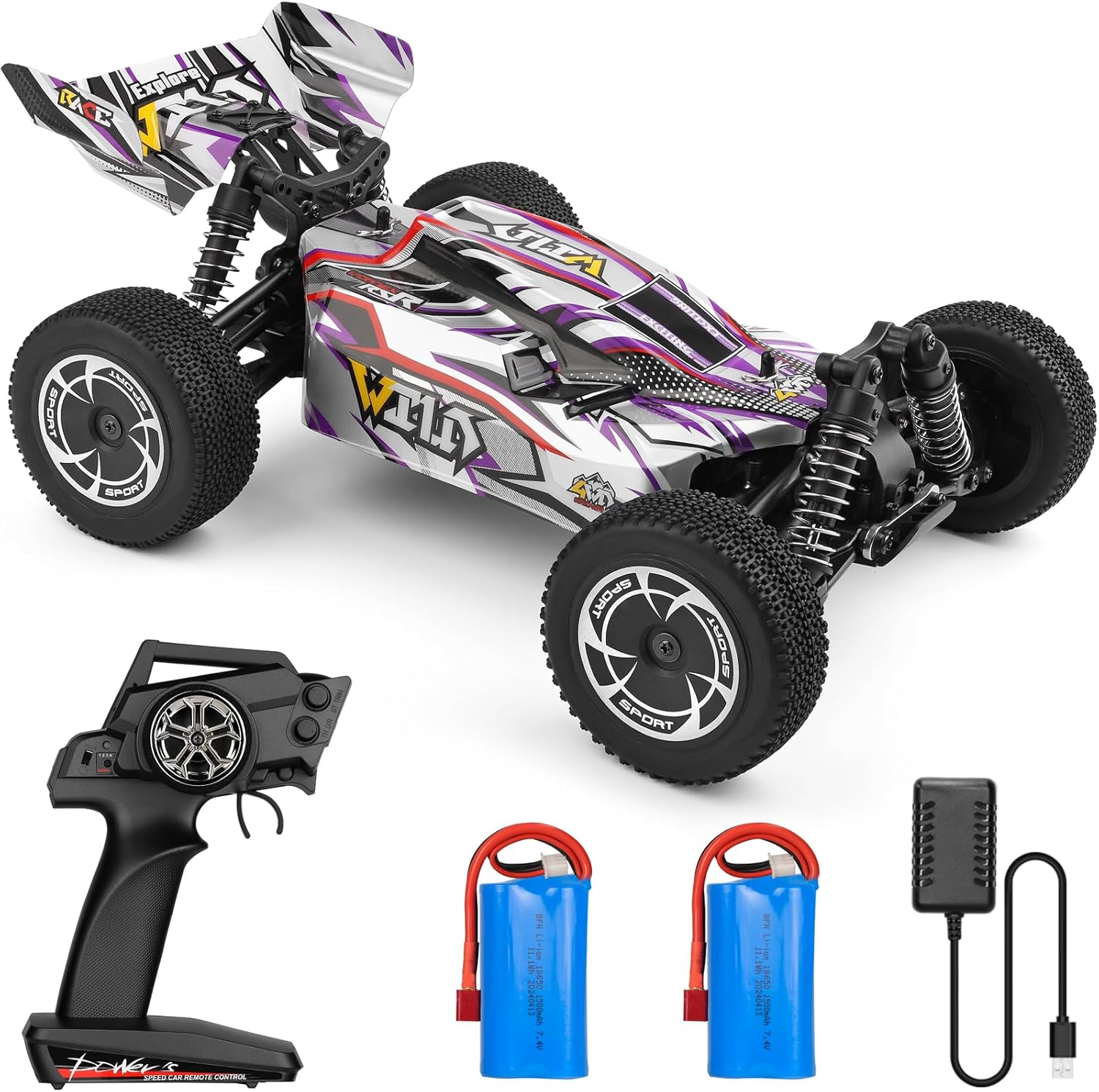
Figure 3.1: Contents of the WLtoys 144016 package, including the RC car, remote, batteries, and charger.
4. Product Features
- Powerful 390 Carbon Brush Motor: Equipped with a robust 390 Strong Magnetic Carbon Brush Motor, this RC car can reach exhilarating speeds up to 35km/h, delivering thrilling speed for racing enthusiasts.
- Long-Lasting Battery: This racing car comes with two 7.4V 1500mAh batteries, ensuring sustained performance and longer playtime for a maximized fun-filled racing experience.
- Conquer Various Terrains: With an independent suspension on the front and rear wheels, the car adopts hardware oil pressure shock absorbers. The 4-wheel drive system provides strong power torque, enabling the WLtoys 144016 RC car to conquer various terrains, enhancing its performance and stability during your epic racing adventures.
- 2.4Ghz Radio System With Anti-Jamming: The remote control is equipped with a 2.4GHz Radio System with anti-jamming capability, allowing multiple cars to race simultaneously on the same track. It offers an 80-meter control distance for free racing.
- High-quality Materials: Central Transmission Shaft and Alloy Differential Gear: The incorporation of a central transmission shaft and alloy differential gear provides improved speed, power, and durability, thus enabling the WLtoys RC car smoother and faster operations.

Figure 4.1: Internal components highlighting the central driving shaft and alloy differential gear for enhanced durability and performance.
5. Specifications
| Feature | Detail |
|---|---|
| Model Number | 144016 |
| Main Material | Alloy + Plastic |
| Speed | About 35km/h |
| Motor | 390 Strong Magnetic Carbon Brush Motor |
| Remote Control Frequency | 2.4GHz |
| Control Distance | About 80m |
| Car Battery | 2 x 7.4V 1500mAh Lithium Battery (included) |
| Controller Battery | 4 x 1.5V AA Battery (not Included) |
| Working Time | About 15 minutes per battery |
| Charge Time | About 3 Hours |
| Product Dimensions | 29 x 21 x 11.5 cm (11.4 x 8.3 x 4.5 inches) |
| Item Weight | 3.8 pounds |
| Recommended Age | 14 years and up |
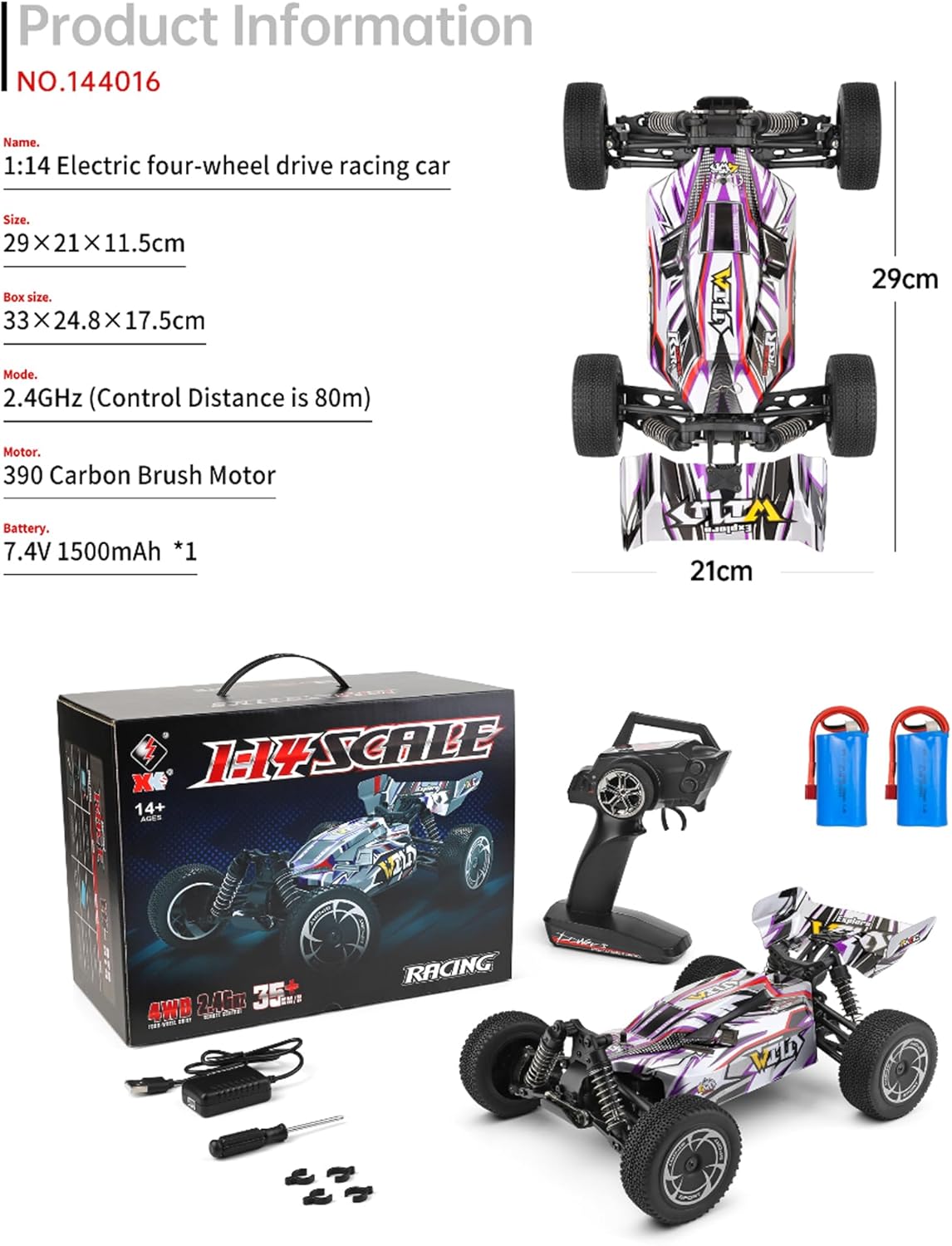
Figure 5.1: Dimensional overview of the WLtoys 144016 RC car.
6. Setup Guide
6.1 Charging the Car Battery
- Connect the charging cable to the 7.4V 1500mAh Lithium Battery.
- Plug the USB end of the charging cable into a compatible USB power adapter (e.g., computer USB port, wall adapter).
- The indicator light on the charging cable will show the charging status (refer to charger instructions for specific light indications).
- Charging typically takes about 3 hours for a full charge. Do not leave batteries charging unattended.
- Once fully charged, disconnect the battery from the charging cable.
6.2 Installing Batteries in the Remote Controller
- Locate the battery compartment on the back of the remote controller.
- Open the battery compartment cover.
- Insert 4 x 1.5V AA batteries (not included) into the compartment, ensuring correct polarity (+/-).
- Close the battery compartment cover securely.
6.3 Installing the Car Battery
- Locate the battery compartment on the underside or top of the RC car.
- Open the battery compartment.
- Carefully insert the charged 7.4V 1500mAh Lithium Battery into the compartment.
- Connect the battery connector to the car's power connector, ensuring a secure fit.
- Close the battery compartment cover.
7. Operating Instructions
7.1 Pairing the Remote Controller with the Car
- Ensure both the car battery and remote controller batteries are installed and charged.
- Turn on the RC car first using its power switch. The car's indicator light will blink.
- Turn on the remote controller. The remote's indicator light will blink.
- Wait a few seconds for the remote controller and car to automatically pair. Once paired, the indicator lights on both the car and remote will become solid.
- If pairing fails, turn off both devices and repeat the steps.
7.2 Basic Controls
- Throttle Trigger: Pull the trigger to accelerate forward. Push the trigger forward to brake, then push again to reverse.
- Steering Wheel: Turn the wheel left to steer the car left, and turn right to steer the car right.
- Steering Trim: If the car does not drive straight when the steering wheel is centered, use the steering trim dial on the remote to adjust.
- Throttle Trim: Adjusts the neutral position of the throttle. Use if the car moves slightly when the throttle trigger is at neutral.

Figure 7.1: The WLtoys 144016 RC car performing on an outdoor terrain.
7.3 Driving Tips
- Start slowly to get a feel for the controls before attempting high speeds.
- Practice steering and throttle control in an open, safe area.
- Avoid driving in wet conditions or through deep puddles to prevent damage to electronics.
- Be mindful of battery life. When the car starts to slow down significantly, it's time to recharge the battery.
8. Maintenance
- Cleaning: After each use, especially when driving on dirt or dusty surfaces, gently clean the car to remove debris. Use a soft brush or compressed air. Avoid using water directly on electronic components.
- Inspecting Components: Regularly check for loose screws, damaged parts (e.g., suspension arms, wheels, body shell), or worn gears. Tighten screws as needed.
- Battery Care: Store batteries in a cool, dry place away from direct sunlight. Do not store fully charged or fully discharged for extended periods. For long-term storage, charge batteries to approximately 50% capacity.
- Motor Care: The 390 carbon brush motor may require occasional cleaning of carbon dust. If performance degrades, consider professional servicing or replacement of the motor brushes if applicable.
- Lubrication: Periodically apply a small amount of RC-specific lubricant to moving parts like universal joints and differential gears to reduce wear and ensure smooth operation.
9. Troubleshooting
| Problem | Possible Cause | Solution |
|---|---|---|
| Car does not respond to remote. |
|
|
| Car runs slowly or lacks power. |
|
|
| Steering is off-center. | Steering trim needs adjustment. | Adjust the steering trim dial on the remote controller until the car drives straight. |
| Short operating time. |
|
|
10. Warranty and Support
TesPower products are manufactured to high quality standards. For specific warranty details, please refer to the warranty card included with your product or visit the official TesPower website. Keep your purchase receipt as proof of purchase.
For technical support, replacement parts, or any inquiries regarding your WLtoys 144016 RC car, please contact TesPower customer service through the following channels:
- Email: Refer to product packaging or official website for contact email.
- Website: Visit the TesPower Store on Amazon
- Phone: Refer to product packaging or official website for phone support.
When contacting support, please have your product model number (144016) and purchase details ready.
Ask a question about this manual
Ask about setup, troubleshooting, compatibility, parts, safety, or missing instructions. Manuals+ will review the question and use this page’s manual context to help answer it.