
Introduction
The PENTAX WG-8 is engineered for extreme conditions, offering outstanding waterproof, dustproof, shock-resistant, and cold-resistant performance. This robust camera is designed to capture high-resolution still images of approximately 20 effective megapixels and high-quality 4K-resolution movie clips, even in demanding environments. It features a multi-application ring light for macro photography and can function as a webcam for high-quality live-streaming.
Key Features
- Heavy-duty construction for underwater shooting down to a depth of 20 meters, for up to two hours of continuous operation.
- 4K-resolution movie recording for extended shooting of high-quality movies.
- Sharp, high-resolution images with approximately 20 effective megapixels and low-noise, high-dynamic-range characteristics.
- Five-times optical zoom lens with 28mm wide-angle coverage.
- Webcam function for live-streaming of high-quality, high-resolution images.
- High-power, variable-brightness, six-bulb LED Ring Light, ideal for close-up macro photography.
- 3.0-inch, wide-frame LCD monitor for wide-angle viewing; Outdoor View Setting adjusts brightness according to changes in ambient lighting conditions.
- Wide range of shooting modes to capture a variety of scenes and subjects.
- Digital Microscope mode makes it easy to take impressive macro photographs that capture details that cannot be resolved by the naked eye.
- Advanced GPS functions and built-in digital compass.
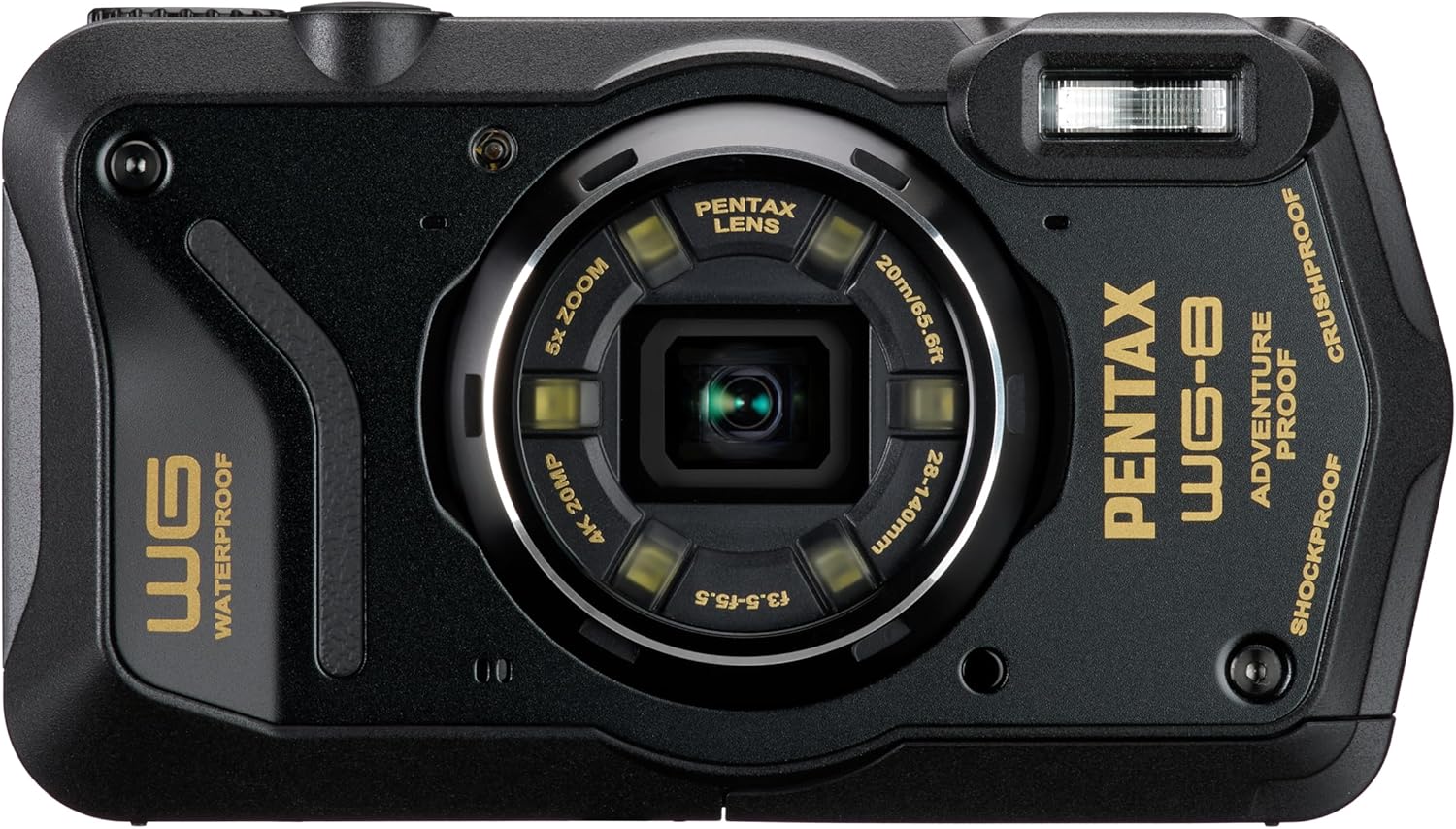
Front view of the PENTAX WG-8 camera.

The PENTAX WG-8 with its multi-application LED ring light illuminated.

The PENTAX WG-8 available in black and green, highlighting optical zoom, resolution, weight, and battery life.
What's in the Box
- Camera Body
- Accessories (e.g., battery, USB cable, strap)
Setup
1. Battery and Memory Card Installation
Open the battery/card compartment door, typically located on the side or bottom of the camera. Insert the supplied Lithium-Ion battery (DB-110) according to the polarity indicators. Insert a compatible SD/SDHC/SDXC memory card into the designated slot until it clicks into place. Ensure the compartment door is securely latched to maintain waterproof integrity.
2. Initial Power On and Settings
Press the power button to turn on the camera. The first time you power on, you may be prompted to set the date, time, and language. Follow the on-screen instructions using the camera's navigation buttons.
3. Charging the Battery
Connect the camera to a power source using the supplied USB cable. The charging indicator light will show the charging status. Ensure the battery is fully charged before initial use, especially for extended outdoor or underwater activities.

The PENTAX WG-8 connected via USB, illustrating charging or data transfer.
Operating the Camera
1. Basic Photography
To take a photo, select your desired shooting mode using the mode dial or menu. Frame your shot using the LCD monitor. Press the shutter button halfway to focus, then press fully to capture the image.

Holding the PENTAX WG-8 to compose a shot on the LCD screen.
2. Waterproof and Shockproof Usage
The WG-8 is waterproof to 20 meters (65.6 feet) for up to 2 hours and shockproof from falls up to 2.1 meters (6.8 feet). Before submerging, always ensure all compartment doors (battery, memory card, USB) are completely sealed and locked. Avoid opening compartments when wet. After saltwater use, rinse the camera thoroughly with fresh water and dry it completely before opening any compartments.

An example underwater photograph of a clownfish, demonstrating the camera's waterproof capabilities.

An underwater shot showcasing the camera's performance in aquatic environments.
3. Macro Photography with Ring Light
Engage Digital Microscope mode for extreme close-up shots, allowing focus as close as 1cm. The six-bulb LED Ring Light can be activated and adjusted for brightness to illuminate subjects evenly, reducing shadows for detailed macro photography.

A macro photograph of plant buds, demonstrating the camera's close-up capabilities.

An extreme macro shot of an onion slice, highlighting fine details.

Illustration of the versatile illumination options provided by the LED ring light for macro photography.
4. 4K Video Recording
Switch to movie mode to record high-quality 4K video clips. The camera supports 4K resolution at 30 frames per second (FPS). Ensure you have a high-speed memory card for optimal recording performance.
5. Webcam Function
Connect the WG-8 to a computer via USB to use it as a high-quality webcam. This feature allows for live-streaming with superior image resolution compared to standard webcams, ideal for online meetings or content creation.

The camera's webcam function is useful for various applications, including remote site inspections or virtual meetings.
6. GPS Functions
The built-in GPS module allows for geotagging of photos, embedding location data directly into the image files. This is useful for documenting travel, outdoor adventures, or professional fieldwork. The camera also features a digital compass.

The camera's display showing detailed GPS information and shooting data.
7. Outdoor View Setting
The Outdoor View Setting automatically adjusts the brightness of the LCD monitor to optimize visibility in varying ambient light conditions, ensuring clear viewing whether in bright sunlight or dim environments.

The Outdoor View Setting enhances screen visibility in bright conditions.
Maintenance
1. Cleaning the Camera
Wipe the camera body with a soft, dry cloth. For stubborn dirt, use a slightly damp cloth and then dry thoroughly. For the lens and LCD screen, use a specialized lens cleaning cloth and solution. Never use abrasive cleaners or solvents.
2. Battery Care
Store the battery in a cool, dry place when not in use. Avoid fully discharging the battery frequently. If storing for an extended period, charge the battery to about 50% capacity. Remove the battery from the camera if it will not be used for a long time.
3. Storage
Store the camera in a dry, well-ventilated area, away from direct sunlight, high temperatures, and humidity. If storing for extended periods, consider using a desiccant to prevent moisture buildup.
Troubleshooting
Camera Not Powering On
- Ensure the battery is fully charged and correctly inserted.
- Check if the battery contacts are clean.
- Try a different charged battery if available.
Poor Image Quality
- Check if the lens is clean and free from smudges or dust.
- Ensure proper lighting conditions for your shot.
- Verify camera settings (e.g., ISO, white balance, shooting mode) are appropriate for the scene.
Water Leakage
- Immediately remove the camera from water and open all compartments to allow drying.
- Inspect all seals and compartment doors for any debris, damage, or improper closure.
- If water ingress occurs, contact customer support for service.
GPS Not Acquiring Signal
- Ensure you are in an open area with a clear view of the sky.
- Allow sufficient time for the camera to acquire satellite signals.
- Check GPS settings in the camera menu to ensure it is enabled.
Technical Specifications
| Feature | Specification |
|---|---|
| Brand | Pentax |
| Model Name | PENTAX WG-8 BLACK |
| Model Number | 01492 |
| Effective Still Resolution | 20 MP |
| Photo Sensor Size | 1/2.3-inch |
| Optical Zoom | 5x |
| Video Resolution | 2160p (4K) |
| Frame Rate | 24 FPS or 30 FPS |
| Water Resistance Level | Waterproof (IP68) |
| Water Resistance Depth | 20 Meters |
| Shockproof | Up to 2.1 meters (6.8 feet) |
| Operating Temperature | As low as 14°F (-10°C) |
| Screen Size | 3 Inches |
| Connectivity Technology | USB, Wi-Fi |
| Battery Type | Lithium Ion |
| Battery Average Life | 2 Hours (approx. 340 shots) |
| Item Weight | 8.48 ounces |
Warranty and Support
Warranty Information
The PENTAX WG-8 camera comes with a 1-year limited warranty from the date of purchase. This warranty covers defects in materials and workmanship under normal use. Please retain your proof of purchase for warranty claims.
Customer Support
For technical assistance, troubleshooting, or warranty service, please contact Pentax customer support. Refer to the official Pentax website or the documentation included with your product for the most current contact information.


