
1. Introduction
Thank you for choosing the Monster 65W USB C Charger Block. This manual provides essential information for the proper setup, operation, and maintenance of your charger. Please read it thoroughly before use.
Product Overview
The Monster 65W USB C Charger Block is a compact, dual-port (USB-C and USB-A) GaN fast charger designed for a wide range of devices, including laptops, tablets, and smartphones. Its foldable plug enhances portability, making it suitable for travel. The charger incorporates advanced GaN technology and PPS protocol for efficient and safe power delivery.

This image displays the Monster 65W USB C Charger Block, featuring one USB-C port and one USB-A port, alongside the included white USB-C charging cable.
What's in the Box
- 1 x Monster 65W 2-port USB-C Charger Block
- 1 x 5A 3.9FT Silicone USB-C Cable
- 1 x User Manual

This image shows the complete package contents: the Monster 65W 2-port USB-C charger, a 5A 3.9FT silicone cable, and the user manual, all presented with the product packaging.
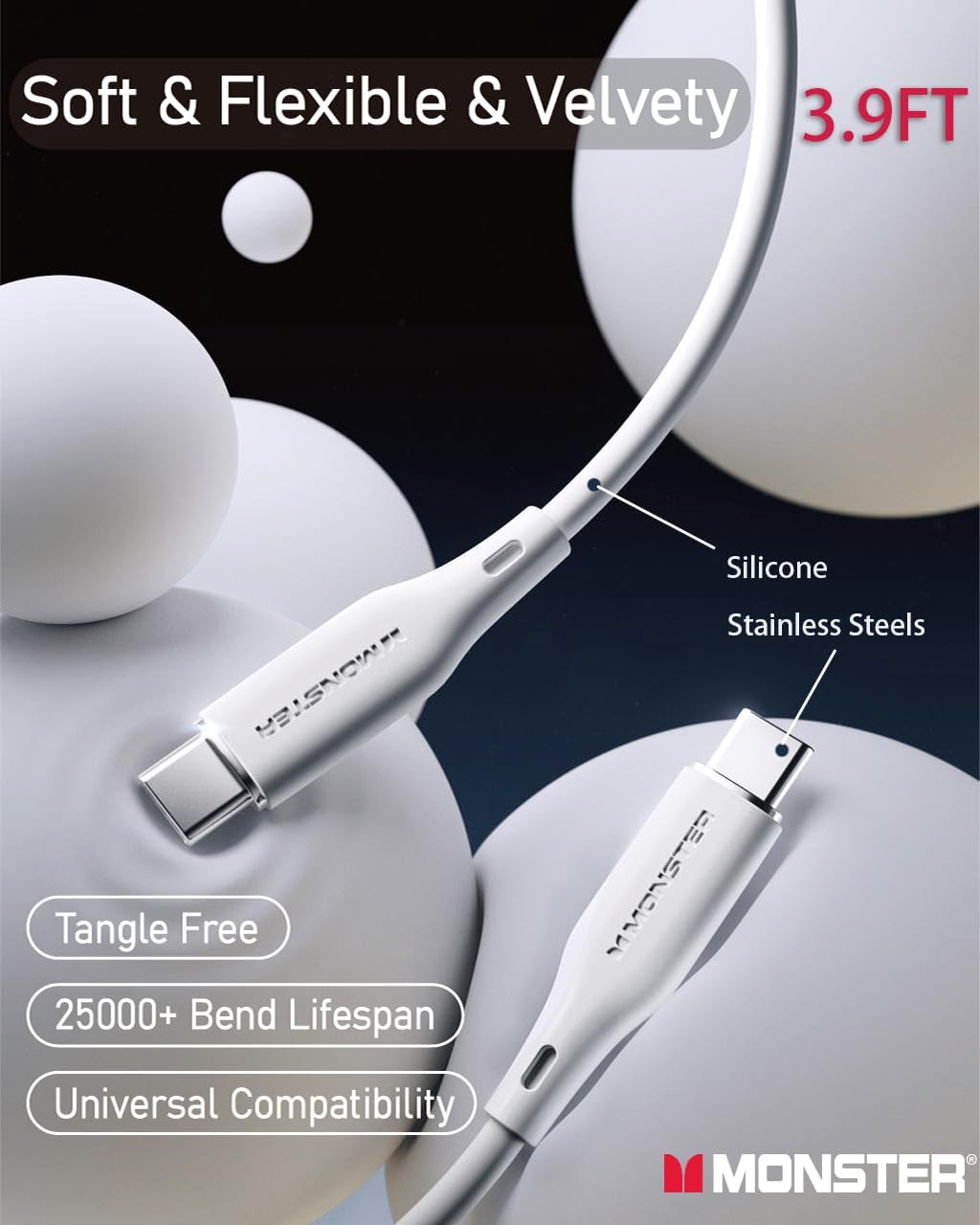
A detailed view of the included 3.9-foot USB-C silicone cable, showcasing its soft texture, flexibility, tangle-free nature, and robust construction designed for over 25,000 bends.
2. Setup
- Unfold the Plug: Gently unfold the AC prongs from the charger body.
- Connect to Power Outlet: Insert the charger into a standard wall outlet. The reinforced pin design ensures stability.
- Connect Charging Cable: Plug one end of your USB-C or USB-A charging cable into the appropriate port on the charger.
- Connect to Device: Plug the other end of the charging cable into your device (smartphone, tablet, laptop, etc.).
- Verify Charging: Confirm that your device indicates it is charging.

This image highlights the reinforced pin design of the charger, ensuring a stable connection when plugged into a wall outlet.
3. Operating Instructions
Single-Port Charging
For optimal fast charging, connect a single device to either the USB-C or USB-A port. The charger intelligently delivers the maximum power supported by your device and the port.
- USB-C Port: Up to 65W output for compatible devices.
- USB-A Port: Up to 22.5W output for compatible devices.
Dual-Port Charging
The charger can simultaneously charge two devices. When both ports are in use, the power output is distributed as follows:
- USB-C Port: Up to 45W
- USB-A Port: Up to 12W
This configuration allows for efficient charging of a laptop and a smartphone, or two smartphones/tablets, from a single compact charger.
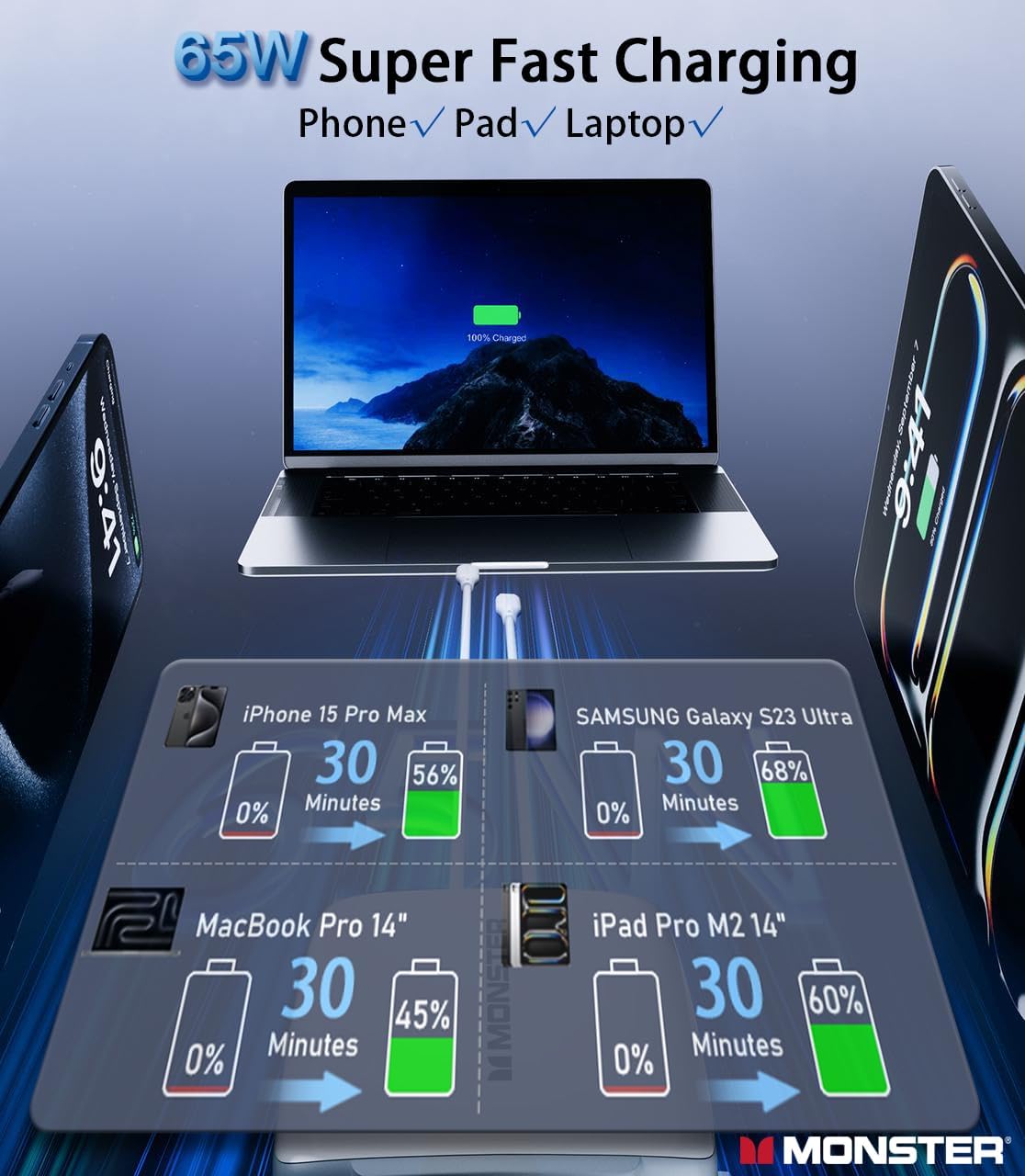
An infographic illustrating the fast charging capabilities of the Monster 65W charger, showing devices like iPhone 15 Pro Max reaching 56% in 30 minutes, Samsung Galaxy S23 Ultra reaching 68% in 30 minutes, MacBook Pro 14 reaching 45% in 30 minutes, and iPad Pro M2 14 reaching 60% in 30 minutes.
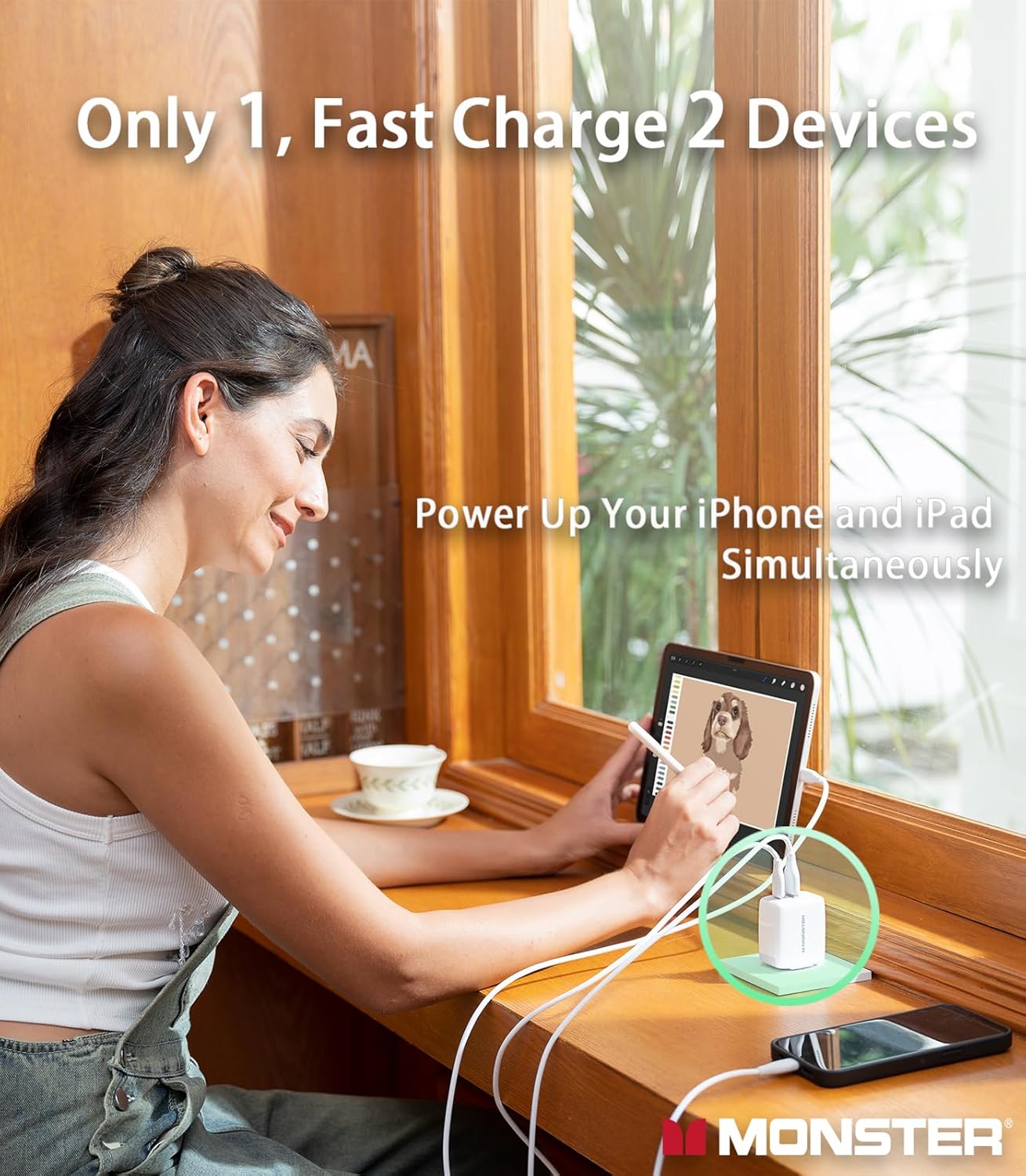
A woman is depicted using the Monster 65W charger to power both her iPhone and iPad concurrently, demonstrating the dual-port charging feature.
Universal Compatibility
The charger is compatible with a wide range of devices, including but not limited to:
- Smartphones: iPhone series (16/15/14/13/12/11/X/XR/XS/8/7/6/5/SE), Samsung Galaxy series (S24/S23/S22/S20/S10/S9/S8/S7/S5/S4, Z Fold, Flip, A, Note), Google Pixel, Huawei, Xiaomi, LG, HTC, Motorola, Nokia, Sony, Blackberry.
- Tablets: Apple iPad (9, Air 3, Mini 4, Pro 12.9), Microsoft Surface, Samsung Tab, Pixelbook.
- Laptops: MacBook Air (M2 15-inch/13-inch), MacBook Pro (M2 14-inch/13-inch), HP Pavilion/Spectre/Elitebook/Chromebook/Folio, Dell Chromebook/Inspiron/Precision/Vostro/XPS/Latitude, Acer Swift/Chromebook/Aspire, Lenovo Chromebook/ThinkPad/IdeaPad.
- Other Devices: Apple Watch (9, Ultra 2), AirPods Pro 2, iPod Touch 7, iPod nano 7, Beats Pill, Nintendo Switch, cameras, headphones, and other USB compatible devices.

A visual representation of the charger's universal compatibility, listing various devices such as iPhone, Galaxy, Google Pixel, MacBook, iPad, and other USB-C compatible devices.
4. Safety Information
The Monster 65W USB C Charger Block is equipped with advanced GaN technology and PPS protocol to ensure safe and efficient charging. It includes multiple protection features:
- Over-Temperature Protection: Prevents overheating during operation.
- Over-Current Protection: Safeguards against excessive current flow.
- Over-Voltage Protection: Protects devices from voltage spikes.
- Short-Circuit Protection: Automatically shuts down in case of a short circuit.
To ensure safe operation:
- Do not expose the charger to liquids or extreme temperatures.
- Avoid dropping or subjecting the charger to strong impacts.
- Do not attempt to disassemble or modify the charger.
- Use only certified and compatible charging cables.
- Keep out of reach of children.

This image highlights the advanced GaN technology within the charger and its safety features, including certifications for over-temperature, over-current, and over-voltage protection.
5. Maintenance
- Cleaning: Disconnect the charger from the power outlet before cleaning. Use a dry, soft cloth to wipe the surface. Do not use liquid cleaners or aerosols.
- Storage: When not in use, store the charger in a cool, dry place. The foldable plug design allows for compact storage.
- Cable Care: Avoid sharp bends or excessive pulling on the charging cable to prolong its lifespan.
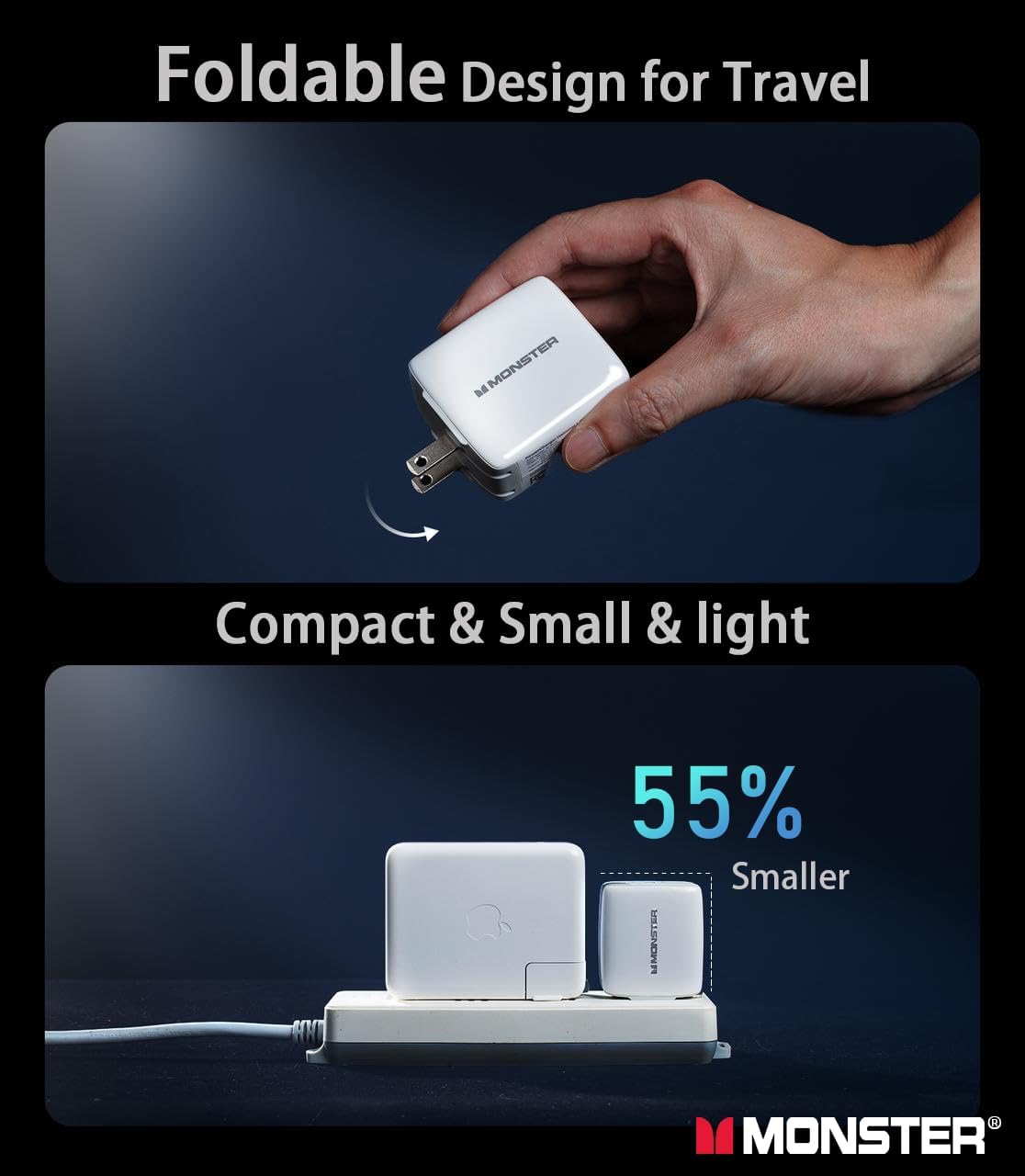
The image illustrates the charger's foldable plug, emphasizing its compact and portable design, making it ideal for travel and easy storage.
6. Troubleshooting
- Device not charging:
- Ensure the charger is securely plugged into a working wall outlet.
- Check that the charging cable is firmly connected to both the charger and your device.
- Try using a different cable or port to rule out a faulty cable or port.
- Verify that your device is compatible with the charger's power output.
- Slow charging:
- Ensure you are using a high-quality, compatible charging cable.
- If charging two devices simultaneously, note that power is distributed, which may result in slower charging for individual devices compared to single-port use.
- Close unnecessary applications on your device to reduce power consumption during charging.
- Charger feels warm:
- It is normal for the charger to become warm during operation, especially during fast charging.
- If the charger becomes excessively hot or emits smoke/unusual odors, immediately disconnect it from the power outlet and discontinue use.
7. Specifications
| Feature | Detail |
|---|---|
| Model Number | RC651 US |
| Product Dimensions | 2.16 x 1.18 x 1.89 inches |
| Item Weight | 7.4 ounces |
| Input Voltage | 100-240 Volts (AC) |
| Total USB Ports | 2 (1x USB-C, 1x USB-A) |
| Single-Port Output (USB-C) | Up to 65W |
| Single-Port Output (USB-A) | Up to 22.5W |
| Dual-Port Output (USB-C) | Up to 45W |
| Dual-Port Output (USB-A) | Up to 12W |
| Connector Type | USB Type A, USB Type C |
| Special Features | Fast Charging, GaN Technology, PPS Protocol, Foldable Plug, Over-Temperature Protection, Over-Current Protection, Over-Voltage Protection, Short-Circuit Protection |
8. Warranty and Support
Monster stands by the quality of its products. This charger comes with an 18-month guarantee from the date of purchase. If you encounter any issues or have questions regarding your Monster 65W USB C Charger Block, please contact our customer service team.
Our professional support team aims to provide a response within 12 hours to assist you with any concerns.
For further assistance, please refer to the contact information provided on the product packaging or visit the official Monster website.

